
Windows 7 Wallpaper do not fit screen

Atra

New member
Local time
10:27 AM
Messages
5
Hello there,
I've been having this problem for a while now & decided to post here and see if any of you could help me.
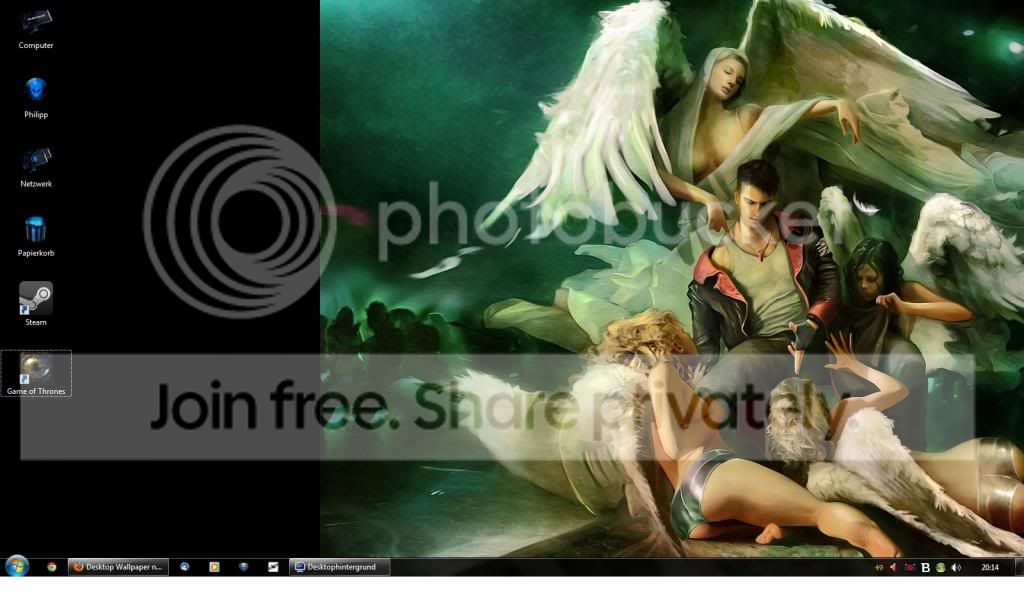
Whenever I set a wallpaper it does not fit the screen. The resolution of my laptop screen is 1600x900, so is that of the wallpapers. It doesn't matter whether I select "Fill", "Stretch", "Center" or whatever, the image will not fit the screen, there's always a part of it that's cut off.

Here's a screenshot that shows what I mean:
desktop.jpg

Does anyone know what's wrong & how to fix this?
 

My Computer My Computer

Computer type
Laptop
Computer Manufacturer/Model Number
Medion
OS
Windows 7 Home Premium 64bit
CPU
Intel Core i5, 2.27Ghz
Motherboard
Medion P7615
Memory
4096 MB DDR3
Graphics Card(s)
Nvidia GeForce GT 330M 1GB
Browser
Firefox, Google Chrome
That is bizarre, I am at a loss buddy...
 

My Computer My Computer

Computer type
Laptop
OS
Windows 7 Ultimate 64bit SP-1
CPU
Intel Core i5 3rd Gen. w/ Turbo Boost 2.6
Motherboard
Asus
Hard Drives
8" Drive (primary storage device)
2 TB External
1 Internal HD
Mouse
Logitech Anywhere MX
Internet Speed
Light Speed
Antivirus
MSE
I can understand if everything on the screen is the same width as the wallpaper, but evidently it isn't as the taskbar extends the full width and you have icons displayed on the part of the screen not covered by the wallpaper.

When you try the different wallpaper options, does the area covered by the wallpaper change in size? What about one of the standard wallpapers as supplied with W7? Does that behave in the same way?
 

My Computer My Computer

Computer type
PC/Desktop
Computer Manufacturer/Model Number
Dwarf Dwf/11/2012 r09/2013
OS
Windows 8.1 Pro RTM x64
CPU
Intel Core-i5-3570K 4-core @ 3.4GHz (Ivy Bridge) (OC 4.4GHz)
Motherboard
ASRock Z77 Extreme4-M
Memory
4 x 4GB DDR3-1600 Corsair Vengeance CMZ8GX3M2A1600C9B (16GB)
Graphics Card(s)
MSI GeForce GTX770 Gaming OC 2GB
Sound Card
Realtek High Definition on board solution (ALC 898)
Monitor(s) Displays
ViewSonic VA1912w Widescreen (VGA)
Screen Resolution
1440x900
Hard Drives
OCZ Agility 3 SSD 120GB SATA III x2 (RAID 0)
Samsung HD501LJ 500GB SATA II x2
Hitachi HDS721010CLA332 1TB SATA II
Iomega 1.5TB Ext USB 2.0
WD 2.0TB Ext USB 3.0
PSU
XFX Pro Series 850W Semi-Modular
Case
Gigabyte IF233
Cooling
1 x 120mm Front Inlet 1 x 120mm Rear Exhaust
Keyboard
Microsoft Comfort Curve Keyboard 3000 (USB)
Mouse
Microsoft Comfort Mouse 3000 for Business (USB)
Internet Speed
NetGear DG834Gv3 ADSL Modem/Router (Ethernet) ~4.0 Mb/s (O2)
Antivirus
Avast! 8.0.1497
Browser
IE 11
Other Info
Optical Drive: HL-DT-ST BD-RE BH10LS30 SATA Bluray
Lexmark S305 Printer/Scanner/Copier (USB)
WEI Score: 8.1/8.1/8.5/8.5/8.25
Asus Eee PC 1011PX Netbook (Windows 7 x86 Starter)
When I try different options such as "Stretch" or "Center" the wallpaper "moves" a bit to the left or right (if at all), meaning it fills more or less of the screen, but never the entire screen. And yes, it happens with the standard wallpapers that come with W7 as well :(
 

My Computer My Computer

Computer type
Laptop
Computer Manufacturer/Model Number
Medion
OS
Windows 7 Home Premium 64bit
CPU
Intel Core i5, 2.27Ghz
Motherboard
Medion P7615
Memory
4096 MB DDR3
Graphics Card(s)
Nvidia GeForce GT 330M 1GB
Browser
Firefox, Google Chrome
Are the video drivers updated?
I had a similar issue once. Reinstalling video drivers fixed the issue.
 

My Computer My Computer

Computer type
PC/Desktop
OS
Windows 7 professional X64
CPU
AMD A10-5800K OC@ 4.4Ghz.
Motherboard
Gigabyte F2A85X-UP4
Memory
8GB Kingston HyperX Blu 1333mhz
Graphics Card(s)
XFX HD7870 2GB Core Edition
Monitor(s) Displays
Acer AL2216W
Screen Resolution
1680x1050
Hard Drives
Seagate Barracuda 500gb 7200rpm
Seagate Barracuda 1.5TB 7200rpm
PSU
Cooler Master Silent Pro M 850W
Case
Thermaltake Commander MS-I
Cooling
Cooler Master N520
Mouse
Logitech M504
Internet Speed
10Mbps
Yes they are up-to-date
 

My Computer My Computer

Computer type
Laptop
Computer Manufacturer/Model Number
Medion
OS
Windows 7 Home Premium 64bit
CPU
Intel Core i5, 2.27Ghz
Motherboard
Medion P7615
Memory
4096 MB DDR3
Graphics Card(s)
Nvidia GeForce GT 330M 1GB
Browser
Firefox, Google Chrome
Open run box - hold windows key and R together. In the box copy and paste %USERPROFILE%\AppData\Roaming\Microsoft\Windows\Themes\ and enter. A folder will come in explorer window with a file TranscodedWallpaper.jpg in it. Delete the file. Reboot the computer.
This deletion sometimes recover some wallpaper related problems.
 

My Computer My Computer

Computer type
Laptop
Computer Manufacturer/Model Number
Dell
OS
Windows 7 Home Premium 32bit
CPU
Intel Core 2 Duo T4400 / 2.1 GHz
Memory
3.0 GB DDR II SDRAM
Graphics Card(s)
512MB ATI Mobility Radeon HD 4570 - 256.0 MB
Sound Card
HD Audio
Screen Resolution
1366x768
Antivirus
Avast Free Antivirus
Browser
Opera
Did as you said, didn't work though =(
 

My Computer My Computer

Computer type
Laptop
Computer Manufacturer/Model Number
Medion
OS
Windows 7 Home Premium 64bit
CPU
Intel Core i5, 2.27Ghz
Motherboard
Medion P7615
Memory
4096 MB DDR3
Graphics Card(s)
Nvidia GeForce GT 330M 1GB
Browser
Firefox, Google Chrome
The desktop icons indicates that you have alienware theme or hyperdesk etc any desktop customizing program installed. Probably there is a control mechanism?
 

My Computer My Computer

Computer type
Laptop
Computer Manufacturer/Model Number
Dell
OS
Windows 7 Home Premium 32bit
CPU
Intel Core 2 Duo T4400 / 2.1 GHz
Memory
3.0 GB DDR II SDRAM
Graphics Card(s)
512MB ATI Mobility Radeon HD 4570 - 256.0 MB
Sound Card
HD Audio
Screen Resolution
1366x768
Antivirus
Avast Free Antivirus
Browser
Opera
I do have a custom icon pack installed, however no customizing program (such as TuneUp) is running. Also, the problem was there before I changed the icons, so it can't have anything to do with that
 

My Computer My Computer

Computer type
Laptop
Computer Manufacturer/Model Number
Medion
OS
Windows 7 Home Premium 64bit
CPU
Intel Core i5, 2.27Ghz
Motherboard
Medion P7615
Memory
4096 MB DDR3
Graphics Card(s)
Nvidia GeForce GT 330M 1GB
Browser
Firefox, Google Chrome
Atra, what did you change/add/do just prior to this issue?
 

My Computer My Computer

Computer type
PC/Desktop
Computer Manufacturer/Model Number
Home Built Desktop By DataTech
OS
Windows 7 Ultimate X64 SP1
CPU
Intel i5-2550K, Differing ~4.4-4.8GHz No built in GPU
Motherboard
ASUS P8Z68-V PRO/GEN3
Memory
16GB G.Skill Sniper 1866MHz @ 2133MHz 2x8GB
Graphics Card(s)
ASUS GTX650TIB-DC2OC-2GD5, (650TI Boost)
Sound Card
Onboard Realtek 5-1
Monitor(s) Displays
Samsung P2570HD
Screen Resolution
1920x1080
Hard Drives
Samsung 840 Pro 256GB SSD for OS, 500GB Seagate Constellation (Enterprise drive) for Data
PSU
Corsair HX650W
Case
Inwin Dragon Rider
Cooling
Hyper 212 EVO w/two Noctua fans, push-pull, @1300 RPM
Keyboard
E-Z Eyes, bright yellow keys with large characters
Mouse
steelseries SENSEI Laser Pro Gaming
Internet Speed
48-51Mbs Mbs down, 11 Mbs up Xfinity Cable
Antivirus
Norton Internet Security 2013
Browser
IE 10, Opera, Pale Moon if needed
Other Info
4 case fans, LG BluRay-RE, ASUS DVD-RW, Mr. Fusion power supply, 1.21 gigawatts.
having a quick google someone suggested in an old thread, "have you tried right clicking the desktop and clicking graphics options /panel fit..."
not sure it will do anything but worth a look.
 

My Computer My Computer

Computer Manufacturer/Model Number
Hewlett packard/p6512uk
OS
Microsoft Windows 7 Home Premium 64-bit 7600
CPU
IIx4 amd athelon 635 processor
Motherboard
FOXCONN 2AA9
Memory
2x2gb
Graphics Card(s)
ati radeon HD 5450
Sound Card
(1) Realtek High Definition Audio (2) AMD High Definition
Monitor(s) Displays
samsung lcd tv 32"
Screen Resolution
1360x 768
Hard Drives
(1) WDC WD10 01FAES-60Z2A0 SATA Disk Device (2) Maxtor OneTouch USB Device (3) ST310003 33AS USB Device (4) WD My Book 1111 USB Device
PSU
?
Cooling
air!
Keyboard
wireless hp
Mouse
wireless Hp,optical
Internet Speed
1.10mb/s
Antivirus
MSE
Browser
Firefox
It is not a system graphics related problem. Then the entire display will become misfit on the monitor including the taskbar, start button and everything. That can be nicely dealt with in nvidia control panel using the adjust desktop size and position option. I believe it is a case of registry mess-up.

You should try to rollback the system to a restore point that is of much earlier than the problem is. If that also fail, a repair install never fails.

http://www.sevenforums.com/tutorials/700-system-restore.html
http://www.sevenforums.com/tutorials/3413-repair-install.html
 

My Computer My Computer

Computer type
Laptop
Computer Manufacturer/Model Number
Dell
OS
Windows 7 Home Premium 32bit
CPU
Intel Core 2 Duo T4400 / 2.1 GHz
Memory
3.0 GB DDR II SDRAM
Graphics Card(s)
512MB ATI Mobility Radeon HD 4570 - 256.0 MB
Sound Card
HD Audio
Screen Resolution
1366x768
Antivirus
Avast Free Antivirus
Browser
Opera
It is not a system graphics related problem. Then the entire display will become misfit on the monitor including the taskbar, start button and everything. That can be nicely dealt with in nvidia control panel using the adjust desktop size and position option. I believe it is a case of registry mess-up.

You should try to rollback the system to a restore point that is of much earlier than the problem is. If that also fail, a repair install never fails.

http://www.sevenforums.com/tutorials/700-system-restore.html
http://www.sevenforums.com/tutorials/3413-repair-install.html
That's not the case here at all, check the snip. http://www.sevenforums.com/customiz...allpaper-do-not-fit-screen-2.html#post2315091
 

My Computer My Computer

Computer type
PC/Desktop
Computer Manufacturer/Model Number
Home Built Desktop By DataTech
OS
Windows 7 Ultimate X64 SP1
CPU
Intel i5-2550K, Differing ~4.4-4.8GHz No built in GPU
Motherboard
ASUS P8Z68-V PRO/GEN3
Memory
16GB G.Skill Sniper 1866MHz @ 2133MHz 2x8GB
Graphics Card(s)
ASUS GTX650TIB-DC2OC-2GD5, (650TI Boost)
Sound Card
Onboard Realtek 5-1
Monitor(s) Displays
Samsung P2570HD
Screen Resolution
1920x1080
Hard Drives
Samsung 840 Pro 256GB SSD for OS, 500GB Seagate Constellation (Enterprise drive) for Data
PSU
Corsair HX650W
Case
Inwin Dragon Rider
Cooling
Hyper 212 EVO w/two Noctua fans, push-pull, @1300 RPM
Keyboard
E-Z Eyes, bright yellow keys with large characters
Mouse
steelseries SENSEI Laser Pro Gaming
Internet Speed
48-51Mbs Mbs down, 11 Mbs up Xfinity Cable
Antivirus
Norton Internet Security 2013
Browser
IE 10, Opera, Pale Moon if needed
Other Info
4 case fans, LG BluRay-RE, ASUS DVD-RW, Mr. Fusion power supply, 1.21 gigawatts.
Sorry Britton30 sir if I caused confusion. I only tried to help. In my post I written it is not an issue of a type.
Thanks for the rectification.
 

My Computer My Computer

Computer type
Laptop
Computer Manufacturer/Model Number
Dell
OS
Windows 7 Home Premium 32bit
CPU
Intel Core 2 Duo T4400 / 2.1 GHz
Memory
3.0 GB DDR II SDRAM
Graphics Card(s)
512MB ATI Mobility Radeon HD 4570 - 256.0 MB
Sound Card
HD Audio
Screen Resolution
1366x768
Antivirus
Avast Free Antivirus
Browser
Opera
The image in Post #1 if that is a full screenshot it measures 1024 x 616 my guess is you have some kind of monitor resolution problem, are you sure you are set at 1600 x 900?

Have you tried uninstalling your graphics driver and then reinstalling the drivers from your manufacturer's website?

Jerry
 

My Computer My Computer

Computer type
Laptop
Computer Manufacturer/Model Number
Sager NP9170
OS
Win 7 Pro x64 / Win 10 Pro
CPU
Intel(R) Core(TM) i7-3630QM CPU @ 2.40GHz
Motherboard
CLEVO P170EM
Memory
12 GB
Graphics Card(s)
(1) Intel(R) HD Graphics 4000 (2) NVIDIA GeForce GTX 675M
Sound Card
(1) Realtek High Definition Audio (2) Intel(R) Display Aud
Monitor(s) Displays
17.3
Screen Resolution
1920x1080
Hard Drives
(1) Samsung 860 EVO 500GB(OS) (1) Samsung 860 EVO 500GB(Data)
Keyboard
Backlite
Antivirus
MSE, Malwarebytes Pro
Browser
Firefox
Other Info
DESKTOP: Custom-built.
OS: Win 10 Pro x64.
CASE: Rosewill R5.
CPU: Intel I5 4670K CPU @ 3.40GHz.
CPU COOLER: Cool Master Hyper 212 EVO.
MOTHERBOARD: Asus Z87-A.
MEMORY: Kingston HyperX 2x4 GB.
GPU: Nvidia Geforce 650 TI.
PSU: Corsair TX750.
DRIVES: (1) Samsung 840 120 GB SSD (2) Western Digital blue 500 GB 7200 RPM.
Is your laptop set up for multiple displays?
 

My Computer My Computer

Computer Manufacturer/Model Number
Self built
OS
Windows 7 64bit home premium
CPU
I5 3570K
Motherboard
Gigabyte Z77-DS3H
Memory
4 x 4GB Crucial Ballistix Sport DDR3 1600 Mhz
Graphics Card(s)
Gigabyte Geforce 660 TI
Sound Card
creative x-fi
Monitor(s) Displays
Primary CiBox 22" Widescreen LCD ,Secondary Dell 22" Widescr
Screen Resolution
Both 1680 x 1050
Hard Drives
2 x 500G HD (SATA) 1 x 2 TB USB
PSU
Corsair HX 620W ATX2.2 Modular SLI Complient PSU
Case
Antec 900 Ultimate Gaming Case
Cooling
3xfront 1xside 1xrear blue fan, 1 200mm blue top fan 1
Keyboard
Trust ds-3200 Wireless keyboard and mouse
Mouse
Trust ds-3200 Wireless keyboard and mouse
Internet Speed
288 / 4000
Other Info
Creative Inspire 7.1 T7900 Speakers
Trust Graphics Tablet
Back
Top