Windows 7 wired network problem (no access)

bharatgoel

New member
Local time
6:50 PM
Messages
5
Hello guys,
I am new here. I am in real need of help. My PC( windows 7 ) has only a wired Ethernet adapter which I connect to my modem. Today when I was using my PC my network went off and a yellow triangle exists in the LAN symbol in the notification bar. I have browsed many sites and forums. But nothing seems to fix the problem.
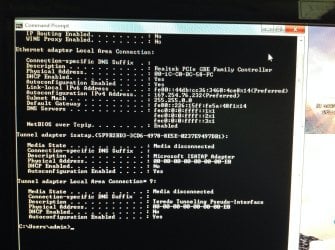
I have attached a picture of my ip confit as I have no other PC and am using my ipad to post this. I am new so every thing need to be explained. Sorry for my English and thanks in advance.
Thanks,
Bharat goel
P.S My net is fine as I'm using wifi from the same modem.
 

Attachments
  • image.jpg
    image.jpg
    459.7 KB · Views: 0

My Computer My Computer

At a glance

Windows 7 home 32 bit
Computer type
PC/Desktop
Computer Manufacturer/Model Number
Custom build
OS
Windows 7 home 32 bit
From the ipconfig it looks like Windows can see the router but isn't picking up a valid IP from it. The 169...IP is just what Windows does when it can't connect to the modem/router.

Have you tried resetting the modem yet? Sometimes just unplugging the modem for a few minutes then letting it boot back up will fix them.
 

My Computer My Computer

At a glance

Windows 7 Ult, Windows 8.1 Pro,Q9650-4.275GHz, E8600 4.5GHz, E6750-3.8GHzG.Skill PC2 9600 1200Mhz 5 5 5 15 2TGTX480
Computer type
PC/Desktop
Computer Manufacturer/Model Number
Home built
OS
Windows 7 Ult, Windows 8.1 Pro,
CPU
Q9650-4.275GHz, E8600 4.5GHz, E6750-3.8GHz
Motherboard
Evga 780i FTW
Memory
G.Skill PC2 9600 1200Mhz 5 5 5 15 2T
Graphics Card(s)
GTX480
Sound Card
Asus Xonar D2
Monitor(s) Displays
HannsG
Screen Resolution
1680X1050
Hard Drives
GSkill Phoenix Pro 120GB SSD
PSU
ThermalTake Toughpower 1000Watt modular
Case
ThermalTake XaserV
Cooling
Xigmatek S1283
Keyboard
Logitech G15
Mouse
Logitech G9
Internet Speed
T1
Sry for the late reply. Yes I did that several number of times.. But doesn't seem to work.
 

My Computer My Computer

At a glance

Windows 7 home 32 bit
Computer type
PC/Desktop
Computer Manufacturer/Model Number
Custom build
OS
Windows 7 home 32 bit
...
 
Last edited:

My Computer My Computer

At a glance

Windows 7 home 32 bit
Computer type
PC/Desktop
Computer Manufacturer/Model Number
Custom build
OS
Windows 7 home 32 bit
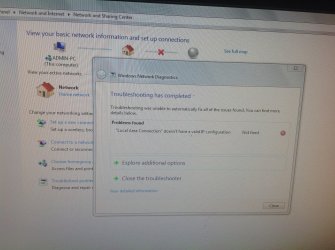
This is what trouble shooting shows..
 

Attachments

  • image.jpg
    image.jpg
    894.7 KB · Views: 0

My Computer My Computer

At a glance

Windows 7 home 32 bit
Computer type
PC/Desktop
Computer Manufacturer/Model Number
Custom build
OS
Windows 7 home 32 bit
I am begging u please help.. I am really frustrated.
 

My Computer My Computer

At a glance

Windows 7 home 32 bit
Computer type
PC/Desktop
Computer Manufacturer/Model Number
Custom build
OS
Windows 7 home 32 bit
How old is your router/modem?

Restart the router and the modem. If you have done that, and its still not working, try connecting your pc directly to the modem. If that fails, replace the modem and see if that resolves the issue. You could also try replacing the Ethernet cable but that is not usually the cause of the problem.
 

My Computer My Computer

At a glance

Windows 10 ProAMD Ryzen 5 2400G Processor with Radeon RX Ve...G.SKILL Ripjaws V Series 16GB (2 x 8GB) 288-P...2047MB NVIDIA GeForce GTX 1060 6GB (EVGA)
Computer type
PC/Desktop
Computer Manufacturer/Model Number
Custom Built
OS
Windows 10 Pro
CPU
AMD Ryzen 5 2400G Processor with Radeon RX Vega 11 Graphics
Motherboard
ASRock X470 Master SLI/AC AM4 AMD Promontory X470 SATA 6Gb/s
Memory
G.SKILL Ripjaws V Series 16GB (2 x 8GB) 288-Pin DDR4 SDRAM D
Graphics Card(s)
2047MB NVIDIA GeForce GTX 1060 6GB (EVGA)
Sound Card
Motherboard Built in
Monitor(s) Displays
Acer R240HY bidx 23.8-Inch IPS HDMI DVI VGA (1920 x 1080) Wi
Screen Resolution
1920 x 1080
Hard Drives
1TB Sandisk SSD PLUS (Main drive)
500 GB Seagate 7200 RPM (Games)
500 GB Western Digital 7200 RPM (Virtual Machines)
PSU
CORSAIR TX Series TX650M 650W 80+ Gold Modular Power Supply
Case
CORSAIR CARBIDE SPEC-02 Mid-Tower Gaming Case, Red LED Fan
Cooling
220mm, two 120mm, and four 60mm fans
Keyboard
Wired Dell keyboard
Mouse
Wireless Logitech mouse
Internet Speed
250mb down, 30mb up
Antivirus
Panda Cloud Antivirus
Browser
Chrome-ish x64
Other Info
Your awesome for reading this.
Don't want to cause any confusion but it may be worth trying to test using Safe mode with Networking. This will help us rule out any possibility for a third party application as a potential culprit.

Can you boot the machine into Safe Mode with Networking and test connectivity.

To do so please follow this tutorial (OPTION ONE ONLY) - http://www.sevenforums.com/tutorials/69585-safe-mode.html

   Note
Please replace all references of Safe Mode with Safe Mode with Networking. This will help to see if there is any third party application causing issues.


Some good help already given. If you can report back your findings I'm sure someone will be able to help :)

Josh :cool:
 

My Computer My Computer

At a glance

Windows 7 Professional x64 SP1 ; Windows Serv...Intel Core i5 2400 @ 3.10GHz8.0GB DDR3 @ 665MHz (2GBx4)AMD Radeon HD 6870
Computer type
PC/Desktop
Computer Manufacturer/Model Number
Custom Built
OS
Windows 7 Professional x64 SP1 ; Windows Server 2012 R2 Standard
CPU
Intel Core i5 2400 @ 3.10GHz
Motherboard
Foxconn H67MP-S/-V/H67MP
Memory
8.0GB DDR3 @ 665MHz (2GBx4)
Graphics Card(s)
AMD Radeon HD 6870
Sound Card
Realtek High Definition Audio
Monitor(s) Displays
AOC 2243W & SMB1930NW
Screen Resolution
1440x900 & 1920x1080
Hard Drives
977GB Seagate ST31000524AS ATA Drive (SATA)
250GB WD iSCSI attached Drive
PSU
750W Gaming PSU
Case
Novatech Night
Cooling
Fan
Keyboard
Dell Standard PS/2 Keyboard
Mouse
R.A.T 07 Gaming Mouse
Internet Speed
Download: 10 Mbps Ping: 30ms Upload: 0.81 Mbps
Browser
Google Chrome
Other Info
Optiarc DVD RW AD-5260S ATA Device
Sry for the late reply. Yes I did that several number of times.. But doesn't seem to work.

We could try resetting the network stack on this machine, just unzip and run the file below, the IPReset file will reboot your machine when it's done.

I assume you have already tried to reinstall the driver for the Ethernet connection?

Repost the ipconfig/all so I can see if anything changed.
 

Attachments

My Computer My Computer

At a glance

Windows 7 Ult, Windows 8.1 Pro,Q9650-4.275GHz, E8600 4.5GHz, E6750-3.8GHzG.Skill PC2 9600 1200Mhz 5 5 5 15 2TGTX480
Computer type
PC/Desktop
Computer Manufacturer/Model Number
Home built
OS
Windows 7 Ult, Windows 8.1 Pro,
CPU
Q9650-4.275GHz, E8600 4.5GHz, E6750-3.8GHz
Motherboard
Evga 780i FTW
Memory
G.Skill PC2 9600 1200Mhz 5 5 5 15 2T
Graphics Card(s)
GTX480
Sound Card
Asus Xonar D2
Monitor(s) Displays
HannsG
Screen Resolution
1680X1050
Hard Drives
GSkill Phoenix Pro 120GB SSD
PSU
ThermalTake Toughpower 1000Watt modular
Case
ThermalTake XaserV
Cooling
Xigmatek S1283
Keyboard
Logitech G15
Mouse
Logitech G9
Internet Speed
T1
Back
Top