Windows 7 wireless problems

beller88

New member
Local time
12:43 AM
Messages
7
wondering can someone help. Im a complete beginner. After installing windows 7, I have not been able to get my computer to recognise my wireless network. If it does recognise it, it then will only allow limited or no access. I have a HP pavillion dv9700. Please help.
 

My Computer

Computer Manufacturer/Model Number
HP Pavillion DV9700
OS
Windows 7/ XP
Hi, i assume you have setup your wireless network with WPA/WEP and you have successfully log onto your network? otherwise you might need to do so.
 

My Computer

Computer Manufacturer/Model Number
Lenovo ThinkPad T60
OS
Windows 7 Ultimate 64Bit
CPU
GenuineIntel Intel(R) Core(TM) DuoCore T2400 @ 1.83GHz
Motherboard
Intel(R) 82801G (ICH7 Family)
Memory
2.00 GB
Graphics Card(s)
Mobile Intel(R) 945 Express Chipset
Sound Card
SoundMAX Integrated Digital HD Audio
Monitor(s) Displays
ThinkPad Display
Screen Resolution
1400x1050
Hard Drives
100Gb SATA
Keyboard
Standard Keyboard
Mouse
HID-compliant Mouse
Internet Speed
Cable Broadband - 54Mbps
Other Info
Intel(R) PRO/1000 PL Network Connection
11a/b/g Wireless LAN Mini PCI Express Adapter
yeah i have
 

My Computer

Computer Manufacturer/Model Number
HP Pavillion DV9700
OS
Windows 7/ XP
Have you try updating your wireless adapter driver? is there a yellow explaimation mark in device manager?
 

My Computer

Computer Manufacturer/Model Number
Lenovo ThinkPad T60
OS
Windows 7 Ultimate 64Bit
CPU
GenuineIntel Intel(R) Core(TM) DuoCore T2400 @ 1.83GHz
Motherboard
Intel(R) 82801G (ICH7 Family)
Memory
2.00 GB
Graphics Card(s)
Mobile Intel(R) 945 Express Chipset
Sound Card
SoundMAX Integrated Digital HD Audio
Monitor(s) Displays
ThinkPad Display
Screen Resolution
1400x1050
Hard Drives
100Gb SATA
Keyboard
Standard Keyboard
Mouse
HID-compliant Mouse
Internet Speed
Cable Broadband - 54Mbps
Other Info
Intel(R) PRO/1000 PL Network Connection
11a/b/g Wireless LAN Mini PCI Express Adapter
ive just done an updateon the driver and trying install some anti virus software, so once it has finished installing, im gona try that.
 

My Computer

Computer Manufacturer/Model Number
HP Pavillion DV9700
OS
Windows 7/ XP
Once up have updated the driver and checked no issue in device manager, i would delete the wireless network and rescan it. But first do a cold reboot of the router.
 

My Computer

Computer Manufacturer/Model Number
Lenovo ThinkPad T60
OS
Windows 7 Ultimate 64Bit
CPU
GenuineIntel Intel(R) Core(TM) DuoCore T2400 @ 1.83GHz
Motherboard
Intel(R) 82801G (ICH7 Family)
Memory
2.00 GB
Graphics Card(s)
Mobile Intel(R) 945 Express Chipset
Sound Card
SoundMAX Integrated Digital HD Audio
Monitor(s) Displays
ThinkPad Display
Screen Resolution
1400x1050
Hard Drives
100Gb SATA
Keyboard
Standard Keyboard
Mouse
HID-compliant Mouse
Internet Speed
Cable Broadband - 54Mbps
Other Info
Intel(R) PRO/1000 PL Network Connection
11a/b/g Wireless LAN Mini PCI Express Adapter
what do you suggest if that doesnt work?
 

My Computer

Computer Manufacturer/Model Number
HP Pavillion DV9700
OS
Windows 7/ XP
So i gather you have deleted your wireless network and re-accessed it successfully. How many bars do you have on the connection indicator, 1 or 4-5 bar?
 

My Computer

Computer Manufacturer/Model Number
Lenovo ThinkPad T60
OS
Windows 7 Ultimate 64Bit
CPU
GenuineIntel Intel(R) Core(TM) DuoCore T2400 @ 1.83GHz
Motherboard
Intel(R) 82801G (ICH7 Family)
Memory
2.00 GB
Graphics Card(s)
Mobile Intel(R) 945 Express Chipset
Sound Card
SoundMAX Integrated Digital HD Audio
Monitor(s) Displays
ThinkPad Display
Screen Resolution
1400x1050
Hard Drives
100Gb SATA
Keyboard
Standard Keyboard
Mouse
HID-compliant Mouse
Internet Speed
Cable Broadband - 54Mbps
Other Info
Intel(R) PRO/1000 PL Network Connection
11a/b/g Wireless LAN Mini PCI Express Adapter
wireless problem

Check the Microsoft compatibility site, I had the same problem until i found out my Linksys MRV210 was not compatible yet.
 

My Computer

OS
windows 7
So i gather you have deleted your wireless network and re-accessed it successfully. How many bars do you have on the connection indicator, 1 or 4-5 bar?

I have full bars (5) and am getting unidentified network no network access. I did look at the compatibility site and couldnt find my router on the list. I take it this is the problem then. Has anybody else found any trouble with internet access through a bt homehub?
 

My Computer

Computer Manufacturer/Model Number
HP Pavillion DV9700
OS
Windows 7/ XP
I'm certain that the unidentified network is due to missing details that w7 require to know for it to sucessfully identify it. If it not missing, it could be simeple not identifiable. Eg. DNS, default gateway, DHCP etc. If you have full bars than it must but this.

Can you get us the detail of your ipconfig /all ?
 

My Computer

Computer Manufacturer/Model Number
Lenovo ThinkPad T60
OS
Windows 7 Ultimate 64Bit
CPU
GenuineIntel Intel(R) Core(TM) DuoCore T2400 @ 1.83GHz
Motherboard
Intel(R) 82801G (ICH7 Family)
Memory
2.00 GB
Graphics Card(s)
Mobile Intel(R) 945 Express Chipset
Sound Card
SoundMAX Integrated Digital HD Audio
Monitor(s) Displays
ThinkPad Display
Screen Resolution
1400x1050
Hard Drives
100Gb SATA
Keyboard
Standard Keyboard
Mouse
HID-compliant Mouse
Internet Speed
Cable Broadband - 54Mbps
Other Info
Intel(R) PRO/1000 PL Network Connection
11a/b/g Wireless LAN Mini PCI Express Adapter
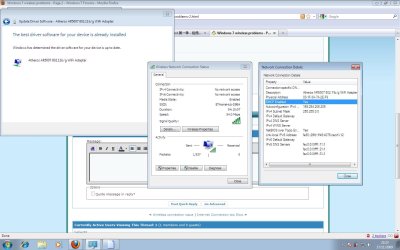
Im not entirely sure if this is what your looking for. Check the attached file.
 

Attachments

  • wireless info screen shot.jpg
    wireless info screen shot.jpg
    118.1 KB · Views: 112

My Computer

Computer Manufacturer/Model Number
HP Pavillion DV9700
OS
Windows 7/ XP
Your adapter is not receiving a valid IP adress from what ever is hosting DHCP service on your network. Most likely your wireless router. The Device named BTHomeHub may needed to be restarted and then you should be able to perform an ipconfig /release and then an ipconfig /renew from a command prompt running as an administrator.
 

My Computer

Computer Manufacturer/Model Number
PartsIsParts
OS
Windows 7 Ultimate 64bit
CPU
Intel Pentium D 3Ghz
Motherboard
ASRock G31M-S
Memory
4 Gigs PC 6400
Graphics Card(s)
Nvidia GeForce 8500 GT
Sound Card
Realtek High Definition Audio Integrated
Monitor(s) Displays
AOC 19inch X2
Screen Resolution
1024 X 768 (I'm Old)
Hard Drives
Segate ST3160815AS Serial ATAII
Western Digital WD1600AAJA-75PSA0 Serial ATAII
PSU
500 watt..don't know mfg.
Case
Giant Black 4u rackmount I've had for years
Cooling
Stock CPU extra 120s in case
Keyboard
Generic Made in China
Mouse
Logitech USB Optical Scroll
Internet Speed
What ever comcast decides to give me usually 21Mbps up/5mbps
Your adapter is not receiving a valid IP adress from what ever is hosting DHCP service on your network. Most likely your wireless router. The Device named BTHomeHub may needed to be restarted and then you should be able to perform an ipconfig /release and then an ipconfig /renew from a command prompt running as an administrator.

How would i do the renew and release? I just want to make sure i do it right.
 

My Computer

Computer Manufacturer/Model Number
HP Pavillion DV9700
OS
Windows 7/ XP
Find your shortcut for a command prompt.....start...all programs....accessories....right click and choose run as administrator. In the command prompt window just type ipconfig /release hit enter and then type ipconfig /renew and hit enter again. Let me know if you get a legitimate IP address, or an error like "unable to contact DHCP server"
 

My Computer

Computer Manufacturer/Model Number
PartsIsParts
OS
Windows 7 Ultimate 64bit
CPU
Intel Pentium D 3Ghz
Motherboard
ASRock G31M-S
Memory
4 Gigs PC 6400
Graphics Card(s)
Nvidia GeForce 8500 GT
Sound Card
Realtek High Definition Audio Integrated
Monitor(s) Displays
AOC 19inch X2
Screen Resolution
1024 X 768 (I'm Old)
Hard Drives
Segate ST3160815AS Serial ATAII
Western Digital WD1600AAJA-75PSA0 Serial ATAII
PSU
500 watt..don't know mfg.
Case
Giant Black 4u rackmount I've had for years
Cooling
Stock CPU extra 120s in case
Keyboard
Generic Made in China
Mouse
Logitech USB Optical Scroll
Internet Speed
What ever comcast decides to give me usually 21Mbps up/5mbps
Back
Top