Windows 7 WONT BOOT!!

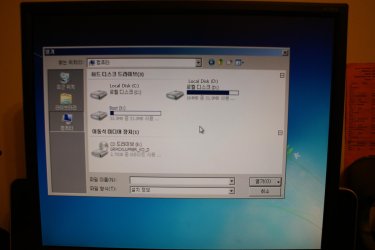
also, when i click startup repair, it says Select the driver, insert the installation media and click OK. so i pressed ok so this window popped up.
 

Attachments

  • DSC01590.jpg
    DSC01590.jpg
    249.3 KB · Views: 8

My Computer My Computer

At a glance

windows 7
OS
windows 7
Ignore the driver link which is not used here at all. You somehow diverted into that.

Disk 0 and 1 are not the partitions, but disks.

You didn't follow what I gave you to type to determine which partition is the 100mb System Reserved partition or the Win7 partition. If you don't have 100mb then determine which is Win7 partition by Size, then type the command I gave you to select it and mark Active.

Then close the Command box and click Repair my Computer, post a picture of what it shows you.
 
now it shows only disk 0.
 

My Computer My Computer

At a glance

windows 7
OS
windows 7
when i type list partition, ther are two partitions which are
partition 1 primary 164 MB 31 KB
partition 2 primary 148GB 164 MB

which on do i choose?
 

My Computer My Computer

At a glance

windows 7
OS
windows 7
Sel par 1
Active
exit

If Win7 doesn't start after running Startup Repair 3 separate times with reboots, change the Active partition to the WIn7 partition #2.

You said earlier you had merged Ubuntu and Win7 partitions? What program did this? Are you sure you used Merge and not Resize, and that it completed? Merge is almost always a paid feature in DIsk Managers. It could have ruined your Win7 if so. We can only try to start it now.
 
partition 1 primary 164 MB 31 KB
partition 2 primary 148GB 164 MB

and thanks for taking your time helping me. i appreciate it :)
 

My Computer My Computer

At a glance

windows 7
OS
windows 7
when i click start up repair, it says something liek "Images from the computer system could not be found. Connect the backup hard disk or DVD, insert the end of the backup set, and you click Retry. Or close the dialog box, take a look at additional options."
 

My Computer My Computer

At a glance

windows 7
OS
windows 7
also i used minitool partition wizard professional and used Merge.
 

My Computer My Computer

At a glance

windows 7
OS
windows 7
You are not selecting Startup Repair but instead chose System Image Recovery. Please pay attention to what you are doing.

Why would you merge Ubuntu partition with Win7 when you clearly needed to delete the Ubuntu partition? Are you sure you didn't delete Ubuntu partition and then Resize Win7 into its space? Merging is a paid feature in PW so you would have had to pay to use it.
 
Sorry, i meant system image recovery. my computer is not in english so i got confused.
and i did delete my Ubuntu partition. i formatted it and then merged it. and i have the paid version.
the problem is that there is no selectable system image on my screen. i guess it got messed up
 

My Computer My Computer

At a glance

windows 7
OS
windows 7
also on command prompt i typed Mountvol and typed dir C:, it says The file or directory is corrupted and unreadable. does that mean i cant restore my files in my hard drive? is it impossible?
 

My Computer My Computer

At a glance

windows 7
OS
windows 7
What happens when you run Startup Repair 3 separate times with reboots? Can you please focus on the tasks at hand?
 
OH! i got confused with start up repair and system image recovery! im so stupid.
il try that.
 

My Computer My Computer

At a glance

windows 7
OS
windows 7
its still the same.
also by running start up repair 3 time, does that mean rebooting and selecting start up repair 3 times? just to make sure.
 

My Computer My Computer

At a glance

windows 7
OS
windows 7
Yes. Run three separate times with reboots to see if Win7 starts after each.

If not boot back in and mark Partition 2 Active which willl often work when you run Startup Repair 3 times if the other one has been corrupted.
 
EDIT: nevermind
 

My Computer My Computer

At a glance

windows 7
OS
windows 7
No, once each partition is marked Active, run Startup Repair up to 3 separate times with reboots in between each to see if Win7 starts on its own.
 
Its not working. now it says NTLDR is missing press ctrl+alt+del to restart

^that is the partition with less space

and the one with 140 GB space doesnt work. only black screen with a _ blinking
 

My Computer My Computer

At a glance

windows 7
OS
windows 7
You'll have to boot into the DVD to run Startup Repair. Enter BIOS setup to make sure DVD drive is still set to boot first, then watch for prompt to Press Any Key to boot Disk.

If that fails try tapping the key given on first boot screen for Boot Menu, choose DVD drive to boot.
 
You need to repair the pbr.

From the command line:

bootsect /nt60 all /mbr


then run startup repair.


also on command prompt i typed Mountvol and typed dir C:, it says The file or directory is corrupted and unreadable. does that mean i cant restore my files in my hard drive? is it impossible?

That doesn't sound good - lets hope the message is misleading.
 

My Computers My Computers

  • At a glance

    7 X64i5 84002x8gb 3200mhz
    Computer type
    PC/Desktop
    OS
    7 X64
    CPU
    i5 8400
    Motherboard
    gigabyte b365m ds3h
    Memory
    2x8gb 3200mhz
    Hard Drives
    various
    PSU
    pure power 11 400w cm
    Case
    Coolermaster
    Cooling
    cryorig m9i
  • At a glance

    7x64g54008gb ddr4 2400
    Computer type
    PC/Desktop
    OS
    7x64
    CPU
    g5400
    Motherboard
    ga b365m ds3h
    Memory
    8gb ddr4 2400
    PSU
    xfx pro 450w
Back
Top
