
Hey guys...newbie posting out of total desperation and needing help!
I bought a Samsung SH-D162D DVD Drive in a USB enclosure to connect to my Toshiba Windows 7 laptop via USB.
I cannot get windows 7 to find it! When I plug in the USB cable the balloon comes up to say it has been installed, I can see it on My Computer for about 1 or 2 minutes then it drops off. It isnt listed in my hardware or anything.
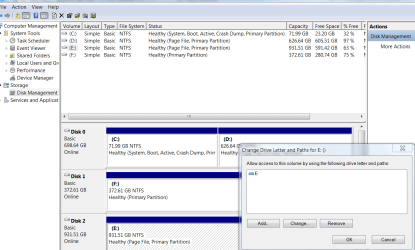
Its not found in Disk Management or My Devices so it isnt a case of changing the drive letter - i cant find the drive to change it.
I have also tried to find the upper and lower settings in regedit....couldnt find them so couldnt delete them as advised in other posts of this nature.
It is set to master, the IDE connector and power connectors are fine. Its gotta be a windows 7 problem cause it does show up very breifly. In the minute or 2 its there I cant do anything with it...it just hangs although it will open and close. Ive googled it and cant find anything...mainly registry issues but they didnt help.
Ive also connected it up to another laptop with XP and had no problems so I know the DVD Rom works fine and all the cables are ok.
Ive tried in all 4 USB ports on my laptop and also turned off all energy settings...all with no luck. And I also have EVERY windows 7 update...
Heres exactly what happens from power off on the enclosure.
1 - I plug in the USB lead then turn on power to the enclosure.
2 - I quickly go to Start, Computer and I can see the DVD Rom drive E next to my laptops dvd rom.
3 - The green bar at the top starts filling up from left to right and gets about half way then suddenly the DVD Rom icon disappears and so does the green bar.
4 - It then flashes up under the laptops DVD Rom icon with a Local Disk drive E but only for a split second.
5 - Sometimes a balloon comes up saying installing device, then device successfully installed...but not every time.
And thats it....Im at a total loss and cant work it out.
Any help or ideas would be greatly appreciated!
I bought a Samsung SH-D162D DVD Drive in a USB enclosure to connect to my Toshiba Windows 7 laptop via USB.
I cannot get windows 7 to find it! When I plug in the USB cable the balloon comes up to say it has been installed, I can see it on My Computer for about 1 or 2 minutes then it drops off. It isnt listed in my hardware or anything.
Its not found in Disk Management or My Devices so it isnt a case of changing the drive letter - i cant find the drive to change it.
I have also tried to find the upper and lower settings in regedit....couldnt find them so couldnt delete them as advised in other posts of this nature.
It is set to master, the IDE connector and power connectors are fine. Its gotta be a windows 7 problem cause it does show up very breifly. In the minute or 2 its there I cant do anything with it...it just hangs although it will open and close. Ive googled it and cant find anything...mainly registry issues but they didnt help.
Ive also connected it up to another laptop with XP and had no problems so I know the DVD Rom works fine and all the cables are ok.
Ive tried in all 4 USB ports on my laptop and also turned off all energy settings...all with no luck. And I also have EVERY windows 7 update...
Heres exactly what happens from power off on the enclosure.
1 - I plug in the USB lead then turn on power to the enclosure.
2 - I quickly go to Start, Computer and I can see the DVD Rom drive E next to my laptops dvd rom.
3 - The green bar at the top starts filling up from left to right and gets about half way then suddenly the DVD Rom icon disappears and so does the green bar.
4 - It then flashes up under the laptops DVD Rom icon with a Local Disk drive E but only for a split second.
5 - Sometimes a balloon comes up saying installing device, then device successfully installed...but not every time.
And thats it....Im at a total loss and cant work it out.
Any help or ideas would be greatly appreciated!
My Computer
- OS
- Windows 7 Home Premium 32bit


 !!! Cheers!


