Solved Windows 7 won't Update. Error Code 80092004

Madoryx

Banned
Local time
6:16 PM
Messages
3
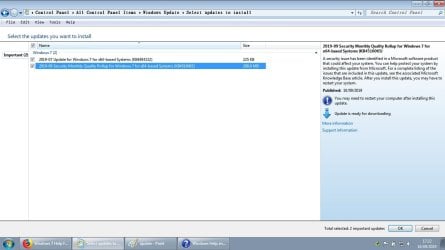
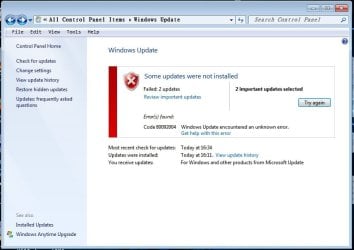
Hi, I'm having trouble installing 2 Updates on my Windows 7 Laptop at the momment. I've never had this issue with updating before and I don't really know what to do. This happened Yesterday and today. When I searched for Updates, I was able to download some of them except 2. I've tried several times now to redownload and install the Updates but it just isn't happening :(


Is there any other ways I can try installing these 2 ? Is it just a server thing right now ? Now I'm getting worried about it :\


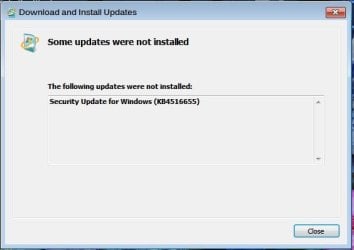
Thanks in advance for any suggestions, I'll post a cap of the window, and a cap of the 2 Updates which I can't install right now.
 

Attachments
  • update.jpg
    update.jpg
    109 KB · Views: 0
  • update2.jpg
    update2.jpg
    177.4 KB · Views: 7

My Computer

Computer type
Laptop
Computer Manufacturer/Model Number
Toshiba
OS
Windows 7 Home Premium 64bit
Memory
6GB RAM
Internet Speed
50MB BT FIBRE OPTIC
Antivirus
Norton Security
Browser
Firefox/Chrome
I'm bookmarking this thread, I need a solution also.
 

My Computer

Computer type
PC/Desktop
Computer Manufacturer/Model Number
Antec desktop; Acer Aspire laptops
OS
Windows 7 Professional 64-bit
CPU
Desktop i5; Acers i5 & i7
Memory
desktop 16GB; 1 Acer 8GB & 1 Acer 16GB
Hard Drives
1TB split into 2 equal partitions [OS and data] usable by RJS
Internet Speed
AT&T DSL
Browser
FF, GChrome, msIE
Other Info
Windows 7 Firewall, Emsisoft AM/AV, MSE [scan-only], SpywareBlaster, Ruiware/BillP combine
Count yourself lucky if KB4493132 won’t install, it runs a nag pop-up about upgrading to Win 10. It does however have a small square that allows you to select not to show again.

As far as KB4516065, maybe check that you have updates installed covered in “How to get this update” section about “Before installing this update” in this link.

KB4516065 Security Monthly Rollup update for Windows 7 - Sept. 10
 

My Computer

Computer type
PC/Desktop
Computer Manufacturer/Model Number
Compaq
OS
Windows 7 Home Premium 32bit.
CPU
AMD Athlon x2 2.30 GHz
Memory
4 GB Ram
One of those Updates I have Installed, but KB4516655 won't Install for me either ! It fails each time, ugh :(
I'm still not able to update :cry:
 

Attachments

  • a2.jpg
    a2.jpg
    34.8 KB · Views: 54

My Computer

Computer type
Laptop
Computer Manufacturer/Model Number
Toshiba
OS
Windows 7 Home Premium 64bit
Memory
6GB RAM
Internet Speed
50MB BT FIBRE OPTIC
Antivirus
Norton Security
Browser
Firefox/Chrome
Same here, cannot update KB4516065 :(

tried using the offline update file and it's failing as well
 

My Computer

Computer type
Laptop
Computer Manufacturer/Model Number
MacBook Pro early 2011
OS
Windows 7 Ultimate x64 running on Bootcamp
CPU
Intel Core i7
Memory
4 GB
Hard Drives
750 GB
Antivirus
Avast updated
Browser
FF latest version

My Computer

Computer type
Laptop
Computer Manufacturer/Model Number
MacBook Pro early 2011
OS
Windows 7 Ultimate x64 running on Bootcamp
CPU
Intel Core i7
Memory
4 GB
Hard Drives
750 GB
Antivirus
Avast updated
Browser
FF latest version
Can't help without logs that tell me what is wrong with computer.
please run
sfc /scannow
then
AutoSURTx64
post CBS Folder please

Bill
 

My Computer

Computer type
PC/Desktop
Computer Manufacturer/Model Number
HP Desktop & Compaq Laptop
OS
Win 10 x64, Linux Lite, Win 7 x64, BlackArch, & Kali
Hard Drives
Samsung 850 Pro 256Gb,
Hitachi HDD 1Tb,
Crucial MX SSD 250Gb
Segate 3Tb USB 3.0 Ext. Backup HDD
Internet Speed
150Mbps dn, 20Mbps up
Antivirus
Avast Free, Malwarebytes Anti-Exploit & Anti-Ransomware
Browser
Firefox, Chrome, Opera, & VPN
I've just managed to resolve the issue by installing an Update that was needed, but wasn't appearing in my Windows Updates. So manually installed, and got my updates.
 

My Computer

Computer type
Laptop
Computer Manufacturer/Model Number
Toshiba
OS
Windows 7 Home Premium 64bit
Memory
6GB RAM
Internet Speed
50MB BT FIBRE OPTIC
Antivirus
Norton Security
Browser
Firefox/Chrome
heeeelp even me facing this same error....
not able to download/install these 2 updates

m9LbUq1.png
 

My Computer

Computer type
PC/Desktop
OS
Windows 7 Ultimate x64 & Win10 x64bit LTSC
Memory
4gb/8GB
Hard Drives
WD SATA 500GB
Seagate Barracuda 1TB
Antivirus
EIS v13
Solved......

This forum is awesome... whenever i comes here with prob it get solved within a day or even within few mins....

Solved! :-)
On clean installed Windows 7, KB4516065 can be installed directly (no SSU required),
otherwise SSU KB4490628 is needed before KB4516065

You can find all updates here (search by the number):
Microsoft Update Catalog

KB4490628 was released March 2019:
Microsoft Update Catalog

KB4516065 offline installer is here:
Microsoft Update Catalog


thanks bro.. i just follow those steps mention by you and voilaa.. all is well now

vUTd5x0.png
:party:
 

My Computer

Computer type
PC/Desktop
OS
Windows 7 Ultimate x64 & Win10 x64bit LTSC
Memory
4gb/8GB
Hard Drives
WD SATA 500GB
Seagate Barracuda 1TB
Antivirus
EIS v13

My Computer

Computer type
PC/Desktop
OS
Windows 7
Well, the hard way, but congrats you resolved your issue.

would be much easier if OPs followed Window Update Posting Instruction
That would help individuals such as I, for the quickest, easiest resolve.

Happy Computing!

Windows 7 can still be upgraded to Windows 10 for FREE

Bill
 

My Computer

Computer type
PC/Desktop
Computer Manufacturer/Model Number
HP Desktop & Compaq Laptop
OS
Win 10 x64, Linux Lite, Win 7 x64, BlackArch, & Kali
Hard Drives
Samsung 850 Pro 256Gb,
Hitachi HDD 1Tb,
Crucial MX SSD 250Gb
Segate 3Tb USB 3.0 Ext. Backup HDD
Internet Speed
150Mbps dn, 20Mbps up
Antivirus
Avast Free, Malwarebytes Anti-Exploit & Anti-Ransomware
Browser
Firefox, Chrome, Opera, & VPN
Offline of KB4490628 failed

I clicked the link for KB4490628 in the above message, but it failed to install. I disabled the network adapter after downloading. (It was in Russian, but I do read Russian.)

My main problem has to do with a printer not installing, so I am doing my best to update Windows 7 completely. (It was completely updated and running perfectly before a mishap with a partition.)

Thank you.
 

My Computers

System One System Two

  • Computer type
    PC/Desktop
    Computer Manufacturer/Model Number
    Me
    OS
    Windows 7 Professional 64
    CPU
    AMD Phenom II X4 840 3.2GHz
    Motherboard
    MSI 970A-G43 Plus
    Memory
    Ballistix Sport 16GB (2 x 8GB) DDR3 1600
    Graphics Card(s)
    NVIDIA GeForce GT 610
    Hard Drives
    ST2000DM 008-2FR102 SATA Disk Device
  • Computer type
    PC/Desktop
    System Manufacturer/Model Number
    Dell Optiplex 3020
    OS
    Windows 10
    CPU
    i5-4590
    Motherboard
    0WMJ54
    Memory
    8GB DDR3
    Graphics Card(s)
    Intel HD 4600
    Monitor(s) Displays
    Samsung
    Hard Drives
    WD5000AAKX ATA Device
Back
Top