
Windows 7 x64 Performance failure

sygnus21

New member
Guru
Gold Member
VIP
Local time
4:30 PM
Messages
7,684
Location
Hampton VA
OK - When I run the “Reliability and Performance Monitor” in Windows 7 x64 it fails the “System Service Check” and clicking the tab tells me I have an “Abnormally Stopped System Services” and clicking the + (plus) symbol reveals nothing and shows “#UKNOWN#”

However, when I run Vista x64’s performance monitor under Vista, all is good and there are no problems. I have Vista and Windows 7 on two different hard drives under the same machine - so obviously the system specs are the same.

All drivers are installed on W7 and looking in device manager shows no problems or missing drivers. I’ve even reinstalled the OS and still get the failure. Here’s an image of it….
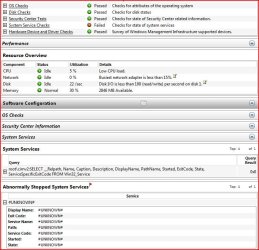
W7 Perf. Error.JPG

Anyone else have or seen this or know what’s going on? I'm afraid i'm a bit lost right now.

Thanks
 

My Computer

Computer type
PC/Desktop
Computer Manufacturer/Model Number
Custom built by me.
OS
Windows 10 Pro
CPU
Intel Core i7-4770K (3.5Ghz)
Motherboard
Gigabyte G1 Sniper 5 (F10 Bios)
Memory
32 gig Corsair Dominator Platinum (4x8Gig)
Graphics Card(s)
Sapphire Tri-X R9 Fury
Sound Card
Soundblaster ZXR
Monitor(s) Displays
NEC PA242W 24" LCD Monitor
Screen Resolution
1920 x 1200
Hard Drives
Primary - Samsung 850 Pro (512gig), Samsung 840 Pro (256gig), 2TB WD Caviar Black.
PSU
EVGA Supernova 1000 G2
Case
Cooler Master HAF X
Cooling
Corsair H100i with Corsair Air Series SP120 Quiet Fans
Keyboard
Logitech Wireless Wave
Mouse
Logitech Performance MX
Internet Speed
High Speed Cable
Antivirus
Norton Security
Browser
IE11
Other Info
Memory Timings - 1866MHz @ 9-9-9-27-1T @ 1.5 volts

My Computer

Computer type
PC/Desktop
Computer Manufacturer/Model Number
Airbot 2.0
OS
Windows 7 Ultimate x64 SP1
CPU
Core i7 920 (D0) @ 4Ghz, *26c idle *65c full load on air
Motherboard
Asus P6X58D Premium - Sata 6Gb/s - USB 3.0
Memory
12GB DDR3 Corsair Dominator -CMD12GX3M6A1600C8 at 1600MHz
Graphics Card(s)
Zotac Geforce GTX 770
Sound Card
ASUS Xonar D2X
Monitor(s) Displays
1 LG 24" Flatron W2453V-PF 1 Samsung 24" P2450H both 2ms RT
Screen Resolution
1920x1080@60hz
Hard Drives
1 Samsung 250GB 840 Evo SSD
1 OCZ Vertex2 180GB SSD
1 TB Samsung Spinpoint F1 7200RPM 32MB cache
2 500GB WD Caviar Blacks 7200RPM 32MB cache (WD5001AALS)

Pioneer DVD Burner DVR-S18M
PSU
Corsair HX1000W
Case
Cooler Master HAF 932
Cooling
Case Fans *3 230mm, *1 140mm/CPU - *Tuniq Tower 120 Extreme
Keyboard
Logitech Wireless MK700
Mouse
Logitech Wireless MK700
Internet Speed
DL 15 Mbps UL 0.98 Mbps
Antivirus
None
Browser
Firefox Nightly
Other Info
Processor-7.7 *RAM- 7.9 *Graphics-7.9 *Gaming Graphics- 7.9 *SSD- 7.8 W.E.I final score= 7.7
*Phone- LG Nexus 5
Thanks Airbot, I posted my question in that thread and linked it back here. Maybe these two can get merged.

It's bedtime now and I'm getting sleepy. I'll check in later.

Thanks.
 

My Computer

Computer type
PC/Desktop
Computer Manufacturer/Model Number
Custom built by me.
OS
Windows 10 Pro
CPU
Intel Core i7-4770K (3.5Ghz)
Motherboard
Gigabyte G1 Sniper 5 (F10 Bios)
Memory
32 gig Corsair Dominator Platinum (4x8Gig)
Graphics Card(s)
Sapphire Tri-X R9 Fury
Sound Card
Soundblaster ZXR
Monitor(s) Displays
NEC PA242W 24" LCD Monitor
Screen Resolution
1920 x 1200
Hard Drives
Primary - Samsung 850 Pro (512gig), Samsung 840 Pro (256gig), 2TB WD Caviar Black.
PSU
EVGA Supernova 1000 G2
Case
Cooler Master HAF X
Cooling
Corsair H100i with Corsair Air Series SP120 Quiet Fans
Keyboard
Logitech Wireless Wave
Mouse
Logitech Performance MX
Internet Speed
High Speed Cable
Antivirus
Norton Security
Browser
IE11
Other Info
Memory Timings - 1866MHz @ 9-9-9-27-1T @ 1.5 volts
OK - When I run the “Reliability and Performance Monitor” in Windows 7 x64 it fails the “System Service Check” and clicking the tab tells me I have an “Abnormally Stopped System Services” and clicking the + (plus) symbol reveals nothing and shows “#UKNOWN#”

However, when I run Vista x64’s performance monitor under Vista, all is good and there are no problems. I have Vista and Windows 7 on two different hard drives under the same machine - so obviously the system specs are the same.

All drivers are installed on W7 and looking in device manager shows no problems or missing drivers. I’ve even reinstalled the OS and still get the failure. Here’s an image of it….

View attachment 3773

Anyone else have or seen this or know what’s going on? I'm afraid i'm a bit lost right now.

Thanks

You may have answered your own question. You're currently running on two different hard drives. The drive you're using for Windows 7 could be failing and Windows 7 is simply reporting it.

It's also possible that your chipset needs an updated driver for your drives to work without errors. Check your motherboard's website for a possible Windows 7 driver. Some people have found success using Vista drivers. In your case, you'd need the 64-bit Vista driver. Of course, it's no guarantee but it is somewhere to start.

Otherwise, I download a hard drive diagnostic tool (like HD Tune) and check the drive for errors/bad sectors. Also, keep in mind that this is an unfinished product. Maybe you should do a search for this error on Microsoft's website or on Google?

Hope this helps. Good luck!
 

My Computer

OS
XP,Win764
Back
Top