Windows 7 & XP Pro

rsvr85

Yeah but no but
Guru
VIP
Local time
5:44 AM
Messages
1,065
Location
C:\Users\Home
Hey guys,

I' having some problems with my home network.

I only got a XP lappy the other day and it's the first time i've really used the OS so i'm not too fimiliar ;)

I've already managed to get everything shared between 7 & XP that i want and all was working perfectly. However, today for no apparent reason, i'm not able to access certain areas of XP :confused:

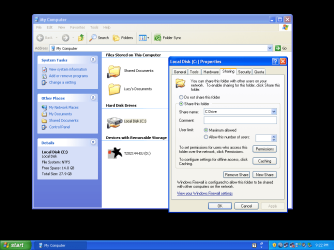
XP shows on my network, i can get through to XP and see all of the shared folders there.
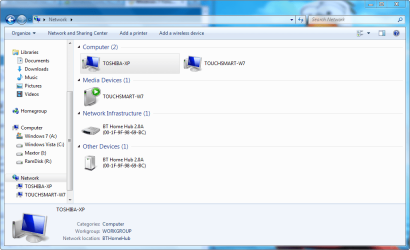
13-08-2009 16-38-14.png
2.png

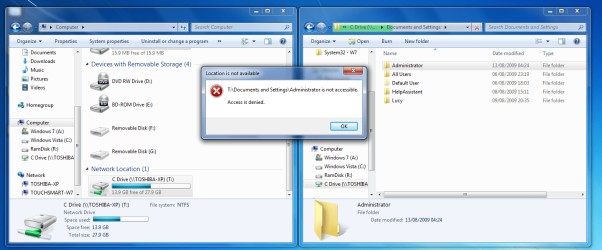
I can access and modify \\Toshiba-xp\SharedDocs, and the printers.
I can access \\Toshiba-xp\c but when i try and access the Admin or Lucy account in Documents & Settings i get this; i get the same message trying to access any other folder in \\Toshiba-xp\c
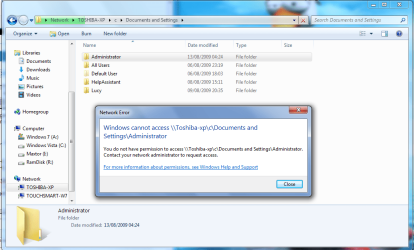
3.png

Even stranger to me, i can get into All Users & Default User. :confused:

I've tried these troubleshooting steps so far, as i say, i'm not very familiar with XP :)
rebooted both machines,
XP - run the network wizard again
XP - deleted c share and re-created it
XP - tried with 'Use simple file sharing' on & off
7 - made sure password protected shares is off on both public & home profiles
resetting router - all no cigar.

Anyone have any ideas please? I'm probably just making a school boy error :cry:

Cheers :D

UPDATE
I've tried without a password for Lucy & Admin & also resetting the passwords. No go :(
 
Last edited:

My Computer

Computer Manufacturer/Model Number
HP Touchsmart IQ771.uk
OS
Windows 7 Ultimate x64
CPU
AMD Turion(tm) 64 X2 Mobile Technology TL-56
Motherboard
ASUS Pheonix
Memory
3GB Nanya PC2-6400 DDR2-SDRAM SO-DIM (400MHz)
Graphics Card(s)
NVIDIA GeForce Go 7600 256MB GDDR3 SDRAM
Sound Card
High Definition Intergrated NVIDIA MCP51
Monitor(s) Displays
46" Sony Bravia HDTV
Screen Resolution
1600x1200
Hard Drives
1.5TB Samsug
320GB Seagate ST3320820AS - SATA 3Gb/s 8MB
500GB Maxtor Basics STM305003EHD301-RK
Internet Speed
↓6.32 Mb/s ↑0.35 Mb/s ↔26ms
Other Info
BIOS - American Megatrends Inc. 5.07
Ethernet Port - NVIDIA nForce 10/100/1000 Mbps
DVD Drive - TSSTcorp DVDR/RW TS-T632L
Hi,

The Documents and Settings folder of the Admin user may be private. Check the folder permissions.

Also, if you make the same user account and password on each computer, it might work better. By default, the "Administrator" user account in Windows 7 is disabled and doesn't have a password. Windows XP will often reject access from accounts which have a blank password.
 

My Computer

Computer Manufacturer/Model Number
Too many to list.
OS
XP, Seven, 2008R2
CPU
AMD, Intel, VIA
Motherboard
Various
Memory
Corsair, Kingston, etc.
Graphics Card(s)
ATI, NVIDIA
Monitor(s) Displays
Samsung
Hard Drives
Maxtor, Western Digital
Keyboard
qwerty
Internet Speed
22 Mb/s @ home, 1 Gb/s @ server
Other Info
All of my systems still run fastest on XP 32-bit for the most part. Win7 is fun to play with, but I still prefer XP for raw speed, security, and functionality.
but when i try and access the Admin or Lucy account in Documents & Settings i get this; i get the same message trying to access any other folder in \\Toshiba-xp\c
I believe this is normal. It would be the same if Lucy were logged in and tried to access the Admin Docs & Settings or yours ie: Access Denied!!!. When you first setup user accounts in XP you can choose to make them private (already mentioned by sup3rsprt) or shared. Shared user accounts will have a folder "My Doc Folder" for each user visible on each user account's explorer.

The C drive is another thing. You can create a folder on the C drive and manually share it accross the network. It is not user specific (and can share files between users as well).

With XP, just create the folders you want to be visible in the network and manually share them. Then move the stuff you want to share into those folders.

Robert
 

My Computer

OS
...
Thanks for your suggestions guys, :D
I'm gonna check over what you have mentioned.

Funny thing is, is that i had access to everything yesterday. The only thing i have changed sine then is my IPv4 DNS server address on 7 (would that be an issue?).
I changed back to default and the problems still exists.
 

My Computer

Computer Manufacturer/Model Number
HP Touchsmart IQ771.uk
OS
Windows 7 Ultimate x64
CPU
AMD Turion(tm) 64 X2 Mobile Technology TL-56
Motherboard
ASUS Pheonix
Memory
3GB Nanya PC2-6400 DDR2-SDRAM SO-DIM (400MHz)
Graphics Card(s)
NVIDIA GeForce Go 7600 256MB GDDR3 SDRAM
Sound Card
High Definition Intergrated NVIDIA MCP51
Monitor(s) Displays
46" Sony Bravia HDTV
Screen Resolution
1600x1200
Hard Drives
1.5TB Samsug
320GB Seagate ST3320820AS - SATA 3Gb/s 8MB
500GB Maxtor Basics STM305003EHD301-RK
Internet Speed
↓6.32 Mb/s ↑0.35 Mb/s ↔26ms
Other Info
BIOS - American Megatrends Inc. 5.07
Ethernet Port - NVIDIA nForce 10/100/1000 Mbps
DVD Drive - TSSTcorp DVDR/RW TS-T632L
The Documents and Settings folder of the Admin user may be private. Check the folder permissions.

I checked the permissions, they're set fine.

Also, if you make the same user account and password on each computer, it might work better. By default, the "Administrator" user account in Windows 7 is disabled and doesn't have a password. Windows XP will often reject access from accounts which have a blank password.

Tested, no difference :(

BTW. Attempting to remote connect to XP from 7 yields the same network error box as above. Again, i was able to connect yesterday.
 

My Computer

Computer Manufacturer/Model Number
HP Touchsmart IQ771.uk
OS
Windows 7 Ultimate x64
CPU
AMD Turion(tm) 64 X2 Mobile Technology TL-56
Motherboard
ASUS Pheonix
Memory
3GB Nanya PC2-6400 DDR2-SDRAM SO-DIM (400MHz)
Graphics Card(s)
NVIDIA GeForce Go 7600 256MB GDDR3 SDRAM
Sound Card
High Definition Intergrated NVIDIA MCP51
Monitor(s) Displays
46" Sony Bravia HDTV
Screen Resolution
1600x1200
Hard Drives
1.5TB Samsug
320GB Seagate ST3320820AS - SATA 3Gb/s 8MB
500GB Maxtor Basics STM305003EHD301-RK
Internet Speed
↓6.32 Mb/s ↑0.35 Mb/s ↔26ms
Other Info
BIOS - American Megatrends Inc. 5.07
Ethernet Port - NVIDIA nForce 10/100/1000 Mbps
DVD Drive - TSSTcorp DVDR/RW TS-T632L
It is not a DNS issue. It is a permissions issue. If you do something like add the "Everyone" group to the ACL, it would work.
 

My Computer

Computer Manufacturer/Model Number
Too many to list.
OS
XP, Seven, 2008R2
CPU
AMD, Intel, VIA
Motherboard
Various
Memory
Corsair, Kingston, etc.
Graphics Card(s)
ATI, NVIDIA
Monitor(s) Displays
Samsung
Hard Drives
Maxtor, Western Digital
Keyboard
qwerty
Internet Speed
22 Mb/s @ home, 1 Gb/s @ server
Other Info
All of my systems still run fastest on XP 32-bit for the most part. Win7 is fun to play with, but I still prefer XP for raw speed, security, and functionality.

My Computer

Computer Manufacturer/Model Number
HP Touchsmart IQ771.uk
OS
Windows 7 Ultimate x64
CPU
AMD Turion(tm) 64 X2 Mobile Technology TL-56
Motherboard
ASUS Pheonix
Memory
3GB Nanya PC2-6400 DDR2-SDRAM SO-DIM (400MHz)
Graphics Card(s)
NVIDIA GeForce Go 7600 256MB GDDR3 SDRAM
Sound Card
High Definition Intergrated NVIDIA MCP51
Monitor(s) Displays
46" Sony Bravia HDTV
Screen Resolution
1600x1200
Hard Drives
1.5TB Samsug
320GB Seagate ST3320820AS - SATA 3Gb/s 8MB
500GB Maxtor Basics STM305003EHD301-RK
Internet Speed
↓6.32 Mb/s ↑0.35 Mb/s ↔26ms
Other Info
BIOS - American Megatrends Inc. 5.07
Ethernet Port - NVIDIA nForce 10/100/1000 Mbps
DVD Drive - TSSTcorp DVDR/RW TS-T632L
access control list

you get to it by right-clicking on a folder and look at the Security tab (with simple file sharing disabled).

Windows XP has admin shares too. Like

\\computer\c$

Administrators can access it.
 

My Computer

Computer Manufacturer/Model Number
Too many to list.
OS
XP, Seven, 2008R2
CPU
AMD, Intel, VIA
Motherboard
Various
Memory
Corsair, Kingston, etc.
Graphics Card(s)
ATI, NVIDIA
Monitor(s) Displays
Samsung
Hard Drives
Maxtor, Western Digital
Keyboard
qwerty
Internet Speed
22 Mb/s @ home, 1 Gb/s @ server
Other Info
All of my systems still run fastest on XP 32-bit for the most part. Win7 is fun to play with, but I still prefer XP for raw speed, security, and functionality.
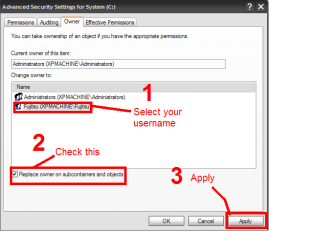
Go to partition where you have shared files(you can do this on all),right click/properties,go to security tab/advanced/owner tab and do like on screenshot:
untitled.PNG
Hope it helps!
 

My Computer

Computer Manufacturer/Model Number
Fujitsu Siemens
OS
XP SP2
CPU
Intel Celeron D 3.07 GHz
Motherboard
/
Memory
1GB
Graphics Card(s)
Nvidia GeForce 6200 SE 256mb
Sound Card
Realtek
Monitor(s) Displays
17 "
Screen Resolution
1280x1024
Hard Drives
160GB
Internet Speed
2mb
keep in mind that "simple file sharing" will only allow Guest access. It won't work because the "Everyone" group (which Guest belongs) does not have access to private folders within Documents and Settings.

That is why I recommend to disable "simple file sharing" and just log in using the correct user account.
 

My Computer

Computer Manufacturer/Model Number
Too many to list.
OS
XP, Seven, 2008R2
CPU
AMD, Intel, VIA
Motherboard
Various
Memory
Corsair, Kingston, etc.
Graphics Card(s)
ATI, NVIDIA
Monitor(s) Displays
Samsung
Hard Drives
Maxtor, Western Digital
Keyboard
qwerty
Internet Speed
22 Mb/s @ home, 1 Gb/s @ server
Other Info
All of my systems still run fastest on XP 32-bit for the most part. Win7 is fun to play with, but I still prefer XP for raw speed, security, and functionality.
access control list

you get to it by right-clicking on a folder and look at the Security tab (with simple file sharing disabled).

Windows XP has admin shares too. Like

\\computer\c$

Administrators can access it.

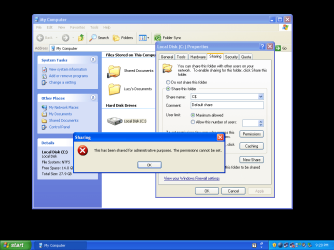
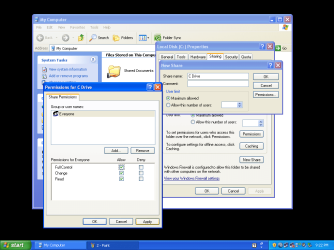
Here's a few screenies from admin account on XP;

1.png
2.png
3.png
4.png

Simple file sharing has been disabled from the off really.
Still no go after the new share was set too :(
 

My Computer

Computer Manufacturer/Model Number
HP Touchsmart IQ771.uk
OS
Windows 7 Ultimate x64
CPU
AMD Turion(tm) 64 X2 Mobile Technology TL-56
Motherboard
ASUS Pheonix
Memory
3GB Nanya PC2-6400 DDR2-SDRAM SO-DIM (400MHz)
Graphics Card(s)
NVIDIA GeForce Go 7600 256MB GDDR3 SDRAM
Sound Card
High Definition Intergrated NVIDIA MCP51
Monitor(s) Displays
46" Sony Bravia HDTV
Screen Resolution
1600x1200
Hard Drives
1.5TB Samsug
320GB Seagate ST3320820AS - SATA 3Gb/s 8MB
500GB Maxtor Basics STM305003EHD301-RK
Internet Speed
↓6.32 Mb/s ↑0.35 Mb/s ↔26ms
Other Info
BIOS - American Megatrends Inc. 5.07
Ethernet Port - NVIDIA nForce 10/100/1000 Mbps
DVD Drive - TSSTcorp DVDR/RW TS-T632L
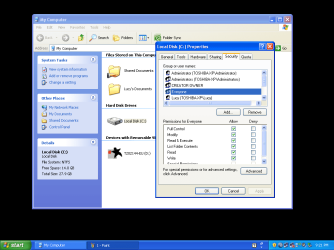
Entries in the ACL will take precedence over share permissions. Just because the Everyone group is allowed access to the C share, it does NOT mean the Everyone group can access C:\Documents and Settings\Administrator.
 

My Computer

Computer Manufacturer/Model Number
Too many to list.
OS
XP, Seven, 2008R2
CPU
AMD, Intel, VIA
Motherboard
Various
Memory
Corsair, Kingston, etc.
Graphics Card(s)
ATI, NVIDIA
Monitor(s) Displays
Samsung
Hard Drives
Maxtor, Western Digital
Keyboard
qwerty
Internet Speed
22 Mb/s @ home, 1 Gb/s @ server
Other Info
All of my systems still run fastest on XP 32-bit for the most part. Win7 is fun to play with, but I still prefer XP for raw speed, security, and functionality.
OK, so how do i go about rectifying this? thanks for your ongoing support btw sup3rsprt :D
 

My Computer

Computer Manufacturer/Model Number
HP Touchsmart IQ771.uk
OS
Windows 7 Ultimate x64
CPU
AMD Turion(tm) 64 X2 Mobile Technology TL-56
Motherboard
ASUS Pheonix
Memory
3GB Nanya PC2-6400 DDR2-SDRAM SO-DIM (400MHz)
Graphics Card(s)
NVIDIA GeForce Go 7600 256MB GDDR3 SDRAM
Sound Card
High Definition Intergrated NVIDIA MCP51
Monitor(s) Displays
46" Sony Bravia HDTV
Screen Resolution
1600x1200
Hard Drives
1.5TB Samsug
320GB Seagate ST3320820AS - SATA 3Gb/s 8MB
500GB Maxtor Basics STM305003EHD301-RK
Internet Speed
↓6.32 Mb/s ↑0.35 Mb/s ↔26ms
Other Info
BIOS - American Megatrends Inc. 5.07
Ethernet Port - NVIDIA nForce 10/100/1000 Mbps
DVD Drive - TSSTcorp DVDR/RW TS-T632L
I think the easiest way may be:

In Windows 7, map the shared C: drive using a username and password that exists on the Windows XP machine. Then you will have the same permissions as if you were actually sitting at the XP computer.

Tools > Map Network Drive

Again, connect using the username and password of an admin that exists on the XP machine.
 

My Computer

Computer Manufacturer/Model Number
Too many to list.
OS
XP, Seven, 2008R2
CPU
AMD, Intel, VIA
Motherboard
Various
Memory
Corsair, Kingston, etc.
Graphics Card(s)
ATI, NVIDIA
Monitor(s) Displays
Samsung
Hard Drives
Maxtor, Western Digital
Keyboard
qwerty
Internet Speed
22 Mb/s @ home, 1 Gb/s @ server
Other Info
All of my systems still run fastest on XP 32-bit for the most part. Win7 is fun to play with, but I still prefer XP for raw speed, security, and functionality.
With admin credentials from XP;

5.png
 

My Computer

Computer Manufacturer/Model Number
HP Touchsmart IQ771.uk
OS
Windows 7 Ultimate x64
CPU
AMD Turion(tm) 64 X2 Mobile Technology TL-56
Motherboard
ASUS Pheonix
Memory
3GB Nanya PC2-6400 DDR2-SDRAM SO-DIM (400MHz)
Graphics Card(s)
NVIDIA GeForce Go 7600 256MB GDDR3 SDRAM
Sound Card
High Definition Intergrated NVIDIA MCP51
Monitor(s) Displays
46" Sony Bravia HDTV
Screen Resolution
1600x1200
Hard Drives
1.5TB Samsug
320GB Seagate ST3320820AS - SATA 3Gb/s 8MB
500GB Maxtor Basics STM305003EHD301-RK
Internet Speed
↓6.32 Mb/s ↑0.35 Mb/s ↔26ms
Other Info
BIOS - American Megatrends Inc. 5.07
Ethernet Port - NVIDIA nForce 10/100/1000 Mbps
DVD Drive - TSSTcorp DVDR/RW TS-T632L
Did you log in using Administrator account? or Lucy? (which one?)

What does the ACL look like for the Administrator folder?

I am testing something similar on my computers at home and all is working well. I can access the C:\Documents and Settings\Username of my XP computer from my Win7 computer.

On the XP computer, go to Control Panel > Administrative Tools > Local Security Policy > Local Policies > Security Options

What is the value for Network access: Sharing and security model for local accounts

It needs to be set Classic
 

My Computer

Computer Manufacturer/Model Number
Too many to list.
OS
XP, Seven, 2008R2
CPU
AMD, Intel, VIA
Motherboard
Various
Memory
Corsair, Kingston, etc.
Graphics Card(s)
ATI, NVIDIA
Monitor(s) Displays
Samsung
Hard Drives
Maxtor, Western Digital
Keyboard
qwerty
Internet Speed
22 Mb/s @ home, 1 Gb/s @ server
Other Info
All of my systems still run fastest on XP 32-bit for the most part. Win7 is fun to play with, but I still prefer XP for raw speed, security, and functionality.
What does the ACL look like for the Administrator folder?

Administrator = Full control
Everyone = Full control
Lucy = Full Control


Did you log in using Administrator account? or Lucy? (which one?)

Administrator

What is the value for Network access: Sharing and security model for local accounts

It needs to be set Classic

It's set to Classic - Local Users
 

My Computer

Computer Manufacturer/Model Number
HP Touchsmart IQ771.uk
OS
Windows 7 Ultimate x64
CPU
AMD Turion(tm) 64 X2 Mobile Technology TL-56
Motherboard
ASUS Pheonix
Memory
3GB Nanya PC2-6400 DDR2-SDRAM SO-DIM (400MHz)
Graphics Card(s)
NVIDIA GeForce Go 7600 256MB GDDR3 SDRAM
Sound Card
High Definition Intergrated NVIDIA MCP51
Monitor(s) Displays
46" Sony Bravia HDTV
Screen Resolution
1600x1200
Hard Drives
1.5TB Samsug
320GB Seagate ST3320820AS - SATA 3Gb/s 8MB
500GB Maxtor Basics STM305003EHD301-RK
Internet Speed
↓6.32 Mb/s ↑0.35 Mb/s ↔26ms
Other Info
BIOS - American Megatrends Inc. 5.07
Ethernet Port - NVIDIA nForce 10/100/1000 Mbps
DVD Drive - TSSTcorp DVDR/RW TS-T632L
Here's mine:

Administrator
Administrators
SYSTEM

Full Control on "This folder, subfolder, and files"

(You can see that info under the Advanced button)

I shared the C: drive on Windows XP

Then from Windows 7, I mapped the C: drive as Z: in My Computer using administrator credentials that exists on the XP machine.

I am not getting any "Access Denied" messages when browsing any of the folders inside Documents and Settings.

My Windows 7 settings are in default state. I have not changed a single thing dealing with file sharing.
 

My Computer

Computer Manufacturer/Model Number
Too many to list.
OS
XP, Seven, 2008R2
CPU
AMD, Intel, VIA
Motherboard
Various
Memory
Corsair, Kingston, etc.
Graphics Card(s)
ATI, NVIDIA
Monitor(s) Displays
Samsung
Hard Drives
Maxtor, Western Digital
Keyboard
qwerty
Internet Speed
22 Mb/s @ home, 1 Gb/s @ server
Other Info
All of my systems still run fastest on XP 32-bit for the most part. Win7 is fun to play with, but I still prefer XP for raw speed, security, and functionality.
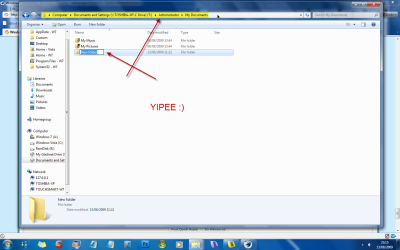
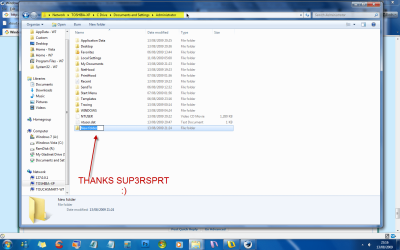
:thumbsup: JOB DONE!!!!! :thumbsup:

I used cacls on XP

I then made sure that my settings matched up to yours. (I set my MND to T)

Just for good measure i added an 'Everyone' entry to the ACL with Full Control to the 'major' folders in needed access to.

My complete access to the XP lappy & Remote desktop connections are now resumed.

Still bemused as to why that it changed over night. :confused:

You sup3rsprt, are a true gent. Your ongoing help tonight (23.29 now) has been greatly appreciated. I hope to help you sometime in the future!

Have some rep. on me :D

6.png
7.png
 

My Computer

Computer Manufacturer/Model Number
HP Touchsmart IQ771.uk
OS
Windows 7 Ultimate x64
CPU
AMD Turion(tm) 64 X2 Mobile Technology TL-56
Motherboard
ASUS Pheonix
Memory
3GB Nanya PC2-6400 DDR2-SDRAM SO-DIM (400MHz)
Graphics Card(s)
NVIDIA GeForce Go 7600 256MB GDDR3 SDRAM
Sound Card
High Definition Intergrated NVIDIA MCP51
Monitor(s) Displays
46" Sony Bravia HDTV
Screen Resolution
1600x1200
Hard Drives
1.5TB Samsug
320GB Seagate ST3320820AS - SATA 3Gb/s 8MB
500GB Maxtor Basics STM305003EHD301-RK
Internet Speed
↓6.32 Mb/s ↑0.35 Mb/s ↔26ms
Other Info
BIOS - American Megatrends Inc. 5.07
Ethernet Port - NVIDIA nForce 10/100/1000 Mbps
DVD Drive - TSSTcorp DVDR/RW TS-T632L
I'n happy your problem it's solved but giving everyone full permissions it's not safe! :sarc:
 

My Computer

Computer Manufacturer/Model Number
Fujitsu Siemens
OS
XP SP2
CPU
Intel Celeron D 3.07 GHz
Motherboard
/
Memory
1GB
Graphics Card(s)
Nvidia GeForce 6200 SE 256mb
Sound Card
Realtek
Monitor(s) Displays
17 "
Screen Resolution
1280x1024
Hard Drives
160GB
Internet Speed
2mb
Back
Top