Solved Windows activation providing error code 0x80070005 (Access is denied)

insomniac0418

New member
Local time
10:17 PM
Messages
16
So I am having a rather unusual issue here....

I have been fixing up a computer which was loaded with malware/viruses. I have run the below software programs to help clean up the system:
- Malwarebytes Anti-Malware
- Super Anti-Spyware
- HiJack This

After cleaning it up, I am running into one additional issue which is flagging my system as not being genuine

The system was purchased with a valid license key for Windows 7 Home Premium 64-bit.

My thought here is that there is still some rootkit or rogue malware running which is preventing me access to this file. It is preventing access to other system files such as the hosts file, the ability to start/stop services through the services.msc console, etc.

Couple of things I have tried to resolve this:
- Microsoft support KB article 2008385 = https://support.microsoft.com/en-us/kb/2008385
- Disabled Plug N Play service within registry through CMD command
- Enabled Administrator account to attempt activation

After attempting these steps and performing a reboot, I am still unable to get around this unusual activation error. Please help!
 

My Computer My Computer

Computer type
PC/Desktop
Computer Manufacturer/Model Number
Custom Build
OS
(1) Windows 7 Ultimate 64-bit | (2) Windows 7 Professional 32-bit
CPU
Intel Core i5-2500K Sandy Bridge 3.3GHz (3.7GHz Turbo Boost)
Motherboard
GIGABYTE GA-Z68A-D3H-B3
Memory
CORSAIR Vengeance 8GB 240-Pin DDR3 SDRAM DDR3 1600
Graphics Card(s)
NVIDIA GTX570
Sound Card
Realtek High Definition Audio
Monitor(s) Displays
Dell P2212H (2 Screens)
Screen Resolution
1920x1080
Hard Drives
OCZ Solid 3 SLD3-25SAT3-60G 2.5" 60GB SATA III MLC (Win7 Ultimate)
OCZ Solid 3 SLD3-25SAT3-60G 2.5" 60GB SATA III MLC (Win7 Pro)
Western Digital WD Green WD20EARS (Storage Drive)
PSU
Rosewill Stallion Series RD500-2SB 500W ATX12V v2.2
Case
Rosewill CHALLENGER Black Gaming ATX Mid Tower
Cooling
Thermaltake Frio CLP0564
Keyboard
Logitech K520
Mouse
Logitech M310
Also provided is my MGADiag results from the infected system:


Diagnostic Report (1.9.0027.0):
-----------------------------------------
Windows Validation Data-->

Validation Code: 50
Cached Online Validation Code: 0x0
Windows Product Key: *****-*****-73CQT-WMF7J-3Q6C9
Windows Product Key Hash: KaFG+RmurcM3ZxzWyfEP9WtPUJw=
Windows Product ID: 00359-OEM-8992687-00010
Windows Product ID Type: 2
Windows License Type: OEM SLP
Windows OS version: 6.1.7601.2.00010300.1.0.003
ID: {51482646-6E61-4A0A-B81F-423BF58A8C0F}(3)
Is Admin: Yes
TestCab: 0x0
LegitcheckControl ActiveX: N/A, hr = 0x80070002
Signed By: N/A, hr = 0x80070002
Product Name: Windows 7 Home Premium
Architecture: 0x00000009
Build lab: 7601.win7sp1_gdr.151019-1254
TTS Error:
Validation Diagnostic:
Resolution Status: N/A

Vista WgaER Data-->
ThreatID(s): N/A, hr = 0x80070002
Version: N/A, hr = 0x80070002

Windows XP Notifications Data-->
Cached Result: N/A, hr = 0x80070002
File Exists: No
Version: N/A, hr = 0x80070002
WgaTray.exe Signed By: N/A, hr = 0x80070002
WgaLogon.dll Signed By: N/A, hr = 0x80070002

OGA Notifications Data-->
Cached Result: N/A, hr = 0x80070002
Version: N/A, hr = 0x80070002
OGAExec.exe Signed By: N/A, hr = 0x80070002
OGAAddin.dll Signed By: N/A, hr = 0x80070002

OGA Data-->
Office Status: 109 N/A
OGA Version: N/A, 0x80070002
Signed By: N/A, hr = 0x80070002
Office Diagnostics: 025D1FF3-364-80041010_025D1FF3-229-80041010_025D1FF3-230-1_025D1FF3-517-80040154_025D1FF3-237-80040154_025D1FF3-238-2_025D1FF3-244-80070002_025D1FF3-258-3

Browser Data-->
Proxy settings: N/A
User Agent: Mozilla/4.0 (compatible; MSIE 8.0; Win32)
Default Browser: C:\Program Files (x86)\Google\Chrome\Application\chrome.exe
Download signed ActiveX controls: Prompt
Download unsigned ActiveX controls: Disabled
Run ActiveX controls and plug-ins: Allowed
Initialize and script ActiveX controls not marked as safe: Disabled
Allow scripting of Internet Explorer Webbrowser control: Disabled
Active scripting: Allowed
Script ActiveX controls marked as safe for scripting: Allowed

File Scan Data-->

Other data-->
Office Details: <GenuineResults><MachineData><UGUID>{51482646-6E61-4A0A-B81F-423BF58A8C0F}</UGUID><Version>1.9.0027.0</Version><OS>6.1.7601.2.00010300.1.0.003</OS><Architecture>x64</Architecture><PKey>*****-*****-*****-*****-3Q6C9</PKey><PID>00359-OEM-8992687-00010</PID><PIDType>2</PIDType><SID>S-1-5-21-531353185-1000728662-116016096</SID><SYSTEM><Manufacturer>HP-Pavilion</Manufacturer><Model>AY633AA-ABA p6313w</Model></SYSTEM><BIOS><Manufacturer>American Megatrends Inc.</Manufacturer><Version>5.14 </Version><SMBIOSVersion major="2" minor="5"/><Date>20100119000000.000000+000</Date></BIOS><HWID>1B583E07018400F4</HWID><UserLCID>0409</UserLCID><SystemLCID>0409</SystemLCID><TimeZone>Eastern Standard Time(GMT-05:00)</TimeZone><iJoin>0</iJoin><SBID><stat>3</stat><msppid></msppid><name></name><model></model></SBID><OEM><OEMID>HPQOEM</OEMID><OEMTableID>SLIC-CPC</OEMTableID></OEM><GANotification/></MachineData><Software><Office><Result>109</Result><Products/><Applications/></Office></Software></GenuineResults>

Spsys.log Content: 0x80070002

Licensing Data-->
On a computer running Microsoft Windows non-core edition, run 'slui.exe 0x2a 0xC004F012' to display the error text.
Error: 0xC004F012

Windows Activation Technologies-->
HrOffline: 0x00000000
HrOnline: 0x00000000
HealthStatus: 0x0000000000000000
Event Time Stamp: 10:10:2015 17:24
ActiveX: Registered, Version: 7.1.7600.16395
Admin Service: Registered, Version: 7.1.7600.16395
HealthStatus Bitmask Output:


HWID Data-->
N/A, hr = 0x8007000d

OEM Activation 1.0 Data-->
N/A

OEM Activation 2.0 Data-->
BIOS valid for OA 2.0: yes
Windows marker version: 0x20001
OEMID and OEMTableID Consistent: yes
BIOS Information:
ACPI Table Name OEMID Value OEMTableID Value
APIC HPQOEM SLIC-CPC
FACP HPQOEM SLIC-CPC
HPET HPQOEM SLIC-CPC
MCFG HPQOEM SLIC-CPC
OEMB HPQOEM SLIC-CPC
INFO HPQOEM SLIC-CPC
NVHD HPQOEM SLIC-CPC
SLIC HPQOEM SLIC-CPC
SSDT HPQOEM SLIC-CPC
 

My Computer My Computer

Computer type
PC/Desktop
Computer Manufacturer/Model Number
Custom Build
OS
(1) Windows 7 Ultimate 64-bit | (2) Windows 7 Professional 32-bit
CPU
Intel Core i5-2500K Sandy Bridge 3.3GHz (3.7GHz Turbo Boost)
Motherboard
GIGABYTE GA-Z68A-D3H-B3
Memory
CORSAIR Vengeance 8GB 240-Pin DDR3 SDRAM DDR3 1600
Graphics Card(s)
NVIDIA GTX570
Sound Card
Realtek High Definition Audio
Monitor(s) Displays
Dell P2212H (2 Screens)
Screen Resolution
1920x1080
Hard Drives
OCZ Solid 3 SLD3-25SAT3-60G 2.5" 60GB SATA III MLC (Win7 Ultimate)
OCZ Solid 3 SLD3-25SAT3-60G 2.5" 60GB SATA III MLC (Win7 Pro)
Western Digital WD Green WD20EARS (Storage Drive)
PSU
Rosewill Stallion Series RD500-2SB 500W ATX12V v2.2
Case
Rosewill CHALLENGER Black Gaming ATX Mid Tower
Cooling
Thermaltake Frio CLP0564
Keyboard
Logitech K520
Mouse
Logitech M310
Another thing to add.... when the machine is booted in safe mode, the error does not appear, leading me to believe that this may be malware. I am really looking for some help with this if anyone can provide some assistance as I am completely stumped on this one
 

My Computer My Computer

Computer type
PC/Desktop
Computer Manufacturer/Model Number
Custom Build
OS
(1) Windows 7 Ultimate 64-bit | (2) Windows 7 Professional 32-bit
CPU
Intel Core i5-2500K Sandy Bridge 3.3GHz (3.7GHz Turbo Boost)
Motherboard
GIGABYTE GA-Z68A-D3H-B3
Memory
CORSAIR Vengeance 8GB 240-Pin DDR3 SDRAM DDR3 1600
Graphics Card(s)
NVIDIA GTX570
Sound Card
Realtek High Definition Audio
Monitor(s) Displays
Dell P2212H (2 Screens)
Screen Resolution
1920x1080
Hard Drives
OCZ Solid 3 SLD3-25SAT3-60G 2.5" 60GB SATA III MLC (Win7 Ultimate)
OCZ Solid 3 SLD3-25SAT3-60G 2.5" 60GB SATA III MLC (Win7 Pro)
Western Digital WD Green WD20EARS (Storage Drive)
PSU
Rosewill Stallion Series RD500-2SB 500W ATX12V v2.2
Case
Rosewill CHALLENGER Black Gaming ATX Mid Tower
Cooling
Thermaltake Frio CLP0564
Keyboard
Logitech K520
Mouse
Logitech M310
Hi insomniac0418 & welcome to sevenforums.

First, you need to run some additional scans for virus/malware/rootkits

List of excellent scanners, for virus, rootkit, adware, nagware, pups, (free) I like free!

Malwarebytes

ADWCleaner

SuperAntiSpyware

HitmanPro choose x64 version

Rootkit Tools

TDSS Killer

Run all of them in their default settings, delete everything they find & post your results.
 

Attachments

My Computer My Computer

Computer type
Laptop
OS
Win 7 Home Premium x64/Linux Lite 2.6 x64
Hi wben353,

Thanks for the response. Please see the attached zip file which contains scan results from the programs recommended


Best regards,

Mike P
 

Attachments

My Computer My Computer

Computer type
PC/Desktop
Computer Manufacturer/Model Number
Custom Build
OS
(1) Windows 7 Ultimate 64-bit | (2) Windows 7 Professional 32-bit
CPU
Intel Core i5-2500K Sandy Bridge 3.3GHz (3.7GHz Turbo Boost)
Motherboard
GIGABYTE GA-Z68A-D3H-B3
Memory
CORSAIR Vengeance 8GB 240-Pin DDR3 SDRAM DDR3 1600
Graphics Card(s)
NVIDIA GTX570
Sound Card
Realtek High Definition Audio
Monitor(s) Displays
Dell P2212H (2 Screens)
Screen Resolution
1920x1080
Hard Drives
OCZ Solid 3 SLD3-25SAT3-60G 2.5" 60GB SATA III MLC (Win7 Ultimate)
OCZ Solid 3 SLD3-25SAT3-60G 2.5" 60GB SATA III MLC (Win7 Pro)
Western Digital WD Green WD20EARS (Storage Drive)
PSU
Rosewill Stallion Series RD500-2SB 500W ATX12V v2.2
Case
Rosewill CHALLENGER Black Gaming ATX Mid Tower
Cooling
Thermaltake Frio CLP0564
Keyboard
Logitech K520
Mouse
Logitech M310
Hi wben353,

Also.... after running these utilities, I have run some other commands to verify registry permissions and the Plug N Play service:

sc sdshow plugplay
REG QUERY "HKEY_LOCAL_MACHINE\SOFTWARE\Microsoft\Windows NT\CurrentVersion\ProfileList\S-1-5-18" /S
REG QUERY "HKEY_LOCAL_MACHINE\SOFTWARE\Microsoft\Windows NT\CurrentVersion\ProfileList\S-1-5-19" /S
REG QUERY "HKEY_LOCAL_MACHINE\SOFTWARE\Microsoft\Windows NT\CurrentVersion\ProfileList\S-1-5-20" /S

Code:
C:\Users\Administrator>sc sdshow plugplay

D:(A;;CCLCSWRPWPDTLOCRRC;;;SY)(A;;CCDCLCSWRPWPDTLOCRSDRCWDWO;;;BA)(A;;CCLCSWLOCR
RC;;;IU)(A;;CCLCSWLOCRRC;;;SU)S:(AU;FA;CCDCLCSWRPWPDTLOCRSDRCWDWO;;;WD)

C:\Users\Administrator>reg query "HKEY_LOCAL_MACHINE\SOFTWARE\Microsoft\WindowsNT\CurrentVersion\ProfileList\S-1-5-18" /S

HKEY_LOCAL_MACHINE\SOFTWARE\Microsoft\Windows NT\CurrentVersion\ProfileList\S-1-5-18
    Flags    REG_DWORD    0xc
    State    REG_DWORD    0x0
    RefCount    REG_DWORD    0x1
    Sid    REG_BINARY    010100000000000512000000
    ProfileImagePath    REG_EXPAND_SZ    %systemroot%\system32\config\systemprofile


C:\Users\Administrator>reg query "HKEY_LOCAL_MACHINE\SOFTWARE\Microsoft\WindowsNT\CurrentVersion\ProfileList\S-1-5-19" /S

HKEY_LOCAL_MACHINE\SOFTWARE\Microsoft\Windows NT\CurrentVersion\ProfileList\S-1-5-19
    ProfileImagePath    REG_EXPAND_SZ    C:\Windows\ServiceProfiles\LocalService

    Flags    REG_DWORD    0x0
    State    REG_DWORD    0x0


C:\Users\Administrator>reg query "HKEY_LOCAL_MACHINE\SOFTWARE\Microsoft\WindowsNT\CurrentVersion\ProfileList\S-1-5-20" /S

HKEY_LOCAL_MACHINE\SOFTWARE\Microsoft\Windows NT\CurrentVersion\ProfileList\S-1-5-20
    ProfileImagePath    REG_EXPAND_SZ    C:\Windows\ServiceProfiles\NetworkService
    Flags    REG_DWORD    0x0
    State    REG_DWORD    0x0
 

My Computer My Computer

Computer type
PC/Desktop
Computer Manufacturer/Model Number
Custom Build
OS
(1) Windows 7 Ultimate 64-bit | (2) Windows 7 Professional 32-bit
CPU
Intel Core i5-2500K Sandy Bridge 3.3GHz (3.7GHz Turbo Boost)
Motherboard
GIGABYTE GA-Z68A-D3H-B3
Memory
CORSAIR Vengeance 8GB 240-Pin DDR3 SDRAM DDR3 1600
Graphics Card(s)
NVIDIA GTX570
Sound Card
Realtek High Definition Audio
Monitor(s) Displays
Dell P2212H (2 Screens)
Screen Resolution
1920x1080
Hard Drives
OCZ Solid 3 SLD3-25SAT3-60G 2.5" 60GB SATA III MLC (Win7 Ultimate)
OCZ Solid 3 SLD3-25SAT3-60G 2.5" 60GB SATA III MLC (Win7 Pro)
Western Digital WD Green WD20EARS (Storage Drive)
PSU
Rosewill Stallion Series RD500-2SB 500W ATX12V v2.2
Case
Rosewill CHALLENGER Black Gaming ATX Mid Tower
Cooling
Thermaltake Frio CLP0564
Keyboard
Logitech K520
Mouse
Logitech M310
Virus/malware scan logs look good. Do you recall the virus name(s) you were infected with? Which program found the infection(s)?

What is the current status of your Windows activation, error code?

Download & run SURT. Post CheckSUR.log located at: C:\Windows\Logs\CBS We'll see if you have any correctable errors

SURT may take a while to complete. If you receive error code post that.
 

My Computer My Computer

Computer type
Laptop
OS
Win 7 Home Premium x64/Linux Lite 2.6 x64
Hi wben353,

Current status of Windows activation has not changed. Still receiving the same error, along with others stating that either a reinstall or system restore is required to fix

As for the SURT, the CheckSUR.log output is posted below:
Code:
=================================
Checking System Update Readiness.
Binary Version 6.1.7601.22471
Package Version 26.0
2015-11-19 11:05

Checking Windows Servicing Packages

Checking Package Manifests and Catalogs

Checking Package Watchlist

Checking Component Watchlist

Checking Packages

Checking Component Store

Summary:
Seconds executed: 1746
 No errors detected
(w)	Unable to get system volume info	0x0000000D	SetupDiGetClassDevs on DiskClassGuid	\\.\C:


Best regards,

MP
 

My Computer My Computer

Computer type
PC/Desktop
Computer Manufacturer/Model Number
Custom Build
OS
(1) Windows 7 Ultimate 64-bit | (2) Windows 7 Professional 32-bit
CPU
Intel Core i5-2500K Sandy Bridge 3.3GHz (3.7GHz Turbo Boost)
Motherboard
GIGABYTE GA-Z68A-D3H-B3
Memory
CORSAIR Vengeance 8GB 240-Pin DDR3 SDRAM DDR3 1600
Graphics Card(s)
NVIDIA GTX570
Sound Card
Realtek High Definition Audio
Monitor(s) Displays
Dell P2212H (2 Screens)
Screen Resolution
1920x1080
Hard Drives
OCZ Solid 3 SLD3-25SAT3-60G 2.5" 60GB SATA III MLC (Win7 Ultimate)
OCZ Solid 3 SLD3-25SAT3-60G 2.5" 60GB SATA III MLC (Win7 Pro)
Western Digital WD Green WD20EARS (Storage Drive)
PSU
Rosewill Stallion Series RD500-2SB 500W ATX12V v2.2
Case
Rosewill CHALLENGER Black Gaming ATX Mid Tower
Cooling
Thermaltake Frio CLP0564
Keyboard
Logitech K520
Mouse
Logitech M310
Do you have recent restore point prior to your issue. You might want to try that first. If you have installed programs after that point they will be removed/deleted. Your personal files, folders, pictures, etc, will be preserved. Most of the time when I try system restore it fails dismally. :(

You can use CCleaner free version, I like FREE, to copy a list of all your installed program to text file. Click on tools, uninstall, save to text file.

I use AOMEI backupper, free (I like FREE). Simple interface, can to System Image, as well as incremental & differential backups. Can schedule them to run automatically if you wish, or manually.

You could perform a Repair Install which is pretty simple, reinstalls windows, preserves you installed programs, files, folders, music, pictures, etc.

Definitely will correct your error code.

You would need win7 DVD & your 25 character windows product key.

Check your PM (private message)
 

My Computer My Computer

Computer type
Laptop
OS
Win 7 Home Premium x64/Linux Lite 2.6 x64
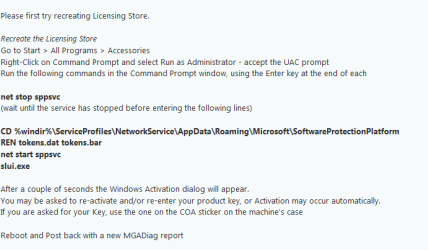
try this

The following should help,
as you said your PC was infected, BIG clue;


Roy
 

Attachments

  • licence.PNG
    licence.PNG
    10.5 KB · Views: 19

My Computer My Computer

Computer type
PC/Desktop
Computer Manufacturer/Model Number
medionl/Aspire 6930G/acer x55a
OS
W7 home premium 32bit/W7HP 64bit/w10 tp insider ring
CPU
E5300 dual core
Motherboard
medion MS7366
Memory
3gb
Graphics Card(s)
Nvidia Geforce 7100 Nforce 630i
Monitor(s) Displays
avixc
Internet Speed
n (isp resticted to 72)
Antivirus
mse/pands
Browser
palemoon
Other Info
Belkin Fd7050 n USB using Railink RT2870 drivers, more upto date
Hi torchwood,

I'm afraid running those commands have also been attempted, although I apologize for not mentioning it earlier in the thread

net stop sppsvc runs successfully:

C:\Windows\system32>net stop sppsvc
The Software Protection service is stopping.
The Software Protection service was stopped successfully.


The next command fails as follows:

C:\Windows\system32>cd %windir%\ServiceProfiles\NetworkService\AppData\Roaming\M
icrosoft\SoftwareProtectionPlatform REN tokens.dat tokens.bar
The system cannot find the path specified.

C:\Windows>cd ServiceProfiles\NetworkService\AppData\Roaming\Microsoft\SoftwareP
rotectionPlatform REN tokens.dat tokens.bar
The system cannot find the path specified.


When reviewing the folder, I do see a tokens.dat file available, so I did a manual rename of the file which was able to take without any issues

Ran net start sppsvc and this completed successfully:

C:\Windows>net start sppsvc
The Software Protection service is starting.
The Software Protection service was started successfully.


However, after launching slui.exe, we are stuck back at square one I'm afraid

Would you happen to have any additional suggestions?
 

My Computer My Computer

Computer type
PC/Desktop
Computer Manufacturer/Model Number
Custom Build
OS
(1) Windows 7 Ultimate 64-bit | (2) Windows 7 Professional 32-bit
CPU
Intel Core i5-2500K Sandy Bridge 3.3GHz (3.7GHz Turbo Boost)
Motherboard
GIGABYTE GA-Z68A-D3H-B3
Memory
CORSAIR Vengeance 8GB 240-Pin DDR3 SDRAM DDR3 1600
Graphics Card(s)
NVIDIA GTX570
Sound Card
Realtek High Definition Audio
Monitor(s) Displays
Dell P2212H (2 Screens)
Screen Resolution
1920x1080
Hard Drives
OCZ Solid 3 SLD3-25SAT3-60G 2.5" 60GB SATA III MLC (Win7 Ultimate)
OCZ Solid 3 SLD3-25SAT3-60G 2.5" 60GB SATA III MLC (Win7 Pro)
Western Digital WD Green WD20EARS (Storage Drive)
PSU
Rosewill Stallion Series RD500-2SB 500W ATX12V v2.2
Case
Rosewill CHALLENGER Black Gaming ATX Mid Tower
Cooling
Thermaltake Frio CLP0564
Keyboard
Logitech K520
Mouse
Logitech M310
Hi Guys,

So I did some things yesterday in preparation for my repair install. I removed my anti-virus software (Avast) and all my anti-malware/rootkit programs. Also as mentioned I ran the commands provided by torchwood

This morning after a restart, we are getting a different Windows activation error:

ERROR = Windows Must Be Reinstalled.. An Unauthorized change has been made to Windows. You must reinstall or restore system files in order to activate. Error Code 0xC004F015

I am running the MGADiag and CheckSUR tools now, and will follow up with an update on the results
 

My Computer My Computer

Computer type
PC/Desktop
Computer Manufacturer/Model Number
Custom Build
OS
(1) Windows 7 Ultimate 64-bit | (2) Windows 7 Professional 32-bit
CPU
Intel Core i5-2500K Sandy Bridge 3.3GHz (3.7GHz Turbo Boost)
Motherboard
GIGABYTE GA-Z68A-D3H-B3
Memory
CORSAIR Vengeance 8GB 240-Pin DDR3 SDRAM DDR3 1600
Graphics Card(s)
NVIDIA GTX570
Sound Card
Realtek High Definition Audio
Monitor(s) Displays
Dell P2212H (2 Screens)
Screen Resolution
1920x1080
Hard Drives
OCZ Solid 3 SLD3-25SAT3-60G 2.5" 60GB SATA III MLC (Win7 Ultimate)
OCZ Solid 3 SLD3-25SAT3-60G 2.5" 60GB SATA III MLC (Win7 Pro)
Western Digital WD Green WD20EARS (Storage Drive)
PSU
Rosewill Stallion Series RD500-2SB 500W ATX12V v2.2
Case
Rosewill CHALLENGER Black Gaming ATX Mid Tower
Cooling
Thermaltake Frio CLP0564
Keyboard
Logitech K520
Mouse
Logitech M310
Here are the results:

MGADiag -
Code:
Diagnostic Report (1.9.0027.0):
-----------------------------------------
Windows Validation Data-->

Validation Code: 50
Cached Online Validation Code: N/A, hr = 0xc004f012
Windows Product Key: *****-*****-73CQT-WMF7J-3Q6C9
Windows Product Key Hash: KaFG+RmurcM3ZxzWyfEP9WtPUJw=
Windows Product ID: 00359-OEM-8992687-00010
Windows Product ID Type: 2
Windows License Type: OEM SLP
Windows OS version: 6.1.7601.2.00010300.1.0.003
ID: {51482646-6E61-4A0A-B81F-423BF58A8C0F}(3)
Is Admin: Yes
TestCab: 0x0
LegitcheckControl ActiveX: N/A, hr = 0x80070002
Signed By: N/A, hr = 0x80070002
Product Name: Windows 7 Home Premium
Architecture: 0x00000009
Build lab: 7601.win7sp1_gdr.151019-1254
TTS Error: 
Validation Diagnostic: 
Resolution Status: N/A

Vista WgaER Data-->
ThreatID(s): N/A, hr = 0x80070002
Version: N/A, hr = 0x80070002

Windows XP Notifications Data-->
Cached Result: N/A, hr = 0x80070002
File Exists: No
Version: N/A, hr = 0x80070002
WgaTray.exe Signed By: N/A, hr = 0x80070002
WgaLogon.dll Signed By: N/A, hr = 0x80070002

OGA Notifications Data-->
Cached Result: N/A, hr = 0x80070002
Version: N/A, hr = 0x80070002
OGAExec.exe Signed By: N/A, hr = 0x80070002
OGAAddin.dll Signed By: N/A, hr = 0x80070002

OGA Data-->
Office Status: 109 N/A
OGA Version: N/A, 0x80070002
Signed By: N/A, hr = 0x80070002
Office Diagnostics: 025D1FF3-364-80041010_025D1FF3-229-80041010_025D1FF3-230-1_025D1FF3-517-80040154_025D1FF3-237-80040154_025D1FF3-238-2_025D1FF3-244-80070002_025D1FF3-258-3

Browser Data-->
Proxy settings: N/A
User Agent: Mozilla/4.0 (compatible; MSIE 8.0; Win32)
Default Browser: C:\Program Files (x86)\Google\Chrome\Application\chrome.exe
Download signed ActiveX controls: Prompt
Download unsigned ActiveX controls: Disabled
Run ActiveX controls and plug-ins: Allowed
Initialize and script ActiveX controls not marked as safe: Disabled
Allow scripting of Internet Explorer Webbrowser control: Disabled
Active scripting: Allowed
Script ActiveX controls marked as safe for scripting: Allowed

File Scan Data-->

Other data-->
Office Details: <GenuineResults><MachineData><UGUID>{51482646-6E61-4A0A-B81F-423BF58A8C0F}</UGUID><Version>1.9.0027.0</Version><OS>6.1.7601.2.00010300.1.0.003</OS><Architecture>x64</Architecture><PKey>*****-*****-*****-*****-3Q6C9</PKey><PID>00359-OEM-8992687-00010</PID><PIDType>2</PIDType><SID>S-1-5-21-531353185-1000728662-116016096</SID><SYSTEM><Manufacturer>HP-Pavilion</Manufacturer><Model>AY633AA-ABA p6313w</Model></SYSTEM><BIOS><Manufacturer>American Megatrends Inc.</Manufacturer><Version>5.14   </Version><SMBIOSVersion major="2" minor="5"/><Date>20100119000000.000000+000</Date></BIOS><HWID>1B583E07018400F4</HWID><UserLCID>0409</UserLCID><SystemLCID>0409</SystemLCID><TimeZone>Eastern Standard Time(GMT-05:00)</TimeZone><iJoin>0</iJoin><SBID><stat>3</stat><msppid></msppid><name></name><model></model></SBID><OEM><OEMID>HPQOEM</OEMID><OEMTableID>SLIC-CPC</OEMTableID></OEM><GANotification/></MachineData><Software><Office><Result>109</Result><Products/><Applications/></Office></Software></GenuineResults>  

Spsys.log Content: 0x80070002

Licensing Data-->
On a computer running Microsoft Windows non-core edition, run 'slui.exe 0x2a 0xC004F012' to display the error text.
Error: 0xC004F012 

Windows Activation Technologies-->
HrOffline: 0x00000000
HrOnline: N/A
HealthStatus: 0x0000000000000000
Event Time Stamp: N/A
ActiveX: Registered, Version: 7.1.7600.16395
Admin Service: Registered, Version: 7.1.7600.16395
HealthStatus Bitmask Output:


HWID Data-->
HWID Hash Current: KgAAAAEAAQABAAEAAAABAAAAAQABAAEAliv6624DVAOYRZ6nJjs01Bh5

OEM Activation 1.0 Data-->
N/A

OEM Activation 2.0 Data-->
BIOS valid for OA 2.0: yes
Windows marker version: 0x20001
OEMID and OEMTableID Consistent: yes
BIOS Information: 
  ACPI Table Name	OEMID Value	OEMTableID Value
  APIC			HPQOEM		SLIC-CPC
  FACP			HPQOEM		SLIC-CPC
  HPET			HPQOEM		SLIC-CPC
  MCFG			HPQOEM		SLIC-CPC
  OEMB			HPQOEM		SLIC-CPC
  INFO			HPQOEM		SLIC-CPC
  NVHD			HPQOEM		SLIC-CPC
  SLIC			HPQOEM		SLIC-CPC
  SSDT			HPQOEM		SLIC-CPC


CheckSUR log is uploaded as an attachment
 
Last edited:

My Computer My Computer

Computer type
PC/Desktop
Computer Manufacturer/Model Number
Custom Build
OS
(1) Windows 7 Ultimate 64-bit | (2) Windows 7 Professional 32-bit
CPU
Intel Core i5-2500K Sandy Bridge 3.3GHz (3.7GHz Turbo Boost)
Motherboard
GIGABYTE GA-Z68A-D3H-B3
Memory
CORSAIR Vengeance 8GB 240-Pin DDR3 SDRAM DDR3 1600
Graphics Card(s)
NVIDIA GTX570
Sound Card
Realtek High Definition Audio
Monitor(s) Displays
Dell P2212H (2 Screens)
Screen Resolution
1920x1080
Hard Drives
OCZ Solid 3 SLD3-25SAT3-60G 2.5" 60GB SATA III MLC (Win7 Ultimate)
OCZ Solid 3 SLD3-25SAT3-60G 2.5" 60GB SATA III MLC (Win7 Pro)
Western Digital WD Green WD20EARS (Storage Drive)
PSU
Rosewill Stallion Series RD500-2SB 500W ATX12V v2.2
Case
Rosewill CHALLENGER Black Gaming ATX Mid Tower
Cooling
Thermaltake Frio CLP0564
Keyboard
Logitech K520
Mouse
Logitech M310
Here's the batch file for same procedure.
If you receive error message product key invalid.
check product key
make correction if necessary
if correct press enter.
Should accept it this time
 

Attachments

My Computer My Computer

Computer type
Laptop
OS
Win 7 Home Premium x64/Linux Lite 2.6 x64
click start orb
type cmd
right-click entry choose run as administrator
copy
C:\Windows\System32>slui.exe 0x2a 0xC004F015
click in cmd window, right-click choose>paste
press enter
post results
 

My Computer My Computer

Computer type
Laptop
OS
Win 7 Home Premium x64/Linux Lite 2.6 x64
Hi wben353,

Went with your earlier suggestion and just did a Windows repair. The setup allowed for me to re-apply the key on the COA sticker and I am no longer receiving license errors.

Please feel free to mark this resolved, and thanks again for your help!
 

My Computer My Computer

Computer type
PC/Desktop
Computer Manufacturer/Model Number
Custom Build
OS
(1) Windows 7 Ultimate 64-bit | (2) Windows 7 Professional 32-bit
CPU
Intel Core i5-2500K Sandy Bridge 3.3GHz (3.7GHz Turbo Boost)
Motherboard
GIGABYTE GA-Z68A-D3H-B3
Memory
CORSAIR Vengeance 8GB 240-Pin DDR3 SDRAM DDR3 1600
Graphics Card(s)
NVIDIA GTX570
Sound Card
Realtek High Definition Audio
Monitor(s) Displays
Dell P2212H (2 Screens)
Screen Resolution
1920x1080
Hard Drives
OCZ Solid 3 SLD3-25SAT3-60G 2.5" 60GB SATA III MLC (Win7 Ultimate)
OCZ Solid 3 SLD3-25SAT3-60G 2.5" 60GB SATA III MLC (Win7 Pro)
Western Digital WD Green WD20EARS (Storage Drive)
PSU
Rosewill Stallion Series RD500-2SB 500W ATX12V v2.2
Case
Rosewill CHALLENGER Black Gaming ATX Mid Tower
Cooling
Thermaltake Frio CLP0564
Keyboard
Logitech K520
Mouse
Logitech M310
I believe either you or forum administrator can mark post resolved
 

My Computer My Computer

Computer type
Laptop
OS
Win 7 Home Premium x64/Linux Lite 2.6 x64
Back
Top