Solved Windows Activation Technologies Pop-up

I am now a victim of falling for this as well 2 days ago. I am having the same things as tjg79 with slow document loading and pop-up websites when shuting down. What is the best course of action to take to remove this as i really have no idea what to do?
 

My Computer

Computer type
Laptop
OS
Windows 7 Pro 64 bit
We don't know how to remove it. The original poster used ESET support.

Perhaps you could check to see what is in here:

C:\Users\Username\AppData\Local\IsolatedStorage\
 

My Computer

Computer type
Laptop
Computer Manufacturer/Model Number
ASUS
OS
Microsoft Windows 7 Home Premium 64-bit 7601 Multiprocessor Free Service Pack 1
CPU
AMD C-60 APU with Radeon(tm) HD Graphics
Motherboard
ASUSTeK COMPUTER INC. X501U
Memory
4.00 GB
Graphics Card(s)
AMD Radeon HD 6290 Graphics
Sound Card
(1) AMD High Definition Audio Device (2) Realtek High Defi
Screen Resolution
1366 x 768 x 32 bits (4294967296 colors) @ 60 Hz
Hard Drives
Hitachi HTS545050A7E380 SATA Disk Device
Antivirus
Comodo CIS & FW, SecureAplus App Whitelisting, Threatfire
Browser
Cyberfox 64bit, Opera 64bit, Airfox
Other Info
Spy-The-Spy, HitmanPro.Alert, Norton Connect Safe, MJRegWatcher, BitDefender TrafficLight, Voodoo Shield, Zemana AntiMalware
I first attempted a chat/remote desktop support with ESET tech support, but the virus was causing a severe connection problem. I was able to send log files by email so that they could analyze the problem and determine a course of action. Based on their analysis, they had me change the name of two files which seemed to stabilize my system so that they could continue with chat/remote desktop support so that they could clean the system and repair the damage. When I get to my other computer, I'll post those file names so others can give it a try. As for cleaning and damage repair, I recommend ESET. They have good support.

PS - I attempted to download the Microsoft Safety Scanner, but the virus slowed the connection speed to the point that it would have taken half a day. I used my laptop and transferred the program with a flash drive. You might try the Microsoft Safety Scanner. The virus definitions are constantly updated and they might have a solution for this virus by now.

Your other options are to attempt a restore point, reimage the system or reload the OS. The virus does cause some damage that won't go away with just cleaning the system.
 

My Computer

Computer type
PC/Desktop
Computer Manufacturer/Model Number
Custom Build
OS
Windows 7 Professional x64 SP1
CPU
Intel i7-980x @ 3.6GHz
Motherboard
Intel DX58SO
Memory
Corsair 12GB DDR3 RAM (3x4GB)
Graphics Card(s)
EVGA NVIDIA GeForce GTX 760 SC
Sound Card
Intel High Definition 7.1 Audio Subsystem - Realtek ALC889
Monitor(s) Displays
Dual Display - LG Electronics Flatron L227WTG
Screen Resolution
1680 x 1050 60Hz 32-bit
Hard Drives
2 Seagate Constellation ST1000NM0033 1TB SATA 6Gb/s HDDs configured as Intel SATA Array 0, RST RAID 1, Vol. 0 (C:\) & Vol. 1 (D:\), & 2 Seagate Barracuda ST500DM002 500GB SATA 6Gb/s HDDs configured as Intel SATA Array 1 RST RAID 1, Vol. 0 (E:\)
PSU
Corsair HX850W
Case
Antec P182
Cooling
Stock Intel i7-980x Cooling Solution + 4 120mm Case Fans
Keyboard
Microsoft Wireless Multimedia Keyboard 1.1
Mouse
Microsoft Standard Wireless Optical Mouse
Internet Speed
DSL - 3.0 Mb/s download 768 Kb/s upload
Antivirus
ESET Smart Security 12, Defender & SuperAntiSpyware Pro
Browser
Firefox Quantum 64-bit
Other Info
Optical Drives: Pioneer DVR-216R & TSSTcorp SH-S223Q, Anker USB 3.0 PCI-E Card, Hauppauge WinTV-HVR 2250 Dual TV Tuner Board for Windows Media Center, Bose Companion 3 Series II multimedia speaker system, APC Smart-UPS SMT1500
Okay, I had thought about trying the Microsoft Safety Scanner but hadn't because I've done so many other scans, but will give it a try just in case. I will get in contact with ESET if the Scanner doesn't work.

I have never made a restore point or reloaded the System before, so that's something I will have to learn how to do
 

My Computer

Computer type
Laptop
OS
Windows 7 Pro 64 bit
Okay, I had thought about trying the Microsoft Safety Scanner but hadn't because I've done so many other scans, but will give it a try just in case. I will get in contact with ESET if the Scanner doesn't work.

I have never made a restore point or reloaded the System before, so that's something I will have to learn how to do

Your system should have been installed with System Restore on by default. If so, you should have plenty of restore points. Check to see if you have any disk space used by system restore. Or better yet, check: Control Panel/System/System Protection (left panel) (System Properties box pops up)/Protection Settings (highlight your system disk) You should have "On" under the "Protection" column. If so, this should be an easy fix. If you click on the "Configure" button, you can see System Restore Disk Space Usage.

You should check to see if you have restore points that predate your infection. If so, try a system restore.

Check the tutorial section of this forum. They should have several tutorials pertaining to System Restore.

Good Luck

PS - I posted below a few System Restore tutorial links from the Tutorial section.

http://www.sevenforums.com/tutorials/700-system-restore.html

http://www.sevenforums.com/tutorials/81500-system-restore-enable-disable.html

http://www.sevenforums.com/tutorials/697-system-restore-point-create.html
 
Last edited:

My Computer

Computer type
PC/Desktop
Computer Manufacturer/Model Number
Custom Build
OS
Windows 7 Professional x64 SP1
CPU
Intel i7-980x @ 3.6GHz
Motherboard
Intel DX58SO
Memory
Corsair 12GB DDR3 RAM (3x4GB)
Graphics Card(s)
EVGA NVIDIA GeForce GTX 760 SC
Sound Card
Intel High Definition 7.1 Audio Subsystem - Realtek ALC889
Monitor(s) Displays
Dual Display - LG Electronics Flatron L227WTG
Screen Resolution
1680 x 1050 60Hz 32-bit
Hard Drives
2 Seagate Constellation ST1000NM0033 1TB SATA 6Gb/s HDDs configured as Intel SATA Array 0, RST RAID 1, Vol. 0 (C:\) & Vol. 1 (D:\), & 2 Seagate Barracuda ST500DM002 500GB SATA 6Gb/s HDDs configured as Intel SATA Array 1 RST RAID 1, Vol. 0 (E:\)
PSU
Corsair HX850W
Case
Antec P182
Cooling
Stock Intel i7-980x Cooling Solution + 4 120mm Case Fans
Keyboard
Microsoft Wireless Multimedia Keyboard 1.1
Mouse
Microsoft Standard Wireless Optical Mouse
Internet Speed
DSL - 3.0 Mb/s download 768 Kb/s upload
Antivirus
ESET Smart Security 12, Defender & SuperAntiSpyware Pro
Browser
Firefox Quantum 64-bit
Other Info
Optical Drives: Pioneer DVR-216R & TSSTcorp SH-S223Q, Anker USB 3.0 PCI-E Card, Hauppauge WinTV-HVR 2250 Dual TV Tuner Board for Windows Media Center, Bose Companion 3 Series II multimedia speaker system, APC Smart-UPS SMT1500
Great. I will get right on that. Thank you. I will try that out asap and I will post again after I've given it a try
 

My Computer

Computer type
Laptop
OS
Windows 7 Pro 64 bit
An ESET Customer Care Representative has updated this
case with the following information:

Hello,

Please boot back into safe mode and rename the
following files and then reboot back into normal mode.

C:\windows\system32\nvspcap64.dll
c:\windows\system32\nvspcap64.dll
c:\windows\system32\nvapi64.dll

You can easily rename these files by
running the following commands from a command prompt window.

ren C:\windows\system32\nvspcap64.dll nvspcap64.dll.old
ren c:\windows\system32\nvspcap64.dll nvspcap64.dll.old
ren c:\windows\system32\nvapi64.dll nvapi64.dll.old

After booting back into
safe mode let me know if any of the issues are resolved.

For more information and support for ESET products, please visit the ESET Knowledgebase
at http://kb.eset.com.

Please tell us how we are doing. At the bottom of this email, you will see a
link to our customer satisfaction survey. We appreciate your feedback!

Thank you for using ESET security products,
ESET Customer Care
North America


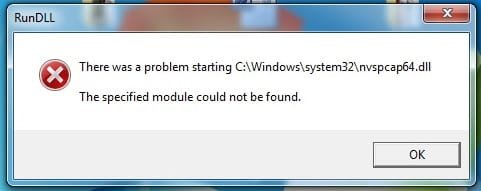
ESET File Rename Reboot Result.jpg

Attached is a screenshot of the pop-up that appeared after renaming the files suggested
below in SAFE Mode and then rebooting into normal mode.


I suspect that file was a valid one.

The system appears to be significantly more stable after that file renaming operation.

Perhaps the other file was the culprit.

I believe you could have a successful remote desktop at this time.

Following the instructions in the top quote above from ESET tech support, the virus appeared to be disabled on my system. My response is the bottom quote. ESET tech support was then able to use remote desktop to clean and repair my system.

This may or may not work on your system. However, renaming files doesn't clean or repair the system.
 
Last edited:

My Computer

Computer type
PC/Desktop
Computer Manufacturer/Model Number
Custom Build
OS
Windows 7 Professional x64 SP1
CPU
Intel i7-980x @ 3.6GHz
Motherboard
Intel DX58SO
Memory
Corsair 12GB DDR3 RAM (3x4GB)
Graphics Card(s)
EVGA NVIDIA GeForce GTX 760 SC
Sound Card
Intel High Definition 7.1 Audio Subsystem - Realtek ALC889
Monitor(s) Displays
Dual Display - LG Electronics Flatron L227WTG
Screen Resolution
1680 x 1050 60Hz 32-bit
Hard Drives
2 Seagate Constellation ST1000NM0033 1TB SATA 6Gb/s HDDs configured as Intel SATA Array 0, RST RAID 1, Vol. 0 (C:\) & Vol. 1 (D:\), & 2 Seagate Barracuda ST500DM002 500GB SATA 6Gb/s HDDs configured as Intel SATA Array 1 RST RAID 1, Vol. 0 (E:\)
PSU
Corsair HX850W
Case
Antec P182
Cooling
Stock Intel i7-980x Cooling Solution + 4 120mm Case Fans
Keyboard
Microsoft Wireless Multimedia Keyboard 1.1
Mouse
Microsoft Standard Wireless Optical Mouse
Internet Speed
DSL - 3.0 Mb/s download 768 Kb/s upload
Antivirus
ESET Smart Security 12, Defender & SuperAntiSpyware Pro
Browser
Firefox Quantum 64-bit
Other Info
Optical Drives: Pioneer DVR-216R & TSSTcorp SH-S223Q, Anker USB 3.0 PCI-E Card, Hauppauge WinTV-HVR 2250 Dual TV Tuner Board for Windows Media Center, Bose Companion 3 Series II multimedia speaker system, APC Smart-UPS SMT1500
Okay, thank you. But from what I'm understanding, even if I rename these files and my computer stabilizes, I'm still going to have to contact ESET so they can clean and repair my system? Or I wonder if a system restore and maybe a disk clean would possibly clean and repair after I change those file names
 

My Computer

Computer type
Laptop
OS
Windows 7 Pro 64 bit
Okay, thank you. But from what I'm understanding, even if I rename these files and my computer stabilizes, I'm still going to have to contact ESET so they can clean and repair my system? Or I wonder if a system restore and maybe a disk clean would possibly clean and repair after I change those file names

Renaming the files, if it works on your system, is just a temporary fix so that the system is stable. To clean and repair, you should do a System Restore to a restore point dated prior to your infection.

You'll need to purchase an ESET Smart Security license before you'll get tech support from ESET. You can download a 30-day trial subscription from the ESET website.

ESET Home Software Downloads | ESET | ESET

I suggest you attempt a System Restore to resolve your infection first. Unless you've disabled System Restore, you should have good restore points.
 
Last edited:

My Computer

Computer type
PC/Desktop
Computer Manufacturer/Model Number
Custom Build
OS
Windows 7 Professional x64 SP1
CPU
Intel i7-980x @ 3.6GHz
Motherboard
Intel DX58SO
Memory
Corsair 12GB DDR3 RAM (3x4GB)
Graphics Card(s)
EVGA NVIDIA GeForce GTX 760 SC
Sound Card
Intel High Definition 7.1 Audio Subsystem - Realtek ALC889
Monitor(s) Displays
Dual Display - LG Electronics Flatron L227WTG
Screen Resolution
1680 x 1050 60Hz 32-bit
Hard Drives
2 Seagate Constellation ST1000NM0033 1TB SATA 6Gb/s HDDs configured as Intel SATA Array 0, RST RAID 1, Vol. 0 (C:\) & Vol. 1 (D:\), & 2 Seagate Barracuda ST500DM002 500GB SATA 6Gb/s HDDs configured as Intel SATA Array 1 RST RAID 1, Vol. 0 (E:\)
PSU
Corsair HX850W
Case
Antec P182
Cooling
Stock Intel i7-980x Cooling Solution + 4 120mm Case Fans
Keyboard
Microsoft Wireless Multimedia Keyboard 1.1
Mouse
Microsoft Standard Wireless Optical Mouse
Internet Speed
DSL - 3.0 Mb/s download 768 Kb/s upload
Antivirus
ESET Smart Security 12, Defender & SuperAntiSpyware Pro
Browser
Firefox Quantum 64-bit
Other Info
Optical Drives: Pioneer DVR-216R & TSSTcorp SH-S223Q, Anker USB 3.0 PCI-E Card, Hauppauge WinTV-HVR 2250 Dual TV Tuner Board for Windows Media Center, Bose Companion 3 Series II multimedia speaker system, APC Smart-UPS SMT1500
Just to let ones know I did a system restore to a time prior to getting this virus and it seems to have completely fixed it. It seems to be running at its full speed again and no more ads and webpages when shutting down. Big thanks to tjg79 for suggesting to try a system restore, really didn't think I could fix this and I never would have thought of trying a system restore, so once again big thanks to tjg79
 

My Computer

Computer type
Laptop
OS
Windows 7 Pro 64 bit
I'm glad it worked out for you.

Now, I would go into the system/system protection/system properties/configure from control panel as I indicated above, click on "configure" and system protection pop-up will appear. On the lower right portion of that pop-up is a delete button to delete all system restore points. I would click that button to delete all system restore points. Then back out of the system to the desktop and perform a disk cleanup. Then reboot the system.

When you are back up and running and everything looks good, go back into the system protection and create a new restore point. You can name it "Good System Check Point."

Alternatively, go into the system from the control panel and create a new restore point. You should get an indication that the restore point was created successfully.

Then back out to the desktop and perform a disk cleanup. On the Disk Cleanup pop-up click on the Clean Administrative files button. Then, after the pop-up reappears, click on the "More Options" tab. Then click on the System Restore and Shadow Copies Cleanup button. Then click delete or OK. After the cleanup is completed, reboot. This action will remove all previous restore points except for the most recent one you just created. You don't want to restore your system to a point when it was infected with that virus.

Regards
 
Last edited:

My Computer

Computer type
PC/Desktop
Computer Manufacturer/Model Number
Custom Build
OS
Windows 7 Professional x64 SP1
CPU
Intel i7-980x @ 3.6GHz
Motherboard
Intel DX58SO
Memory
Corsair 12GB DDR3 RAM (3x4GB)
Graphics Card(s)
EVGA NVIDIA GeForce GTX 760 SC
Sound Card
Intel High Definition 7.1 Audio Subsystem - Realtek ALC889
Monitor(s) Displays
Dual Display - LG Electronics Flatron L227WTG
Screen Resolution
1680 x 1050 60Hz 32-bit
Hard Drives
2 Seagate Constellation ST1000NM0033 1TB SATA 6Gb/s HDDs configured as Intel SATA Array 0, RST RAID 1, Vol. 0 (C:\) & Vol. 1 (D:\), & 2 Seagate Barracuda ST500DM002 500GB SATA 6Gb/s HDDs configured as Intel SATA Array 1 RST RAID 1, Vol. 0 (E:\)
PSU
Corsair HX850W
Case
Antec P182
Cooling
Stock Intel i7-980x Cooling Solution + 4 120mm Case Fans
Keyboard
Microsoft Wireless Multimedia Keyboard 1.1
Mouse
Microsoft Standard Wireless Optical Mouse
Internet Speed
DSL - 3.0 Mb/s download 768 Kb/s upload
Antivirus
ESET Smart Security 12, Defender & SuperAntiSpyware Pro
Browser
Firefox Quantum 64-bit
Other Info
Optical Drives: Pioneer DVR-216R & TSSTcorp SH-S223Q, Anker USB 3.0 PCI-E Card, Hauppauge WinTV-HVR 2250 Dual TV Tuner Board for Windows Media Center, Bose Companion 3 Series II multimedia speaker system, APC Smart-UPS SMT1500
So I did the first option and it did the Disk Cleanup. Now when I restarted, it did a Windows update, got stuck on the screen at 100% completed for a long time and now it is stuck in 'Failure configuring Windows updates. Reverting changes' screen for over an hour now. I did the turn it off and back on, and yes I know that's a bad idea, and it continues to get stuck at this screen :(
 

My Computer

Computer type
Laptop
OS
Windows 7 Pro 64 bit
So I did the first option and it did the Disk Cleanup. Now when I restarted, it did a Windows update, got stuck on the screen at 100% completed for a long time and now it is stuck in 'Failure configuring Windows updates. Reverting changes' screen for over an hour now. I did the turn it off and back on, and yes I know that's a bad idea, and it continues to get stuck at this screen :(

I think your virus issue is resolved.

If you've removed all the old restore points and created a new fresh restore point, then start a new thread in this section of the forum to address the update issue.

After your update issue is fixed, I would again create a new restore point and then delete all the previous restore points as described in the second method.

Good luck with the update issue. I'm sure there is someone here who can help you clear that issue.

Regards
 

My Computer

Computer type
PC/Desktop
Computer Manufacturer/Model Number
Custom Build
OS
Windows 7 Professional x64 SP1
CPU
Intel i7-980x @ 3.6GHz
Motherboard
Intel DX58SO
Memory
Corsair 12GB DDR3 RAM (3x4GB)
Graphics Card(s)
EVGA NVIDIA GeForce GTX 760 SC
Sound Card
Intel High Definition 7.1 Audio Subsystem - Realtek ALC889
Monitor(s) Displays
Dual Display - LG Electronics Flatron L227WTG
Screen Resolution
1680 x 1050 60Hz 32-bit
Hard Drives
2 Seagate Constellation ST1000NM0033 1TB SATA 6Gb/s HDDs configured as Intel SATA Array 0, RST RAID 1, Vol. 0 (C:\) & Vol. 1 (D:\), & 2 Seagate Barracuda ST500DM002 500GB SATA 6Gb/s HDDs configured as Intel SATA Array 1 RST RAID 1, Vol. 0 (E:\)
PSU
Corsair HX850W
Case
Antec P182
Cooling
Stock Intel i7-980x Cooling Solution + 4 120mm Case Fans
Keyboard
Microsoft Wireless Multimedia Keyboard 1.1
Mouse
Microsoft Standard Wireless Optical Mouse
Internet Speed
DSL - 3.0 Mb/s download 768 Kb/s upload
Antivirus
ESET Smart Security 12, Defender & SuperAntiSpyware Pro
Browser
Firefox Quantum 64-bit
Other Info
Optical Drives: Pioneer DVR-216R & TSSTcorp SH-S223Q, Anker USB 3.0 PCI-E Card, Hauppauge WinTV-HVR 2250 Dual TV Tuner Board for Windows Media Center, Bose Companion 3 Series II multimedia speaker system, APC Smart-UPS SMT1500
I have resolved the updates issue and so now I will get that new restore point created as I have deleted all the others. I will run another disk cleanup and all should be good.

Thanks again
 

My Computer

Computer type
Laptop
OS
Windows 7 Pro 64 bit
Back
Top