Re: Malware issues. Suggest getting help in the System Security thread.
If you like you can also run a scan with Ultra Adware Killer. You can launch it from UVK's welcome screen. Do not select anything for removal. When the scan completes select "Menu" then "Open Log" - upload the file.

You could also run scans with the other built in apps. Scan with MBAM and ADW Cleaner. Do not use the other apps!
Welcome Screen > System Repair > Third Party Apps.
It will download the app or update to the latest version if you already have the app installed.
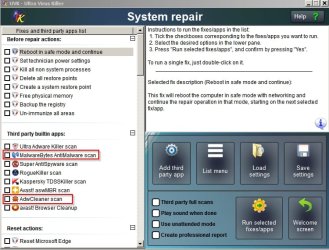
If you like you can also run a scan with Ultra Adware Killer. You can launch it from UVK's welcome screen. Do not select anything for removal. When the scan completes select "Menu" then "Open Log" - upload the file.
You could also run scans with the other built in apps. Scan with MBAM and ADW Cleaner. Do not use the other apps!
Welcome Screen > System Repair > Third Party Apps.
It will download the app or update to the latest version if you already have the app installed.
My Computer
- Computer type
- Laptop
- Computer Manufacturer/Model Number
- ASUS
- OS
- Microsoft Windows 7 Home Premium 64-bit 7601 Multiprocessor Free Service Pack 1
- CPU
- AMD C-60 APU with Radeon(tm) HD Graphics
- Motherboard
- ASUSTeK COMPUTER INC. X501U
- Memory
- 4.00 GB
- Graphics Card(s)
- AMD Radeon HD 6290 Graphics
- Sound Card
- (1) AMD High Definition Audio Device (2) Realtek High Defi
- Screen Resolution
- 1366 x 768 x 32 bits (4294967296 colors) @ 60 Hz
- Hard Drives
- Hitachi HTS545050A7E380 SATA Disk Device
- Antivirus
- Comodo CIS & FW, SecureAplus App Whitelisting, Threatfire
- Browser
- Cyberfox 64bit, Opera 64bit, Airfox
- Other Info
- Spy-The-Spy, HitmanPro.Alert, Norton Connect Safe, MJRegWatcher, BitDefender TrafficLight, Voodoo Shield, Zemana AntiMalware