
windows administrator icon and execution

Fayska

New member
Local time
10:06 AM
Messages
6
Hi all of you. Let's say that since vista windows grab up a few anoying things don't i really F. hate why should i be allways right clicking on an icon or executable file to run it as an administrator? and should i be allways looking at that litle thing in the icons the adimistrator shield icon? c'mon shouldn't windows and vista be more delightfull to our eyes? aren't they forgetting the design and visual concepts of that litlte thing w.y.s.i.w.y.g. if it's preety it should be preety isn't that? c'mon those of you that might know how take that thing out of my sight and how to allways run everything as an administrator without righcliking in everything to do it justr let me know i would be greatfull for that...
 

My Computer My Computer

At a glance

windows vista and 7/ and xubuntu linux
OS
windows vista and 7/ and xubuntu linux
Try typing UAC in search and setting to never.

Not recommended, but you can try if you want.
 

My Computer My Computer

At a glance

Windows 10, Home Clean InstallIntel Core2 processsor Q8200(2.33Ghz 1333FSB)...6 gbATI Radeon 256MB HD3650
Computer type
PC/Desktop
Computer Manufacturer/Model Number
Dell XPS 420
OS
Windows 10, Home Clean Install
CPU
Intel Core2 processsor Q8200(2.33Ghz 1333FSB) Quad Core Tech
Motherboard
Dell
Memory
6 gb
Graphics Card(s)
ATI Radeon 256MB HD3650
Sound Card
Intergrated 7.1 Channel Audio
Monitor(s) Displays
Dell SP2009W 20"
Hard Drives
640 GB Serial ATA Hard drive
Cooling
Fan
Keyboard
Dell USB Keyboard
Mouse
Dell Premium Optical USB
Internet Speed
DSL 2.85
Hi Fayska, Welcome to SF,

You have to do this because of in-build feature called User Account Control.

It's a very good feature . In this way, only applications trusted by the user may receive administrative privileges, and malware should be kept from compromising the operating system. We strongly recommend not to turn off.

For each the shortcut Right Click and Go To Properties then go to the Tab which says Compatibility and check on Run as administrator so from next time by default it would run as administrator. Then is your willing to take a risk then Turn the UAC off.

Follow this article http://www.sevenforums.com/tutorials/299-user-account-control-uac-change-notification-settings.html

Hope this helps,
Captain
 

My Computer My Computer

At a glance

Windows 7 Ultimate - 64-bit | Windows 8 Pro -...Intel® Core™ i7 Processor 3,610QM (2.30Hz, 6M...8 GBNVIDIA® GeForce® GT 650M 2GB Graphics, Optimu...
Computer Manufacturer/Model Number
Samsung NP550P5C-S02IN
OS
Windows 7 Ultimate - 64-bit | Windows 8 Pro - 64-bit
CPU
Intel® Core™ i7 Processor 3,610QM (2.30Hz, 6MB L3 Cach
Memory
8 GB
Graphics Card(s)
NVIDIA® GeForce® GT 650M 2GB Graphics, Optimus™ techno
Sound Card
SoundAlive™ JBL 3 Speakers (With sub-Woofer)
Monitor(s) Displays
39.62cm (15.6) SuperBright 300nit HD+ LED Display
Screen Resolution
1,600 x 900, Anti-Reflective
Hard Drives
1TB S-ATA II Hard Drive (5,400RPM)
Hi friends

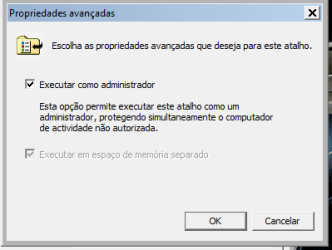
Ok, you have good answers but in the meanwhile i've already done that, captain jack what i want is to run all the exe to run as administrator all in once and to turn severall let's see nero for example has almost ten principal executable files and there are certain programs like labview and other with severall aplications this takes a lot of time doing to each exe file, exe-1, exe-2, exe-3... it's a pain in the a**

Another question, in win 7 doing that didn't erase the litle shield icon on some programs, i would like to see the icons without that, you can see on the atachments.

Thanks for your help...

Vitor "FaYsKa"
 

Attachments

  • adanced prop.png
    adanced prop.png
    5.7 KB · Views: 54
  • shield icon.png
    shield icon.png
    1.7 KB · Views: 705

My Computer My Computer

At a glance

windows vista and 7/ and xubuntu linux
OS
windows vista and 7/ and xubuntu linux
Back
Top