I've been running my laptop without a logon password for the last couple years, as it was mostly a home computer. However, I recently entered a situation where a logon password is needed, to keep at least the slightly computer illiterate from accessing my computer. I've set passwords before (easy stuff  ) so I go to User accounts, entered my password twice, and figured all was good to go.
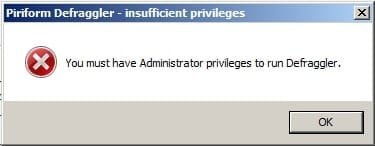
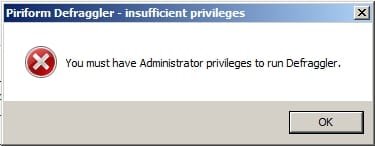
I log on with my shiny new password, everything running great, and then I go to start up Defraggler. Little message box pops up "You must have Administrator privileges to run Defraggler". "Huh, that's odd, I'm sure I logged on as myself as the Guest account is de-activated and the hidden Administrator account is still hidden" I think to myself. Hit OK, go to User Account Type, "Huh, weird, it's changed itself to Standard. No big deal, I just click this little radio button and I'm good to go." Nope, I hit Save Changes, check, and the text next to my account avatar says "Guest account". Odd, try again, no luck.
So, now I'm in trouble. Have tried everything I can think of, with no positive results. UAC is completely turned off, I'm very careful with what I run and internet is well filtered. Also, when I first got the computer I set it to log on automatically to my account at boot, could this be affecting it somehow? I desperately need to get a printer installed (blocks that) and some maintenance type stuff done, so this is a bit of a downer.
'net user' dump below.
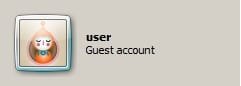
No matter how many times I change the account type to Administrator, always goes back to this.
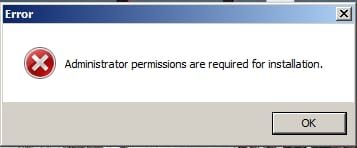
Permissions message.
) so I go to User accounts, entered my password twice, and figured all was good to go.I log on with my shiny new password, everything running great, and then I go to start up Defraggler. Little message box pops up "You must have Administrator privileges to run Defraggler". "Huh, that's odd, I'm sure I logged on as myself as the Guest account is de-activated and the hidden Administrator account is still hidden" I think to myself. Hit OK, go to User Account Type, "Huh, weird, it's changed itself to Standard. No big deal, I just click this little radio button and I'm good to go." Nope, I hit Save Changes, check, and the text next to my account avatar says "Guest account". Odd, try again, no luck.
So, now I'm in trouble. Have tried everything I can think of, with no positive results. UAC is completely turned off, I'm very careful with what I run and internet is well filtered. Also, when I first got the computer I set it to log on automatically to my account at boot, could this be affecting it somehow? I desperately need to get a printer installed (blocks that) and some maintenance type stuff done, so this is a bit of a downer.
'net user' dump below.
Code:
Microsoft Windows [Version 6.1.7601]
Copyright (c) 2009 Microsoft Corporation.  All rights reserved.

C:\Users\user>net user

User accounts for \\USER-PC

-------------------------------------------------------------------------------
Administrator            Guest                    user
The command completed successfully.


C:\Users\user>
Code:
C:\Users\user>net user Administrator
User name                    Administrator
Full Name
Comment                      Built-in account for administering the computer/domain
ain
User's comment
Country code                 000 (System Default)
Account active               No
Account expires              Never

Password last set            13-Jul-09 23:13:36
Password expires             Never
Password changeable          13-Jul-09 23:13:36
Password required            Yes
User may change password     Yes

Workstations allowed         All
Logon script
User profile
Home directory
Last logon                   06-Mar-11 18:53:59

Logon hours allowed          All

Local Group Memberships      *Administrators
Global Group memberships     *None
The command completed successfully.
Code:
Microsoft Windows [Version 6.1.7601]
Copyright (c) 2009 Microsoft Corporation.  All rights reserved.

C:\Users\user>net user Guest
User name                    Guest
Full Name
Comment                      Built-in account for guest access to the computer/domain
omain
User's comment
Country code                 000 (System Default)
Account active               No
Account expires              Never

Password last set            21-Aug-13 21:56:48
Password expires             Never
Password changeable          21-Aug-13 21:56:48
Password required            No
User may change password     No

Workstations allowed         All
Logon script
User profile
Home directory
Last logon                   Never

Logon hours allowed          All

Local Group Memberships      *Guests
Global Group memberships     *None
The command completed successfully.
Code:
C:\Users\user>net user user
User name                    user
Full Name
Comment
User's comment
Country code                 000 (System Default)
Account active               Yes
Account expires              Never

Password last set            21-Aug-13 07:25:15
Password expires             Never
Password changeable          21-Aug-13 07:25:15
Password required            No
User may change password     Yes

Workstations allowed         All
Logon script
User profile
Home directory
Last logon                   21-Aug-13 12:23:57

Logon hours allowed          All

Local Group Memberships      *HelpLibraryUpdaters
Global Group memberships     *None
The command completed successfully.
No matter how many times I change the account type to Administrator, always goes back to this.
Permissions message.
Last edited:
My Computer
- Computer type
- Laptop
- Computer Manufacturer/Model Number
- Toshiba Satellite A665-S5173
- OS
- Windows 7 Home Premium x64 SP1
- CPU
- Intel Core i5 480M, 2.67 GHz with Turbo to 2.9 GHz
- Motherboard
- Toshiba NWQAA (CPU), PSAW0U-0L3031
- Memory
- Samsung 2x2 GB, 667 MHz DDR3
- Graphics Card(s)
- Intel HD Graphics first gen (Arrandale)
- Sound Card
- Intel Display Audio, Realtek HD Audio
- Monitor(s) Displays
- LP156WH2-TLAA (built in)
- Screen Resolution
- 1366x768
- Hard Drives
- Hitachi 500 GB, 5400 RPM, SATA-II 3.0Gb/s
- Keyboard
- US+Numkey layout, backlit.
- Mouse
- MS Comfort Optical 3000 with some extra weight added.
- Internet Speed
- Horrible, with brief blips of momentary sanity.
- Antivirus
- MSE
- Browser
- FF 23.0.1