Windows boot error 0xc000000f every ~ 1-in-4 to 6 startups with SSD

have the same problem.
I have installed the SSD CORSAIR FORCE GT 60 GB in an six year motherboard ASUS A8N SLI de Luxe with a HDD SEAGATE ST31500541AS and optical drive LG GH24NS70.
The O.S. is Windows 7 32 bits
It was working perfectly during 3 days. In the 4th day, in the morning when I start the computer the SSD was not recognized. After several tests, I change the PSU branch, I leaved alone in one branch the SSD and it starts to work. I have to rearrange the boot secuence in the BIOS. The BIOS move up the HDD to the first position when the SSD was not detected

After two or three days the SSD was not detected again in the first boot up.
I started the computer leaving it on during several minutes.
I re-start the computer, then, the SSD was detected but it was not in the first position to boot.
I rearranged the boot secuence in the BIOS (the SSD was there), restarted and working again.
In my opinion, the SSD needes a PSU in good (probably perfect) condition. If the PSU has any weak voltage at the begining, the SSD will not be reconigzed but with the same PSU the Seagate HDD is always well recognized.
Maybe try with a new PSU
Regards
progress.gif
 

My Computer My Computer

At a glance

W7 ultimate 32 bits
OS
W7 ultimate 32 bits
Replaced the SATA cable with a much more snug one - just yesterday. It's been a while since I got the last of this error (last was about last Wednesday, so 20th Jan possibly) which made me think positive, but I got it again today. Gotta say again - when this happens, just before it goes into the OS, the ACHI thing says "Scanning Drives" with "......................" for some time, then only detects me 2 HDDs and DVD drive, so when I did try startup repair, the SSD was unfindable. All the boot orders are in order too.

Anything to to with it being a SATA III device on a SATA II board?

Also, that PSU message from jnemo2004 scares me - I paid a lot of money for my Corsair TX750W in 2009! It's a highly rated PSU too!
I you suggesting I change the boot priority sequence to somethign else? Because it had been doing this before that. Buying a new PSU really scares me! Maybe change the SATA power connection will help?
 

My Computer My Computer

At a glance

Windows 7 Home-Premium 64bitAMD Phenom II x4 955 Black Edition 3.2GHz (st...8GB Corsair Red Vengeance @1333MHz 9-9-9-24 D...XFX AMD Radeon HD 6970 2GB (stock)
Computer Manufacturer/Model Number
Myself
OS
Windows 7 Home-Premium 64bit
CPU
AMD Phenom II x4 955 Black Edition 3.2GHz (stock) with CM V8
Motherboard
Gigabyte GA-MA790XT-UD4P (AM3)
Memory
8GB Corsair Red Vengeance @1333MHz 9-9-9-24 Dual-Channel
Graphics Card(s)
XFX AMD Radeon HD 6970 2GB (stock)
Sound Card
Onboard Realtek Azalea 8.1 Channel
Monitor(s) Displays
Samsung Syncmaster P2250 DVI-D
Screen Resolution
1920x1080@60Hz
Hard Drives
1. 60GB (55.7GiB) Corsair Force 3 SSD (firmware 1.3.3) SATA III (in SATA II mode) - contains OS, drivers and non-game programs
2. 500GB (465GiB) Western Digital Caviar Blue 500GB SATA II 7,200rpm 16MB Cache - contains games
3. 250GB (232GiB) Weste
PSU
Corsair TX750W 750W PSU with 4x PCI-E 6+2-pin connectors
Case
Lancool [Lian Li] PC-K62 Dragonlord (originally w/blue fans)
Cooling
Lian Li: 3x140mm, 1x120mm | Bitfenix: 1x140mm - ALL RED LED
Keyboard
Logitech G110
Mouse
Logitech MX518
Internet Speed
BT Infinity Option 2 ~38Mbps download, ~8Mbps upload
Other Info
Also have a Logitech G27 Racing Wheel, Creative Fatal1ty Stereo headset, Logitech X-140 Stereo Speakers, a disused Xbox 360 USB game controller pad and a CM Storm WoC M4 Mouse mat. The *GB of Corsair Red Vengeance DRAM is the CMZ8GX3M2A1600C9R set which can run at 1600MHz at 9-9-9-24 in Intel's XMP but my AMD board doesn't have this and it's not recommended for AMD Phenom II's anyway.
Jay, I don't have an answer from here. Your BIOS has to detect the SSD before the boot process can start on the drive. The Startup Repair you did should have corrected the Windows boot config on the SSD, if that was a problem. When the PC can't detect the drive, go back into the BIOS setup screen and verify the SATA ports are turned on and see if the SSD is listed. Try loading the default values and see if the drive gets picked up.

Is your date & time correct in BIOS and Windows? Just wondering if your CMOS battery isn't saving your changes. You can use a SATA 3 drive with a SATA 2 mobo connection. The drive will just run at SATA 2 speeds. IMO, I do not believe your power supply has anything to do with the issue. SSD drives use less power than a disk drive, which only uses around 5W.
 

My Computer My Computer

At a glance

Windows
OS
Windows
Drive is not detected SOMETIMES which is the problem. When it is undetected (therefore no Windows boot can occur), I have to turn off the system, unplug then replug in the SATA data cable and start up, fixing it (but not preventing a future problem). In BIOS, SATA_0, 1, 2 & 3 are on and in ACHI mode, while SATA_4 & 5 are in IDE mode with no devices (to prevent the "No Any device found message"). GSATA_0 & 1 are disabled (nothing plugged in). Boot sequence prioritises Hard Disk first. BIOS is at latest version (F8), cable connections all secure.

When I did do start up repair, I did it at a time when the SSD was detected. It came up with what was posted earlier.

As for date and time - they may be minutes fast intentionally in WIndows, but I suppose I'll have to set them to the same as the battery but I don't know if I'll get the exact same times.
 

My Computer My Computer

At a glance

Windows 7 Home-Premium 64bitAMD Phenom II x4 955 Black Edition 3.2GHz (st...8GB Corsair Red Vengeance @1333MHz 9-9-9-24 D...XFX AMD Radeon HD 6970 2GB (stock)
Computer Manufacturer/Model Number
Myself
OS
Windows 7 Home-Premium 64bit
CPU
AMD Phenom II x4 955 Black Edition 3.2GHz (stock) with CM V8
Motherboard
Gigabyte GA-MA790XT-UD4P (AM3)
Memory
8GB Corsair Red Vengeance @1333MHz 9-9-9-24 Dual-Channel
Graphics Card(s)
XFX AMD Radeon HD 6970 2GB (stock)
Sound Card
Onboard Realtek Azalea 8.1 Channel
Monitor(s) Displays
Samsung Syncmaster P2250 DVI-D
Screen Resolution
1920x1080@60Hz
Hard Drives
1. 60GB (55.7GiB) Corsair Force 3 SSD (firmware 1.3.3) SATA III (in SATA II mode) - contains OS, drivers and non-game programs
2. 500GB (465GiB) Western Digital Caviar Blue 500GB SATA II 7,200rpm 16MB Cache - contains games
3. 250GB (232GiB) Weste
PSU
Corsair TX750W 750W PSU with 4x PCI-E 6+2-pin connectors
Case
Lancool [Lian Li] PC-K62 Dragonlord (originally w/blue fans)
Cooling
Lian Li: 3x140mm, 1x120mm | Bitfenix: 1x140mm - ALL RED LED
Keyboard
Logitech G110
Mouse
Logitech MX518
Internet Speed
BT Infinity Option 2 ~38Mbps download, ~8Mbps upload
Other Info
Also have a Logitech G27 Racing Wheel, Creative Fatal1ty Stereo headset, Logitech X-140 Stereo Speakers, a disused Xbox 360 USB game controller pad and a CM Storm WoC M4 Mouse mat. The *GB of Corsair Red Vengeance DRAM is the CMZ8GX3M2A1600C9R set which can run at 1600MHz at 9-9-9-24 in Intel's XMP but my AMD board doesn't have this and it's not recommended for AMD Phenom II's anyway.
The "No bootable devices found" message is due to the computer not detecting your SSD hard drive, or any hard drive with Windows installed. The million dollar question is why isn't the drive being recognized?

  • Bad SATA cable or connector on the mobo
  • Bad/loose power connector to SSD or power supply side
  • Bad/broken/poor data or power connector on the SSD itself
  • Maybe the SSD is defective
Those are just a few ideas. If the drive is new, you could try calling their tech support for some insight or get it replaced under warranty.

As far as the time: I asked because when the battery that remembers your BIOS settings goes bad, the time and date will be off. It will usually revert back to the year 2000 or whatever.
 

My Computer My Computer

At a glance

Windows
OS
Windows
jayrap,

I only try to help.
I had the same problem. I say "I had".
After several days, the problem did not raise again.

I leaved alone the SSD in one branch of the PSU.
I also bought a new PSU Radix V-650 just in case of to have the problem again to test if this new PSU solves the problem.

Sometimes, it is no easy to discover the root cause of the problems for that reason you cannot reject any suggestion only due to you expend a lot of money in your Corsair PSU.

I thougt the problem could bein the PSU due to the following:
a) The problem only appears after several hours with the PC shut down
b) The problem never appers during the normal PC usage. You can re-start the PC several times and the SSD is well recognized.
c) When the SSD was not detected, I leave several minutes the PC in such situation, just to "warm" the PSU. Then, I re-started again the PC and the SSD was recognized.
d) Therefore, I suppose that the PSU has any "weak" capacitor and it is giving "any" voltage not enough for the SSD.
e) As I said, I only try to help. I have spent 57 euros in a new PSU, just only for testing the problem. In any case it will be used later. The PSUs have to be replaced after several years of usage.

Nice to chat with you (sorry for my english)
 

My Computer My Computer

At a glance

W7 ultimate 32 bits
OS
W7 ultimate 32 bits
Today, I have had the same problem.
The computer was shut down about 12 hrs.
I started the computer and during the boot up, the BIOS did not detect the SSD reporting that the HDD has not OS. (the HHDs detected, none of them have OS installed.
I waited 5 minutes in this situation given time to warm the PSU.
I have rebooted the computer and the SSD was detected.
The computer stopped again claimed for a HHD with SO.
I moved up the SSD in the BIOS to the first position.
I have re-started the computer and all OK.
Remark: My BIOS, when the SSd is not detected is removed from the HD drives list.
When the SSD is detected again is placed in the last position of the HHDs and for that reason I have to move up to the first position the SSD.
That's all. Have a nice day. Regards

2nd remark: The PSU installed is the 6 years old, not he new one
3rd remark: It is clear that the SSD it is very sensitive. The HDDs are working perfectly with the same PSU. The SSD has to be improved.
 
Last edited:

My Computer My Computer

At a glance

W7 ultimate 32 bits
OS
W7 ultimate 32 bits
Remark: My BIOS, when the SSd is not detected is removed from the HD drives list.

This is what leads me to believe it's a hardware issue like the ones I posted earlier. You can test your power supply if you have a voltmeter, but I think it's the drive.
 

My Computer My Computer

At a glance

Windows
OS
Windows
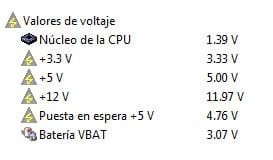
In the attachment you can find the current voltages, read by EVEREST.
All are OK.
When computer is being used, can be re-started, shut down, booted,...and all times the SSD is detected, only when the computer is shutdown several hours (and not always) the SSD is not detected in the boot up process.
I have to change the PSU but I have to find time to do it.
IN my opinion the SSD has to be improved, I do not know where has to be improved. Firmware? or hardware? . As I said before, ALL the HDDs are working perfectly with the current PSU.
I have tested:
Optical drives IDE (one) and SATA (one).
Hard Disk Drives IDE (three) and SATA (one).
None of them have problems with the current PSU only the SSD.
The SSD is just in the borderline. I have not resources to determine where is the difference with the HHDs during the boot up process. It is clear that my motherboard is very old (6 years) and the SSD is the last technology and maybe they do not match perfectly. I do not know it.
I need to find time to replace the PSU and I'll see what happen.
Regards
 

Attachments

  • 2012-01-29_101159.jpg
    2012-01-29_101159.jpg
    6.8 KB · Views: 277

My Computer My Computer

At a glance

W7 ultimate 32 bits
OS
W7 ultimate 32 bits
I have already use the RMA.
SSD was defective for sure.
 

My Computer My Computer

At a glance

W7 ultimate 32 bits
OS
W7 ultimate 32 bits
Back
Top