
Solved Windows boot fail: Boot selection failed because a required device is

gerico

New member
Local time
2:55 AM
Messages
5
Hi there,

I've recently built a new rig and I've had continuous problems trying to boot. I have two HDDs and one SDD. It seems when the two HDDs are plugged in, i can sometimes boot ok, and most times i get:

Windows failed to start. A recent hardware or software change might be the cause.

Status: 0xc000000e

Boot selection failed because a required device is inaccessible
Or

Please select a boot device, or something to the affect.

I've updated to the latest bios on my new mobo ( Gigabyte z97x SOC Force ) and ive done a fresh install of windows several times on the SDD. I also ran crystal disk to check health on the SDD and it came back healthy.

It seems mostly my boot problems are linked to plugging in the two other HDDs, though I've no idea why this would be, and how to fix it? Is it a motherboard problem or a HDD problem?

Any help greatly appreciated.
 
Last edited:

My Computer

Computer type
PC/Desktop
Computer Manufacturer/Model Number
Custom build
OS
Windows 7 Ultimate x64 bit
CPU
Intel i7 4790k
Motherboard
Gigabyte z97x SOC Force
Memory
8GB Corsair Dominator
Graphics Card(s)
2x AMD 290s
Hard Drives
1 x Corsair F120
2 x Western digital 1TB HDDs
Thanks for the reply, I will try this, although most the time I can't boot with the additional storage drives plugged in, i get the inaccessible drive error that prevents me going any further.
 

My Computer

Computer type
PC/Desktop
Computer Manufacturer/Model Number
Custom build
OS
Windows 7 Ultimate x64 bit
CPU
Intel i7 4790k
Motherboard
Gigabyte z97x SOC Force
Memory
8GB Corsair Dominator
Graphics Card(s)
2x AMD 290s
Hard Drives
1 x Corsair F120
2 x Western digital 1TB HDDs
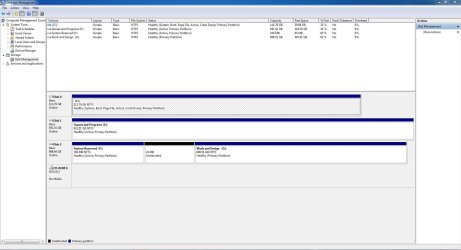
Ok, managed to get it to boot by some miracle and have taken the shot for you. Please find attached.
 

Attachments

  • disk-management.JPG
    disk-management.JPG
    145.4 KB · Views: 3

My Computer

Computer type
PC/Desktop
Computer Manufacturer/Model Number
Custom build
OS
Windows 7 Ultimate x64 bit
CPU
Intel i7 4790k
Motherboard
Gigabyte z97x SOC Force
Memory
8GB Corsair Dominator
Graphics Card(s)
2x AMD 290s
Hard Drives
1 x Corsair F120
2 x Western digital 1TB HDDs
Hi

First partitions of both had drives are seems to be marked as "Active". It might be causing the issues. Please try the below steps.

1. Download "Partition Wizard" from Best Free Partition Manager Freeware and free partition magic for Windows 7, Windows 8, Windows Vista and Windows XP 32 bit & 64 bit. MiniTool Free Partition Manager Software Home Edition.

2. Now the "Active" mark from both slave had drive's needed to be removed. Please watch the official video guide carefully.

How to Set Active/Inactive partition with partition magic? Partition Wizard Video Help.

Make sue to not remove the "Active" marking from SSD. Doing so will make the system unbootable ( which needed to be corrected using a boot disc ).


After the above steps, please post an updated screenshot.
 

My Computer

Computer type
PC/Desktop
OS
Windows 7 Ultimate x64
Thanks for the reply :)

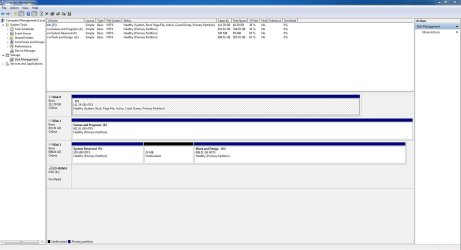
I downloaded and went through the steps you mentioned. This is a screenshot of what it now looks like:
 

Attachments

  • disk-management-2.JPG
    disk-management-2.JPG
    132.1 KB · Views: 1

My Computer

Computer type
PC/Desktop
Computer Manufacturer/Model Number
Custom build
OS
Windows 7 Ultimate x64 bit
CPU
Intel i7 4790k
Motherboard
Gigabyte z97x SOC Force
Memory
8GB Corsair Dominator
Graphics Card(s)
2x AMD 290s
Hard Drives
1 x Corsair F120
2 x Western digital 1TB HDDs
You did it correctly :). How the system works now ?.
 

My Computer

Computer type
PC/Desktop
OS
Windows 7 Ultimate x64
Seems to have cured my issues! Thank you ever so much for your help, I was worried it'd never get fixed!
 

My Computer

Computer type
PC/Desktop
Computer Manufacturer/Model Number
Custom build
OS
Windows 7 Ultimate x64 bit
CPU
Intel i7 4790k
Motherboard
Gigabyte z97x SOC Force
Memory
8GB Corsair Dominator
Graphics Card(s)
2x AMD 290s
Hard Drives
1 x Corsair F120
2 x Western digital 1TB HDDs
Back
Top