Windows boot issue

beginner16

New member
Local time
4:04 AM
Messages
6
guys can you help me my pc is not opening because of this problem

20000101_193601.jpg
 

My Computer

Computer type
Laptop
Computer Manufacturer/Model Number
Asus
OS
windows starter 32bit
Browser
Uc browser
Hello and welcome beginner now first up can you please update your sytem specs preferably in your profile as it is very difficult to advise without knowing what you have got or rather the machine has got.
See this and follow please System Info - See Your System Specs

Now to get going have you tried rebooting the machine - that is powering off leave for a few seconds then power on again?

That error showing in your pic is almost certain to be a hardware or driver issue and without the specs we cannot advise you on what to test or anything else for example device drivers etc

Just one more thing can you boot into safe mode?? to do that power off and then power on while tapping the F8 key.
 

My Computer

Computer type
PC/Desktop
Computer Manufacturer/Model Number
Own build (new) Desk1 / Asus ROG Win 7 / Desk2 1st build
OS
Desk1 7 Home Prem / Desk2 10 Pro / Main lap Asus ROG 10 Pro 2 laptop Toshiba 7 Pro Asus P2520 7 & 10
CPU
Desk1 i5 3750K / Laptop i7 GTX 860M / Desk2 i5 2500
Motherboard
Desk1 Asus P877-V / Desk2 Gigabyte H67 UD3H / Laptop ?
Memory
Desk1 8GB (1866) / Desk2 16GB (1333) / Laptop 8Gb DDR3
Graphics Card(s)
Desk 1& 2NVidia GTX 650 & Laptops on board Intel
Sound Card
Desk 1 & 2 -XONAR DG Realtek High Def audio Laptop
Monitor(s) Displays
Desk 1 Benq HD 2450 / Desk2 Philips 24" / Laptop 17.5"
Screen Resolution
1920x1080 D1 & D2 & Laptop 1
Hard Drives
Desk1 Samsung 120GB 830 SSD
Asus ROG 256GB 850 Pro SSD
Desk2 Samsung 840 256 SSD
Toshiba 120GB EVO
PSU
Desk 1 Corsair HX 1050/ Laptop ? / Desk 2 Corsair HX 650
Case
Desk 1 Cooler HAF XM ? Toshiba laptop / Desk2 Coolermaster
Cooling
Fans on all Desk1 -2 Desk2 - all Coolermasters 5 Laptop ?
Keyboard
Desk 1 MS Sidewinder X6 Desk 2 MS Sidewinder X 4
Mouse
Desk 1&2 - Gigabyte MS 900 gamer - laptop - Logitec wireless
Internet Speed
ADSL2+
Other Info
One other Desktop (tester) and spare Toshba laptop both with SSD's
Running Kaspersky 2016 ISS on all machines config'd identically
Logitec audio stereo systems on each machine (x3)
Canon MG5250MFC
Router/modem TP-Link running WPA2SK
i can't open my pc so i don't know what specs my laptop is. all I know that it is a windows 7 starter, intel core i3, hd 5470 graphics 512 mb.

I tried to reboot it but its still the same.

I can't boot it to safe mode also, when i tap f8 nothings appear.
 
Last edited:

My Computer

Computer type
Laptop
Computer Manufacturer/Model Number
Asus
OS
windows starter 32bit
Browser
Uc browser
Ok mate now the machine will have a model number on the bottom of it somewhere can you let us know what that is - from that we can pin down some of the specs.

Now in the crash screen it says something about an external device being hooked up to the machine just what was that? It also says to plug whatever it was back in again and reboot and that also the attached device was removed incorrectly that is just taking it out manually usually a big no no because it can corrupt stuff on the machine and the device..

There is this you can go through as well and se if any of the options do anything for you.
Troubleshooting Windows 7 Failure to Boot
 

My Computer

Computer type
PC/Desktop
Computer Manufacturer/Model Number
Own build (new) Desk1 / Asus ROG Win 7 / Desk2 1st build
OS
Desk1 7 Home Prem / Desk2 10 Pro / Main lap Asus ROG 10 Pro 2 laptop Toshiba 7 Pro Asus P2520 7 & 10
CPU
Desk1 i5 3750K / Laptop i7 GTX 860M / Desk2 i5 2500
Motherboard
Desk1 Asus P877-V / Desk2 Gigabyte H67 UD3H / Laptop ?
Memory
Desk1 8GB (1866) / Desk2 16GB (1333) / Laptop 8Gb DDR3
Graphics Card(s)
Desk 1& 2NVidia GTX 650 & Laptops on board Intel
Sound Card
Desk 1 & 2 -XONAR DG Realtek High Def audio Laptop
Monitor(s) Displays
Desk 1 Benq HD 2450 / Desk2 Philips 24" / Laptop 17.5"
Screen Resolution
1920x1080 D1 & D2 & Laptop 1
Hard Drives
Desk1 Samsung 120GB 830 SSD
Asus ROG 256GB 850 Pro SSD
Desk2 Samsung 840 256 SSD
Toshiba 120GB EVO
PSU
Desk 1 Corsair HX 1050/ Laptop ? / Desk 2 Corsair HX 650
Case
Desk 1 Cooler HAF XM ? Toshiba laptop / Desk2 Coolermaster
Cooling
Fans on all Desk1 -2 Desk2 - all Coolermasters 5 Laptop ?
Keyboard
Desk 1 MS Sidewinder X6 Desk 2 MS Sidewinder X 4
Mouse
Desk 1&2 - Gigabyte MS 900 gamer - laptop - Logitec wireless
Internet Speed
ADSL2+
Other Info
One other Desktop (tester) and spare Toshba laptop both with SSD's
Running Kaspersky 2016 ISS on all machines config'd identically
Logitec audio stereo systems on each machine (x3)
Canon MG5250MFC
Router/modem TP-Link running WPA2SK
Before i have this problem, first i suffer system failure in my pc because of an certain app. it keeps restarting saying about the new application i install.

I ignore it and there it comes.
when i open my pc nothings appear even i tap f8 in order to restore it. many times i tried on and off.

until i decide to have a recovery. I have a recovery disk -4 disks. i reboot it with the disk but it fails then that crush appear. i tried using the disk again. i have 100% successful but when it restarts the crush is still there.

so i think it will solved if i install new windows but the error keeping my installation not to succeed.
that's why i am here seeking for help.
 

My Computer

Computer type
Laptop
Computer Manufacturer/Model Number
Asus
OS
windows starter 32bit
Browser
Uc browser
Error 0xc000009e indicates that the BIOS cannot communicate with the hard drive.

Have you checked the cables connected to the hard drive, they may be loose or faulty. It's also possible the hard drive has failed.

If you have a Windows Starter installation DVD you could try a Start Up Repair.

Is there anything you have done to the computer before this failure occurred, such as new hardware or new software. Have you had ant power outages, lightning strikes nearby etc..
 

My Computer

Computer type
PC/Desktop
Computer Manufacturer/Model Number
Self built using existing case
OS
Windows 7 Home Premium 64 bit sp1
CPU
Intel i5 3570 3.4Ghz Ivy Bridge SKT 1155 quad core
Motherboard
Gigabyte Z77-HD3 SKT 1155 2xSata 3, 4x USB 3.0
Memory
G-Skill Rip Jaws 16Gb (8x2) DDR3 -1600 PC3 12800 CL 10 red
Graphics Card(s)
Gigabyte NVIDIA GT610 1Gb DDR3 810/1200 PCI-E 2.0 Silent
Sound Card
NVIDIA High Definition & Realtech High Definition Audio
Monitor(s) Displays
2 x Philips 226V4L 16:9 aspect ratio
Screen Resolution
1920 x 1080 HD
Hard Drives
Samsung 840 Pro 256gb SSD, SATA 3.
Hitachi Touro Portable 1tb, USB 3.0 HDD used for image b/ups.
PSU
Corsair VS450
Case
Codeng
Cooling
PSU fan & CPU fan
Keyboard
Logitech
Mouse
Logitech Wireless trackball M570
Internet Speed
Wireless 3G. 3mg down & 550kb up.
Antivirus
Bitdefender Internet Security 2020
Browser
Opera (Current Version) & Firefox
Other Info
MS Office 2013 Pro. Davis weather station software. MGE Nova 600 avr UPS.
Actually its a laptop i'm using.

The manufacturer is Asus.
Model: A40J.
MB Ver. : K42JE ID : 3G
ABN0AS43261847B
 

My Computer

Computer type
Laptop
Computer Manufacturer/Model Number
Asus
OS
windows starter 32bit
Browser
Uc browser
I tried using Window starter installation and go to start up repair but it didn't solve.
 

My Computer

Computer type
Laptop
Computer Manufacturer/Model Number
Asus
OS
windows starter 32bit
Browser
Uc browser
Is there anything you have done to the computer before this failure occurred, such as new hardware or new software.


Ok mate now as Ranger has asked have you had any hardware installed on this machine internally or externally. I ask because the screen shot in post #1 states that there has been a device attached and then removed in an unsafe manner.

Now as for the SATA cables it is not possible for you to do anything because the drive is a straight plug in device. But have you ever had that drive out of the machine?

In the meantime I shall dig around for that model for specs.

Now if you have data on that machine you need then there are ways of recovering it and I am not sure but it may be possible to test the drive while using the recovery program.
 

My Computer

Computer type
PC/Desktop
Computer Manufacturer/Model Number
Own build (new) Desk1 / Asus ROG Win 7 / Desk2 1st build
OS
Desk1 7 Home Prem / Desk2 10 Pro / Main lap Asus ROG 10 Pro 2 laptop Toshiba 7 Pro Asus P2520 7 & 10
CPU
Desk1 i5 3750K / Laptop i7 GTX 860M / Desk2 i5 2500
Motherboard
Desk1 Asus P877-V / Desk2 Gigabyte H67 UD3H / Laptop ?
Memory
Desk1 8GB (1866) / Desk2 16GB (1333) / Laptop 8Gb DDR3
Graphics Card(s)
Desk 1& 2NVidia GTX 650 & Laptops on board Intel
Sound Card
Desk 1 & 2 -XONAR DG Realtek High Def audio Laptop
Monitor(s) Displays
Desk 1 Benq HD 2450 / Desk2 Philips 24" / Laptop 17.5"
Screen Resolution
1920x1080 D1 & D2 & Laptop 1
Hard Drives
Desk1 Samsung 120GB 830 SSD
Asus ROG 256GB 850 Pro SSD
Desk2 Samsung 840 256 SSD
Toshiba 120GB EVO
PSU
Desk 1 Corsair HX 1050/ Laptop ? / Desk 2 Corsair HX 650
Case
Desk 1 Cooler HAF XM ? Toshiba laptop / Desk2 Coolermaster
Cooling
Fans on all Desk1 -2 Desk2 - all Coolermasters 5 Laptop ?
Keyboard
Desk 1 MS Sidewinder X6 Desk 2 MS Sidewinder X 4
Mouse
Desk 1&2 - Gigabyte MS 900 gamer - laptop - Logitec wireless
Internet Speed
ADSL2+
Other Info
One other Desktop (tester) and spare Toshba laptop both with SSD's
Running Kaspersky 2016 ISS on all machines config'd identically
Logitec audio stereo systems on each machine (x3)
Canon MG5250MFC
Router/modem TP-Link running WPA2SK
No, I never drive out the SATA from the machine.

I think it because of the recovery disk I boot in the laptop. After it failed, that pic in post #1 appears. Just now I tried open the PC while the disk booting on it. Its still the same.
 

My Computer

Computer type
Laptop
Computer Manufacturer/Model Number
Asus
OS
windows starter 32bit
Browser
Uc browser
Ok well in that first post pic it mentions a failing drive either the hard drive or the optical. If it is the optical that os not reading the disk properly then replacing it would be a fix maybe for that.

To test the optical you could try this
BOOTABLE UBUNTU
Make a bootable Ubuntu disk Download Ubuntu Desktop | Download | Ubuntu
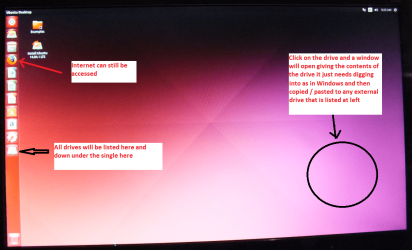
Set the BIOS to boot from the optical when the machine boots it will show you a screen with TRY or INSTALL > select TRY not INSTALL!!
When it is finished - it takes very little time you will get a screen like in the pic .
Open the drive you want > User and dig down until you get to the data / settings you may be able to copy / paste the material you want to an external source or other installed drive doing this.
I am not sure if it will but I have recovered tons of data etc using this method both on "dead" or just plain drives that you cannot get data from using Windows.
There is another Linux based one here*Emergency Kit - save your files from a dead OS*I prefer my Ubuntu fix only because it is a little easier to set up.

You will need to make a bootable disk on another machine obviously and then insert the disk into the machine while powering up.

Now all you need to see is if the disk will boot that system - it is a Linux based one that does not require Windows to run. Don't worry about retrieving data as per my little ditty I just need to see if the optical drive is working as it should and if need be retrieving data can be done later if it should be a bad hard drive.
 

Attachments

  • UBUNTU SCREEN X2.PNG
    UBUNTU SCREEN X2.PNG
    272.7 KB · Views: 0

My Computer

Computer type
PC/Desktop
Computer Manufacturer/Model Number
Own build (new) Desk1 / Asus ROG Win 7 / Desk2 1st build
OS
Desk1 7 Home Prem / Desk2 10 Pro / Main lap Asus ROG 10 Pro 2 laptop Toshiba 7 Pro Asus P2520 7 & 10
CPU
Desk1 i5 3750K / Laptop i7 GTX 860M / Desk2 i5 2500
Motherboard
Desk1 Asus P877-V / Desk2 Gigabyte H67 UD3H / Laptop ?
Memory
Desk1 8GB (1866) / Desk2 16GB (1333) / Laptop 8Gb DDR3
Graphics Card(s)
Desk 1& 2NVidia GTX 650 & Laptops on board Intel
Sound Card
Desk 1 & 2 -XONAR DG Realtek High Def audio Laptop
Monitor(s) Displays
Desk 1 Benq HD 2450 / Desk2 Philips 24" / Laptop 17.5"
Screen Resolution
1920x1080 D1 & D2 & Laptop 1
Hard Drives
Desk1 Samsung 120GB 830 SSD
Asus ROG 256GB 850 Pro SSD
Desk2 Samsung 840 256 SSD
Toshiba 120GB EVO
PSU
Desk 1 Corsair HX 1050/ Laptop ? / Desk 2 Corsair HX 650
Case
Desk 1 Cooler HAF XM ? Toshiba laptop / Desk2 Coolermaster
Cooling
Fans on all Desk1 -2 Desk2 - all Coolermasters 5 Laptop ?
Keyboard
Desk 1 MS Sidewinder X6 Desk 2 MS Sidewinder X 4
Mouse
Desk 1&2 - Gigabyte MS 900 gamer - laptop - Logitec wireless
Internet Speed
ADSL2+
Other Info
One other Desktop (tester) and spare Toshba laptop both with SSD's
Running Kaspersky 2016 ISS on all machines config'd identically
Logitec audio stereo systems on each machine (x3)
Canon MG5250MFC
Router/modem TP-Link running WPA2SK
Back
Top