
Solved Windows boots very slow and runs slow after booting

abyssal

New member
Local time
2:32 PM
Messages
25
Hello 7forums. I have a problem with my Windows 7 Professional (32bit). I'll try to explain everything in detail.

PC specs:
Processor: Intel Core 2 DUO CPU T5800 @2.0 GHZ
Installed memory (RAM): 2.0 GB
System type: 32-bit operating system

Yesterday I was using uTorrent to download some files (24 gigabytes +). It was downloading at a speed of ~7-8 Mb/s. During the download I noticed that the PC was running pretty hard and I checked in the Task Manager for processor and RAM usage, noticing that the processor was used at around 50% of capacity but RAM memory was used at 1.9 GB, that's around 98%.

I restarted the laptop and run the download again. Memory usage was about 1.4 GB. Then, I tried to open Firefox and go check something on a website and everything crashed. I unplugged the laptop (n00b way of solving things) to shut it down and then started it back. At this point I noticed that it took like half an hour to boot and show desktop. Also, everything was running extremely slow.

I inserted my Windows 7 disc and ran through the `Repair Windows` wizard. I left it like that for about an hour and it was just telling me `Attempting Repairs`. I stopped it at that point and then re-installed Windows by formatting the partition.

Now, when I start the laptop it takes like 5-10 minutes until it shows me the desktop (before was 1 minute). Also I noticed that everything runs extremely slow. All the drivers have been successfully installed (except for 2 USB ports).

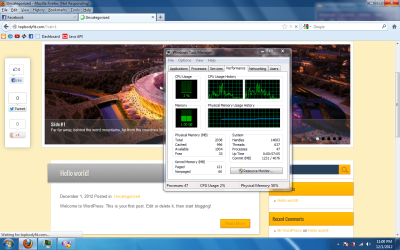
If I keep my Windows Task Manager opened to performance & memory usage when I try to do stuff on the laptop, it shows me 0% CPU usage when the laptop has a `crash moment`. It simply crashes (stops doing anything) while CPU is 0-3% used and RAM memory around 700 Mb.

I attached a photo with one of this `crashes` where I wanted to visit a page and Firefox was just Not Responding while CPU was at 1% usage.

Also, after some time it just begins to work okay.

Any hints on this ? Help would be greatly appreciated.
 

Attachments
  • w7fail.png
    w7fail.png
    171.4 KB · Views: 28

My Computer My Computer

At a glance

Windows 7 Professional 64bit
OS
Windows 7 Professional 64bit
Hello and welcome abyssal Mate for very starters I would be running some malware scans the two I would run would Malwarebytes and SuperAntiSpyware.


http://www.superantispyware.com/ and http://www.malwarebytes.org/


Next would sticking another 2GB of RAM what you have got is absolute bare minimum.

Plus some specs on your system would be helpful:)
 

My Computer My Computer

At a glance

Desk1 7 Home Prem / Desk2 10 Pro / Main lap A...Desk1 i5 3750K / Laptop i7 GTX 860M / Desk2 i...Desk1 8GB (1866) / Desk2 16GB (1333) / Laptop...Desk 1& 2NVidia GTX 650 & Laptops on board Intel
Computer type
PC/Desktop
Computer Manufacturer/Model Number
Own build (new) Desk1 / Asus ROG Win 7 / Desk2 1st build
OS
Desk1 7 Home Prem / Desk2 10 Pro / Main lap Asus ROG 10 Pro 2 laptop Toshiba 7 Pro Asus P2520 7 & 10
CPU
Desk1 i5 3750K / Laptop i7 GTX 860M / Desk2 i5 2500
Motherboard
Desk1 Asus P877-V / Desk2 Gigabyte H67 UD3H / Laptop ?
Memory
Desk1 8GB (1866) / Desk2 16GB (1333) / Laptop 8Gb DDR3
Graphics Card(s)
Desk 1& 2NVidia GTX 650 & Laptops on board Intel
Sound Card
Desk 1 & 2 -XONAR DG Realtek High Def audio Laptop
Monitor(s) Displays
Desk 1 Benq HD 2450 / Desk2 Philips 24" / Laptop 17.5"
Screen Resolution
1920x1080 D1 & D2 & Laptop 1
Hard Drives
Desk1 Samsung 120GB 830 SSD
Asus ROG 256GB 850 Pro SSD
Desk2 Samsung 840 256 SSD
Toshiba 120GB EVO
PSU
Desk 1 Corsair HX 1050/ Laptop ? / Desk 2 Corsair HX 650
Case
Desk 1 Cooler HAF XM ? Toshiba laptop / Desk2 Coolermaster
Cooling
Fans on all Desk1 -2 Desk2 - all Coolermasters 5 Laptop ?
Keyboard
Desk 1 MS Sidewinder X6 Desk 2 MS Sidewinder X 4
Mouse
Desk 1&2 - Gigabyte MS 900 gamer - laptop - Logitec wireless
Internet Speed
ADSL2+
Other Info
One other Desktop (tester) and spare Toshba laptop both with SSD's
Running Kaspersky 2016 ISS on all machines config'd identically
Logitec audio stereo systems on each machine (x3)
Canon MG5250MFC
Router/modem TP-Link running WPA2SK
Well thanks man. I'll run the malware scan.

And about my PC configuration, I find it quite good for what the laptop is meant to do: surf the web, watch a movie and make some C++/Java/php quick scripts from time to time. Actually before this my PC was running extremely well.

I just think there's something that makes my processor stop working for like few seconds from time to time. (sounds foolish, I know).
 

My Computer My Computer

At a glance

Windows 7 Professional 64bit
OS
Windows 7 Professional 64bit
Ok mate do both scans and just how old is this machine as the intermittent stopping of the CPU sounds like it may be a heat related problem.

You can check that by running Speccy Speccy - System Information - Free Download its free and takes very little space and time to run.
 

My Computer My Computer

At a glance

Desk1 7 Home Prem / Desk2 10 Pro / Main lap A...Desk1 i5 3750K / Laptop i7 GTX 860M / Desk2 i...Desk1 8GB (1866) / Desk2 16GB (1333) / Laptop...Desk 1& 2NVidia GTX 650 & Laptops on board Intel
Computer type
PC/Desktop
Computer Manufacturer/Model Number
Own build (new) Desk1 / Asus ROG Win 7 / Desk2 1st build
OS
Desk1 7 Home Prem / Desk2 10 Pro / Main lap Asus ROG 10 Pro 2 laptop Toshiba 7 Pro Asus P2520 7 & 10
CPU
Desk1 i5 3750K / Laptop i7 GTX 860M / Desk2 i5 2500
Motherboard
Desk1 Asus P877-V / Desk2 Gigabyte H67 UD3H / Laptop ?
Memory
Desk1 8GB (1866) / Desk2 16GB (1333) / Laptop 8Gb DDR3
Graphics Card(s)
Desk 1& 2NVidia GTX 650 & Laptops on board Intel
Sound Card
Desk 1 & 2 -XONAR DG Realtek High Def audio Laptop
Monitor(s) Displays
Desk 1 Benq HD 2450 / Desk2 Philips 24" / Laptop 17.5"
Screen Resolution
1920x1080 D1 & D2 & Laptop 1
Hard Drives
Desk1 Samsung 120GB 830 SSD
Asus ROG 256GB 850 Pro SSD
Desk2 Samsung 840 256 SSD
Toshiba 120GB EVO
PSU
Desk 1 Corsair HX 1050/ Laptop ? / Desk 2 Corsair HX 650
Case
Desk 1 Cooler HAF XM ? Toshiba laptop / Desk2 Coolermaster
Cooling
Fans on all Desk1 -2 Desk2 - all Coolermasters 5 Laptop ?
Keyboard
Desk 1 MS Sidewinder X6 Desk 2 MS Sidewinder X 4
Mouse
Desk 1&2 - Gigabyte MS 900 gamer - laptop - Logitec wireless
Internet Speed
ADSL2+
Other Info
One other Desktop (tester) and spare Toshba laptop both with SSD's
Running Kaspersky 2016 ISS on all machines config'd identically
Logitec audio stereo systems on each machine (x3)
Canon MG5250MFC
Router/modem TP-Link running WPA2SK
Ok, Speecy shows my CPU temperature is around 60 degrees Celsius. I'll just try to look into the laptop and maybe clean it out a little. Thanks, I'll get back with more updates.
 

My Computer My Computer

At a glance

Windows 7 Professional 64bit
OS
Windows 7 Professional 64bit
Ok mate if you are confident in taking the bottom cover off then it might jut down to a lot of crud in the small "radiator" on the end of the heatpipes. If I knew what model your machine I may be able to find the repair manual for it to give you a step by step guide especially if it is a Toshiba.

But if you are ok with doing this just be careful to keep the tiny screws safe and keep an eye on the order they come out as there are usually different length ones.
The temp is a little on the high side and I would hazard a guess at crud being your problem there as the CPU has an inbuilt thermal shutdown (you can sometimes set this shutdown temp in the BIOS) Make sure you clean the fan and whatever you do "ground" yourself before touching anything under that cover. You probably know this already but I am just making sure:)
 

My Computer My Computer

At a glance

Desk1 7 Home Prem / Desk2 10 Pro / Main lap A...Desk1 i5 3750K / Laptop i7 GTX 860M / Desk2 i...Desk1 8GB (1866) / Desk2 16GB (1333) / Laptop...Desk 1& 2NVidia GTX 650 & Laptops on board Intel
Computer type
PC/Desktop
Computer Manufacturer/Model Number
Own build (new) Desk1 / Asus ROG Win 7 / Desk2 1st build
OS
Desk1 7 Home Prem / Desk2 10 Pro / Main lap Asus ROG 10 Pro 2 laptop Toshiba 7 Pro Asus P2520 7 & 10
CPU
Desk1 i5 3750K / Laptop i7 GTX 860M / Desk2 i5 2500
Motherboard
Desk1 Asus P877-V / Desk2 Gigabyte H67 UD3H / Laptop ?
Memory
Desk1 8GB (1866) / Desk2 16GB (1333) / Laptop 8Gb DDR3
Graphics Card(s)
Desk 1& 2NVidia GTX 650 & Laptops on board Intel
Sound Card
Desk 1 & 2 -XONAR DG Realtek High Def audio Laptop
Monitor(s) Displays
Desk 1 Benq HD 2450 / Desk2 Philips 24" / Laptop 17.5"
Screen Resolution
1920x1080 D1 & D2 & Laptop 1
Hard Drives
Desk1 Samsung 120GB 830 SSD
Asus ROG 256GB 850 Pro SSD
Desk2 Samsung 840 256 SSD
Toshiba 120GB EVO
PSU
Desk 1 Corsair HX 1050/ Laptop ? / Desk 2 Corsair HX 650
Case
Desk 1 Cooler HAF XM ? Toshiba laptop / Desk2 Coolermaster
Cooling
Fans on all Desk1 -2 Desk2 - all Coolermasters 5 Laptop ?
Keyboard
Desk 1 MS Sidewinder X6 Desk 2 MS Sidewinder X 4
Mouse
Desk 1&2 - Gigabyte MS 900 gamer - laptop - Logitec wireless
Internet Speed
ADSL2+
Other Info
One other Desktop (tester) and spare Toshba laptop both with SSD's
Running Kaspersky 2016 ISS on all machines config'd identically
Logitec audio stereo systems on each machine (x3)
Canon MG5250MFC
Router/modem TP-Link running WPA2SK
Thanks, I've done it before, I'll do it again.

Please note that by `crashing` I don't refer to shutting down. It just doesn't do anything for 5-6 seconds, then comes back. This also makes scanning almost impossible, because it scans a number of files and then it stops for 5-6 seconds, than scans another for just few seconds before stopping again.

Any other hints are greatly appreciated.
 
Last edited:

My Computer My Computer

At a glance

Windows 7 Professional 64bit
OS
Windows 7 Professional 64bit
Ok mate dd those scans come up with anything then? would be very surprised if they didn't.

What you describe then might not be a heat related problem but will not hurt for a bit of a clear out.

As an afterthought you could try a memtest for any problems with the RAM

Memtest86+ - Advanced Memory Diagnostic Tool you will need to make a bootable disk and set the BIOS to boot from the optical drive and it does take a fair time to do and I think they recommend at least 7 passes - best left running when you go to bed.
If you need a disk burner then ImgBurn is good for that .

The Official ImgBurn Website < just a tip but be very careful when you see free sans offered for whatever and only then when you know for absolute definite they are ok - but there isn't many that I would run if any.

Another if you haven't got it already for cleaning up the machine is CCleaner - excellent tool free and just about everyone uses it.

CCleaner - Download < download form piriform

Let us know how you go.:)

John
 

My Computer My Computer

At a glance

Desk1 7 Home Prem / Desk2 10 Pro / Main lap A...Desk1 i5 3750K / Laptop i7 GTX 860M / Desk2 i...Desk1 8GB (1866) / Desk2 16GB (1333) / Laptop...Desk 1& 2NVidia GTX 650 & Laptops on board Intel
Computer type
PC/Desktop
Computer Manufacturer/Model Number
Own build (new) Desk1 / Asus ROG Win 7 / Desk2 1st build
OS
Desk1 7 Home Prem / Desk2 10 Pro / Main lap Asus ROG 10 Pro 2 laptop Toshiba 7 Pro Asus P2520 7 & 10
CPU
Desk1 i5 3750K / Laptop i7 GTX 860M / Desk2 i5 2500
Motherboard
Desk1 Asus P877-V / Desk2 Gigabyte H67 UD3H / Laptop ?
Memory
Desk1 8GB (1866) / Desk2 16GB (1333) / Laptop 8Gb DDR3
Graphics Card(s)
Desk 1& 2NVidia GTX 650 & Laptops on board Intel
Sound Card
Desk 1 & 2 -XONAR DG Realtek High Def audio Laptop
Monitor(s) Displays
Desk 1 Benq HD 2450 / Desk2 Philips 24" / Laptop 17.5"
Screen Resolution
1920x1080 D1 & D2 & Laptop 1
Hard Drives
Desk1 Samsung 120GB 830 SSD
Asus ROG 256GB 850 Pro SSD
Desk2 Samsung 840 256 SSD
Toshiba 120GB EVO
PSU
Desk 1 Corsair HX 1050/ Laptop ? / Desk 2 Corsair HX 650
Case
Desk 1 Cooler HAF XM ? Toshiba laptop / Desk2 Coolermaster
Cooling
Fans on all Desk1 -2 Desk2 - all Coolermasters 5 Laptop ?
Keyboard
Desk 1 MS Sidewinder X6 Desk 2 MS Sidewinder X 4
Mouse
Desk 1&2 - Gigabyte MS 900 gamer - laptop - Logitec wireless
Internet Speed
ADSL2+
Other Info
One other Desktop (tester) and spare Toshba laptop both with SSD's
Running Kaspersky 2016 ISS on all machines config'd identically
Logitec audio stereo systems on each machine (x3)
Canon MG5250MFC
Router/modem TP-Link running WPA2SK
Okay, I tried scanning but this is impossible. Not only that it takes too long due to the processor refusing to do anything but it also restarted my PC (half and hour to boot). CPU stays at 0% while it should be doing stuff.

I guess there's a hardware problem. I may try to run some scans through network from another PC.
 

My Computer My Computer

At a glance

Windows 7 Professional 64bit
OS
Windows 7 Professional 64bit
Hum what I might suggest abyssal is to get that drive out and if you have access to another machine install it using a USB gadget or into the machine it self, and try Patition Magic to see what is on the drive.

Another thing before that tough may be to run a Seatools Hard drive test on the drive and you could also try a disk surface test with Partition Wizard. You can also see what is on the disk with it too.

SeaTools | Seagate

Best Free Partition Manager Freeware and free partition magic for Windows 7, Windows 8, Windows Vista and Windows XP 32 bit & 64 bit. MiniTool Free Partition Manager Software Home Edition.

The boot time is very wrong and mate I personally would not wait for more than ten minutes as there is something terribly wrong with some hardware somewhere and I would be very suspicious of the CPU - especially the thermal paste. If the machine is more than say four years old then like my best laptop I have - the thermal could be well and truly hardened and is not doing the the job it was meant to. In fact I would go so far as to say it may be insulating or keeping the CPU from contact with the heatsink (and heat pipes)and hence the constant shut down and extreme boot time.

Sorry my friend but time to have a very close look at the internals but try the tests first.
 

My Computer My Computer

At a glance

Desk1 7 Home Prem / Desk2 10 Pro / Main lap A...Desk1 i5 3750K / Laptop i7 GTX 860M / Desk2 i...Desk1 8GB (1866) / Desk2 16GB (1333) / Laptop...Desk 1& 2NVidia GTX 650 & Laptops on board Intel
Computer type
PC/Desktop
Computer Manufacturer/Model Number
Own build (new) Desk1 / Asus ROG Win 7 / Desk2 1st build
OS
Desk1 7 Home Prem / Desk2 10 Pro / Main lap Asus ROG 10 Pro 2 laptop Toshiba 7 Pro Asus P2520 7 & 10
CPU
Desk1 i5 3750K / Laptop i7 GTX 860M / Desk2 i5 2500
Motherboard
Desk1 Asus P877-V / Desk2 Gigabyte H67 UD3H / Laptop ?
Memory
Desk1 8GB (1866) / Desk2 16GB (1333) / Laptop 8Gb DDR3
Graphics Card(s)
Desk 1& 2NVidia GTX 650 & Laptops on board Intel
Sound Card
Desk 1 & 2 -XONAR DG Realtek High Def audio Laptop
Monitor(s) Displays
Desk 1 Benq HD 2450 / Desk2 Philips 24" / Laptop 17.5"
Screen Resolution
1920x1080 D1 & D2 & Laptop 1
Hard Drives
Desk1 Samsung 120GB 830 SSD
Asus ROG 256GB 850 Pro SSD
Desk2 Samsung 840 256 SSD
Toshiba 120GB EVO
PSU
Desk 1 Corsair HX 1050/ Laptop ? / Desk 2 Corsair HX 650
Case
Desk 1 Cooler HAF XM ? Toshiba laptop / Desk2 Coolermaster
Cooling
Fans on all Desk1 -2 Desk2 - all Coolermasters 5 Laptop ?
Keyboard
Desk 1 MS Sidewinder X6 Desk 2 MS Sidewinder X 4
Mouse
Desk 1&2 - Gigabyte MS 900 gamer - laptop - Logitec wireless
Internet Speed
ADSL2+
Other Info
One other Desktop (tester) and spare Toshba laptop both with SSD's
Running Kaspersky 2016 ISS on all machines config'd identically
Logitec audio stereo systems on each machine (x3)
Canon MG5250MFC
Router/modem TP-Link running WPA2SK
Okay so I opened it and I noticed there was a lot of dust near the cooler or how it's called. I cleaned it up and powered the laptop again. Booting was still pretty slow but a little faster than before. PC works kinda better (although it still seems to have the problem - CPU refuses to do something from time to time).

I was finally able to run a malware scan on the whole HDD but it didn't found anything. Also after I cleaned it up the CPU temperature dropped to around 40 degrees Celsius.

Thanks again for advices, will look more into it.
 

My Computer My Computer

At a glance

Windows 7 Professional 64bit
OS
Windows 7 Professional 64bit
What were the results of the hardware tests?

Have you established a Clean boot yet?

How close do you have to a perfect Clean Reinstall, which spells out the Best Practices for Win7 install?
 
Sorry late reply abyssal - work and all that good the CPU has cooled as it was definitely sounding like it was a lot of the problem, and in the future at some stage when things are going it might be an idea to have a loom at the thermal compound too.:)

Now that is sorted I think it would be good to do what Greg has said mate, and let us know what the go is.
 

My Computer My Computer

At a glance

Desk1 7 Home Prem / Desk2 10 Pro / Main lap A...Desk1 i5 3750K / Laptop i7 GTX 860M / Desk2 i...Desk1 8GB (1866) / Desk2 16GB (1333) / Laptop...Desk 1& 2NVidia GTX 650 & Laptops on board Intel
Computer type
PC/Desktop
Computer Manufacturer/Model Number
Own build (new) Desk1 / Asus ROG Win 7 / Desk2 1st build
OS
Desk1 7 Home Prem / Desk2 10 Pro / Main lap Asus ROG 10 Pro 2 laptop Toshiba 7 Pro Asus P2520 7 & 10
CPU
Desk1 i5 3750K / Laptop i7 GTX 860M / Desk2 i5 2500
Motherboard
Desk1 Asus P877-V / Desk2 Gigabyte H67 UD3H / Laptop ?
Memory
Desk1 8GB (1866) / Desk2 16GB (1333) / Laptop 8Gb DDR3
Graphics Card(s)
Desk 1& 2NVidia GTX 650 & Laptops on board Intel
Sound Card
Desk 1 & 2 -XONAR DG Realtek High Def audio Laptop
Monitor(s) Displays
Desk 1 Benq HD 2450 / Desk2 Philips 24" / Laptop 17.5"
Screen Resolution
1920x1080 D1 & D2 & Laptop 1
Hard Drives
Desk1 Samsung 120GB 830 SSD
Asus ROG 256GB 850 Pro SSD
Desk2 Samsung 840 256 SSD
Toshiba 120GB EVO
PSU
Desk 1 Corsair HX 1050/ Laptop ? / Desk 2 Corsair HX 650
Case
Desk 1 Cooler HAF XM ? Toshiba laptop / Desk2 Coolermaster
Cooling
Fans on all Desk1 -2 Desk2 - all Coolermasters 5 Laptop ?
Keyboard
Desk 1 MS Sidewinder X6 Desk 2 MS Sidewinder X 4
Mouse
Desk 1&2 - Gigabyte MS 900 gamer - laptop - Logitec wireless
Internet Speed
ADSL2+
Other Info
One other Desktop (tester) and spare Toshba laptop both with SSD's
Running Kaspersky 2016 ISS on all machines config'd identically
Logitec audio stereo systems on each machine (x3)
Canon MG5250MFC
Router/modem TP-Link running WPA2SK
All right, I guess I fixed it. I just ran a /chkdsk /r /f in CMD and restarted the PC. It found some `bad clusters` on the hard drive and it fixed it automatically.

Works fine now and hopefully it will work fine in the future. Thanks both of you for support.
 

My Computer My Computer

At a glance

Windows 7 Professional 64bit
OS
Windows 7 Professional 64bit
If it was the HD causing slowness then I'd want to also confirm the HD condition with HD Diagnostics for your brand HD.
 

My Computer My Computer

At a glance

Desk1 7 Home Prem / Desk2 10 Pro / Main lap A...Desk1 i5 3750K / Laptop i7 GTX 860M / Desk2 i...Desk1 8GB (1866) / Desk2 16GB (1333) / Laptop...Desk 1& 2NVidia GTX 650 & Laptops on board Intel
Computer type
PC/Desktop
Computer Manufacturer/Model Number
Own build (new) Desk1 / Asus ROG Win 7 / Desk2 1st build
OS
Desk1 7 Home Prem / Desk2 10 Pro / Main lap Asus ROG 10 Pro 2 laptop Toshiba 7 Pro Asus P2520 7 & 10
CPU
Desk1 i5 3750K / Laptop i7 GTX 860M / Desk2 i5 2500
Motherboard
Desk1 Asus P877-V / Desk2 Gigabyte H67 UD3H / Laptop ?
Memory
Desk1 8GB (1866) / Desk2 16GB (1333) / Laptop 8Gb DDR3
Graphics Card(s)
Desk 1& 2NVidia GTX 650 & Laptops on board Intel
Sound Card
Desk 1 & 2 -XONAR DG Realtek High Def audio Laptop
Monitor(s) Displays
Desk 1 Benq HD 2450 / Desk2 Philips 24" / Laptop 17.5"
Screen Resolution
1920x1080 D1 & D2 & Laptop 1
Hard Drives
Desk1 Samsung 120GB 830 SSD
Asus ROG 256GB 850 Pro SSD
Desk2 Samsung 840 256 SSD
Toshiba 120GB EVO
PSU
Desk 1 Corsair HX 1050/ Laptop ? / Desk 2 Corsair HX 650
Case
Desk 1 Cooler HAF XM ? Toshiba laptop / Desk2 Coolermaster
Cooling
Fans on all Desk1 -2 Desk2 - all Coolermasters 5 Laptop ?
Keyboard
Desk 1 MS Sidewinder X6 Desk 2 MS Sidewinder X 4
Mouse
Desk 1&2 - Gigabyte MS 900 gamer - laptop - Logitec wireless
Internet Speed
ADSL2+
Other Info
One other Desktop (tester) and spare Toshba laptop both with SSD's
Running Kaspersky 2016 ISS on all machines config'd identically
Logitec audio stereo systems on each machine (x3)
Canon MG5250MFC
Router/modem TP-Link running WPA2SK
Okay I'm back here. The PC kept having the problem even after I checked the disc and repaired it. I installed Windows 7 once again. It still has a very slow boot and now a new problem showed up. At the first boot after installing Windows it was working pretty good. I got some updates for Windows and when I restarted the PC, it won't boot anymore.

Before booting Windows I get this error:

Error code: 0xc00000e9

Something related to I/O (error)


Any hints on this ? I guess it's the HDD causing it.
 

My Computer My Computer

At a glance

Windows 7 Professional 64bit
OS
Windows 7 Professional 64bit
Could you, maybe, try safe boot or boot from last know configuration, and then run the HDD tests. I bet the hard drive is causing this. :rolleyes:
 

My Computer My Computer

At a glance

Windows 7 x86 UltimateIntel Pentium 4 (3.2GHz) @3.6GHz3 GB DDR2 (2GB @800MHz + 1GB @533MHz)-3 inuvi...ATI Radeon HD 5450 1GB DDR3
Computer Manufacturer/Model Number
Me, Myself and I (:
OS
Windows 7 x86 Ultimate
CPU
Intel Pentium 4 (3.2GHz) @3.6GHz
Motherboard
Asus P5N-D SLI
Memory
3 GB DDR2 (2GB @800MHz + 1GB @533MHz)-3 inuvidual sticks
Graphics Card(s)
ATI Radeon HD 5450 1GB DDR3
Sound Card
Realtek HD Audio
Monitor(s) Displays
Philips Brilliance 170p 17" DVI/VGA
Screen Resolution
1280x1024 @60 Hz
Hard Drives
WDC WD400BD-08LRAO 40 GB Blue Caviar-Sata II
PSU
LC-Power LC6480S Scorpio-480W 18A@ +12V
Cooling
CPU~Arctic Freezer 7 Pro; 2 92mm case fans; HDD fan;
Keyboard
Logitec Usb
Mouse
Dell optical mouse Usb
Internet Speed
2 Mb/s
Other Info
SOLD MY PC 6 MONTHS AGO IN ORDER TO BUY A MOTORCYCLE :D I don't need a PC :D
Back
Top