Solved Windows cannot be installed to Disk

Re69

New member
Local time
6:39 PM
Messages
13
Hello all,

For a few days now, I have been trying to install Windows 7 on my old laptop, as my dads laptop with Windows 7 recently died.

I used my own legit iso file, opened it with winrar and put it on a USB and used AnyBurn. I think it's like Rufus.
Here's my adventure:

- booting the laptop in UEFI, the USB didn't show up
- changing UEFI to Legacy, the USB does show up, but I get "Windows cannot verify the digital signature for this file"
- I disable Digital signatures, I get "winload.efi missing or corrupt"
- I fixed winload.efi, I finally get the install screen, it says "Windows cannot be installed to disk because the disk is GPT"
- *googles how to change disk to MSR* = Boot in UEFI
- Turns on UEFI, disable Secure boot, downloaded efi\boot\bootx64.efi so USB shows up in boot screen, which works
- Windows is loading files, screen freezes on startup
- Change back to Legacy, screen doesnt freeze, same disk GPT issue
- Cry
- Ask for help here

Specs:
acer-aspire-e5-471
4gb ram
500 gb hdd
Intel Core i3-4030U

What do I do?
 

My Computer

Computer type
PC/Desktop
OS
Windows 7 Pro x64
On a laptop with 4 G of memory I recommend you install Win 7 32Bits.
Win 7 32 bits can only be installed as Legacy - MBR
Win 7 64 bits can be installed as Legacy - MBR or UEFI - GPT

1)To make a Win 7 (32 or 64 Bits) USB boot able drive:

Open a CMD window as administrator and type:

diskpart
list disk (it will list all drives. Identify the USB drive number)
select disk n (replace n by the USB drive number obtained with list disk)
clean
convert mbr
create part primary
select part 1
format fs=fat32 quick
assign
active
exit (to exit diskpart)

If you have a Win 7 installation iso file
On Win 7 use 7Zip to extract all files and folders from the Win 7 iso file to the USB drive.
On Win 10, mount the iso file and copy all files and folders to the USB drive.

If you have a Win 7 installation DVD
On a computer that has ODD, copy all files and folders from the DVD to the USB drive.

To make it universal (all Win 7 versions), go to \sources on the USB drive and delete \sources\ei.cfg

It will boot as Legacy to install as Legacy - MBR

2) To make a Win 7 64 bits USB UEFI boot able you must add the \efi\boot folder
419872-windows-7-laptop-users-why-my-laptop-slow-efi-boot.jpg


It will boot as Legacy to install as Legacy - MBR or boot as UEFI to install as UEFI-MBR.

On BIOS
- Set Disk mode to AHCI, not RAID
- Select OS mode = UEFI or Select OS mode = other + UEFI (depends on BIOS).
- Disable fast boot and secure boot (win 7 isn't compatible)

Windows can be installed in two ways: Legacy-MBR or UEFI-GPT
To install as Legacy-MBR you must boot the installation drive as Legacy
To install as UEFI-GPT you must boot the installation drive as UEFI.

If you have a UEFI BIOS, you should install as UEFI-GPT
Detach any other drives (SATA or Power cable) from the MB.

During POST, press F12(?) to launch the boot menu. You will see two options for the USB drive. USB UEFI (Name) and USB (Name). Select USB UEFI (Name).
Go to install and delete ALL partitions on the main drive till you have one and only one unallocated space and then proceed.
 
Last edited:

My Computers

System One System Two

  • Computer type
    PC/Desktop
    Computer Manufacturer/Model Number
    custom build
    OS
    Windows 7 HP 64
    CPU
    i5 6600K - 800MHz to 4200MHz
    Motherboard
    GA-Z170-HD3P
    Memory
    4+4G GSkill DDR4 3000
    Graphics Card(s)
    IG - Intel 530
    Monitor(s) Displays
    Samsung 226BW
    Screen Resolution
    1680x1050
    Hard Drives
    (1) -1 SM951 – 128GB M.2 AHCI PCIe SSD drive for Windows 7 and Lubuntu
    (2) -1 WD SATA 3 - 1T for Data
    (3) -1 WD SATA 3 - 1T for backup
    PSU
    Thermaltake 450W TR2 gold
    Keyboard
    Old and good Chicony mechanical keyboard
    Mouse
    Logitech mX performance - 9 buttons (had to disable some)
    Internet Speed
    500Mb/s
    Browser
    Firefox 64
    Other Info
    TinyWall firewall
  • Computer type
    Laptop
    System Manufacturer/Model Number
    Asus Q550LF
    OS
    Windows 7 Pro
    CPU
    i7-4500U 800MHz to 3.0GHz
    Motherboard
    Asus Q550LF
    Memory
    (4+4)G DDR3 1600
    Graphics Card(s)
    IG intel 4400 + NVIDIA GeForce GT 745M
    Sound Card
    Realtek
    Monitor(s) Displays
    LG Display LP156WF4-SPH1
    Screen Resolution
    1920 x 1080
    Hard Drives
    BX500 120G SSD for Windows and programs +
    1T HDD for data
    Internet Speed
    500 Mb/s
    Browser
    Firefox
    Other Info
    TinyWall firewall
On a laptop with 4 G of memory I recommend you install Win 7 32Bits.
Win 7 32 bits can only be installed as Legacy - MBR
Win 7 64 bits can be installed as Legacy - MBR or UEFI - GPT

1)To make a Win 7 (32 or 64 Bits) USB boot able drive:

Open a CMD window as administrator and type:

diskpart
list disk (it will list all drives. Identify the USB drive number)
select disk n (replace n by the USB drive number obtained with list disk)
clean
convert mbr
create part primary
select part 1
format fs=fat32 quick
assign
active
exit (to exit diskpart)

If you have a Win 7 installation iso file
On Win 7 use 7Zip to extract all files and folders from the Win 7 iso file to the USB drive.
On Win 10, mount the iso file and copy all files and folders to the USB drive.

If you have a Win 7 installation DVD
On a computer that has ODD, copy all files and folders from the DVD to the USB drive.

To make it universal (all Win 7 versions), go to \sources on the USB drive and delete \sources\ei.cfg

It will boot as Legacy to install as Legacy - MBR

2) To make a Win 7 64 bits USB UEFI boot able you must add the \efi\boot folder
419872-windows-7-laptop-users-why-my-laptop-slow-efi-boot.jpg


It will boot as Legacy to install as Legacy - MBR or boot as UEFI to install as UEFI-MBR.

On BIOS
- Set Disk mode to AHCI, not RAID
- Select OS mode = UEFI or Select OS mode = other + UEFI (depends on BIOS).
- Disable fast boot and secure boot (win 7 isn't compatible)

Windows can be installed in two ways: Legacy-MBR or UEFI-GPT
To install as Legacy-MBR you must boot the installation drive as Legacy
To install as UEFI-GPT you must boot the installation drive as UEFI.

If you have a UEFI BIOS, you should install as UEFI-GPT
Detach any other drives (SATA or Power cable) from the MB.

During POST, press F12(?) to launch the boot menu. You will see two options for the USB drive. USB UEFI (Name) and USB (Name). Select USB UEFI (Name).
Go to install and delete ALL partitions on the main drive till you have one and only one unallocated space and then proceed.
Hey, thank you for trying to help me. However, it did not work.
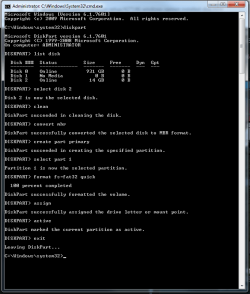
1. I cleaned up the USB like you said
Screenshot_3.png
2. I opened my Win7 iso and put the files onto the USB
3. I downloaded \efi\boot folder and put it there
4. I deleted \sources\ei.cfg
5. I changed from RAID to AHCI using this command: bcdedit /set {current} safeboot minimal
6. Changed from Legacy to UEFI
7. Disabled Fast boot
8. Removed charging cables, mouse, anything else besides USB
9. Booted and pressed F12
10. Again, freezes after "Loading Files" like I said in the beginning
 

My Computer

Computer type
PC/Desktop
OS
Windows 7 Pro x64
Where did you get the Win 7 iso?

"I changed from RAID to AHCI using this command: bcdedit /set {current} safeboot minimal"

I said to change BIOS settings from RAID to AHCI ( A laptop will probably only have AHCI)
Does it only have two options (Legacy or UEFI)? Does it say UEFI Win 8?
 

My Computers

System One System Two

  • Computer type
    PC/Desktop
    Computer Manufacturer/Model Number
    custom build
    OS
    Windows 7 HP 64
    CPU
    i5 6600K - 800MHz to 4200MHz
    Motherboard
    GA-Z170-HD3P
    Memory
    4+4G GSkill DDR4 3000
    Graphics Card(s)
    IG - Intel 530
    Monitor(s) Displays
    Samsung 226BW
    Screen Resolution
    1680x1050
    Hard Drives
    (1) -1 SM951 – 128GB M.2 AHCI PCIe SSD drive for Windows 7 and Lubuntu
    (2) -1 WD SATA 3 - 1T for Data
    (3) -1 WD SATA 3 - 1T for backup
    PSU
    Thermaltake 450W TR2 gold
    Keyboard
    Old and good Chicony mechanical keyboard
    Mouse
    Logitech mX performance - 9 buttons (had to disable some)
    Internet Speed
    500Mb/s
    Browser
    Firefox 64
    Other Info
    TinyWall firewall
  • Computer type
    Laptop
    System Manufacturer/Model Number
    Asus Q550LF
    OS
    Windows 7 Pro
    CPU
    i7-4500U 800MHz to 3.0GHz
    Motherboard
    Asus Q550LF
    Memory
    (4+4)G DDR3 1600
    Graphics Card(s)
    IG intel 4400 + NVIDIA GeForce GT 745M
    Sound Card
    Realtek
    Monitor(s) Displays
    LG Display LP156WF4-SPH1
    Screen Resolution
    1920 x 1080
    Hard Drives
    BX500 120G SSD for Windows and programs +
    1T HDD for data
    Internet Speed
    500 Mb/s
    Browser
    Firefox
    Other Info
    TinyWall firewall
I downloaded my Win7 iso file from Microsoft's website back when you had to type in your licence key.
Anyway, I fixed it. I booted in Legacy, which gave me the "Cannot install on GPT" error
So I did Shift+F10 and cleaned C-drive and converted to MBR through CMD. Then it worked, it downloaded, booted, started up. It's all working now
 

My Computer

Computer type
PC/Desktop
OS
Windows 7 Pro x64

My Computers

System One System Two

  • Computer type
    PC/Desktop
    Computer Manufacturer/Model Number
    custom build
    OS
    Windows 7 HP 64
    CPU
    i5 6600K - 800MHz to 4200MHz
    Motherboard
    GA-Z170-HD3P
    Memory
    4+4G GSkill DDR4 3000
    Graphics Card(s)
    IG - Intel 530
    Monitor(s) Displays
    Samsung 226BW
    Screen Resolution
    1680x1050
    Hard Drives
    (1) -1 SM951 – 128GB M.2 AHCI PCIe SSD drive for Windows 7 and Lubuntu
    (2) -1 WD SATA 3 - 1T for Data
    (3) -1 WD SATA 3 - 1T for backup
    PSU
    Thermaltake 450W TR2 gold
    Keyboard
    Old and good Chicony mechanical keyboard
    Mouse
    Logitech mX performance - 9 buttons (had to disable some)
    Internet Speed
    500Mb/s
    Browser
    Firefox 64
    Other Info
    TinyWall firewall
  • Computer type
    Laptop
    System Manufacturer/Model Number
    Asus Q550LF
    OS
    Windows 7 Pro
    CPU
    i7-4500U 800MHz to 3.0GHz
    Motherboard
    Asus Q550LF
    Memory
    (4+4)G DDR3 1600
    Graphics Card(s)
    IG intel 4400 + NVIDIA GeForce GT 745M
    Sound Card
    Realtek
    Monitor(s) Displays
    LG Display LP156WF4-SPH1
    Screen Resolution
    1920 x 1080
    Hard Drives
    BX500 120G SSD for Windows and programs +
    1T HDD for data
    Internet Speed
    500 Mb/s
    Browser
    Firefox
    Other Info
    TinyWall firewall
Some time in the future they'll make little programs that can write an OS to a USB device for booting. Some of these might be called Wintousb, Balena Etcher, Rufus, and Microsoft may even make their own...

Code:
https://alternativeto.net/software/etcher/

- - - Updated - - -

= sudo nerd mode =


PXE from an Android! LOL

https://hitachi-lg.com/sw/include/page/sw/nation/eng/phone/index.html?ckattempt=1

Amazon.com

Servers Ultimate - Apps on Google Play

"Dude! What kind of LAMP stack are you running? It's hela fast! Oh, it's just a Google Pixel. LOL!

All joking aside, use NTlite next time to customize and slipstream updates...
 

My Computer

Computer type
PC/Desktop
OS
Windows 7 Ultimate x64
Back
Top