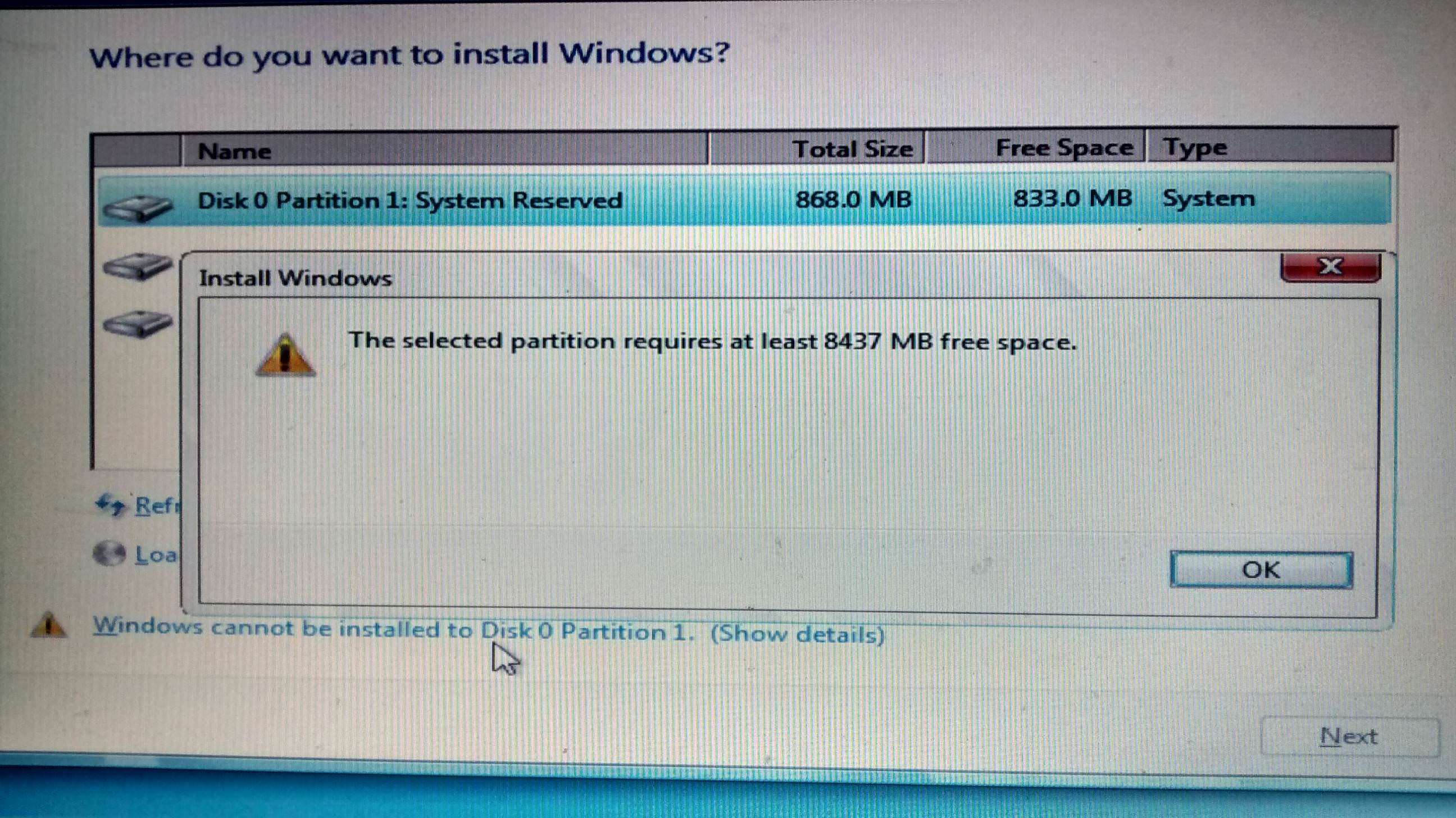
"windows cannot be installed to disk 0 partition 1"

llamaface

New member
Local time
11:14 AM
Messages
4
Hello,

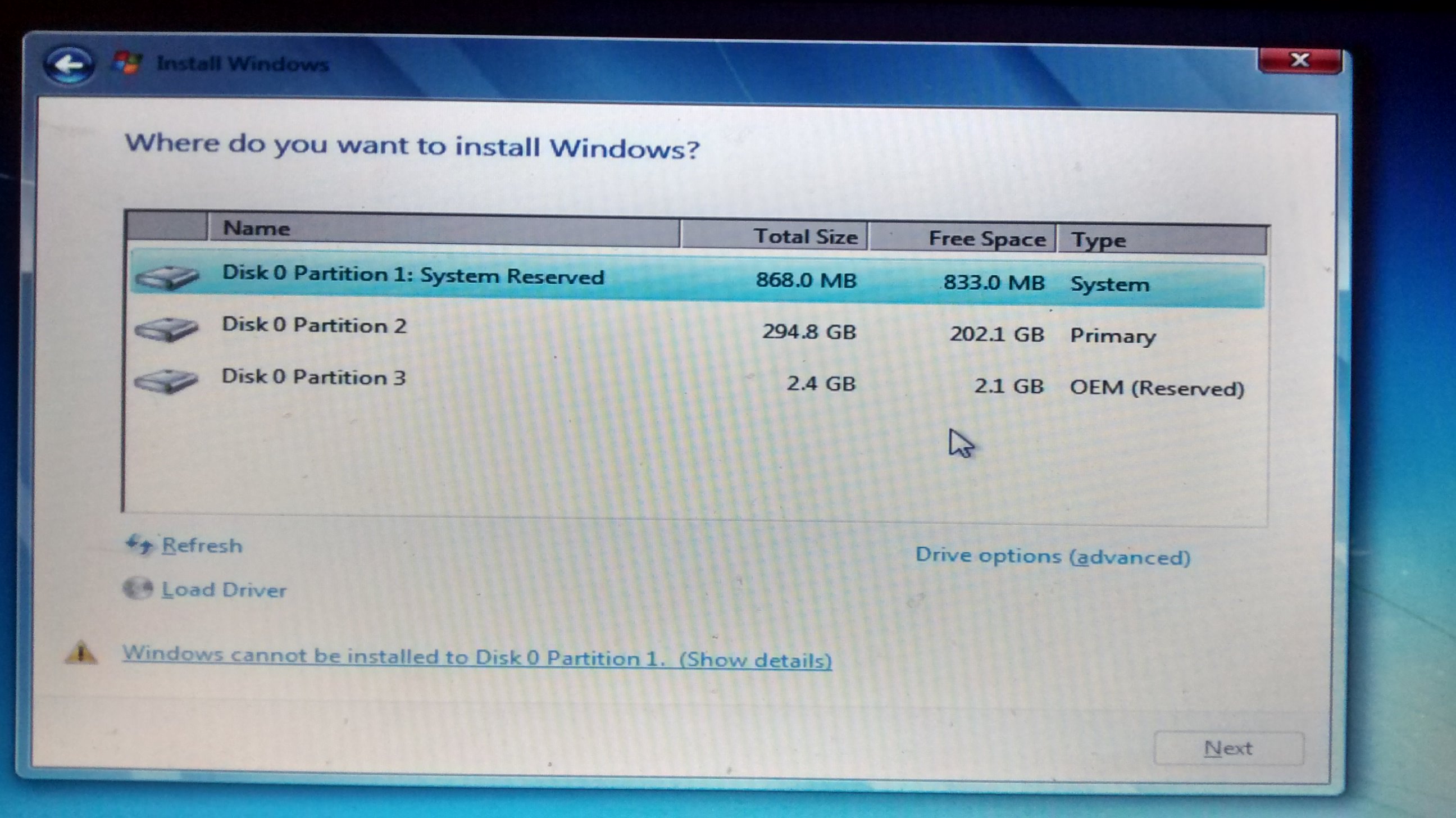
I'm in the process of doing a clean install of Windows 7 Home Premium for my Dell Latitude E5530 laptop that currently has windows 10. I was following this video "Windows 7 Formatting and Clean Installation [Tutorial] - YouTube" and ran into a problem shown in the pictures Below. What am I suppose to do in layman's terms to complete the install?
SBQOzoD.jpg
5ZXld1m.jpg
 

My Computer

Computer type
Laptop
Computer Manufacturer/Model Number
Lenovo thinkpad edge
OS
Windows 7 Ultimate 64 bit
Disk 0 Partition 2 is where all your space is, in Disk Management you can shrink the volume by about 120GB. Format the unallocated space then install to that location. That would be 120x1024=122880
 

My Computer

Computer type
Laptop
Computer Manufacturer/Model Number
HP 17-ak0xx, dv7 3173nr
OS
Win7 Home Premium x64 W10Pro&Home
CPU
A12 9720p 4+8 TurionII M520
Motherboard
HP 3839
Memory
6GB 8GB
Graphics Card(s)
R7
Monitor(s) Displays
24" sa550
Screen Resolution
1600x900 1920x1080
Mouse
Logitechx2
Internet Speed
120Mb/s down 12up
Hi llamaface,

read our tutorial
Clean Install Windows 7 - Windows 7 Help Forums

You need to delete partitions 2 & 3, (click on drive options) and then let the DVD run its course

Points to note
Are your USB ports USB3 if so you will need to import the drivers for them otherwise the install will FAIL
What is your current BIOS state EUFI will also require a different install type
Not all W10 comps have downgrade rights, do you have a valid W7 product key


Roy
 

My Computer

Computer type
PC/Desktop
Computer Manufacturer/Model Number
medionl/Aspire 6930G/acer x55a
OS
W7 home premium 32bit/W7HP 64bit/w10 tp insider ring
CPU
E5300 dual core
Motherboard
medion MS7366
Memory
3gb
Graphics Card(s)
Nvidia Geforce 7100 Nforce 630i
Monitor(s) Displays
avixc
Internet Speed
n (isp resticted to 72)
Antivirus
mse/pands
Browser
palemoon
Other Info
Belkin Fd7050 n USB using Railink RT2870 drivers, more upto date
Welcome to the Forum.

We need to know more about your hardware.
Please edit your profile with All the specs. System Info - See Your System Specs - Windows 7 Help Forums

From the partitions and size of your drive I guess that it isn't the Win 10 drive. Did you replaced the original drive?
If your computer came with Win 10, you must change some BIOS settings.
- Disable secure Boot. Some computers has it as OS= Other, some as CSM (Compatible System Mode)
- Disable Fast Boot.

Is your Win 7 installation disk on a DVD or USB flash?
 

My Computers

System One System Two

  • Computer type
    PC/Desktop
    Computer Manufacturer/Model Number
    custom build
    OS
    Windows 7 HP 64
    CPU
    i5 6600K - 800MHz to 4200MHz
    Motherboard
    GA-Z170-HD3P
    Memory
    4+4G GSkill DDR4 3000
    Graphics Card(s)
    IG - Intel 530
    Monitor(s) Displays
    Samsung 226BW
    Screen Resolution
    1680x1050
    Hard Drives
    (1) -1 SM951 – 128GB M.2 AHCI PCIe SSD drive for Windows 7 and Lubuntu
    (2) -1 WD SATA 3 - 1T for Data
    (3) -1 WD SATA 3 - 1T for backup
    PSU
    Thermaltake 450W TR2 gold
    Keyboard
    Old and good Chicony mechanical keyboard
    Mouse
    Logitech mX performance - 9 buttons (had to disable some)
    Internet Speed
    500Mb/s
    Browser
    Firefox 64
    Other Info
    TinyWall firewall
  • Computer type
    Laptop
    System Manufacturer/Model Number
    Asus Q550LF
    OS
    Windows 7 Pro
    CPU
    i7-4500U 800MHz to 3.0GHz
    Motherboard
    Asus Q550LF
    Memory
    (4+4)G DDR3 1600
    Graphics Card(s)
    IG intel 4400 + NVIDIA GeForce GT 745M
    Sound Card
    Realtek
    Monitor(s) Displays
    LG Display LP156WF4-SPH1
    Screen Resolution
    1920 x 1080
    Hard Drives
    BX500 120G SSD for Windows and programs +
    1T HDD for data
    Internet Speed
    500 Mb/s
    Browser
    Firefox
    Other Info
    TinyWall firewall
Welcome to the Forum.

We need to know more about your hardware.
Please edit your profile with All the specs. System Info - See Your System Specs - Windows 7 Help Forums

From the partitions and size of your drive I guess that it isn't the Win 10 drive. Did you replaced the original drive?
If your computer came with Win 10, you must change some BIOS settings.
- Disable secure Boot. Some computers has it as OS= Other, some as CSM (Compatible System Mode)
- Disable Fast Boot.

Is your Win 7 installation disk on a DVD or USB flash?

The laptop originally had windows 7. I'm not sure what type though since my mom got it from a thrift shop that refurbished it. Also, the Win 7 installation is on a DVD.
 

My Computer

Computer type
Laptop
Computer Manufacturer/Model Number
Lenovo thinkpad edge
OS
Windows 7 Ultimate 64 bit
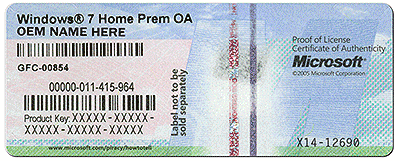
If it came originally with Windows 7 it should have one of these somewhere on the computer.
Maybe in the battery compartment.

Coa sticker.gif

Jack
 

My Computer

Computer type
PC/Desktop
Computer Manufacturer/Model Number
Home made Desktop
OS
Windows 10 Pro. 64/ version 1709 Windows 7 Pro/64
CPU
Intel i7-6800K @ 4.3
Motherboard
ASUS X-99 Deluxe II
Memory
Corsair Platinum 16 gig @2400
Graphics Card(s)
EVGA GTX 1070 OC
Monitor(s) Displays
Asus 27" LED LCD/VE278Q
Screen Resolution
1920-1080 or 1280-720 HDMI
Hard Drives
INTEL SSD 730-240 Gb Sata 3.0/
PSU
EVGA Platium 1200W
Case
Phanteks Luxe Tempered Glass 8 fans/ one radiator
Cooling
XSPC/ Water Cooled CPU
Keyboard
Das 4 Professional
Mouse
Logitech M705/MX Anywhere 2-S
Internet Speed
100 mbits
Antivirus
Microsoft Security Essentials/ Malwarebytes Premium 3.0/ SAS
Browser
I.E. 11 default/Firefox/ ISP Time Warner Cable/Spectrum
Other Info
LG BluRay Burner/
Sound system-KLipsch-THX/
Icy Dock ssd Hot Swap bays.
Hi llamaface,

read our tutorial
Clean Install Windows 7 - Windows 7 Help Forums

You need to delete partitions 2 & 3, (click on drive options) and then let the DVD run its course

Points to note
Are your USB ports USB3 if so you will need to import the drivers for them otherwise the install will FAIL
What is your current BIOS state EUFI will also require a different install type
Not all W10 comps have downgrade rights, do you have a valid W7 product key


Roy
What are the chances that something can go wrong after deleting 2&3?

Are your USB ports USB3?
Yes they are. How do I import them and where do I import them to?

What is your current BIOS state?
The system information says the BIOS Mode is Legacy

Do you have a valid W7 product key?
Yes, I bought a new one.

Sorry for the late reply BTW.
 

My Computer

Computer type
Laptop
Computer Manufacturer/Model Number
Lenovo thinkpad edge
OS
Windows 7 Ultimate 64 bit
Hi

Dell actually provide an excellent recovery tutorial and download options, follow this link
Reinstall Microsoft Windows


notes
provided the service tag no: is picked up by the tool you may not even need that purchased key.
It may automatically pick up the pre-installed key, or you can use the one on the COA sticker

Looking at the homepage for that model the USB3 drivers will be included
LEAVE the Bios as legacy.

AS IT SAYS IN THE TUTORIAL
ALL USER DATA WILL BE LOST, (unless backed-up)

If you use another or the Dell recovery options drives 2 and 3 will be over written, no worries there.


Roy
 

My Computer

Computer type
PC/Desktop
Computer Manufacturer/Model Number
medionl/Aspire 6930G/acer x55a
OS
W7 home premium 32bit/W7HP 64bit/w10 tp insider ring
CPU
E5300 dual core
Motherboard
medion MS7366
Memory
3gb
Graphics Card(s)
Nvidia Geforce 7100 Nforce 630i
Monitor(s) Displays
avixc
Internet Speed
n (isp resticted to 72)
Antivirus
mse/pands
Browser
palemoon
Other Info
Belkin Fd7050 n USB using Railink RT2870 drivers, more upto date
If you recently bought a Win 7 ultimate, there are big chances it's pirate.
My suggestion is to install Win 7 HP using the COA sticker key. If you don't have a Win 7 HP SP1 disk, we can send you a M$ link so you can download it.

To install you need to boot from Win 7 installation disk, go to install - Drive options (advanced) and delete all 3 partitions (everything on disk will be erased) - Create new partition. It will create one small RAW partition (120M) and one big NTFS partition. Choose the big NTFS and proceed.
Clean Install Windows 7 - Windows 7 Help Forums

Did you replaced the original drive?
Is your Win 7 installation disk on a DVD or USB flash?

You didn't gave us ALL your hardware specs as Memory, CPU etc.
When you booted from the Win 7 disk, did it asked for a driver on CD / DVD?

For the updates use the offline updates MS releases SP2 for Windows 7 - Windows 7 Help Forums
 

My Computers

System One System Two

  • Computer type
    PC/Desktop
    Computer Manufacturer/Model Number
    custom build
    OS
    Windows 7 HP 64
    CPU
    i5 6600K - 800MHz to 4200MHz
    Motherboard
    GA-Z170-HD3P
    Memory
    4+4G GSkill DDR4 3000
    Graphics Card(s)
    IG - Intel 530
    Monitor(s) Displays
    Samsung 226BW
    Screen Resolution
    1680x1050
    Hard Drives
    (1) -1 SM951 – 128GB M.2 AHCI PCIe SSD drive for Windows 7 and Lubuntu
    (2) -1 WD SATA 3 - 1T for Data
    (3) -1 WD SATA 3 - 1T for backup
    PSU
    Thermaltake 450W TR2 gold
    Keyboard
    Old and good Chicony mechanical keyboard
    Mouse
    Logitech mX performance - 9 buttons (had to disable some)
    Internet Speed
    500Mb/s
    Browser
    Firefox 64
    Other Info
    TinyWall firewall
  • Computer type
    Laptop
    System Manufacturer/Model Number
    Asus Q550LF
    OS
    Windows 7 Pro
    CPU
    i7-4500U 800MHz to 3.0GHz
    Motherboard
    Asus Q550LF
    Memory
    (4+4)G DDR3 1600
    Graphics Card(s)
    IG intel 4400 + NVIDIA GeForce GT 745M
    Sound Card
    Realtek
    Monitor(s) Displays
    LG Display LP156WF4-SPH1
    Screen Resolution
    1920 x 1080
    Hard Drives
    BX500 120G SSD for Windows and programs +
    1T HDD for data
    Internet Speed
    500 Mb/s
    Browser
    Firefox
    Other Info
    TinyWall firewall
It may have been said but, if you have no data you need on that hard drive, then delete ALL the partitions so you are left with nothing but unallocated space, after that, simply click next.

The install will then begin.

You should get your network drivers on a flash drive so you have them to install on the new W7 install and get online to get the rest of your drivers, laptops are very finicky :)

But all your drivers can be found at Dell.

Just follow the Clean Install tutorial that was posted and you`ll be fine.
 

My Computer

Computer type
PC/Desktop
Computer Manufacturer/Model Number
Skylake Special #666
OS
Windows 10 Pro x64
CPU
Intel Core i7 6700K
Motherboard
Asus Sabertooth Z170 Mark 1
Memory
GSkill TridentZ RGB 16GB 3600 16-16-16-36
Graphics Card(s)
EVGA GTX 980 Ti SC x2
Sound Card
Realtek High Definition
Monitor(s) Displays
AOC G2460PG
Screen Resolution
1920 x 1080 144Hz
Hard Drives
Samsung 860 Pro 256GB, Seagate Barracuda 4TB x2
PSU
EVGA 1000 P2, EVGA White Custom Braided Cables
Case
Corsair Vengeance C70 Gunmetal Black
Cooling
Corsair H100i v2, Corsair ML120 x2, Thermal Grizzly Kryonaut
Keyboard
Logitech G910 Orion Spectrum
Mouse
Logitech G700s
Internet Speed
Verizon Fios Quantum Gateway 75/75
Antivirus
Windows Defender, Malwarebytes Free 3.8.3
Browser
Chrome
Other Info
Corsair SP120 x4, LG Blu-ray Drive, Durabrand HT-395 100 Watt Dolby Digital Amp, Corsair H2100 Wireless 7.1 Headset
Back
Top