Windows cannot find %windir%

pawell

New member
Local time
3:13 PM
Messages
7
Hi!

I'm distraught. I have a problem and I can't resolve it. ;( It's computer in a firm and I can't reinstall Windows.

When I type in cmd: echo %path% -> the answer is: %path%.

When I try check environmment variables (in Advanced System Settings) I have an error "Windows cannot find '%windir%\system32\systempropertiesadvances.exe'. Make sure you typed name correctly, and the try again."


When I go to C:\WINDOWS\system32\SystemPropertiesAdvanced.exe, I have:

Path -> %CommonProgramFiles%\Microsoft Shared\Windows Live;%SystemRoot%\system32;%SystemRoot%;%SystemRoot%\System32\Wbem;%SYSTEMROOT%\System32\WindowsPowerShell\v1.0\

windir -> %SystemRoot%


I beg You, please help me. It's very important.


P.S. Sorry for my English.

Best regards
 

My Computer

Computer type
PC/Desktop
OS
Windows 7 64 bit
Hello Pawell, and welcome to Seven Forums.

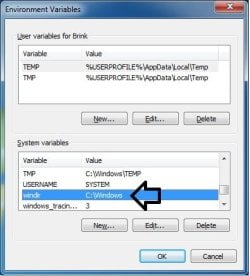
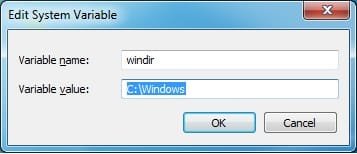
See if using this below for windir instead may work better.

windir -> C:\Windows


windir.jpg windir-2.jpg

Hope this helps, :)
Shawn
 

My Computer

Computer type
PC/Desktop
Computer Manufacturer/Model Number
Self built custom
OS
64-bit Windows 11 Pro for Workstations
CPU
Intel i7-8700K OC'd to 5 GHz
Motherboard
ASUS ROG Maximus XI Formula Z390
Memory
64 GB (4x16GB) G.SKILL TridentZ RGB DDR4 3600 MHz
Graphics Card(s)
ASUS ROG-STRIX-GTX1080TI-O11G-GAMING
Sound Card
Integrated
Monitor(s) Displays
2 x Samsung Odyssey G7 27"
Screen Resolution
2560x1440
Hard Drives
1TB Samsung 990 PRO M.2,
4TB Samsung 990 PRO PRO M.2,
TerraMaster F8 SSD Plus NAS
PSU
Seasonic Prime Titanium 850W
Case
Thermaltake Core P3
Cooling
Corsair Hydro H115i
Keyboard
Logitech wireless K800
Mouse
Logitech MX Master 4
Internet Speed
2 Gb/s Download and 100 Mb/s Upload
Antivirus
Malwarebyte Anti-Malware Premium
Browser
Google Chrome
Other Info
Logitech Z625 speaker system,
Logitech BRIO 4K Pro webcam,
HP Color LaserJet Pro MFP M477fdn,
APC SMART-UPS RT 1000 XL - SURT1000XLI,
Galaxy S23 Plus phone
I found someones problem the same as yours

"I was able to enter the default environments back in to the system variable path while running under safe mode"

EDIT: Shawn replied quicker and seems to be the better answer :)
 

My Computer

Computer type
PC/Desktop
Computer Manufacturer/Model Number
Dell / Lenovo g550
OS
Windows 7 Ultimate 64-bit
CPU
Intel Core 2 Duo E6550 @2.33GHz
Motherboard
foxconn g33m02
Memory
4GB DDR"
Graphics Card(s)
NVIDIA GeForce 8600 GS
Hard Drives
HDD 1 = 150GB
HDD 2 = 1.5TB
PSU
450W
Cooling
Stock fan
Internet Speed
12Mb
Antivirus
AVG Internet Security
Hello Pawell, and welcome to Seven Forums.

See if using this below for windir instead may work better.

windir -> C:\Windows


Hope this helps, :)
Shawn

Thank You for You answer. But I it hasn't helped me. :( I jave windir as C:\Windows and I still have a problem.
I noticed that when Windows is starting I can open window with Advanced System Settings but after while it is imposible. :(
 

My Computer

Computer type
PC/Desktop
OS
Windows 7 64 bit
I found someones problem the same as yours

"I was able to enter the default environments back in to the system variable path while running under safe mode"


Hi! Thank You but I can modify system variables... I have default path in Path variable. Windir is OK...
 

My Computer

Computer type
PC/Desktop
OS
Windows 7 64 bit
The "path" for mine is, as follows:

Code:
%SystemRoot%\system32;%SystemRoot%;%SystemRoot%\System32\Wbem;%SYSTEMROOT%\System32\WindowsPowerShell\v1.0\

Maybe you can edit yours
 

My Computer

Computer type
PC/Desktop
Computer Manufacturer/Model Number
Dell / Lenovo g550
OS
Windows 7 Ultimate 64-bit
CPU
Intel Core 2 Duo E6550 @2.33GHz
Motherboard
foxconn g33m02
Memory
4GB DDR"
Graphics Card(s)
NVIDIA GeForce 8600 GS
Hard Drives
HDD 1 = 150GB
HDD 2 = 1.5TB
PSU
450W
Cooling
Stock fan
Internet Speed
12Mb
Antivirus
AVG Internet Security
benjy206, unfortunately it hasn't help me. :(
 

My Computer

Computer type
PC/Desktop
OS
Windows 7 64 bit

My Computer

Computer type
PC/Desktop
Computer Manufacturer/Model Number
Dell / Lenovo g550
OS
Windows 7 Ultimate 64-bit
CPU
Intel Core 2 Duo E6550 @2.33GHz
Motherboard
foxconn g33m02
Memory
4GB DDR"
Graphics Card(s)
NVIDIA GeForce 8600 GS
Hard Drives
HDD 1 = 150GB
HDD 2 = 1.5TB
PSU
450W
Cooling
Stock fan
Internet Speed
12Mb
Antivirus
AVG Internet Security
It's really important but I can't restore system. It's imposible... It's not my computer.
 

My Computer

Computer type
PC/Desktop
OS
Windows 7 64 bit
Very strange. Did you try a restart after entering that path.
 

My Computer

Computer type
PC/Desktop
Computer Manufacturer/Model Number
Dell / Lenovo g550
OS
Windows 7 Ultimate 64-bit
CPU
Intel Core 2 Duo E6550 @2.33GHz
Motherboard
foxconn g33m02
Memory
4GB DDR"
Graphics Card(s)
NVIDIA GeForce 8600 GS
Hard Drives
HDD 1 = 150GB
HDD 2 = 1.5TB
PSU
450W
Cooling
Stock fan
Internet Speed
12Mb
Antivirus
AVG Internet Security
It's connected with access.... ! When i open cmd as user and I wrote: echo %windir% it gives %windir%...... :( BUT!!! If I open cmd as Admin (Run as Administrator) it works!!! echo %windir% -> C:\Windows....

It seems something like environment variables need admin access to use them... or something like that...

The same is when I type "notepad" in cmd... If it normal cmd it writes: "notepad is not recognize" when i run as Administrator it opens Notepad.


I can't open Advanced system settings as Administrator because there isn't option to right-click....


Could You help me now???
 

My Computer

Computer type
PC/Desktop
OS
Windows 7 64 bit
(Yes benjy206, I restart computer after every operation)
 

My Computer

Computer type
PC/Desktop
OS
Windows 7 64 bit

My Computer

Computer type
PC/Desktop
Computer Manufacturer/Model Number
Dell / Lenovo g550
OS
Windows 7 Ultimate 64-bit
CPU
Intel Core 2 Duo E6550 @2.33GHz
Motherboard
foxconn g33m02
Memory
4GB DDR"
Graphics Card(s)
NVIDIA GeForce 8600 GS
Hard Drives
HDD 1 = 150GB
HDD 2 = 1.5TB
PSU
450W
Cooling
Stock fan
Internet Speed
12Mb
Antivirus
AVG Internet Security
Back
Top