
Solved Windows Defender nag after Windows update

bawldiggle

GrayGhost2 ret.
Pro User
VIP
Local time
12:12 AM
Messages
895
Location
Australia
To day I manually updated Windows 7. Bypassed optional updates. No selective updates
With every reboot and cold boot -- I get the Windows Defender nag :cry:
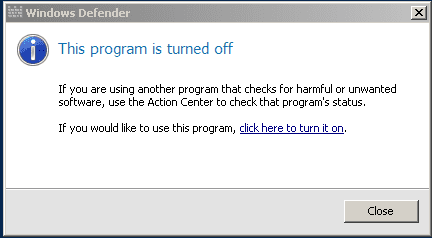
windows-defender-alert.png

How do I stop this nag screen recurring?
This is the second machine that has this gremlin.
First was a Win7 x64 that is now in mothballs until ... one day !! :banghead:
Would appreciate any help :)
 
Last edited:

My Computer My Computer

Computer type
PC/Desktop
Computer Manufacturer/Model Number
Toshiba, Lenovo (laptops) + 4 rigs
OS
XP Pro (x86) | 7 HP (x86) & (x64) | 7 Pro (x64)

My Computer My Computer

Computer type
PC/Desktop
Computer Manufacturer/Model Number
Home made Desktop
OS
Windows 10 Pro. 64/ version 1709 Windows 7 Pro/64
CPU
Intel i7-6800K @ 4.3
Motherboard
ASUS X-99 Deluxe II
Memory
Corsair Platinum 16 gig @2400
Graphics Card(s)
EVGA GTX 1070 OC
Monitor(s) Displays
Asus 27" LED LCD/VE278Q
Screen Resolution
1920-1080 or 1280-720 HDMI
Hard Drives
INTEL SSD 730-240 Gb Sata 3.0/
PSU
EVGA Platium 1200W
Case
Phanteks Luxe Tempered Glass 8 fans/ one radiator
Cooling
XSPC/ Water Cooled CPU
Keyboard
Das 4 Professional
Mouse
Logitech M705/MX Anywhere 2-S
Internet Speed
100 mbits
Antivirus
Microsoft Security Essentials/ Malwarebytes Premium 3.0/ SAS
Browser
I.E. 11 default/Firefox/ ISP Time Warner Cable/Spectrum
Other Info
LG BluRay Burner/
Sound system-KLipsch-THX/
Icy Dock ssd Hot Swap bays.
Hi Layback Bear
I have 5 PCs + 3 laptops
- all business machines, no games
- 2 laptops + 1 PC already as threads in sevenforums.com
- impossible to list all in my User-CP

Current problem laptop is ...

Computer Type:= Laptop
Manufacturer:= Toshiba Satellite C665
OS:= Windows 7 Home Premium (32-bit), sp1 (Build 7601)
CPU:= Intel(R) Core(TM) i5-2410M CPU @ 2.30GHz
Motherboard:= TOSHIBA Portable PC
Memory:= 2,806 MB
Graphics:= NVIDIA GeForce 315M *
Sound Card:= Speakers (Conexant SmartAudio H |
Monitors:= x1, Generic PnP
Screen Resolution:= 1366 X 768 - 32 bit
Hard Drives:= C: 585.4GB
PSU:= n/a
Case:= Toshiba Satellite
Cooling:= default fan
Keyboard:= default + Logitech K260
Mouse:= default pad + Logitech M210
Internet Speed:= ADSL2
Antivirus:= Bitdefender Internet Security 2013
Browser:= IE-9.10, PaleMoon, Firefox 23.0.1
Others:= USB Safely Remove, Metapad, ClipX,
7Zip, Classic Shell Start, FileSearchEX, KeyboardLEDS, CapsLock,
MalwareBytes, MyDefrag, PostBox, ClipX, MS Word Viewer.
 
Last edited:

My Computer My Computer

Computer type
PC/Desktop
Computer Manufacturer/Model Number
Toshiba, Lenovo (laptops) + 4 rigs
OS
XP Pro (x86) | 7 HP (x86) & (x64) | 7 Pro (x64)
With that many computer I understand. Thanks for posting the information.
Just going by my memory and reading many post.
When you installed Bitdefender it should of turned off Windows Defender.
The notification popup should of stopped then.
Sorry but I'm don't have any knowledge using Bitdefender.
Some members use it and hopefully they will be able to help.

You might find some help by doing this.
Right click on Start Orb and select Properties then go to Notification area and select Customize.
You might find something there listing Defender. It's a maybe at best.

You might be able to find something here.

http://www.sevenforums.com/gtsearch...&cof=FORID:9&ie=UTF-8&q=bitdefender&sa=Search
 

My Computer My Computer

Computer type
PC/Desktop
Computer Manufacturer/Model Number
Home made Desktop
OS
Windows 10 Pro. 64/ version 1709 Windows 7 Pro/64
CPU
Intel i7-6800K @ 4.3
Motherboard
ASUS X-99 Deluxe II
Memory
Corsair Platinum 16 gig @2400
Graphics Card(s)
EVGA GTX 1070 OC
Monitor(s) Displays
Asus 27" LED LCD/VE278Q
Screen Resolution
1920-1080 or 1280-720 HDMI
Hard Drives
INTEL SSD 730-240 Gb Sata 3.0/
PSU
EVGA Platium 1200W
Case
Phanteks Luxe Tempered Glass 8 fans/ one radiator
Cooling
XSPC/ Water Cooled CPU
Keyboard
Das 4 Professional
Mouse
Logitech M705/MX Anywhere 2-S
Internet Speed
100 mbits
Antivirus
Microsoft Security Essentials/ Malwarebytes Premium 3.0/ SAS
Browser
I.E. 11 default/Firefox/ ISP Time Warner Cable/Spectrum
Other Info
LG BluRay Burner/
Sound system-KLipsch-THX/
Icy Dock ssd Hot Swap bays.
Thanks "Layback Bear" for your reponse, :)

I am still stuck.
 

My Computer My Computer

Computer type
PC/Desktop
Computer Manufacturer/Model Number
Toshiba, Lenovo (laptops) + 4 rigs
OS
XP Pro (x86) | 7 HP (x86) & (x64) | 7 Pro (x64)
Today phoned local Bitdefender phone support (Australia)
They suggested I do a bitdefender Repair (which I did) plus 250 MB update (after all my diligent updates every day!!)
   Note
Bitdefender tech ... should fix "Windows Defender" nag screen


No! It did not! :banghead:

Windows Defender nag screen still opens with every reboot and cold-boot :mad:

Would appreciate any help
Desperate and grovelling :confused:
 

My Computer My Computer

Computer type
PC/Desktop
Computer Manufacturer/Model Number
Toshiba, Lenovo (laptops) + 4 rigs
OS
XP Pro (x86) | 7 HP (x86) & (x64) | 7 Pro (x64)
Did you look at Action Center / Security ?
Does it show Bitdefender (or any program) is turned on for "Spyware and unwanted software protection"?
 

My Computer My Computer

Computer type
PC/Desktop
Computer Manufacturer/Model Number
home built
OS
Multi-Boot W7_Pro_x64 W8.1_Pro_x64 W10_Pro_x64 +Linux_VMs +Chromium_VM
CPU
AMD Athlon II x4 620
Motherboard
Gigabyte GA-MA785G-UD3H
Memory
6GB GSkill DDR2 800
Graphics Card(s)
AMD 4670 GPU + AMD 4200 IGP
Sound Card
on board Realtek ALC889A
Monitor(s) Displays
RCA 40" LCD TV, Insignia 32" LCD TV, HP 15" LCD monitor
Screen Resolution
1680 x 1050
Hard Drives
OCZ Vertex 3 120GB,
Samsung F3 1TB (3),
Several others - WD, Seagate, Hitachi, ...
PSU
Corsair 500 W
Case
Rosewill mid tower
Cooling
CM 90mm rifle
Keyboard
Gyration wireless, Logitech wireless, Dell USB wired
Mouse
Gyration wireless, Logitech wireless, V7 USB wired
Internet Speed
Spectrum - 100Mbps D / 10Mbps U
Antivirus
Avast, MBAM3, EMET, WinPatrol
Browser
Pale Moon, Firefox, IE
Other Info
2 multi-boot PC's
Mainly HTPC/Office/Gen purpose (no gaming).
Trendnet USB KVM.
LG DVD burner/Blue Ray Player.
Tray system for removable SATA backup drives.

Not currently OCd, under-volted.
I use Hybrid sleep, rarely re-boot or shutdown.

Hauppauge HD-PVR, Avermedia PCIe TV Tuner, Hauppauge PCI TV Tuner.
Thank you "DavidW7ncus" for your response. :)

Here is the current settings in my CP > Action Centre > Security
(I have abbreviated some "strings"

   Note
• Network firewall:= ON
- Bitdefender Firewall reports it is ON
• Windows Update:= Off
- I prefer manual updates that I control
• Virus Protection:=On
- Bitdefender AntiVirus reports it is ON + up to date
• Spyware and unwanted software protection:= On
- Bitdefender Aintspyware reports it is ON
• Internet security settings:= On
- at recommended levels
• User Account Control:= On
- will notify when changes are attempted
• Network Access Protection:= Off
- not running

** Laptop shares a printer via WiFi + controls Sonos speakers through Sonos router

I am still learning! :)
 

My Computer My Computer

Computer type
PC/Desktop
Computer Manufacturer/Model Number
Toshiba, Lenovo (laptops) + 4 rigs
OS
XP Pro (x86) | 7 HP (x86) & (x64) | 7 Pro (x64)
That looks OK to me.
The only other thing I can think of to check is see how the Windows Defender service is set.

I'm on a system with Windows Defender turned off, and the Windows Defender service is set to Manual startup (and it's not running).
 

My Computer My Computer

Computer type
PC/Desktop
Computer Manufacturer/Model Number
home built
OS
Multi-Boot W7_Pro_x64 W8.1_Pro_x64 W10_Pro_x64 +Linux_VMs +Chromium_VM
CPU
AMD Athlon II x4 620
Motherboard
Gigabyte GA-MA785G-UD3H
Memory
6GB GSkill DDR2 800
Graphics Card(s)
AMD 4670 GPU + AMD 4200 IGP
Sound Card
on board Realtek ALC889A
Monitor(s) Displays
RCA 40" LCD TV, Insignia 32" LCD TV, HP 15" LCD monitor
Screen Resolution
1680 x 1050
Hard Drives
OCZ Vertex 3 120GB,
Samsung F3 1TB (3),
Several others - WD, Seagate, Hitachi, ...
PSU
Corsair 500 W
Case
Rosewill mid tower
Cooling
CM 90mm rifle
Keyboard
Gyration wireless, Logitech wireless, Dell USB wired
Mouse
Gyration wireless, Logitech wireless, V7 USB wired
Internet Speed
Spectrum - 100Mbps D / 10Mbps U
Antivirus
Avast, MBAM3, EMET, WinPatrol
Browser
Pale Moon, Firefox, IE
Other Info
2 multi-boot PC's
Mainly HTPC/Office/Gen purpose (no gaming).
Trendnet USB KVM.
LG DVD burner/Blue Ray Player.
Tray system for removable SATA backup drives.

Not currently OCd, under-volted.
I use Hybrid sleep, rarely re-boot or shutdown.

Hauppauge HD-PVR, Avermedia PCIe TV Tuner, Hauppauge PCI TV Tuner.
If your WD is disabled and the WD service is not running and you still get this nag, post back.
I've got another idea - you may or may not like it ... :cool:
 

My Computer My Computer

Computer type
PC/Desktop
Computer Manufacturer/Model Number
home built
OS
Multi-Boot W7_Pro_x64 W8.1_Pro_x64 W10_Pro_x64 +Linux_VMs +Chromium_VM
CPU
AMD Athlon II x4 620
Motherboard
Gigabyte GA-MA785G-UD3H
Memory
6GB GSkill DDR2 800
Graphics Card(s)
AMD 4670 GPU + AMD 4200 IGP
Sound Card
on board Realtek ALC889A
Monitor(s) Displays
RCA 40" LCD TV, Insignia 32" LCD TV, HP 15" LCD monitor
Screen Resolution
1680 x 1050
Hard Drives
OCZ Vertex 3 120GB,
Samsung F3 1TB (3),
Several others - WD, Seagate, Hitachi, ...
PSU
Corsair 500 W
Case
Rosewill mid tower
Cooling
CM 90mm rifle
Keyboard
Gyration wireless, Logitech wireless, Dell USB wired
Mouse
Gyration wireless, Logitech wireless, V7 USB wired
Internet Speed
Spectrum - 100Mbps D / 10Mbps U
Antivirus
Avast, MBAM3, EMET, WinPatrol
Browser
Pale Moon, Firefox, IE
Other Info
2 multi-boot PC's
Mainly HTPC/Office/Gen purpose (no gaming).
Trendnet USB KVM.
LG DVD burner/Blue Ray Player.
Tray system for removable SATA backup drives.

Not currently OCd, under-volted.
I use Hybrid sleep, rarely re-boot or shutdown.

Hauppauge HD-PVR, Avermedia PCIe TV Tuner, Hauppauge PCI TV Tuner.
Solution

Thank you 'DavidW7ncus' for your generosity of time. :D

I tracked down a solution, via Bitdefender.com forum

SOLUTION:
Two steps
1. Services Setting:-
Start > Run:= services.msc
Services (dialog) > Services (Local)
- Name field can be sorted A-Z or Z-A ... by clicking the "Name" header
Scroll down to ... "Windows Defender"
RClick > Properties
Windows Defender Properties (Local Computer) ... dialog
General (tab)
Startup type:= Disabled ... selected from drop down list

2. CCleaner
Open CCleaner ... I use installed free version
Tools (icon)
"Startup" mode (click) ... under "Uninstall"
Startup (mode)
Windows (tab)
- scroll down to "Windows Defender" > RClick > Disable
Close CCleaner
Reboot
- and you are done
 
Last edited:

My Computer My Computer

Computer type
PC/Desktop
Computer Manufacturer/Model Number
Toshiba, Lenovo (laptops) + 4 rigs
OS
XP Pro (x86) | 7 HP (x86) & (x64) | 7 Pro (x64)
Great, glad to hear you have it sorted!
:)
 

My Computer My Computer

Computer type
PC/Desktop
Computer Manufacturer/Model Number
home built
OS
Multi-Boot W7_Pro_x64 W8.1_Pro_x64 W10_Pro_x64 +Linux_VMs +Chromium_VM
CPU
AMD Athlon II x4 620
Motherboard
Gigabyte GA-MA785G-UD3H
Memory
6GB GSkill DDR2 800
Graphics Card(s)
AMD 4670 GPU + AMD 4200 IGP
Sound Card
on board Realtek ALC889A
Monitor(s) Displays
RCA 40" LCD TV, Insignia 32" LCD TV, HP 15" LCD monitor
Screen Resolution
1680 x 1050
Hard Drives
OCZ Vertex 3 120GB,
Samsung F3 1TB (3),
Several others - WD, Seagate, Hitachi, ...
PSU
Corsair 500 W
Case
Rosewill mid tower
Cooling
CM 90mm rifle
Keyboard
Gyration wireless, Logitech wireless, Dell USB wired
Mouse
Gyration wireless, Logitech wireless, V7 USB wired
Internet Speed
Spectrum - 100Mbps D / 10Mbps U
Antivirus
Avast, MBAM3, EMET, WinPatrol
Browser
Pale Moon, Firefox, IE
Other Info
2 multi-boot PC's
Mainly HTPC/Office/Gen purpose (no gaming).
Trendnet USB KVM.
LG DVD burner/Blue Ray Player.
Tray system for removable SATA backup drives.

Not currently OCd, under-volted.
I use Hybrid sleep, rarely re-boot or shutdown.

Hauppauge HD-PVR, Avermedia PCIe TV Tuner, Hauppauge PCI TV Tuner.
Back
Top