
Windows Defender opening up problem

Darksky40

New member
Local time
9:47 AM
Messages
39
I have Windows Defender which was working it scans for viruses, etc and it has started to fail to open up. When I click on the flag at the bottom of the screen it says 1 message says Windows defender needs to scan your computer with a message saying Windows defender This program is turned off if you are using another program that checks for harmful or unwanted software use the Action Centre to check that program's status. If you would like to use this program, click here to turn it on (example picture) and when I click on to that I get another message saying this program is blocked by group policy. For more information, contract your system administration. (Error code 0x800704ec) (example picture) Can anyone identify what has gone wrong and how do I get windows defender up and running again properly? Is it because of my other protection avast?
 

Attachments
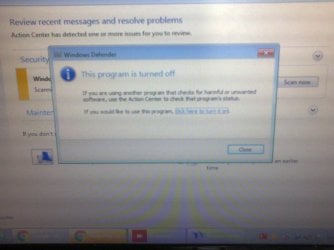
  • Window Defender 1.jpg
    Window Defender 1.jpg
    137.7 KB · Views: 0
  • Window Defender 2.jpg
    Window Defender 2.jpg
    97.9 KB · Views: 1

My Computer

Computer type
Laptop
Computer Manufacturer/Model Number
Samsung N-145
OS
Windows 7 32 bit
CPU
Intel(R) Atom(TM) CPU N455 @ 1.66GHz
Motherboard
SAMSUNG ELECTRONICS CO., LTD. N250P/N145P
Memory
1.00 GB
Graphics Card(s)
(1) Intel(R) Graphics Media Accelerator 3150 (2) Intel(R)
Sound Card
Realtek High Definition Audio
Mouse
Logitech B100
Antivirus
Avast Internet Security
Other Info
Vodafone Dongle Pay as you go sim
Hi,
Unless your system spec's are out of date it shows you use Norton and which Windows defender would be rightfully disabled.
 

My Computer

Computer type
PC/Desktop
Computer Manufacturer/Model Number
Custom assembled by me :}
OS
Win-7-Pro64bit 7-H-Prem-64bit
CPU
i7-5930K 2nd i9-9940x both water blocked VRM's too
Motherboard
ASUS SABERTOOTH X99 2nd ASUS x299 Apex
Memory
Trident-z 3200C14 2nd Trident-z 3600C16
Graphics Card(s)
EVGA 1080ti ftw3 2nd Titan Xp both water blocked
Sound Card
Built-in Realtek
Monitor(s) Displays
1-AOC G2460PG 24"G-Sync 144Hz/ 2nd 1-ASUS VG248QE 24" 144Hz
Screen Resolution
1920 x 1080 144Hz
Hard Drives
2-Samsung M.2 Evo & Evo Plus
2-Samsung 850 EVO 500GB SSD's/ 3-2.5 W.D. Black 1tb-&3-1tb/3-3.5 WD Black 1tb hdd's
PSU
EVGA SuperNOVA 1000-P2 2nd 1200-P2
Case
2-Corsair Obsidian Series 450D Black ATX Mid Tower
Cooling
Custom water loops
Keyboard
Logitech G710+/ 2nd Logitech G910
Mouse
2-RedDragon M901 Perdition 16400 dpi Gaming mouse = wired
Internet Speed
Comcast Ping 19ms 89.31mbps download speed 6.12mbps upload
Antivirus
Malwarebytes Pro/ Superantispyware Pro
Browser
FireFox & Pale moon
Other Info
2nd ASUS X299 Apex/Intel i9-9940x with Custom water loop/7H-Prem-x64/Corsair 450D case/Ram Trident-z 3600C16 4x8gb / Samsung970Evo plus 500gb SSD/Dual ssd EZ swap evo/PSU EVGA SuperNova 1200w-P2 80+Platinum/GPU Titan Xp /8-ML-140 on push-pull on 2-280GTX rads
Hi:

Yes, @ThrashZone is correct: most of the major 3rd-party AVs automatically disable WD, to prevent conflicts, clashes and slow-downs. So that is normal.

However, your screen shot shows a "Group Policy" dialog window. That further suggests that your system administrator has changed those settings.

Is this a work/school/business computer by any chance? If so, I would be mindful of trying to override or bypass those settings. The system admin likely controls what software can be installed and by whom.

Or did you edit the Group Policy settings?

MM
 

My Computer

Computer type
PC/Desktop
Computer Manufacturer/Model Number
Dell Studio XPS 8500
OS
OEM Windows 7 Ult (x64) SP1
CPU
Intel Core-i7 3770 @ 3.4 GHz
Motherboard
"Dell" branded
Memory
16 GB DDR3 SDRAM @ 1333 MHz
Graphics Card(s)
NVidia GeForce GT620 1 GB
Sound Card
THX TruStudio PC
Monitor(s) Displays
Dell U2410 Full HD
Hard Drives
2.0 TB SATA2 @ 7200 RPM
PSU
350W
Keyboard
MS 4000 Ergon - Wired
Mouse
Logitech Anywhere MX
Internet Speed
Cable HSI w/Turbo (router)
Antivirus
KIS-MBAM Premium-MBAE Premium
Browser
Fx (current version); IE
Other Info
And a Win7/64 Pro laptop; And a Win10/64 Pro desktop.
Hi, Thank you for the reply and I am with Avast Internet Security and not with Norton will that have the same effect or do the same thing?
Also I have not done anything to the group policy settings and I use my Netbook for Personal/Home use only.
 

My Computer

Computer type
Laptop
Computer Manufacturer/Model Number
Samsung N-145
OS
Windows 7 32 bit
CPU
Intel(R) Atom(TM) CPU N455 @ 1.66GHz
Motherboard
SAMSUNG ELECTRONICS CO., LTD. N250P/N145P
Memory
1.00 GB
Graphics Card(s)
(1) Intel(R) Graphics Media Accelerator 3150 (2) Intel(R)
Sound Card
Realtek High Definition Audio
Mouse
Logitech B100
Antivirus
Avast Internet Security
Other Info
Vodafone Dongle Pay as you go sim
Hi:

All of the major, 3rd-party AVs will disable WD by default when they are installed, at least on Win 8/8.1/10, as we previously mentioned.
That, by itself, is not abnormal.
That's because WD under those OS versions is a full-fledged AV.
And each system should have only one active AV.

Having said that, WD under Win7 is not a full AV -- it's a weak anti-malware application.
So I'm not 100% sure all of the AVs will therefore automatically disable it on that platform.
(IIRC I had to manually disable at least some of the WD settings from the Windows Control Panel when I installed KIS on my Win7 boxes. The realtime protection had been disabled, but it still tried to phone home for updates.)

I am also concerned by the "Group Policy" dialog shown in your screen shot.
If this is a personal computer and you did not make the changes yourself, it suggests that you *might be* infected.
Certain types of malware can cause these sort of "Group Policy" changes.

You might want to run some anti-malware scans and/or get a bit of expert help checking the system to be sure it's clean.

MM
 

My Computer

Computer type
PC/Desktop
Computer Manufacturer/Model Number
Dell Studio XPS 8500
OS
OEM Windows 7 Ult (x64) SP1
CPU
Intel Core-i7 3770 @ 3.4 GHz
Motherboard
"Dell" branded
Memory
16 GB DDR3 SDRAM @ 1333 MHz
Graphics Card(s)
NVidia GeForce GT620 1 GB
Sound Card
THX TruStudio PC
Monitor(s) Displays
Dell U2410 Full HD
Hard Drives
2.0 TB SATA2 @ 7200 RPM
PSU
350W
Keyboard
MS 4000 Ergon - Wired
Mouse
Logitech Anywhere MX
Internet Speed
Cable HSI w/Turbo (router)
Antivirus
KIS-MBAM Premium-MBAE Premium
Browser
Fx (current version); IE
Other Info
And a Win7/64 Pro laptop; And a Win10/64 Pro desktop.
Which Windows 7 do you have installed?
 

My Computer

Computer type
PC/Desktop
Computer Manufacturer/Model Number
Home made Desktop
OS
Windows 10 Pro. 64/ version 1709 Windows 7 Pro/64
CPU
Intel i7-6800K @ 4.3
Motherboard
ASUS X-99 Deluxe II
Memory
Corsair Platinum 16 gig @2400
Graphics Card(s)
EVGA GTX 1070 OC
Monitor(s) Displays
Asus 27" LED LCD/VE278Q
Screen Resolution
1920-1080 or 1280-720 HDMI
Hard Drives
INTEL SSD 730-240 Gb Sata 3.0/
PSU
EVGA Platium 1200W
Case
Phanteks Luxe Tempered Glass 8 fans/ one radiator
Cooling
XSPC/ Water Cooled CPU
Keyboard
Das 4 Professional
Mouse
Logitech M705/MX Anywhere 2-S
Internet Speed
100 mbits
Antivirus
Microsoft Security Essentials/ Malwarebytes Premium 3.0/ SAS
Browser
I.E. 11 default/Firefox/ ISP Time Warner Cable/Spectrum
Other Info
LG BluRay Burner/
Sound system-KLipsch-THX/
Icy Dock ssd Hot Swap bays.
Back
Top