Windows doesn't install new USB devices

Difusal

New member
Member
Local time
12:15 PM
Messages
67
Yesterday, I noticed that my computer isn't able to install any new hardware.

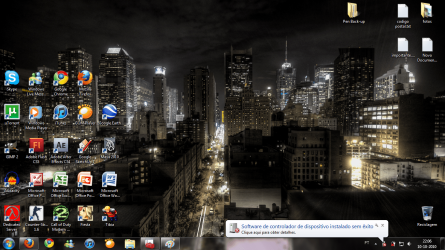
Everytime I connect a USB device that I've never connected to my computer, windows new hardware wizard pops up saying: "Installing new software drivers", but then, another balloon pops up saying: "Device drivers couldn't be installed".

This is happening with every hardware I've never connected to the computer before!

What is happening:

- My pen works in every USB ports. I have used it since I bought my computer (this summer) and I used it in every port since then. It works just fine.

- My mouse (which I also use since I bought my computer) is working fine too, but in one port only! When I got my computer, I plugged my mouse to only one port and it installed it fine. Now, it works only in that port and if I try to connect it to another port, it won't install.

- My older mouse, which I used as well lots of times, worked fine, but only in one port too, because it was the only port it was ever connected too. I went to Device Manager and uninstalled the controler of this mouse. Once I plugged it in, in the same port it used to work, windows isn't able to install the drivers.

- My sisters pen, which I have never connected to my computer before won't work in any of the ports. Windows isn't able to install it.

Any of the new hardware is working!

I have updated all my drivers with Driver Genius Professional Edition. I have updated my BIOS to the latest version. I have tried to perform a startup repair. I have contacted HP, but they didn't help that much...

I need help, please! I wonder how Microsoft, after so many years still has this huge bugs in their system...

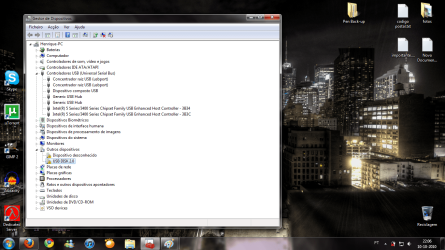
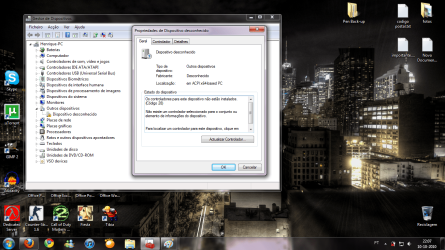
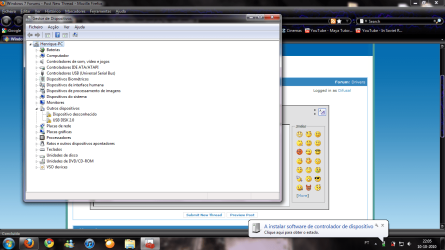
I will try to attach some pictures of what is going on.

Please, I really need some help

P.S. - This is my first post in a forum. Please tell me if you need any more detail to help me.
 

Attachments
  • Sem Título.png
    Sem Título.png
    99.4 KB · Views: 346
  • 2.png
    2.png
    608.7 KB · Views: 210
  • 3.png
    3.png
    306.3 KB · Views: 261
  • 4.png
    4.png
    387.9 KB · Views: 352

My Computer

Computer Manufacturer/Model Number
HP
OS
Windows 7 Ultimate x64
CPU
Intel Core i7-720QM 1,60 GHz
Motherboard
Hewlett-Packard 1448 65.35
Memory
6 GB DDR3 (1 x 2.048 MB + 1 x 4.096 MB)
Graphics Card(s)
ATI Mobility Radeon HD 5650
Sound Card
Altec Lansing
Monitor(s) Displays
Monitor LED HP BrightView HD
Screen Resolution
1.366 x 768
I've looked at the screen shoots but my only language is English so I couldn't read them. If you have system restore enabled you could try restoring to a time before you noticed this problem. If it doesn't help you can always undo it and go back to the way your system is now. Another option would be to boot from your windows 7 DVD and try doing a repair. Have you installed any programs recently? Messing around with the group policy editor? If you have more than one user account see if it does it in all user accounts of just the one. does your user account has administrator privileges?

On a side not, one of the things that annoys me is when you plug a device you have already installed, into a different USB port, windows considers it a new device and wants to install the drivers again. For most items its not a big deal but when you end up with Wireless Network Connection #9 it gets old.
Thats why your mouse only works in the one port it was originally installed to. When you move it, windows is treating it as a new device but your glitch is preventing any new devices from being installed.
 

My Computer

Computer type
PC/Desktop
Computer Manufacturer/Model Number
Home Built
OS
Windows 10 Education 64 bit
CPU
AMD Phenom II X4 980 Black Edition Deneb 3.7GHz
Motherboard
Asus M4N68T-M V2 µATX Motherboard
Memory
8GB 4GBx2 Kingston PC10600 DDR3 1333 Memory
Graphics Card(s)
Zotac NVIDIA Geforce GT640 2 Gig DDR3 PCIe
Sound Card
VIA VT1708s High Definition Audio 8-channel Onboard
Monitor(s) Displays
22" LG E2242 1080p and 2 19" I-INC AG191D
Screen Resolution
1280x1024 - 1920x1080 - 1280x1024
Hard Drives
Crucial M100 256 GB SSD and 500 GB WD Blue SATA
PSU
Thermaltake TR 620
Case
Power Up Black ATX Mid-Tower Case
Cooling
Stock heatsink and fan
Keyboard
Logitech Wireless K350 Wave
Mouse
Logitech Wireless M570 Trackman Wheel
Internet Speed
80 Mbps Down 30 Mbps Up
Antivirus
Windows Defender
Browser
Internet Explorer 11
Other Info
HP DVD1040e Lightscribe - External USB2
I've tried to repair windows 7 with startup repair.. that didn't solve it and I don't know when this problem began, I only noticed it when I connected my sisters pe the other day... You asked: Messing around with the group policy editor? what do you mean with that? And yes, I have recently added a new user account to this computer, but when I log in that account, it happens the same thing. And yes, my user account has entire administrator privileges.
 

My Computer

Computer Manufacturer/Model Number
HP
OS
Windows 7 Ultimate x64
CPU
Intel Core i7-720QM 1,60 GHz
Motherboard
Hewlett-Packard 1448 65.35
Memory
6 GB DDR3 (1 x 2.048 MB + 1 x 4.096 MB)
Graphics Card(s)
ATI Mobility Radeon HD 5650
Sound Card
Altec Lansing
Monitor(s) Displays
Monitor LED HP BrightView HD
Screen Resolution
1.366 x 768
I didn't mean any thing by it, I probably should have just asked if you had been using it. It's one way of tweaking some hidden settings, and sometimes it doesn't do what you thought it would do. If you weren't using it we can rule it out as a possible cause. There is a more in depth repair than just doing a startup repair.
One option id to do this:>http://www.sevenforums.com/tutorials/1538-sfc-scannow-command-system-file-checker.html?filter[2]=Performance Maintenance
If you haven't created on of these, now might be a good time:> http://www.sevenforums.com/tutorials/2083-system-repair-disc-create.html?filter[2]=Performance Maintenance Maintenance. Ideally you want to create it before you are having system troubles.
I am sure there is another tutorial in there some where on doing a windows 7 repair install but I can't find it at the moment. Google should give you enough info to do it. I know how to do it on XP but haven't had to try it on windows 7 yet.
 

My Computer

Computer type
PC/Desktop
Computer Manufacturer/Model Number
Home Built
OS
Windows 10 Education 64 bit
CPU
AMD Phenom II X4 980 Black Edition Deneb 3.7GHz
Motherboard
Asus M4N68T-M V2 µATX Motherboard
Memory
8GB 4GBx2 Kingston PC10600 DDR3 1333 Memory
Graphics Card(s)
Zotac NVIDIA Geforce GT640 2 Gig DDR3 PCIe
Sound Card
VIA VT1708s High Definition Audio 8-channel Onboard
Monitor(s) Displays
22" LG E2242 1080p and 2 19" I-INC AG191D
Screen Resolution
1280x1024 - 1920x1080 - 1280x1024
Hard Drives
Crucial M100 256 GB SSD and 500 GB WD Blue SATA
PSU
Thermaltake TR 620
Case
Power Up Black ATX Mid-Tower Case
Cooling
Stock heatsink and fan
Keyboard
Logitech Wireless K350 Wave
Mouse
Logitech Wireless M570 Trackman Wheel
Internet Speed
80 Mbps Down 30 Mbps Up
Antivirus
Windows Defender
Browser
Internet Explorer 11
Other Info
HP DVD1040e Lightscribe - External USB2
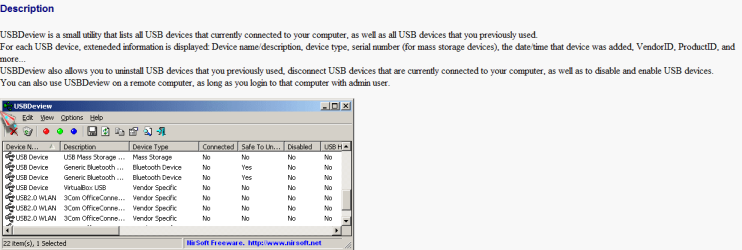
when you try and install the drivers are you online ? have you checked the cables inside the machine do a routine check just to see if anything on the motherboard is not connected i had this sort of problem when my machine was in transit and some cables came off the motherboard also here is a program from nirsoft helps you see whats connected on the usb ports
http://www.nirsoft.net/utils/usb_devices_view.html

also look here for help http://support.microsoft.com/fixit#tab0
 

Attachments

  • nirsoft.PNG
    nirsoft.PNG
    15.6 KB · Views: 183
Last edited:

My Computer

Computer Manufacturer/Model Number
packard bell IXTREME M5722
OS
Operating System : Windows 7 Home Premium Edition 6.01.7600 SP1 (x64)
CPU
Processor : Intel Core 2 Quad Q8300 @ 2500 MHz
Motherboard
Mainboard : Packard Bell (Acer EG43M )
Memory
Physical Memory :8GB Corsair4x 2GB 800MHz C5 DDR2
Graphics Card(s)
Video Card : XFX 6700 AMD
Monitor(s) Displays
Maestro 234DL - BenQ V2220 - BenQ VW2420H
Screen Resolution
Current Display :1920x1080p pixels at 60 Hz in HD LED
Hard Drives
Hard Disks : WDC (1000 GB)
Drive C: (Hard Disk) : 428 GB available on 491 GB
Drive D: (Hard Disk) : 426 GB available on 492 GB
SAMSUNG spinpoint HD103SJ 1000.2 GB
(X 2) KINGSTON SSD NOW V 30GB
PSU
XFX ProSeries 550W PSU
Case
PACKARD BELL IXTREME
Cooling
System Blower Current: 150mA Air Flow16CFM ;Akasa 90mm rear
Keyboard
Gigabyte Aivia K8100
Mouse
TRUST-Wireless Laser Mouse - Carbon edition MI-7770C
Internet Speed
TP-LINK > TL-WN951N / AV500 Gigabit Powerline Adapters
Browser
chrome dev
Other Info
EXTRA COOLING>(FAN CONTROLLER) PC Bay Cooler 3 x 40mm fans; Akasa AK-HD-BL Blue hard drive cooler 2 x 40 mm fan 4500 rpm 29.7 dBA
Bios> American Megatrends Inc.
Version : P01-A1
Date : 08/31/2009
Last edited:

My Computer

Computer Manufacturer/Model Number
packard bell IXTREME M5722
OS
Operating System : Windows 7 Home Premium Edition 6.01.7600 SP1 (x64)
CPU
Processor : Intel Core 2 Quad Q8300 @ 2500 MHz
Motherboard
Mainboard : Packard Bell (Acer EG43M )
Memory
Physical Memory :8GB Corsair4x 2GB 800MHz C5 DDR2
Graphics Card(s)
Video Card : XFX 6700 AMD
Monitor(s) Displays
Maestro 234DL - BenQ V2220 - BenQ VW2420H
Screen Resolution
Current Display :1920x1080p pixels at 60 Hz in HD LED
Hard Drives
Hard Disks : WDC (1000 GB)
Drive C: (Hard Disk) : 428 GB available on 491 GB
Drive D: (Hard Disk) : 426 GB available on 492 GB
SAMSUNG spinpoint HD103SJ 1000.2 GB
(X 2) KINGSTON SSD NOW V 30GB
PSU
XFX ProSeries 550W PSU
Case
PACKARD BELL IXTREME
Cooling
System Blower Current: 150mA Air Flow16CFM ;Akasa 90mm rear
Keyboard
Gigabyte Aivia K8100
Mouse
TRUST-Wireless Laser Mouse - Carbon edition MI-7770C
Internet Speed
TP-LINK > TL-WN951N / AV500 Gigabit Powerline Adapters
Browser
chrome dev
Other Info
EXTRA COOLING>(FAN CONTROLLER) PC Bay Cooler 3 x 40mm fans; Akasa AK-HD-BL Blue hard drive cooler 2 x 40 mm fan 4500 rpm 29.7 dBA
Bios> American Megatrends Inc.
Version : P01-A1
Date : 08/31/2009
Welcome to SevenForums.
This has been known to fix USB port issues with laptops, it seems simple but has been successful.

Try unplugging the AC adapter then removing the battery for about 5 minutes or so. then replace the battery and ac adapter and check to see if it has reset the cmos and re-enabled the use of your usb ports.

Here is also a trouble shooting program you can run.Hardware Helper Online: Windows USB Device drivers
Fabe
 

My Computer

Computer Manufacturer/Model Number
Self Built
OS
Windows 7 ultimate 64 bit / XP Home sp3
CPU
intel Core 2 Duo E8400 3.0ghz
Motherboard
Asus P5ND bios 1401
Memory
8 gigs 1066 OCZ Fata1ty
Graphics Card(s)
EVGA GTX 580 Call of Duty Black Ops Edition
Sound Card
Creative Soundblaster Audigy 2zs
Monitor(s) Displays
Asus 24in LCD's 2MS X2
Screen Resolution
1920x1080p @60Hz
Hard Drives
WD Caviar 500 Black/ WD Caviar 200 Blue
PSU
OCZ 700W GameXtreme
Case
NZXT Apollo
Cooling
Corsair H50 CPU/120mm x3 /60mm x2 /Corsair Dominator Ram
Keyboard
Logitech Bluetooth Wireless MX5000
Mouse
Logitech Bluetooth Wireless MX1000
Internet Speed
Download 19.83 Upload 0.97
Other Info
Logitech Z2300 Speakers/ Bose Noise Cancelling Headphones/Avermedia PCI-e Hybrid TV Bravo/Epson NX415 all in one/ 4 Port Powered USB Hub/ LG 10x Bluray Burner /TSST Corp DVDRW External
Thanks for all your replies! I'm really glad I have someone who is trying to help me fixing this problem!

thefabe, I've tried to remove my AC adaptor and my battery. I waited 10 minutes, then place the battery and AC adaptor. Turned on the laptop and plugged the pen and other types of hardware. That didn't solve it... :(
I have updated my drivers with Driver Genius, but it didn't work too. :(
 

My Computer

Computer Manufacturer/Model Number
HP
OS
Windows 7 Ultimate x64
CPU
Intel Core i7-720QM 1,60 GHz
Motherboard
Hewlett-Packard 1448 65.35
Memory
6 GB DDR3 (1 x 2.048 MB + 1 x 4.096 MB)
Graphics Card(s)
ATI Mobility Radeon HD 5650
Sound Card
Altec Lansing
Monitor(s) Displays
Monitor LED HP BrightView HD
Screen Resolution
1.366 x 768
when you try and install the drivers are you online ?

Yes, I am online


have you checked the cables inside the machine do a routine check just to see if anything on the motherboard is not connected i had this sort of problem when my machine was in transit and some cables came off the motherboardhttp://support.microsoft.com/fixit#tab0

Do you mean, if I used the laptop when I was in a bus or car? Yes I did. If I open my laptop to see if everything is connected, won't that void my warranty?
 

My Computer

Computer Manufacturer/Model Number
HP
OS
Windows 7 Ultimate x64
CPU
Intel Core i7-720QM 1,60 GHz
Motherboard
Hewlett-Packard 1448 65.35
Memory
6 GB DDR3 (1 x 2.048 MB + 1 x 4.096 MB)
Graphics Card(s)
ATI Mobility Radeon HD 5650
Sound Card
Altec Lansing
Monitor(s) Displays
Monitor LED HP BrightView HD
Screen Resolution
1.366 x 768
uninstall all of the USB ports/hubs listed in the Device Manager ( they automatically get reinstalled with a fresh restart of the computer) download a chipset driver installation utility from the Intel site (http://downloadcenter.intel.com/con...D=&DwnldId=16023&strOSs=&OSFullName=&lang=eng), and restart the computer.


I have several things under USB, in device manager (as you see in my ss) there are listed 7 things and only two have the words HUB, are you saying to uninstall them and reboot?
Btw, what is a hub? (I'm Portuguese :/ just say a definition or what it looks like please)
 

My Computer

Computer Manufacturer/Model Number
HP
OS
Windows 7 Ultimate x64
CPU
Intel Core i7-720QM 1,60 GHz
Motherboard
Hewlett-Packard 1448 65.35
Memory
6 GB DDR3 (1 x 2.048 MB + 1 x 4.096 MB)
Graphics Card(s)
ATI Mobility Radeon HD 5650
Sound Card
Altec Lansing
Monitor(s) Displays
Monitor LED HP BrightView HD
Screen Resolution
1.366 x 768
I didn't mean any thing by it, I probably should have just asked if you had been using it. It's one way of tweaking some hidden settings, and sometimes it doesn't do what you thought it would do. If you weren't using it we can rule it out as a possible cause.

I'm sorry but I want to try everything I can to solve this.. Could you please tell me what I should do to see if everything is as it should be in the Group Policy Editor and how to access it
 

My Computer

Computer Manufacturer/Model Number
HP
OS
Windows 7 Ultimate x64
CPU
Intel Core i7-720QM 1,60 GHz
Motherboard
Hewlett-Packard 1448 65.35
Memory
6 GB DDR3 (1 x 2.048 MB + 1 x 4.096 MB)
Graphics Card(s)
ATI Mobility Radeon HD 5650
Sound Card
Altec Lansing
Monitor(s) Displays
Monitor LED HP BrightView HD
Screen Resolution
1.366 x 768
If you weren't previously using the group policy editor, I wouldn't mess with it now. It would likely just make things worse. I'm running Home Premium so I can't even launch it to see what settings might do that. If you had been using it I would have asked you what policies you changed and why?

I wouldn't attempt to open up the case on your laptop to look for loose wires or connections. It will void your warranty if you still have one, and the USB ports will be soldered to the motherboard so there are no wires to come loose. On a desktop PC some of the USB ports are on headers and connect to the motherboard with cables. If the cables come loose or one of the plugs is on wrong it can mess up your USB ports. I believe the other poster thought you had a desktop PC.

Removing the (large) battery and disconnecting the power pack won't reset the BIOS on a laptop. There is another small battery inside that maintains the date and time stored in the BIOS. Even removing that will not reset it on a laptop. The BIOS chip that the data is stored in is different from those in a desktop PC. It's done that way on purpose to prevent you from easily bypassing the BIOS password if the laptop is lost or stolen. You can however go into the BIOS settings menu and look for a "reset to defaults" option. I'm not sure it would help in instance so I'll let you decide if you want to do it or not. If you do do it you'll have to go back in and set the date and time, boot order, etc. You can go though all the current settings and write them down before you do the reset. Removing the battery and power pack wasn't a bad idea though. USB ports have an overload protection mechanism and the only way to reset it is to remove all power.
 

My Computer

Computer type
PC/Desktop
Computer Manufacturer/Model Number
Home Built
OS
Windows 10 Education 64 bit
CPU
AMD Phenom II X4 980 Black Edition Deneb 3.7GHz
Motherboard
Asus M4N68T-M V2 µATX Motherboard
Memory
8GB 4GBx2 Kingston PC10600 DDR3 1333 Memory
Graphics Card(s)
Zotac NVIDIA Geforce GT640 2 Gig DDR3 PCIe
Sound Card
VIA VT1708s High Definition Audio 8-channel Onboard
Monitor(s) Displays
22" LG E2242 1080p and 2 19" I-INC AG191D
Screen Resolution
1280x1024 - 1920x1080 - 1280x1024
Hard Drives
Crucial M100 256 GB SSD and 500 GB WD Blue SATA
PSU
Thermaltake TR 620
Case
Power Up Black ATX Mid-Tower Case
Cooling
Stock heatsink and fan
Keyboard
Logitech Wireless K350 Wave
Mouse
Logitech Wireless M570 Trackman Wheel
Internet Speed
80 Mbps Down 30 Mbps Up
Antivirus
Windows Defender
Browser
Internet Explorer 11
Other Info
HP DVD1040e Lightscribe - External USB2
so, what do I try next? reset BIOS?
 

My Computer

Computer Manufacturer/Model Number
HP
OS
Windows 7 Ultimate x64
CPU
Intel Core i7-720QM 1,60 GHz
Motherboard
Hewlett-Packard 1448 65.35
Memory
6 GB DDR3 (1 x 2.048 MB + 1 x 4.096 MB)
Graphics Card(s)
ATI Mobility Radeon HD 5650
Sound Card
Altec Lansing
Monitor(s) Displays
Monitor LED HP BrightView HD
Screen Resolution
1.366 x 768
I would be surprised if the "driver genious" didn't disable automatic device installation on your computer.
 
I already had this problem before I installed driver genius, I only installed it to see if it would solve it... Nut I think it is a good program
 

My Computer

Computer Manufacturer/Model Number
HP
OS
Windows 7 Ultimate x64
CPU
Intel Core i7-720QM 1,60 GHz
Motherboard
Hewlett-Packard 1448 65.35
Memory
6 GB DDR3 (1 x 2.048 MB + 1 x 4.096 MB)
Graphics Card(s)
ATI Mobility Radeon HD 5650
Sound Card
Altec Lansing
Monitor(s) Displays
Monitor LED HP BrightView HD
Screen Resolution
1.366 x 768
Did you try running the program I linked you to and see if it could find a resolution? Fabe
 

My Computer

Computer Manufacturer/Model Number
Self Built
OS
Windows 7 ultimate 64 bit / XP Home sp3
CPU
intel Core 2 Duo E8400 3.0ghz
Motherboard
Asus P5ND bios 1401
Memory
8 gigs 1066 OCZ Fata1ty
Graphics Card(s)
EVGA GTX 580 Call of Duty Black Ops Edition
Sound Card
Creative Soundblaster Audigy 2zs
Monitor(s) Displays
Asus 24in LCD's 2MS X2
Screen Resolution
1920x1080p @60Hz
Hard Drives
WD Caviar 500 Black/ WD Caviar 200 Blue
PSU
OCZ 700W GameXtreme
Case
NZXT Apollo
Cooling
Corsair H50 CPU/120mm x3 /60mm x2 /Corsair Dominator Ram
Keyboard
Logitech Bluetooth Wireless MX5000
Mouse
Logitech Bluetooth Wireless MX1000
Internet Speed
Download 19.83 Upload 0.97
Other Info
Logitech Z2300 Speakers/ Bose Noise Cancelling Headphones/Avermedia PCI-e Hybrid TV Bravo/Epson NX415 all in one/ 4 Port Powered USB Hub/ LG 10x Bluray Burner /TSST Corp DVDRW External
yes, I have.. unfortunatly, it didn't solve it
 

My Computer

Computer Manufacturer/Model Number
HP
OS
Windows 7 Ultimate x64
CPU
Intel Core i7-720QM 1,60 GHz
Motherboard
Hewlett-Packard 1448 65.35
Memory
6 GB DDR3 (1 x 2.048 MB + 1 x 4.096 MB)
Graphics Card(s)
ATI Mobility Radeon HD 5650
Sound Card
Altec Lansing
Monitor(s) Displays
Monitor LED HP BrightView HD
Screen Resolution
1.366 x 768

My Computer

Computer Manufacturer/Model Number
HP
OS
Windows 7 Ultimate x64
CPU
Intel Core i7-720QM 1,60 GHz
Motherboard
Hewlett-Packard 1448 65.35
Memory
6 GB DDR3 (1 x 2.048 MB + 1 x 4.096 MB)
Graphics Card(s)
ATI Mobility Radeon HD 5650
Sound Card
Altec Lansing
Monitor(s) Displays
Monitor LED HP BrightView HD
Screen Resolution
1.366 x 768
Copy any files you want saved to external media and reinstall windows from scratch, clean install. If you add all the time you've spent trying to fix it with no results, its probably more than it would take to just start over with a clean slate. If it fixes it, it was a software problem, if it doesn't then its looking more like a hardware fault.
 

My Computer

Computer type
PC/Desktop
Computer Manufacturer/Model Number
Home Built
OS
Windows 10 Education 64 bit
CPU
AMD Phenom II X4 980 Black Edition Deneb 3.7GHz
Motherboard
Asus M4N68T-M V2 µATX Motherboard
Memory
8GB 4GBx2 Kingston PC10600 DDR3 1333 Memory
Graphics Card(s)
Zotac NVIDIA Geforce GT640 2 Gig DDR3 PCIe
Sound Card
VIA VT1708s High Definition Audio 8-channel Onboard
Monitor(s) Displays
22" LG E2242 1080p and 2 19" I-INC AG191D
Screen Resolution
1280x1024 - 1920x1080 - 1280x1024
Hard Drives
Crucial M100 256 GB SSD and 500 GB WD Blue SATA
PSU
Thermaltake TR 620
Case
Power Up Black ATX Mid-Tower Case
Cooling
Stock heatsink and fan
Keyboard
Logitech Wireless K350 Wave
Mouse
Logitech Wireless M570 Trackman Wheel
Internet Speed
80 Mbps Down 30 Mbps Up
Antivirus
Windows Defender
Browser
Internet Explorer 11
Other Info
HP DVD1040e Lightscribe - External USB2
I know I can always do that.. But, I want to let that option for the very last attempt... Besides, wont it void my warranty starting from scratch?
 

My Computer

Computer Manufacturer/Model Number
HP
OS
Windows 7 Ultimate x64
CPU
Intel Core i7-720QM 1,60 GHz
Motherboard
Hewlett-Packard 1448 65.35
Memory
6 GB DDR3 (1 x 2.048 MB + 1 x 4.096 MB)
Graphics Card(s)
ATI Mobility Radeon HD 5650
Sound Card
Altec Lansing
Monitor(s) Displays
Monitor LED HP BrightView HD
Screen Resolution
1.366 x 768
Back
Top