
Solved Windows doesn't use page file on different drive

djeyewater

New member
Local time
11:44 AM
Messages
28
I recently bought an SSD and told Windows to use it for storing the page file on. I disabled the page file on my C:, but I would get an error message each time I started the PC that the pagefile size for C: was wrong (or something to that effect).

So I added a 512MB page file to the C: This got rid of the error on start up.

However, I was doing some memory intensive work today, and Windows popped up an error dialog saying that I was out of memory.

When I check the settings, it seems that Windows is refusing to use the SSD for paging now that a pagefile exists on the C:. It says the total paging file size for all drives is 512MB, i.e. what I set for the C:. I set the SSD to system managed. When I check the SSD, there is no pagefile.sys on there either. (There was when I had no page file set for C:).

I gather that Windows requires some pagefile on C: for memory dumps. But how can I get it to use a pagefile on a different disk as well?
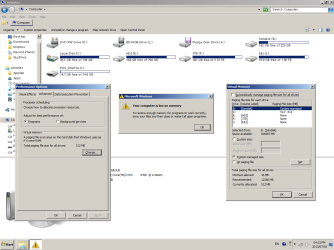
page-file-out-of-memory.png
 

My Computer My Computer

Computer type
PC/Desktop
OS
Windows 7 Pro x64
Try putting the page file on another drive other than B. Windows has issues, sometimes with drives A and B when used with other than floppy drives.
 
Last edited:

My Computer My Computer

Computer type
PC/Desktop
Computer Manufacturer/Model Number
Custom Built
OS
Windows 10 Pro x64, Windows 8.1 Pro x64, Windows 7 Ultimate x64 SP1,
CPU
INTEL i9-7920X LGA 2066
Motherboard
Gigabyte X299-WU8 F3
Memory
64 GB (4 X 16 GB) G-Skill V Series DDR4 3200 Quad Channel
Graphics Card(s)
EVGA GTX 1060 SC 3 GB
Sound Card
Realtek Onboard ALC1220
Monitor(s) Displays
2 x Samsung S27E310
Screen Resolution
1920x1080
Hard Drives
Samsung 2 x 970 EVO Plus 500 GB NVMe
1 x 6TB WD 6003FZBX SATA
1 x 6TB WD 60EFRX SATA
12 x 3TB WD 30EFRX SATA
PSU
Seasonic X-1050
Case
Thermaltake Armor+
Cooling
Corsair H80i V2 Liquid AOI Cooler
Keyboard
Logitech G510s
Mouse
Logitech MX Master 2S
Internet Speed
200 Mb/s
Antivirus
ESET NOD32 13.1
Browser
EDGE (Dev, Canary, Beta), Chrome
Other Info
ASUS RT-AC68U router
Malwarebytes 4.0.4
Never EVER use drive A and B. They are there for legacy reasons. They will act funky unless used by floppy drives.
Change drive letter.
 

My Computer My Computer

Computer type
PC/Desktop
Computer Manufacturer/Model Number
custom built
OS
Win 7 Pro 64-bit 7601
CPU
AMD Phenom 9650 QuadCore, revision DR-B3
Motherboard
ASUS M4A78
Memory
5 GB yes I run 2x 2GB and 1x 1GB, different brand, spank me.
Graphics Card(s)
NVIDIA GeForce 9800 GT 512 Mb, unknown manufacturer.
Sound Card
Crappy Realtek Integrated Audio
Monitor(s) Displays
Fujitsu Siemens P19-3P
Screen Resolution
1280 x 1024 x 32 bits @ 60 Hz Oh yeah, 4:3 rocks!
Hard Drives
(1) MAXTOR S TM3320613AS SATA Disk Device (2) STM35004 18AS SATA Disk Device (3) TOSHIBA USB 2.5"-HDD
PSU
whatever, around 450w
Case
Scavenged from old company PC, 10+ years old
Cooling
CPU fan, GPU fan, case fan, nothing fancy
Keyboard
Microsoft, PS/2, white.
Mouse
Optical, logitec.
Internet Speed
effective max speeds: 70-ish kB/s down 30-ish kB/s up
Antivirus
Avira, free edition.
Browser
Firefox with FXChrome to make it look like Google Chrome :P
Other Info
Was discarded by previous owner due to "horrible performance".
Was running Win Xp from a IDE drive. Yeah. Was a pain.
SATA II drive and Win7 and it zips away! Yay!
Since your question appears to be answered, as an aside may I ask why you're running a year 2000 theme instead of Win7's beautiful Aero graphics? If it's to save resources, Aero doesn't use that much more than without it.

To enable an Aero theme rightclick a blank area of the Desktop to choose Personalize.
 
Thanks for the help! I changed the drive letter as suggested, and now it shows 8703MB as available for paging, and the pagefile.sys file exists on the SSD.

It's rather annoying that MS didn't bother adding a warning when you set a drive to A: or B: that it shouldn't be used with a non-floppy drive and can cause issues with Windows. I'd already set up some things pointing to the SSD, and now I'll have to change them to point to the new drive letter. I didn't realise before that using A or B was any different to any other drive letter.

Regarding the appearance of my windows, I don't find Aero any more usable, and since it uses up resources I don't use it.
 

My Computer My Computer

Computer type
PC/Desktop
OS
Windows 7 Pro x64
It is a myth that Aero uses up resources. Modern hardware can more than handle it. We see instances where more resources are used with Aero turned off.

Sorry but I've never understood why some respond to beauty added to the world by turning it off. Win7 is beautiful. Yours is a deliberate attempt to make it hideously file-cabinet grey ugly.

In countless installs I've done I always gift the new owners with the entire world's national-editions collection of Win7 backgrounds, and without fail it is the thing which they like the best. These are perhaps the most beautiful world scenic pictures ever taken: http://www.mydigitallife.info/2009/...on-scenery-regional-wallpapers-free-download/
 
I don't find Aero any more usable, and since it uses up resources I don't use it.
It actually frees up CPU. Windows older interfaces run on the CPU, Aero moves the load on the GPU (graphic card) which most of the times is sitting there doing nothing. When gaming it's Aero is disabled so there is no performance hit.
 

My Computer My Computer

Computer type
PC/Desktop
Computer Manufacturer/Model Number
custom built
OS
Win 7 Pro 64-bit 7601
CPU
AMD Phenom 9650 QuadCore, revision DR-B3
Motherboard
ASUS M4A78
Memory
5 GB yes I run 2x 2GB and 1x 1GB, different brand, spank me.
Graphics Card(s)
NVIDIA GeForce 9800 GT 512 Mb, unknown manufacturer.
Sound Card
Crappy Realtek Integrated Audio
Monitor(s) Displays
Fujitsu Siemens P19-3P
Screen Resolution
1280 x 1024 x 32 bits @ 60 Hz Oh yeah, 4:3 rocks!
Hard Drives
(1) MAXTOR S TM3320613AS SATA Disk Device (2) STM35004 18AS SATA Disk Device (3) TOSHIBA USB 2.5"-HDD
PSU
whatever, around 450w
Case
Scavenged from old company PC, 10+ years old
Cooling
CPU fan, GPU fan, case fan, nothing fancy
Keyboard
Microsoft, PS/2, white.
Mouse
Optical, logitec.
Internet Speed
effective max speeds: 70-ish kB/s down 30-ish kB/s up
Antivirus
Avira, free edition.
Browser
Firefox with FXChrome to make it look like Google Chrome :P
Other Info
Was discarded by previous owner due to "horrible performance".
Was running Win Xp from a IDE drive. Yeah. Was a pain.
SATA II drive and Win7 and it zips away! Yay!
Sorry for the continued meaningless derailment of this thread by personal aesthetic and efficiency preferences, but I thought I might as well add in my 2¢ worth.

I use Aero, but I have a soft spot in my heart for the classic Windows 2000 style view. I like it much more than the normal Windows XP look, for example. And actually, I'm pretty close to being on the fence in regards to using Aero vs. Classic. Classic is easier for me to navigate and see what I'm looking at, and it just feels overall more streamlined and efficient, less pretentious, and has a nice retro feel. However, I do actually like the look of Aero, at least how I have it set up on my PC, and it works well enough.
 

My Computer My Computer

Computer type
PC/Desktop
OS
Windows 7 Professional SP1 64bit, Manjaro Xfce, Debian 10 64bit Xfce
CPU
Intel i7-3930K @ 4.2GHz
Motherboard
ASUS P9X79 WS
Memory
Corsair Dominator 64GB Quad Channel DDR3 @ 1600MHz
Graphics Card(s)
EVGA GeForce GTX Titan Black Superclocked (×2, SLI)
Monitor(s) Displays
Sony Bravia 46"
Screen Resolution
1920×1080 (Full Screen), 1366×768 (Windows)
Hard Drives
Samsung 860 PRO 4TB SSD, Samsung 850 EVO 1TB SSD, Western Digital WD Gold 16TB 7200 RPM 512MB Cache HDD
PSU
Corsair AX1200 (1200W, 100.4A @ 12V)
Case
Corsair Obsidian 750D
Cooling
Corsair H110, 5 NOCTUA NF-A14 industrialPPC-3000 PWM Fans
Keyboard
Logitech K360
Mouse
Logitech M220
Browser
Firefox Developer Edition, Pale Moon, Tor
Back
Top