
Hi, this is my first post here, but long time lurker.
I have searched this forum for a solution, but cannot find one.
I have a Sony Vaio PCG-71313M suffering with the dreaded KSOD.
It came installed with Windows 7 Home Premium OA x64.
It loads up to a black screen with white cursor, but will not allow me to do ANYTHING once there.
I have tried Ctrl+Alt+Del, and Other variations, to no avail.
I have tried to modify
HKEY_LOCAL_MACHINE>Software>Microsoft>WindowsNT>CurrentVersion>Winlogon
Changed the long string of text in there to explorer.exe, which made no difference.
I have tried to change startup programs/devices. (I'm thinking it could be the video card)
And i have tried Numerous other recommended fixes, none have worked for me.
There are no System Restore points showing.
So i find myself now, taking the Hard Drive out, and Puttting it into a cradle/dock and attaching it to this Laptop which has Windows 7 Ultimate installed.
So here is my question.
Is there a way i can use Windows Easy Transfer to transfer the settings and programs (With activation keys i paid for and licenses) from the version in the USB dock, into a file, Put the hard drive back into the Vaio, and restore factory settings, and then restore the files and programs the way i had them?
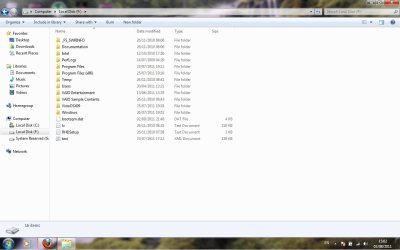
Incidentally, Here is a Screenshot (attached) of the Drive in the USB cradle. It says VISTAOSX09, but do not know if that makes a difference.
Also, the OS is installed in D:\ as opposed to C:\ Which most drives are normally on, C:\ is where the "System Reserved" Partition resides when in the Laptop.
I have searched this forum for a solution, but cannot find one.
I have a Sony Vaio PCG-71313M suffering with the dreaded KSOD.
It came installed with Windows 7 Home Premium OA x64.
It loads up to a black screen with white cursor, but will not allow me to do ANYTHING once there.
I have tried Ctrl+Alt+Del, and Other variations, to no avail.
I have tried to modify
HKEY_LOCAL_MACHINE>Software>Microsoft>WindowsNT>CurrentVersion>Winlogon
Changed the long string of text in there to explorer.exe, which made no difference.
I have tried to change startup programs/devices. (I'm thinking it could be the video card)
And i have tried Numerous other recommended fixes, none have worked for me.
There are no System Restore points showing.
So i find myself now, taking the Hard Drive out, and Puttting it into a cradle/dock and attaching it to this Laptop which has Windows 7 Ultimate installed.
So here is my question.
Is there a way i can use Windows Easy Transfer to transfer the settings and programs (With activation keys i paid for and licenses) from the version in the USB dock, into a file, Put the hard drive back into the Vaio, and restore factory settings, and then restore the files and programs the way i had them?
Incidentally, Here is a Screenshot (attached) of the Drive in the USB cradle. It says VISTAOSX09, but do not know if that makes a difference.
Also, the OS is installed in D:\ as opposed to C:\ Which most drives are normally on, C:\ is where the "System Reserved" Partition resides when in the Laptop.
Attachments
Last edited:
My Computer
At a glance
Windows 7 32Bit
- OS
- Windows 7 32Bit


