Windows Energy Screen Saver - Restore

How to Restore "Windows Energy Screen Saver" Back in Windows 7 and Windows 8

   Information
This tutorial will show you how to restore the Windows Energy screen saver back into Windows 7 and Windows 8.

You must be logged in as an administrator to be able to do the steps in this tutorial.


EXAMPLE: Windows Energy screen saver

Windows_Energy_Example.jpg
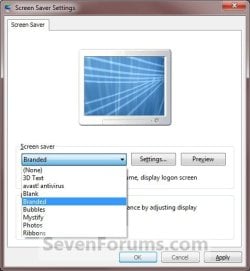
EXAMPLE: Screen Saver Settings
NOTE: If restored, the Windows Energy screen saver will be added back to the Screen Saver Settings screen to be available to select as Branded.
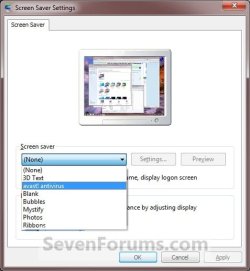
Settings.jpgWindows_Energy.jpg


Here's How:
1. Click/tap on the Download button below to download the Windows_Energy.zip file below.

Download


2. Save the .zip file to the desktop.

3. Open the .zip file and extract (drag and drop) the ssBranded.scr file to your desktop.

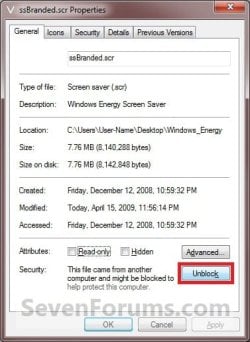
4. Right click or press and hold on the ssBranded.scr file and click/tap on Properties, General tab, and the Unblock button. (See screenshot below)
NOTE: If the unblock button is not there, then the ssBranded.scr file is already set to be unblocked. Continue on to step 5.
Unblock.jpg
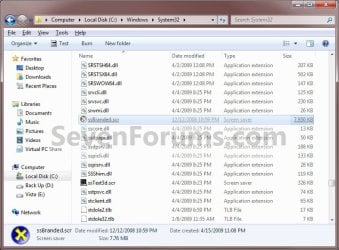
5. In Windows Explorer, navigate to C:\Windows\System32 and copy and paste the ssBranded.scr file here. (See screenshot below)
Branded_Windows_Energy.jpg
6. Click/tap on Continue and Yes to approve copying the ssBranded.scr file.

7. The Windows Energy (Branded) Screen Saver is now available to change your screen saver to. (See screenshot below)
Windows_Energy.jpg
8. When done, you can delete the downloaded ssBranded.scr and .zip files on the desktop if you like.
That's it,
Shawn


Attachments

Last edited:
Thank you! I really don't understand why they removed it from Windows 7. It was probably one of the best screen savers out there.
 

My Computer My Computer

Computer Manufacturer/Model Number
Dell Studio XPS 9100
OS
Windows 7 Home Premium x64
CPU
Intel Core i7 930 2.8GHz/8MB
Motherboard
Intel X58
Memory
12GB DDR3
Graphics Card(s)
Radeon 5670 1GB
Sound Card
ESI Juli@
Monitor(s) Displays
23" LED
Screen Resolution
1920 x 1080
Hard Drives
Seagate Barracuda 7200.12 1TB x 2
WD Scorpio Black 750GB (laptop)
PSU
Base
Case
Base
Cooling
Base
Keyboard
Multimedia
Mouse
Microsoft precision optical
Internet Speed
10Mbits
Other Info
Mobile: Dell XPS 15 L502X
Intel i7 2630QM, 8 gigs DDR3 RAM, 750 gigs WD Scorpio Black (7,200 rpm SATA3), Nvidia GT525M 1 gig, 15.6" B+RGLED 1920 x1080, Win7 HP
You're most welcome Lior. I'm not sure why they removed this one either. :)
 

My Computer My Computer

Computer type
PC/Desktop
Computer Manufacturer/Model Number
Self built custom
OS
64-bit Windows 11 Pro for Workstations
CPU
Intel i7-8700K OC'd to 5 GHz
Motherboard
ASUS ROG Maximus XI Formula Z390
Memory
64 GB (4x16GB) G.SKILL TridentZ RGB DDR4 3600 MHz
Graphics Card(s)
ASUS ROG-STRIX-GTX1080TI-O11G-GAMING
Sound Card
Integrated
Monitor(s) Displays
2 x Samsung Odyssey G7 27"
Screen Resolution
2560x1440
Hard Drives
1TB Samsung 990 PRO M.2,
4TB Samsung 990 PRO PRO M.2,
TerraMaster F8 SSD Plus NAS
PSU
Seasonic Prime Titanium 850W
Case
Thermaltake Core P3
Cooling
Corsair Hydro H115i
Keyboard
Logitech wireless K800
Mouse
Logitech MX Master 4
Internet Speed
2 Gb/s Download and 100 Mb/s Upload
Antivirus
Malwarebyte Anti-Malware Premium
Browser
Google Chrome
Other Info
Logitech Z625 speaker system,
Logitech BRIO 4K Pro webcam,
HP Color LaserJet Pro MFP M477fdn,
APC SMART-UPS RT 1000 XL - SURT1000XLI,
Galaxy S23 Plus phone
Windows Energy Screensaver on Dual Monitors?

Thanks for the info. I've downloaded the screensaver for my computer, but I have dual monitors. The screensaver is only working on my "main" monitor. What do I do to get it to work on or across both monitors?

(Sorry, but I guess I'm not terribly computer savvy.)

Thanks!

Susie
 

My Computer My Computer

OS
Windows 7 Professional
Hello Susie,

The Windows Energy screen saver only plays across one monitor for me as well while all the other default screen savers play across both monitors. Not sure why, but I guess this may be a reason why it was not included by default in Windows 7. :(
 

My Computer My Computer

Computer type
PC/Desktop
Computer Manufacturer/Model Number
Self built custom
OS
64-bit Windows 11 Pro for Workstations
CPU
Intel i7-8700K OC'd to 5 GHz
Motherboard
ASUS ROG Maximus XI Formula Z390
Memory
64 GB (4x16GB) G.SKILL TridentZ RGB DDR4 3600 MHz
Graphics Card(s)
ASUS ROG-STRIX-GTX1080TI-O11G-GAMING
Sound Card
Integrated
Monitor(s) Displays
2 x Samsung Odyssey G7 27"
Screen Resolution
2560x1440
Hard Drives
1TB Samsung 990 PRO M.2,
4TB Samsung 990 PRO PRO M.2,
TerraMaster F8 SSD Plus NAS
PSU
Seasonic Prime Titanium 850W
Case
Thermaltake Core P3
Cooling
Corsair Hydro H115i
Keyboard
Logitech wireless K800
Mouse
Logitech MX Master 4
Internet Speed
2 Gb/s Download and 100 Mb/s Upload
Antivirus
Malwarebyte Anti-Malware Premium
Browser
Google Chrome
Other Info
Logitech Z625 speaker system,
Logitech BRIO 4K Pro webcam,
HP Color LaserJet Pro MFP M477fdn,
APC SMART-UPS RT 1000 XL - SURT1000XLI,
Galaxy S23 Plus phone
Thanks for this screensaver! It was my favorite one when I had Vista. :) Sorry to resurrect an old topic by the way...
 

My Computer My Computer

Computer Manufacturer/Model Number
Compaq Presario CQ60-215DX
OS
Windows 7 Home Premium
CPU
2 AMD Athlon 64 X2
Graphics Card(s)
NVIDIA GeForce 8200M G graphics
No problem. You're most welcome Wii Master. :)
 

My Computer My Computer

Computer type
PC/Desktop
Computer Manufacturer/Model Number
Self built custom
OS
64-bit Windows 11 Pro for Workstations
CPU
Intel i7-8700K OC'd to 5 GHz
Motherboard
ASUS ROG Maximus XI Formula Z390
Memory
64 GB (4x16GB) G.SKILL TridentZ RGB DDR4 3600 MHz
Graphics Card(s)
ASUS ROG-STRIX-GTX1080TI-O11G-GAMING
Sound Card
Integrated
Monitor(s) Displays
2 x Samsung Odyssey G7 27"
Screen Resolution
2560x1440
Hard Drives
1TB Samsung 990 PRO M.2,
4TB Samsung 990 PRO PRO M.2,
TerraMaster F8 SSD Plus NAS
PSU
Seasonic Prime Titanium 850W
Case
Thermaltake Core P3
Cooling
Corsair Hydro H115i
Keyboard
Logitech wireless K800
Mouse
Logitech MX Master 4
Internet Speed
2 Gb/s Download and 100 Mb/s Upload
Antivirus
Malwarebyte Anti-Malware Premium
Browser
Google Chrome
Other Info
Logitech Z625 speaker system,
Logitech BRIO 4K Pro webcam,
HP Color LaserJet Pro MFP M477fdn,
APC SMART-UPS RT 1000 XL - SURT1000XLI,
Galaxy S23 Plus phone
Hey i cant figure out how to paste it it only lets me put it a new folder and that dont work please help
 

My Computer My Computer

Computer type
PC/Desktop
Computer Manufacturer/Model Number
Custom
OS
Win 7 and 8
CPU
Core 2 Duo
Motherboard
intel
Memory
kingston
Graphics Card(s)
Nvidia
Hard Drives
SSD ( Win 7 )
HDD ( Win 8 )
Antivirus
Bitdefender
Browser
Firefox
Hello Freedom, and welcome to Seven Forums. :)

Could you give more details on what you mean?

Are you logged in as an administrator?
 

My Computer My Computer

Computer type
PC/Desktop
Computer Manufacturer/Model Number
Self built custom
OS
64-bit Windows 11 Pro for Workstations
CPU
Intel i7-8700K OC'd to 5 GHz
Motherboard
ASUS ROG Maximus XI Formula Z390
Memory
64 GB (4x16GB) G.SKILL TridentZ RGB DDR4 3600 MHz
Graphics Card(s)
ASUS ROG-STRIX-GTX1080TI-O11G-GAMING
Sound Card
Integrated
Monitor(s) Displays
2 x Samsung Odyssey G7 27"
Screen Resolution
2560x1440
Hard Drives
1TB Samsung 990 PRO M.2,
4TB Samsung 990 PRO PRO M.2,
TerraMaster F8 SSD Plus NAS
PSU
Seasonic Prime Titanium 850W
Case
Thermaltake Core P3
Cooling
Corsair Hydro H115i
Keyboard
Logitech wireless K800
Mouse
Logitech MX Master 4
Internet Speed
2 Gb/s Download and 100 Mb/s Upload
Antivirus
Malwarebyte Anti-Malware Premium
Browser
Google Chrome
Other Info
Logitech Z625 speaker system,
Logitech BRIO 4K Pro webcam,
HP Color LaserJet Pro MFP M477fdn,
APC SMART-UPS RT 1000 XL - SURT1000XLI,
Galaxy S23 Plus phone
The issue im having is that i don't know how to paste ssBranded.scr file to system 32. I can create a new folder with ssBranded.scr in it but that doesn't work. I just cant figure out how to paste it to the system32 file.
 

My Computer My Computer

Computer type
PC/Desktop
Computer Manufacturer/Model Number
Custom
OS
Win 7 and 8
CPU
Core 2 Duo
Motherboard
intel
Memory
kingston
Graphics Card(s)
Nvidia
Hard Drives
SSD ( Win 7 )
HDD ( Win 8 )
Antivirus
Bitdefender
Browser
Firefox
The issue im having is i don't know how to paste ssBranded.scr to the system 32 file. I can create a new folder with the ssBranded.scr file in it but that doesn't work. I guess what I'm asking is how do i paste it in system 32 instead of putting it in a folder in system 32???
 

My Computer My Computer

Computer type
PC/Desktop
Computer Manufacturer/Model Number
Custom
OS
Win 7 and 8
CPU
Core 2 Duo
Motherboard
intel
Memory
kingston
Graphics Card(s)
Nvidia
Hard Drives
SSD ( Win 7 )
HDD ( Win 8 )
Antivirus
Bitdefender
Browser
Firefox
Just a few questions. :)

Do you have UAC enabled?

Are you logged in an administrator account?

Did you extract the ssBranded.scr file to your desktop first, then try copying it into the System32 folder?

What happens when you paste the ssBranded.scr file into the System32 folder?
 

My Computer My Computer

Computer type
PC/Desktop
Computer Manufacturer/Model Number
Self built custom
OS
64-bit Windows 11 Pro for Workstations
CPU
Intel i7-8700K OC'd to 5 GHz
Motherboard
ASUS ROG Maximus XI Formula Z390
Memory
64 GB (4x16GB) G.SKILL TridentZ RGB DDR4 3600 MHz
Graphics Card(s)
ASUS ROG-STRIX-GTX1080TI-O11G-GAMING
Sound Card
Integrated
Monitor(s) Displays
2 x Samsung Odyssey G7 27"
Screen Resolution
2560x1440
Hard Drives
1TB Samsung 990 PRO M.2,
4TB Samsung 990 PRO PRO M.2,
TerraMaster F8 SSD Plus NAS
PSU
Seasonic Prime Titanium 850W
Case
Thermaltake Core P3
Cooling
Corsair Hydro H115i
Keyboard
Logitech wireless K800
Mouse
Logitech MX Master 4
Internet Speed
2 Gb/s Download and 100 Mb/s Upload
Antivirus
Malwarebyte Anti-Malware Premium
Browser
Google Chrome
Other Info
Logitech Z625 speaker system,
Logitech BRIO 4K Pro webcam,
HP Color LaserJet Pro MFP M477fdn,
APC SMART-UPS RT 1000 XL - SURT1000XLI,
Galaxy S23 Plus phone
Thanks i got it i had trouble extracting it im good to go now :rolleyes::geek::cool:
 

My Computer My Computer

Computer type
PC/Desktop
Computer Manufacturer/Model Number
Custom
OS
Win 7 and 8
CPU
Core 2 Duo
Motherboard
intel
Memory
kingston
Graphics Card(s)
Nvidia
Hard Drives
SSD ( Win 7 )
HDD ( Win 8 )
Antivirus
Bitdefender
Browser
Firefox
Perfect. I'm happy to hear that you got it sorted. :party:
 

My Computer My Computer

Computer type
PC/Desktop
Computer Manufacturer/Model Number
Self built custom
OS
64-bit Windows 11 Pro for Workstations
CPU
Intel i7-8700K OC'd to 5 GHz
Motherboard
ASUS ROG Maximus XI Formula Z390
Memory
64 GB (4x16GB) G.SKILL TridentZ RGB DDR4 3600 MHz
Graphics Card(s)
ASUS ROG-STRIX-GTX1080TI-O11G-GAMING
Sound Card
Integrated
Monitor(s) Displays
2 x Samsung Odyssey G7 27"
Screen Resolution
2560x1440
Hard Drives
1TB Samsung 990 PRO M.2,
4TB Samsung 990 PRO PRO M.2,
TerraMaster F8 SSD Plus NAS
PSU
Seasonic Prime Titanium 850W
Case
Thermaltake Core P3
Cooling
Corsair Hydro H115i
Keyboard
Logitech wireless K800
Mouse
Logitech MX Master 4
Internet Speed
2 Gb/s Download and 100 Mb/s Upload
Antivirus
Malwarebyte Anti-Malware Premium
Browser
Google Chrome
Other Info
Logitech Z625 speaker system,
Logitech BRIO 4K Pro webcam,
HP Color LaserJet Pro MFP M477fdn,
APC SMART-UPS RT 1000 XL - SURT1000XLI,
Galaxy S23 Plus phone
Necropost, but thought I should share the knowledge: The ssBranded.scr can be renamed whatever you want. I didn't think "Branded" was very descriptive of the screensaver, so renamed it ssEnergy.scr.
 

My Computer My Computer

Computer Manufacturer/Model Number
Gateway GT5268E
OS
Windows 7 Professional 64bit SP1
CPU
Intel Core2 Duo E7500
Motherboard
OEM
Memory
4GB 800MHz
Graphics Card(s)
Nvidia Geforce 8600GTS
Sound Card
Onboard HD Audio with S/PDIF optical output
Monitor(s) Displays
Vizio M220VA (22" LCD TV)
Screen Resolution
1920*1080
Hard Drives
250GB SATA
1TB SATA
1TB USB
1TB USB
PSU
285 watts
Case
OEM
Cooling
OEM
Keyboard
OEM
Mouse
Logitech M-BZ96C
Internet Speed
Depends on amount of ISP throttling at any given moment.
Other Info
APC XS1300 (shows my computer's average power draw is 145-155w); same UPS for second PC, but average power draw is only around 65-80w.

Second PC: HP SR5110NX, Win7 Pro 64, AMD Athon 3800+, 4GB 533MHz RAM, Onboard graphics, 17" CRT display @1280*1024, 200w PSU, 250GB boot hdd, 640GB USB HDD.
Back
Top