Windows error when trying to re-install on partition.

yiati

New member
Local time
7:42 AM
Messages
18
Hi Everyone.

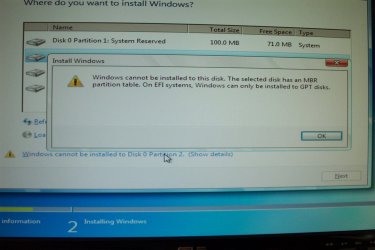
I am having some problems with W7(64bit), and I want to re-install. I have three partitions setup, and when Windows setup asks me which disk/partition I want to install Windows on (see image DCP_1.jpg), I select partition2, which is the primary partition. Windows now displays an error see(DCP_2.jpg).

Why wont Windows let me write over the old installation with a brand new W7 installation, I'm not sure I understand the error message. Please see the two images included.

Do I have to delete all partitions?

Can anyone help out?

Thanks
yiti.
 

Attachments

  • DCP_1.JPG
    DCP_1.JPG
    164.4 KB · Views: 1
  • DCP_2.JPG
    DCP_2.JPG
    161.6 KB · Views: 1

My Computer My Computer

Computer type
PC/Desktop
OS
W7 64bit
Maybe you need to boot with DVD listed in UEFI portion or change something in BIOS. Use the Boot Menu during POST (should say which key in BIOS screen)

Until someone else comments.
 

My Computer My Computer

Computer type
PC/Desktop
Computer Manufacturer/Model Number
Custom Build
OS
Windows 7 Ultimate x64 SP1
CPU
AMD Phenom 2 1090T
Motherboard
Gigabyte GA-890FXA-UD5
Memory
2x8GB Kingston HyperX Fury Black 1600Mhz Unganged
Graphics Card(s)
MSI GTX 970 Gaming 4G
Sound Card
Realtek On-Board HD 7.1 Audio / Logitech G35
Monitor(s) Displays
3xAcer GD245HQ
Screen Resolution
1920x1080
Hard Drives
Samsung 850 Pro 512GB SSD - OS /
WD Caviar Black SATA 3 - 1 TBx2 - Dynamic RAID 0 /
WD Caviar Green SATA 2 - 640GBx2 - Dynamic RAID 0 /
WD Caviar Green SATA 2 - 640GB - Internal Backup /
Seagate Barracude SATA 3 - 3TB - External Backup/ Sync
PSU
HighPower 1000W
Case
Cooler Master HAF 932
Cooling
Noctua NH-D14
Keyboard
Logitech G19
Mouse
Logitech G500
Internet Speed
100/4 Mbit Cable (100GB quota)
Antivirus
ZoneAlarm Extreme Security / MBAM Pro / MBAE Free / SAS Free
Browser
IE 11 - Firefox - Chrome
Other Info
Logitech F710/ G27/ G940/ Z5500 // TrackIR 5 // Nvidia 3D Surround Vision
I don't know too much about W7, I'm not in IT, what is UEFI, and how is that going to help me?
 

My Computer My Computer

Computer type
PC/Desktop
OS
W7 64bit
UEFI (Unified Extensible Firmware Interface) is a standard firmware interface for PCs, designed to replace BIOS (basic input/output system). This standard was created by over 140 technology companies as part of the UEFI consortium, including Microsoft.
https://www.google.com/search?q=what+is+UEFI
Just guessing here, but yes, you might have to delete that partition and let Win7 re-make it in whatever way it wishes...just please do not do that until somewhere here who actually knows says that is the way to go!
 

My Computer My Computer

OS
Win7 Ultimate x64
bump, anyone?
 

My Computer My Computer

Computer type
PC/Desktop
OS
W7 64bit
Surprised no one answered you. Anyway you are trying to install Windows 7 to a hard drive setup in a MBR partition style using the UEFI bios, all you have to do is go into the bios and change it to Legacy mode, or maybe there`s an option like mine that says Legacy & UEFI. But you have to disable UEFI and enable Legacy mode.

Then you`ll be good to go :)
 

My Computer My Computer

Computer type
PC/Desktop
Computer Manufacturer/Model Number
Skylake Special #666
OS
Windows 10 Pro x64
CPU
Intel Core i7 6700K
Motherboard
Asus Sabertooth Z170 Mark 1
Memory
GSkill TridentZ RGB 16GB 3600 16-16-16-36
Graphics Card(s)
EVGA GTX 980 Ti SC x2
Sound Card
Realtek High Definition
Monitor(s) Displays
AOC G2460PG
Screen Resolution
1920 x 1080 144Hz
Hard Drives
Samsung 860 Pro 256GB, Seagate Barracuda 4TB x2
PSU
EVGA 1000 P2, EVGA White Custom Braided Cables
Case
Corsair Vengeance C70 Gunmetal Black
Cooling
Corsair H100i v2, Corsair ML120 x2, Thermal Grizzly Kryonaut
Keyboard
Logitech G910 Orion Spectrum
Mouse
Logitech G700s
Internet Speed
Verizon Fios Quantum Gateway 75/75
Antivirus
Windows Defender, Malwarebytes Free 3.8.3
Browser
Chrome
Other Info
Corsair SP120 x4, LG Blu-ray Drive, Durabrand HT-395 100 Watt Dolby Digital Amp, Corsair H2100 Wireless 7.1 Headset
Thanks AddRAM, I'll look into the BIOS. So now for the other questions, what the difference between the two (Legacy & UEFI) and how is one better or worse that the other?

Thanks
yiati
 

My Computer My Computer

Computer type
PC/Desktop
OS
W7 64bit
You can google that.

I see no advantage with UEFI.
 

My Computer My Computer

Computer type
PC/Desktop
Computer Manufacturer/Model Number
Skylake Special #666
OS
Windows 10 Pro x64
CPU
Intel Core i7 6700K
Motherboard
Asus Sabertooth Z170 Mark 1
Memory
GSkill TridentZ RGB 16GB 3600 16-16-16-36
Graphics Card(s)
EVGA GTX 980 Ti SC x2
Sound Card
Realtek High Definition
Monitor(s) Displays
AOC G2460PG
Screen Resolution
1920 x 1080 144Hz
Hard Drives
Samsung 860 Pro 256GB, Seagate Barracuda 4TB x2
PSU
EVGA 1000 P2, EVGA White Custom Braided Cables
Case
Corsair Vengeance C70 Gunmetal Black
Cooling
Corsair H100i v2, Corsair ML120 x2, Thermal Grizzly Kryonaut
Keyboard
Logitech G910 Orion Spectrum
Mouse
Logitech G700s
Internet Speed
Verizon Fios Quantum Gateway 75/75
Antivirus
Windows Defender, Malwarebytes Free 3.8.3
Browser
Chrome
Other Info
Corsair SP120 x4, LG Blu-ray Drive, Durabrand HT-395 100 Watt Dolby Digital Amp, Corsair H2100 Wireless 7.1 Headset
ok, will do that.
 

My Computer My Computer

Computer type
PC/Desktop
OS
W7 64bit
Quote from this post: UEFI Boot Mode (installing using the GPT partition style) and Legacy BIOS Boot Mode (installing using the MBR partition style). -> link

   Tip
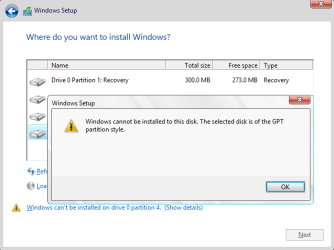
Error message when you boot from the Windows installation media in Legacy BIOS Boot Mode:

Windows cannot be installed to this disk. The selected disk is of the GPT partition style. (see screenshot below)

That is because Windows can only be installed to MBR disk in Legacy BIOS Boot Mode, but you plan to install Windows on a GPT disk.

- Boot from the Windows installation media in UEFI Boot Mode, so you can use GPT (GUID Partition Table).
- But if you want to use MBR (Master Boot Record) partition table, then delete all partitions on the disk.

Windows cannot be installed to this disk. The selected disk is of the GPT partition style.png

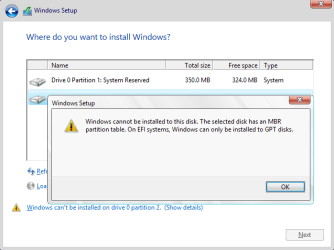
Error message when you boot from the Windows installation media in UEFI Boot Mode:

Windows cannot be installed to this disk. The selected disk has an MBR partition table. On EFI systems, Windows can only be installed to GPT disks. (see screenshot below)

That is because Windows can only be installed to GPT disk in UEFI Boot Mode, but you plan to install Windows on an MBR disk.

- Delete all partitions on the disk, so you can use GPT (GUID Partition Table).
- But if you want to use MBR (Master Boot Record) partition table, then boot from the Windows installation media in Legacy BIOS Boot Mode.

Windows cannot be installed on this disk. The selected disk has an MBR partition table.png
 
Last edited:

My Computer My Computer

Computer type
Laptop
Computer Manufacturer/Model Number
Lenovo IdeaPad G580
OS
Windows 8.1/10 x64
CPU
Intel Core i5-3230M
Memory
8 GB
Graphics Card(s)
Intel HD Graphics 4000
Antivirus
Windows Defender, EMET, standard user account
Browser
Internet Explorer
So if I select legacy mode within my BIOS and then boot from the Windows install disk, I can then re install W7(64)?
 

My Computer My Computer

Computer type
PC/Desktop
OS
W7 64bit
Yes, it should work now.

Don`t forget to format partition 1, after it`s formatted just click next and the install should start.
 

My Computer My Computer

Computer type
PC/Desktop
Computer Manufacturer/Model Number
Skylake Special #666
OS
Windows 10 Pro x64
CPU
Intel Core i7 6700K
Motherboard
Asus Sabertooth Z170 Mark 1
Memory
GSkill TridentZ RGB 16GB 3600 16-16-16-36
Graphics Card(s)
EVGA GTX 980 Ti SC x2
Sound Card
Realtek High Definition
Monitor(s) Displays
AOC G2460PG
Screen Resolution
1920 x 1080 144Hz
Hard Drives
Samsung 860 Pro 256GB, Seagate Barracuda 4TB x2
PSU
EVGA 1000 P2, EVGA White Custom Braided Cables
Case
Corsair Vengeance C70 Gunmetal Black
Cooling
Corsair H100i v2, Corsair ML120 x2, Thermal Grizzly Kryonaut
Keyboard
Logitech G910 Orion Spectrum
Mouse
Logitech G700s
Internet Speed
Verizon Fios Quantum Gateway 75/75
Antivirus
Windows Defender, Malwarebytes Free 3.8.3
Browser
Chrome
Other Info
Corsair SP120 x4, LG Blu-ray Drive, Durabrand HT-395 100 Watt Dolby Digital Amp, Corsair H2100 Wireless 7.1 Headset
Great, Thanks.
 

My Computer My Computer

Computer type
PC/Desktop
OS
W7 64bit
You should choose UEFI DVD choice on the Boot menu to take full advantage of all the BIOS's features. But you'll need to delete all partitions first.

If the other partitions are separate hard drives, these should always be unplugged during reinstall.

As suggested you should be able to install to the disc in its present condition if you change the bios to CSM or legacy mode then boot the disc as a legacy DVD and not a UEFI DVD.
 
Last edited:
Thanks gregrocker, this is perfect, great info.
 

My Computer My Computer

Computer type
PC/Desktop
OS
W7 64bit
Just one more thing, why did the original installation go in without fault. I can see it set up a system reserve partition (disk0 partition1), and then it installed the op system on(disk0 partition2), and I went in with Acronis and did the rest. Did Windows install on a MBR, I assume it did.

So why is it booting with UEFI support?
 

My Computer My Computer

Computer type
PC/Desktop
OS
W7 64bit
Separate hard drives can support either MBR Or GPT with CSM or Legacy BIOS enabled in BIOS setup. In that case all you need to do is delete the partitions on the erroring disk to allow it to install as MBR.

What are these settings choices in BIOS? Pictures will help.
 
Thanks gregrocker I'm not sure what you mean by air ring disk, I have one single disk, with one primary, and two logical partitions. As I'm in the middle of work, I will take a pic when I reboot latter and post.
 

My Computer My Computer

Computer type
PC/Desktop
OS
W7 64bit
Well here's the BIOS pics, I cant see where UEFI is mentioned.
 

Attachments

My Computer My Computer

Computer type
PC/Desktop
OS
W7 64bit
Back
Top