Windows error when trying to re-install on partition.

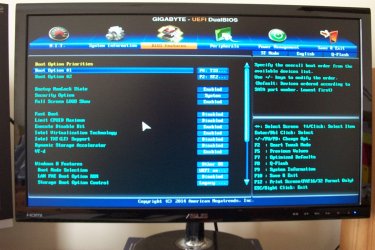
UEFI is the name of your BIOS as shown in screenshots.

Pictures can be posted inline in the thread using the paper clip icon. Screenshots and Files - Upload and Post in Seven Forums - Windows 7 Forums

When you click either the Setup or System choice in Security tab there should be another choice for Secure Boot that must be disabled.

On the Boot Options which we cannot see, there should be a choice for UEFI DVD drive to select to install correctly to UEFI (Unified Extensible Firmware Interface) - Install Windows 7 with - Windows 7 Forums

There are also obvious UEFI setings under Windows 8 Features where you have selected Other OS. Read the Help dialogues on the right when you highlight each of those settings which should be for UEFI and Legacy.
 
Last edited:
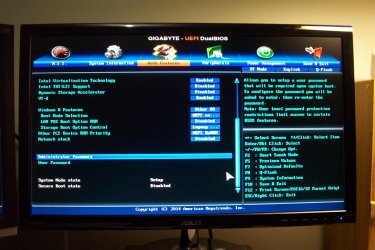
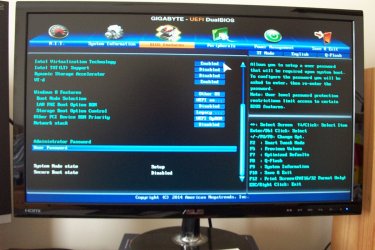
Well here's the BIOS pics, I cant see where UEFI is mentioned.

Your UEFI firmware (BIOS) settings are okay.

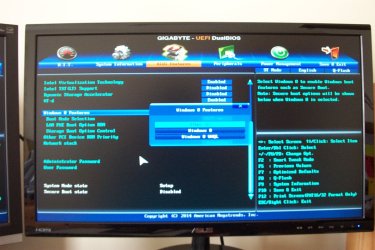
Windows 8 Features
Allows you to select the operating system to be installed.
- Other OS (Default)
- Windows 8
- Windows 8 WHQL

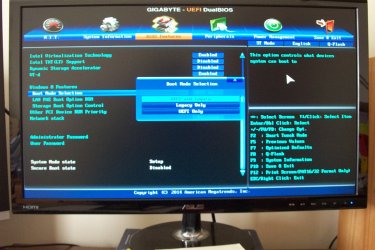
Boot Mode Selection
Allows you to select which type of operating system to boot.
- UEFI and Legacy - Allows booting from operating systems that support legacy option ROM or UEFI option ROM. (Default)
- Legacy only - Allows booting from operating systems that only support legacy option ROM.
- UEFI only - Allows booting from operating systems that only support UEFI option ROM.

DCP_0005.JPG

edit:

The Gigabyte motherboard UEFI firmware (BIOS) settings. -> link
 

My Computer My Computer

Computer type
Laptop
Computer Manufacturer/Model Number
Lenovo IdeaPad G580
OS
Windows 8.1/10 x64
CPU
Intel Core i5-3230M
Memory
8 GB
Graphics Card(s)
Intel HD Graphics 4000
Antivirus
Windows Defender, EMET, standard user account
Browser
Internet Explorer
Good help, Genet.

Since other OS is default, I'd go ahead and reset the BIOS to Optimal Defaults.
 
You should choose UEFI DVD choice on the Boot menu to take full advantage of all the BIOS's features. This will allow you to install to the selected partition without deleting all others first.

If the other partitions are separate hard drives, these should always be unplugged during reinstall.

If these are partitions on the same drive, then they must be deleted during install to change the formatting to MBR, another reason I would not do it.

Since you don't seem to know what you're doing, I strongly suggest that you read over the steps in Clean Reinstall Windows 7 which compiles everything that works best in tens of thousands of Win7 installs we've directly helped with here. You'll get and keep a perfect install to the exact extent you stick with the tools and methods given.

It`s already a MBR drive. 1st post.

They are not separate disks, all his partitions are on Disk 0, if he converted to GPT he would loose his data on partition 3.
 

My Computer My Computer

Computer type
PC/Desktop
Computer Manufacturer/Model Number
Skylake Special #666
OS
Windows 10 Pro x64
CPU
Intel Core i7 6700K
Motherboard
Asus Sabertooth Z170 Mark 1
Memory
GSkill TridentZ RGB 16GB 3600 16-16-16-36
Graphics Card(s)
EVGA GTX 980 Ti SC x2
Sound Card
Realtek High Definition
Monitor(s) Displays
AOC G2460PG
Screen Resolution
1920 x 1080 144Hz
Hard Drives
Samsung 860 Pro 256GB, Seagate Barracuda 4TB x2
PSU
EVGA 1000 P2, EVGA White Custom Braided Cables
Case
Corsair Vengeance C70 Gunmetal Black
Cooling
Corsair H100i v2, Corsair ML120 x2, Thermal Grizzly Kryonaut
Keyboard
Logitech G910 Orion Spectrum
Mouse
Logitech G700s
Internet Speed
Verizon Fios Quantum Gateway 75/75
Antivirus
Windows Defender, Malwarebytes Free 3.8.3
Browser
Chrome
Other Info
Corsair SP120 x4, LG Blu-ray Drive, Durabrand HT-395 100 Watt Dolby Digital Amp, Corsair H2100 Wireless 7.1 Headset
Good catch, Brian. I read the error backwards. Somehow the settings have changed to UEFI and/or he booted the disc as a UEFI DVD generating the error that the installer needs all partitions deleted so it can reformat GPT. Possibly this occurred because the bios was reset to default.

What I would do in this case is back up your data which should always be the case anyway then delete all partitions to allow the installer to reformat GPT. Shouldn't need to change any settings to do that.
 
When you click either the Setup or System choice in Security tab there should be another choice for Secure Boot that must be disabled.

This is set to Disabled within the BIOS features section.

On the Boot Options which we cannot see, there should be a choice for UEFI DVD drive to select to install correctly to UEFI (Unified Extensible Firmware Interface) - Install Windows 7 with - Windows 7 Forums

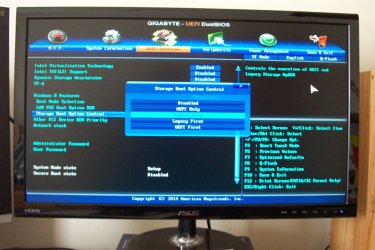
I've included more pics on this with the selections expanded, really sorry about the quality.

So, it seems the BIOS was set to boot UEFI and Legacy, stated as "Default" in the BIOS manual.

>> UEFI and Legacy Allows booting from operating systems that support legacy option ROM or UEFI
option ROM. (Default)

I think it booted as Legacy. The op system went in as MBR. Why the rest happened,...well who knows.
If you all agree, then I want to re install as MBR, which is what the partition is at the moment (see 1st post pics), and although I've learned a lot, I'm still not too clear on how to do this.

OR: should I just re do everything to UEFI because its better?, is it?

BTW: I have reset the BIOS to optimized defaults, which seems to be what it was originally.
 

Attachments

  • DCP_0002.JPG
    DCP_0002.JPG
    264.7 KB · Views: 0
  • DCP_0003.JPG
    DCP_0003.JPG
    259.1 KB · Views: 0
  • DCP_0004.JPG
    DCP_0004.JPG
    243.4 KB · Views: 1
  • DCP_0005.JPG
    DCP_0005.JPG
    251.7 KB · Views: 0
  • DCP_0006.JPG
    DCP_0006.JPG
    240.6 KB · Views: 0
  • DCP_0001.JPG
    DCP_0001.JPG
    269.7 KB · Views: 0

My Computer My Computer

Computer type
PC/Desktop
OS
W7 64bit

My Computer My Computer

Computer type
PC/Desktop
Computer Manufacturer/Model Number
Skylake Special #666
OS
Windows 10 Pro x64
CPU
Intel Core i7 6700K
Motherboard
Asus Sabertooth Z170 Mark 1
Memory
GSkill TridentZ RGB 16GB 3600 16-16-16-36
Graphics Card(s)
EVGA GTX 980 Ti SC x2
Sound Card
Realtek High Definition
Monitor(s) Displays
AOC G2460PG
Screen Resolution
1920 x 1080 144Hz
Hard Drives
Samsung 860 Pro 256GB, Seagate Barracuda 4TB x2
PSU
EVGA 1000 P2, EVGA White Custom Braided Cables
Case
Corsair Vengeance C70 Gunmetal Black
Cooling
Corsair H100i v2, Corsair ML120 x2, Thermal Grizzly Kryonaut
Keyboard
Logitech G910 Orion Spectrum
Mouse
Logitech G700s
Internet Speed
Verizon Fios Quantum Gateway 75/75
Antivirus
Windows Defender, Malwarebytes Free 3.8.3
Browser
Chrome
Other Info
Corsair SP120 x4, LG Blu-ray Drive, Durabrand HT-395 100 Watt Dolby Digital Amp, Corsair H2100 Wireless 7.1 Headset
Now what I would do is back up your data on the hard drive, unplug any other hard drives, boot the disk as a UEFI DVD drive, delete all partitions using the Advanced Drive Options, create and format New partitions as you wish then click Next, or just click Next and the installer will do it for you.
 
gregrocker, just to make sure I understand correctly, if I just click next at some point during the w7 install, do you mean Windows installer will automatically delete all partitions, and I assume install itself into one large primary partition. OR I can use the Advanced Drive Options, to create and format new partitions as I wish.

In any case I'm sure the prompts will show what to do.

Thanks for every ones help so far, I've come along a bit since I started this project.
 

My Computer My Computer

Computer type
PC/Desktop
OS
W7 64bit
No, the install dvd does not delete the partitions by itself, you have to click on each partition and delete it if you want to.
 

My Computer My Computer

Computer type
PC/Desktop
Computer Manufacturer/Model Number
Skylake Special #666
OS
Windows 10 Pro x64
CPU
Intel Core i7 6700K
Motherboard
Asus Sabertooth Z170 Mark 1
Memory
GSkill TridentZ RGB 16GB 3600 16-16-16-36
Graphics Card(s)
EVGA GTX 980 Ti SC x2
Sound Card
Realtek High Definition
Monitor(s) Displays
AOC G2460PG
Screen Resolution
1920 x 1080 144Hz
Hard Drives
Samsung 860 Pro 256GB, Seagate Barracuda 4TB x2
PSU
EVGA 1000 P2, EVGA White Custom Braided Cables
Case
Corsair Vengeance C70 Gunmetal Black
Cooling
Corsair H100i v2, Corsair ML120 x2, Thermal Grizzly Kryonaut
Keyboard
Logitech G910 Orion Spectrum
Mouse
Logitech G700s
Internet Speed
Verizon Fios Quantum Gateway 75/75
Antivirus
Windows Defender, Malwarebytes Free 3.8.3
Browser
Chrome
Other Info
Corsair SP120 x4, LG Blu-ray Drive, Durabrand HT-395 100 Watt Dolby Digital Amp, Corsair H2100 Wireless 7.1 Headset
ok, sounds good to me. Better start backing up all my stuff.
 

My Computer My Computer

Computer type
PC/Desktop
OS
W7 64bit
Back
Top