Windows Experience Index Issue

pare

New member
Member
Local time
4:37 PM
Messages
98
Location
Aruba
Hi folks,
Can any of you guys advice me with this issue?
I have been trying to rate my computer but it give me this message;
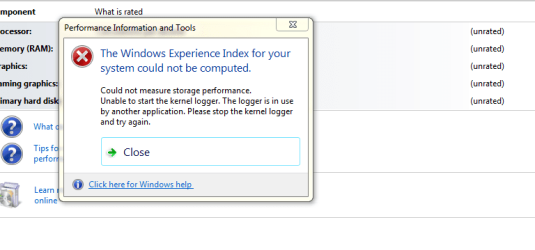
Capture 9.PNG
 

My Computer

OS
windows 7 home premium 64bit
CPU
Intel (R) Pentium (R) 4 CPU 3.06 GHz
Motherboard
Gigabyte GA-81865 GME-775
Memory
Ultra 1024 MB PC2700 DDR 333 MHz (2 RAM)
Graphics Card(s)
Nvidia Geforce 6200 256 Mbytes
Sound Card
Realtek AC'97 Audio
Monitor(s) Displays
Generic PnP monitor
Screen Resolution
1024*768 @ 75 Hz
Hard Drives
Seagate ST3320620AS 320 GB Serial ATA
Case
PC312 Lyra Super Case
Internet Speed
100 Mbps

My Computer

Computer type
PC/Desktop
Computer Manufacturer/Model Number
Dell XPS 420
OS
Windows 10, Home Clean Install
CPU
Intel Core2 processsor Q8200(2.33Ghz 1333FSB) Quad Core Tech
Motherboard
Dell
Memory
6 gb
Graphics Card(s)
ATI Radeon 256MB HD3650
Sound Card
Intergrated 7.1 Channel Audio
Monitor(s) Displays
Dell SP2009W 20"
Hard Drives
640 GB Serial ATA Hard drive
Cooling
Fan
Keyboard
Dell USB Keyboard
Mouse
Dell Premium Optical USB
Internet Speed
DSL 2.85
I am sorry Rich, I did perform this clean boot but it did n't fix the issue.

I have the feeling that this problem started when an update Windows Internet Explorer 9 for Windows 7 for x64-based Systems failed twice on may 13th and it appear as an important update.

I did n't even downloaded Windows Internet Explorer 9 and I don't want to download it since I am perfectly allright with Windows Internet Explorer 8

Right now there are 8 important updates waiting to be installed which include again this Windows Internet Explorer 9

Is it recommended to deselect this one and install the other 7 updates?
 

My Computer

OS
windows 7 home premium 64bit
CPU
Intel (R) Pentium (R) 4 CPU 3.06 GHz
Motherboard
Gigabyte GA-81865 GME-775
Memory
Ultra 1024 MB PC2700 DDR 333 MHz (2 RAM)
Graphics Card(s)
Nvidia Geforce 6200 256 Mbytes
Sound Card
Realtek AC'97 Audio
Monitor(s) Displays
Generic PnP monitor
Screen Resolution
1024*768 @ 75 Hz
Hard Drives
Seagate ST3320620AS 320 GB Serial ATA
Case
PC312 Lyra Super Case
Internet Speed
100 Mbps
Yes that is a big yes. You do not need 9 if not wanted. Do the others. Do a few at a time and you will be ok.
 

My Computer

Computer type
PC/Desktop
Computer Manufacturer/Model Number
Dell XPS 420
OS
Windows 10, Home Clean Install
CPU
Intel Core2 processsor Q8200(2.33Ghz 1333FSB) Quad Core Tech
Motherboard
Dell
Memory
6 gb
Graphics Card(s)
ATI Radeon 256MB HD3650
Sound Card
Intergrated 7.1 Channel Audio
Monitor(s) Displays
Dell SP2009W 20"
Hard Drives
640 GB Serial ATA Hard drive
Cooling
Fan
Keyboard
Dell USB Keyboard
Mouse
Dell Premium Optical USB
Internet Speed
DSL 2.85
I did install the updates except for the Internet Explorer 9 (I did hide it)

They installed succesfully except for this one "Security Update for Windows 7 x64 based systems KB 2535512" this one failed.

I did even installed KB 976932 Windows 7 Service Pack 1 for x64 based systems.

But the W.E.I. issue still persist. It give me this "The assesment or other operation did not complete succesfully. This is due to an error being reported from the O.S. driver or other component.
 

My Computer

OS
windows 7 home premium 64bit
CPU
Intel (R) Pentium (R) 4 CPU 3.06 GHz
Motherboard
Gigabyte GA-81865 GME-775
Memory
Ultra 1024 MB PC2700 DDR 333 MHz (2 RAM)
Graphics Card(s)
Nvidia Geforce 6200 256 Mbytes
Sound Card
Realtek AC'97 Audio
Monitor(s) Displays
Generic PnP monitor
Screen Resolution
1024*768 @ 75 Hz
Hard Drives
Seagate ST3320620AS 320 GB Serial ATA
Case
PC312 Lyra Super Case
Internet Speed
100 Mbps
I did install the updates except for the Internet Explorer 9 (I did hide it)

They installed succesfully except for this one "Security Update for Windows 7 x64 based systems KB 2535512" this one failed.

I did even installed KB 976932 Windows 7 Service Pack 1 for x64 based systems.

But the W.E.I. issue still persist. It give me this "The assesment or other operation did not complete succesfully. This is due to an error being reported from the O.S. driver or other component.

Do you have any type of MBR protection? I run a security app called AppGuard which has a component called MBR Guard. When MBR Guard is enabled, WEI will not complete and gives the message you refer to in your first post. If MBR Guard is disabled, WEI will complete.
 

My Computer

Computer Manufacturer/Model Number
Averatec 6130HS-20
OS
Windows 7 Professional 32-bit (6.1, Build 7600)
CPU
Intel(R) Pentium(R) 4 3.00 GHz HT
Memory
2.0 GB
Graphics Card(s)
ATI Mobility Radeon 9600 64MB
Sound Card
Realtek AC'97 Audio
Screen Resolution
1280 x 800
Hard Drives
Seagate 96023A 60GB 7200RPM -
Seagate FreeAgentDesktop 250GB
Cooling
20 Inch Box Fan
Mouse
Targus PAWM10 Wireless Optical Laptop Mouse
That can be an error caused by your graphics card driver. A Guy
 

My Computer

Computer type
PC/Desktop
OS
Windows 10 Home x64
CPU
INTEL Core i5-750 Quad-Core 3.37GHz
Motherboard
ASUS P7P55D
Memory
HyperX Fury Black Series 8GB (2 x 4GB) 1866Mhz
Graphics Card(s)
EVGA GeForce GTX 750 Superclocked 1GB 128-Bit GDDR5
Monitor(s) Displays
LG 32MA68HY 32" IPS
Screen Resolution
1920 x 1080
Hard Drives
Samsung 840 Evo 120GB, SEAGATE 500GB Barracuda® 7200.12, SATA 3 Gb/s, 7200 RPM, 16MB cache
PSU
ANTEC TruePower New TP-550, 80 PLUS, 550W
Case
ANTEC Three Hundred Illusion
Cooling
COOLER MASTER Hyper 212 Plus, 4 x 120mm 1 x 140mm Noctua's
Internet Speed
85 + Mbps
Antivirus
Avast
Browser
Vivaldi

My Computer

Computer type
PC/Desktop
Computer Manufacturer/Model Number
Dwarf Dwf/11/2012 r09/2013
OS
Windows 8.1 Pro RTM x64
CPU
Intel Core-i5-3570K 4-core @ 3.4GHz (Ivy Bridge) (OC 4.4GHz)
Motherboard
ASRock Z77 Extreme4-M
Memory
4 x 4GB DDR3-1600 Corsair Vengeance CMZ8GX3M2A1600C9B (16GB)
Graphics Card(s)
MSI GeForce GTX770 Gaming OC 2GB
Sound Card
Realtek High Definition on board solution (ALC 898)
Monitor(s) Displays
ViewSonic VA1912w Widescreen (VGA)
Screen Resolution
1440x900
Hard Drives
OCZ Agility 3 SSD 120GB SATA III x2 (RAID 0)
Samsung HD501LJ 500GB SATA II x2
Hitachi HDS721010CLA332 1TB SATA II
Iomega 1.5TB Ext USB 2.0
WD 2.0TB Ext USB 3.0
PSU
XFX Pro Series 850W Semi-Modular
Case
Gigabyte IF233
Cooling
1 x 120mm Front Inlet 1 x 120mm Rear Exhaust
Keyboard
Microsoft Comfort Curve Keyboard 3000 (USB)
Mouse
Microsoft Comfort Mouse 3000 for Business (USB)
Internet Speed
NetGear DG834Gv3 ADSL Modem/Router (Ethernet) ~4.0 Mb/s (O2)
Antivirus
Avast! 8.0.1497
Browser
IE 11
Other Info
Optical Drive: HL-DT-ST BD-RE BH10LS30 SATA Bluray
Lexmark S305 Printer/Scanner/Copier (USB)
WEI Score: 8.1/8.1/8.5/8.5/8.25
Asus Eee PC 1011PX Netbook (Windows 7 x86 Starter)
Hi Dwarf,
It took a couple of days, I am sorry. Have been very busy, fathersday etc.
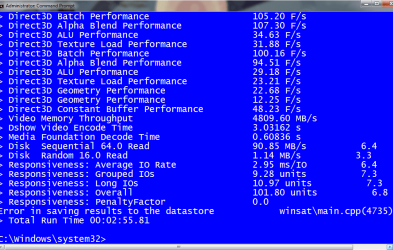
Here is a screenshot of my winsat!

Capture 10.PNG

I don't understand a thing. Like a cat watching her self in the mirror.
I can see there is an error somewhere but what does it mean???
 

My Computer

OS
windows 7 home premium 64bit
CPU
Intel (R) Pentium (R) 4 CPU 3.06 GHz
Motherboard
Gigabyte GA-81865 GME-775
Memory
Ultra 1024 MB PC2700 DDR 333 MHz (2 RAM)
Graphics Card(s)
Nvidia Geforce 6200 256 Mbytes
Sound Card
Realtek AC'97 Audio
Monitor(s) Displays
Generic PnP monitor
Screen Resolution
1024*768 @ 75 Hz
Hard Drives
Seagate ST3320620AS 320 GB Serial ATA
Case
PC312 Lyra Super Case
Internet Speed
100 Mbps
pare, do you use Kaspersky? I remember some versions causing this problem.

A Guy
 

My Computer

Computer type
PC/Desktop
OS
Windows 10 Home x64
CPU
INTEL Core i5-750 Quad-Core 3.37GHz
Motherboard
ASUS P7P55D
Memory
HyperX Fury Black Series 8GB (2 x 4GB) 1866Mhz
Graphics Card(s)
EVGA GeForce GTX 750 Superclocked 1GB 128-Bit GDDR5
Monitor(s) Displays
LG 32MA68HY 32" IPS
Screen Resolution
1920 x 1080
Hard Drives
Samsung 840 Evo 120GB, SEAGATE 500GB Barracuda® 7200.12, SATA 3 Gb/s, 7200 RPM, 16MB cache
PSU
ANTEC TruePower New TP-550, 80 PLUS, 550W
Case
ANTEC Three Hundred Illusion
Cooling
COOLER MASTER Hyper 212 Plus, 4 x 120mm 1 x 140mm Noctua's
Internet Speed
85 + Mbps
Antivirus
Avast
Browser
Vivaldi
No, I don't use Kaspersky.
So I do have a problem?
I have AVG free edition.
I appreciate any help I can get!
Thanks any way.
 

My Computer

OS
windows 7 home premium 64bit
CPU
Intel (R) Pentium (R) 4 CPU 3.06 GHz
Motherboard
Gigabyte GA-81865 GME-775
Memory
Ultra 1024 MB PC2700 DDR 333 MHz (2 RAM)
Graphics Card(s)
Nvidia Geforce 6200 256 Mbytes
Sound Card
Realtek AC'97 Audio
Monitor(s) Displays
Generic PnP monitor
Screen Resolution
1024*768 @ 75 Hz
Hard Drives
Seagate ST3320620AS 320 GB Serial ATA
Case
PC312 Lyra Super Case
Internet Speed
100 Mbps
Try this. Go to:

C:\windows\Performance\WinSAT\DataStore

And delete the content of the DataStore folder. Try to rerun the assessment. A Guy
 

My Computer

Computer type
PC/Desktop
OS
Windows 10 Home x64
CPU
INTEL Core i5-750 Quad-Core 3.37GHz
Motherboard
ASUS P7P55D
Memory
HyperX Fury Black Series 8GB (2 x 4GB) 1866Mhz
Graphics Card(s)
EVGA GeForce GTX 750 Superclocked 1GB 128-Bit GDDR5
Monitor(s) Displays
LG 32MA68HY 32" IPS
Screen Resolution
1920 x 1080
Hard Drives
Samsung 840 Evo 120GB, SEAGATE 500GB Barracuda® 7200.12, SATA 3 Gb/s, 7200 RPM, 16MB cache
PSU
ANTEC TruePower New TP-550, 80 PLUS, 550W
Case
ANTEC Three Hundred Illusion
Cooling
COOLER MASTER Hyper 212 Plus, 4 x 120mm 1 x 140mm Noctua's
Internet Speed
85 + Mbps
Antivirus
Avast
Browser
Vivaldi
Should I do this true administrator: Command Prompt?

If I do so I can see C:\Windows\system32>

How to get only C:\Windows\Performance\Winsat\Data store

I hope my explanation is clear.
 

My Computer

OS
windows 7 home premium 64bit
CPU
Intel (R) Pentium (R) 4 CPU 3.06 GHz
Motherboard
Gigabyte GA-81865 GME-775
Memory
Ultra 1024 MB PC2700 DDR 333 MHz (2 RAM)
Graphics Card(s)
Nvidia Geforce 6200 256 Mbytes
Sound Card
Realtek AC'97 Audio
Monitor(s) Displays
Generic PnP monitor
Screen Resolution
1024*768 @ 75 Hz
Hard Drives
Seagate ST3320620AS 320 GB Serial ATA
Case
PC312 Lyra Super Case
Internet Speed
100 Mbps
Just navigate to the folder:

Start> Computer> Click on C:> Click on Windows> Click on Performance> Click on Winsat> Click on DataStore> Delete the contents> Try WEI again :)

A Guy
 

My Computer

Computer type
PC/Desktop
OS
Windows 10 Home x64
CPU
INTEL Core i5-750 Quad-Core 3.37GHz
Motherboard
ASUS P7P55D
Memory
HyperX Fury Black Series 8GB (2 x 4GB) 1866Mhz
Graphics Card(s)
EVGA GeForce GTX 750 Superclocked 1GB 128-Bit GDDR5
Monitor(s) Displays
LG 32MA68HY 32" IPS
Screen Resolution
1920 x 1080
Hard Drives
Samsung 840 Evo 120GB, SEAGATE 500GB Barracuda® 7200.12, SATA 3 Gb/s, 7200 RPM, 16MB cache
PSU
ANTEC TruePower New TP-550, 80 PLUS, 550W
Case
ANTEC Three Hundred Illusion
Cooling
COOLER MASTER Hyper 212 Plus, 4 x 120mm 1 x 140mm Noctua's
Internet Speed
85 + Mbps
Antivirus
Avast
Browser
Vivaldi
If I go like this:

C:\Windows\system32>performance\winsat\datastore

I get this message:

The system cannot find the path specified.
 

My Computer

OS
windows 7 home premium 64bit
CPU
Intel (R) Pentium (R) 4 CPU 3.06 GHz
Motherboard
Gigabyte GA-81865 GME-775
Memory
Ultra 1024 MB PC2700 DDR 333 MHz (2 RAM)
Graphics Card(s)
Nvidia Geforce 6200 256 Mbytes
Sound Card
Realtek AC'97 Audio
Monitor(s) Displays
Generic PnP monitor
Screen Resolution
1024*768 @ 75 Hz
Hard Drives
Seagate ST3320620AS 320 GB Serial ATA
Case
PC312 Lyra Super Case
Internet Speed
100 Mbps
All of them?

There are like almost 50.

Right click on each one of them and delete?

One at a time?

I am sorry.
 

My Computer

OS
windows 7 home premium 64bit
CPU
Intel (R) Pentium (R) 4 CPU 3.06 GHz
Motherboard
Gigabyte GA-81865 GME-775
Memory
Ultra 1024 MB PC2700 DDR 333 MHz (2 RAM)
Graphics Card(s)
Nvidia Geforce 6200 256 Mbytes
Sound Card
Realtek AC'97 Audio
Monitor(s) Displays
Generic PnP monitor
Screen Resolution
1024*768 @ 75 Hz
Hard Drives
Seagate ST3320620AS 320 GB Serial ATA
Case
PC312 Lyra Super Case
Internet Speed
100 Mbps
Yes, all of them Just left click and highlight them all at once. Right click on them and choose delete. No need to delete one at a time. A Guy
 

My Computer

Computer type
PC/Desktop
OS
Windows 10 Home x64
CPU
INTEL Core i5-750 Quad-Core 3.37GHz
Motherboard
ASUS P7P55D
Memory
HyperX Fury Black Series 8GB (2 x 4GB) 1866Mhz
Graphics Card(s)
EVGA GeForce GTX 750 Superclocked 1GB 128-Bit GDDR5
Monitor(s) Displays
LG 32MA68HY 32" IPS
Screen Resolution
1920 x 1080
Hard Drives
Samsung 840 Evo 120GB, SEAGATE 500GB Barracuda® 7200.12, SATA 3 Gb/s, 7200 RPM, 16MB cache
PSU
ANTEC TruePower New TP-550, 80 PLUS, 550W
Case
ANTEC Three Hundred Illusion
Cooling
COOLER MASTER Hyper 212 Plus, 4 x 120mm 1 x 140mm Noctua's
Internet Speed
85 + Mbps
Antivirus
Avast
Browser
Vivaldi
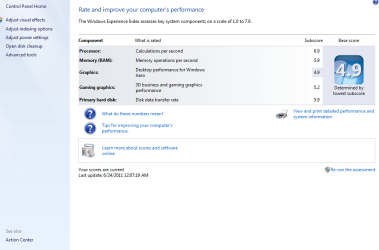
Oh my god!!!!!!!

We did it.

Here is a snap shot.

Capture 11.PNG

Thank you, thank you, thank you.
 

My Computer

OS
windows 7 home premium 64bit
CPU
Intel (R) Pentium (R) 4 CPU 3.06 GHz
Motherboard
Gigabyte GA-81865 GME-775
Memory
Ultra 1024 MB PC2700 DDR 333 MHz (2 RAM)
Graphics Card(s)
Nvidia Geforce 6200 256 Mbytes
Sound Card
Realtek AC'97 Audio
Monitor(s) Displays
Generic PnP monitor
Screen Resolution
1024*768 @ 75 Hz
Hard Drives
Seagate ST3320620AS 320 GB Serial ATA
Case
PC312 Lyra Super Case
Internet Speed
100 Mbps
Congratulations pare, well done. You're very welcome :)

A Guy
 

My Computer

Computer type
PC/Desktop
OS
Windows 10 Home x64
CPU
INTEL Core i5-750 Quad-Core 3.37GHz
Motherboard
ASUS P7P55D
Memory
HyperX Fury Black Series 8GB (2 x 4GB) 1866Mhz
Graphics Card(s)
EVGA GeForce GTX 750 Superclocked 1GB 128-Bit GDDR5
Monitor(s) Displays
LG 32MA68HY 32" IPS
Screen Resolution
1920 x 1080
Hard Drives
Samsung 840 Evo 120GB, SEAGATE 500GB Barracuda® 7200.12, SATA 3 Gb/s, 7200 RPM, 16MB cache
PSU
ANTEC TruePower New TP-550, 80 PLUS, 550W
Case
ANTEC Three Hundred Illusion
Cooling
COOLER MASTER Hyper 212 Plus, 4 x 120mm 1 x 140mm Noctua's
Internet Speed
85 + Mbps
Antivirus
Avast
Browser
Vivaldi
Back
Top