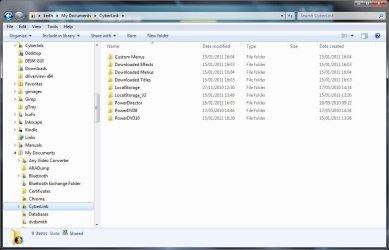
Solved Windows Explorer columns

Astronautilus

New member
Local time
5:33 PM
Messages
4
In Windows Explorer under XP, all file types had the same basic set of columns... File name/date modified/file type/size. This is mostly true with Windows 7, but I notice that with certain file types such as mp3s, wavs and jpegs, Microsoft have tried to be clever and choose columns more appropriate to the file type. So mp3s now default to name/#/title/contributing artist/album.

My question is: are these defaults user accessible?

I'm a photographer and I have about 100 folders containing jpegs. I'd like to change the columns currently shown, but I don't want to have to change 100 folders individually.....

Thanks.
 

My Computer

OS
Windows 7 Ultimate 32-bit
Hi Astronautilus and welcome to Seven Forums.

Yes you can do this. Below is ashort tutorial on how to change it for the documents folder template. You can do the same for any other folder type.

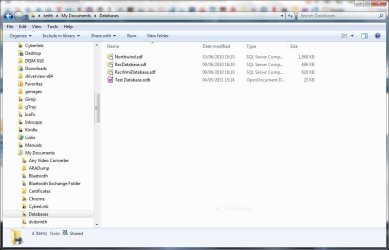
The folder before change.
Capture.JPG

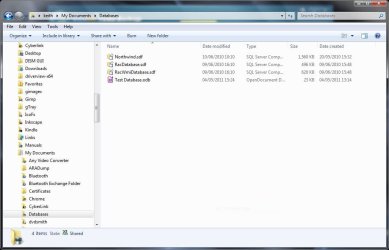
With a new column added
Capture1.JPG

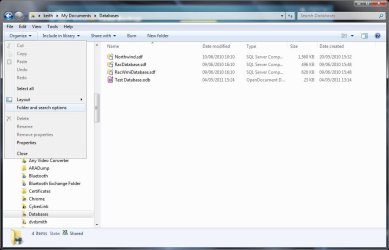
Open the Folder and Search options.
Capture2.JPG

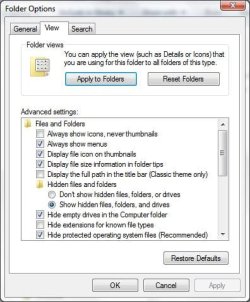
On the view tab press the Apply to folders button.
Capture3.JPG

Showing another folder of the same type.
Capture4.JPG
 
Last edited by a moderator:

My Computer

Computer type
Laptop
Computer Manufacturer/Model Number
Hewlett-Packard/G62-107SA Notebook
OS
Microsoft Windows 7 Home Premium 64-bit Service Pack 1
CPU
Intel(R) Core(TM) i3 CPU M 330 @ 2.13GHz
Motherboard
Hewlett-Packard 1425
Memory
8 GB DDR3
Graphics Card(s)
Intel(R) HD Graphics
Sound Card
Realtek High Definition Audio
Monitor(s) Displays
Builtin
Screen Resolution
1366 x 768 x 32 bits (4294967296 colors) @ 60 Hz
Hard Drives
250 GB SATA Hard Disk Drive 7200 rpm
2TB Seagate GoFlex USB 2 Drive
1TB Iomega Prestige USB 2 Drive
1.5TB Iomega Prestige USB 2 Drive (Samsung)
2TB WD MyBook Live NAS.
Mouse
Logitech Anywhere MX
Internet Speed
152 Mbs download 10 Mbs upload
Antivirus
Norton 360
Browser
Chrome
It can be confusing so I am glad to have been of help.
 

My Computer

Computer type
Laptop
Computer Manufacturer/Model Number
Hewlett-Packard/G62-107SA Notebook
OS
Microsoft Windows 7 Home Premium 64-bit Service Pack 1
CPU
Intel(R) Core(TM) i3 CPU M 330 @ 2.13GHz
Motherboard
Hewlett-Packard 1425
Memory
8 GB DDR3
Graphics Card(s)
Intel(R) HD Graphics
Sound Card
Realtek High Definition Audio
Monitor(s) Displays
Builtin
Screen Resolution
1366 x 768 x 32 bits (4294967296 colors) @ 60 Hz
Hard Drives
250 GB SATA Hard Disk Drive 7200 rpm
2TB Seagate GoFlex USB 2 Drive
1TB Iomega Prestige USB 2 Drive
1.5TB Iomega Prestige USB 2 Drive (Samsung)
2TB WD MyBook Live NAS.
Mouse
Logitech Anywhere MX
Internet Speed
152 Mbs download 10 Mbs upload
Antivirus
Norton 360
Browser
Chrome
Back
Top