Windows Explorer crashes even in safe mode CAUSE still unknown.

Have you changed the boot order and followed their tutorial?


Nommy
 

My Computer My Computer

At a glance

Microsoft Windows 8.1 64-bit ProfessionalIntel(R) Core(TM) i7-4510U CPU @ 2.00GHz8.00 GB (2 x 4.00 GB)AMD Radeon R7 M265
Computer type
Laptop
Computer Manufacturer/Model Number
Dell Inspiron 5547
OS
Microsoft Windows 8.1 64-bit Professional
CPU
Intel(R) Core(TM) i7-4510U CPU @ 2.00GHz
Motherboard
Dell Inc. 08KNCD
Memory
8.00 GB (2 x 4.00 GB)
Graphics Card(s)
AMD Radeon R7 M265
Screen Resolution
1366 x 768 x 4294967296 colors
Hard Drives
(1) 1TB ST1000LM024 HN-M101MBB (2) 2TB Western Digital external hard drive (3) 500GB Packard Bell external hard drive
Mouse
Corsair Vengeance M60
Antivirus
Windows Defender & Malwarebytes
Browser
Firefox, Chromium
Other Info
+ Acer TravelMate 7730G with 32bit Ubuntu 14.04 LTS Trusty Tahr.
Have you changed the boot order and followed their tutorial?


Nommy

Yes of course i tried changing the cable of my hard drive SATA, still same result

But i will still try to do a Clean Install!

+ 12kb bad sectors in chkdsk i remembered
 
Last edited:

My Computer My Computer

At a glance

Windows 7 - 64-biti7-2600kCorsair 8GBPowerColor 6970 HD 2GB
Computer type
PC/Desktop
Computer Manufacturer/Model Number
Custom
OS
Windows 7 - 64-bit
CPU
i7-2600k
Motherboard
ASUS P8Z68-V-PRO
Memory
Corsair 8GB
Graphics Card(s)
PowerColor 6970 HD 2GB
Monitor(s) Displays
Samsung LED 23"
Screen Resolution
1920x1080
Hard Drives
Seagate HDD 1TB
PSU
1000W Cooler Master Silent PRO 80+ Gold
Case
Zalman Z9+
Cooling
Xion-HP1216b
Keyboard
Ttesports Ultimate
Mouse
Razer Deathadder
Internet Speed
3MBPS
Antivirus
MSE
Browser
Google Chrome
Bad HardDrive?? :S

I need your reply cuz i'll be windows shopping HDD's and SSD's if this is the cause.
 

My Computer My Computer

At a glance

Windows 7 - 64-biti7-2600kCorsair 8GBPowerColor 6970 HD 2GB
Computer type
PC/Desktop
Computer Manufacturer/Model Number
Custom
OS
Windows 7 - 64-bit
CPU
i7-2600k
Motherboard
ASUS P8Z68-V-PRO
Memory
Corsair 8GB
Graphics Card(s)
PowerColor 6970 HD 2GB
Monitor(s) Displays
Samsung LED 23"
Screen Resolution
1920x1080
Hard Drives
Seagate HDD 1TB
PSU
1000W Cooler Master Silent PRO 80+ Gold
Case
Zalman Z9+
Cooling
Xion-HP1216b
Keyboard
Ttesports Ultimate
Mouse
Razer Deathadder
Internet Speed
3MBPS
Antivirus
MSE
Browser
Google Chrome
I don't know very much about HDD's and SSD's..
I recommend you to make a thread in our Hardware & Devices subforum asking for advice on what to purchase there:)

Can't you run Seatools for DOS? If so, do run Seatools for Windows.


Good luck and keep us posted,
Nommy
 

My Computer My Computer

At a glance

Microsoft Windows 8.1 64-bit ProfessionalIntel(R) Core(TM) i7-4510U CPU @ 2.00GHz8.00 GB (2 x 4.00 GB)AMD Radeon R7 M265
Computer type
Laptop
Computer Manufacturer/Model Number
Dell Inspiron 5547
OS
Microsoft Windows 8.1 64-bit Professional
CPU
Intel(R) Core(TM) i7-4510U CPU @ 2.00GHz
Motherboard
Dell Inc. 08KNCD
Memory
8.00 GB (2 x 4.00 GB)
Graphics Card(s)
AMD Radeon R7 M265
Screen Resolution
1366 x 768 x 4294967296 colors
Hard Drives
(1) 1TB ST1000LM024 HN-M101MBB (2) 2TB Western Digital external hard drive (3) 500GB Packard Bell external hard drive
Mouse
Corsair Vengeance M60
Antivirus
Windows Defender & Malwarebytes
Browser
Firefox, Chromium
Other Info
+ Acer TravelMate 7730G with 32bit Ubuntu 14.04 LTS Trusty Tahr.
I can't run Seatools for DOS because it doesn't detect my HDD i don't know why though.

So the problem perhaps is the HDD??

Don't worry about the HDD & SSD advice i need to know first if its the HDD causing this..
 

My Computer My Computer

At a glance

Windows 7 - 64-biti7-2600kCorsair 8GBPowerColor 6970 HD 2GB
Computer type
PC/Desktop
Computer Manufacturer/Model Number
Custom
OS
Windows 7 - 64-bit
CPU
i7-2600k
Motherboard
ASUS P8Z68-V-PRO
Memory
Corsair 8GB
Graphics Card(s)
PowerColor 6970 HD 2GB
Monitor(s) Displays
Samsung LED 23"
Screen Resolution
1920x1080
Hard Drives
Seagate HDD 1TB
PSU
1000W Cooler Master Silent PRO 80+ Gold
Case
Zalman Z9+
Cooling
Xion-HP1216b
Keyboard
Ttesports Ultimate
Mouse
Razer Deathadder
Internet Speed
3MBPS
Antivirus
MSE
Browser
Google Chrome
I have asked for assistance, please be patient for a little while longer.


Nommy
 

My Computer My Computer

At a glance

Microsoft Windows 8.1 64-bit ProfessionalIntel(R) Core(TM) i7-4510U CPU @ 2.00GHz8.00 GB (2 x 4.00 GB)AMD Radeon R7 M265
Computer type
Laptop
Computer Manufacturer/Model Number
Dell Inspiron 5547
OS
Microsoft Windows 8.1 64-bit Professional
CPU
Intel(R) Core(TM) i7-4510U CPU @ 2.00GHz
Motherboard
Dell Inc. 08KNCD
Memory
8.00 GB (2 x 4.00 GB)
Graphics Card(s)
AMD Radeon R7 M265
Screen Resolution
1366 x 768 x 4294967296 colors
Hard Drives
(1) 1TB ST1000LM024 HN-M101MBB (2) 2TB Western Digital external hard drive (3) 500GB Packard Bell external hard drive
Mouse
Corsair Vengeance M60
Antivirus
Windows Defender & Malwarebytes
Browser
Firefox, Chromium
Other Info
+ Acer TravelMate 7730G with 32bit Ubuntu 14.04 LTS Trusty Tahr.
I will ^^
 

My Computer My Computer

At a glance

Windows 7 - 64-biti7-2600kCorsair 8GBPowerColor 6970 HD 2GB
Computer type
PC/Desktop
Computer Manufacturer/Model Number
Custom
OS
Windows 7 - 64-bit
CPU
i7-2600k
Motherboard
ASUS P8Z68-V-PRO
Memory
Corsair 8GB
Graphics Card(s)
PowerColor 6970 HD 2GB
Monitor(s) Displays
Samsung LED 23"
Screen Resolution
1920x1080
Hard Drives
Seagate HDD 1TB
PSU
1000W Cooler Master Silent PRO 80+ Gold
Case
Zalman Z9+
Cooling
Xion-HP1216b
Keyboard
Ttesports Ultimate
Mouse
Razer Deathadder
Internet Speed
3MBPS
Antivirus
MSE
Browser
Google Chrome
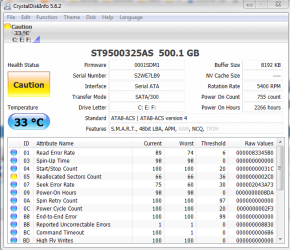
As a quick alternative, install and run CrystalDiskInfo - uncheck the option to install dealply. Post a screen capture of the main screen - like the example shown below:

1.PNG
 

My Computer My Computer

At a glance

Windows 10 Pro x64 ; Xubuntu x64Intel i7 860 @ 2.80 GHz O/C'ed to 4.0GHz16GB Corsair Vengance DDR3 @ 661 MHz Dual Cha...EVGA NVidia GTX 560 1024MB
Computer type
PC/Desktop
Computer Manufacturer/Model Number
Golden Mk. I.4
OS
Windows 10 Pro x64 ; Xubuntu x64
CPU
Intel i7 860 @ 2.80 GHz O/C'ed to 4.0GHz
Motherboard
Gigabyte P55A-UD3R Rev.1. Award BIOS F13
Memory
16GB Corsair Vengance DDR3 @ 661 MHz Dual Channel (9-9-9-24)
Graphics Card(s)
EVGA NVidia GTX 560 1024MB
Sound Card
Realtek Integrated
Monitor(s) Displays
Dual Samsung SyncMaster 2494HS
Screen Resolution
1920*1080 and 1920*1080
Hard Drives
1*Samsung 840 EVO 120GB SSD;
1*OCZ Vertex 2 60GB SSD;
2*Samsung F3 SpinPoint 1TB in RAID0;
1*Samsung F1 SpinPoint 1TB;
2*Western Digital 1TB External USB 3.0
1*Western Digital 500GB External USB 3.0
1*Seagate 500GB External USB 2.0
PSU
Thermaltake ToughPower QFan 750W
Case
Thermaltake Element S VK60001W2Z
Cooling
Corsair H60 Water Cooling, 2*230mm and 2*80mm case fans
Keyboard
Logitech G110
Mouse
Logitech MX518
Install? or is it like SeaTools for DOS? in Seagate?

You just have to burn it onto a cd/dvd or put it in a USB to run it?

-

If install is the case i can't do this T_T
 

My Computer My Computer

At a glance

Windows 7 - 64-biti7-2600kCorsair 8GBPowerColor 6970 HD 2GB
Computer type
PC/Desktop
Computer Manufacturer/Model Number
Custom
OS
Windows 7 - 64-bit
CPU
i7-2600k
Motherboard
ASUS P8Z68-V-PRO
Memory
Corsair 8GB
Graphics Card(s)
PowerColor 6970 HD 2GB
Monitor(s) Displays
Samsung LED 23"
Screen Resolution
1920x1080
Hard Drives
Seagate HDD 1TB
PSU
1000W Cooler Master Silent PRO 80+ Gold
Case
Zalman Z9+
Cooling
Xion-HP1216b
Keyboard
Ttesports Ultimate
Mouse
Razer Deathadder
Internet Speed
3MBPS
Antivirus
MSE
Browser
Google Chrome
Just download and install it to your computer.
 

My Computer My Computer

At a glance

Windows 10 Pro x64 ; Xubuntu x64Intel i7 860 @ 2.80 GHz O/C'ed to 4.0GHz16GB Corsair Vengance DDR3 @ 661 MHz Dual Cha...EVGA NVidia GTX 560 1024MB
Computer type
PC/Desktop
Computer Manufacturer/Model Number
Golden Mk. I.4
OS
Windows 10 Pro x64 ; Xubuntu x64
CPU
Intel i7 860 @ 2.80 GHz O/C'ed to 4.0GHz
Motherboard
Gigabyte P55A-UD3R Rev.1. Award BIOS F13
Memory
16GB Corsair Vengance DDR3 @ 661 MHz Dual Channel (9-9-9-24)
Graphics Card(s)
EVGA NVidia GTX 560 1024MB
Sound Card
Realtek Integrated
Monitor(s) Displays
Dual Samsung SyncMaster 2494HS
Screen Resolution
1920*1080 and 1920*1080
Hard Drives
1*Samsung 840 EVO 120GB SSD;
1*OCZ Vertex 2 60GB SSD;
2*Samsung F3 SpinPoint 1TB in RAID0;
1*Samsung F1 SpinPoint 1TB;
2*Western Digital 1TB External USB 3.0
1*Western Digital 500GB External USB 3.0
1*Seagate 500GB External USB 2.0
PSU
Thermaltake ToughPower QFan 750W
Case
Thermaltake Element S VK60001W2Z
Cooling
Corsair H60 Water Cooling, 2*230mm and 2*80mm case fans
Keyboard
Logitech G110
Mouse
Logitech MX518
I bought an SSD and a new HDD.

Installed Windows 7 on my SSD

But i need help with making my HDD to be my primary STORAGE where games, softwares i install will be stored in my HDD

because i tried installing, changed its location to E:= (HDD) then it installed successfully but whenever i run it through the START MENU it shows = "The specified path does not exist" PLUS i see folders being made through my C: Drive = (SSD)
 
Last edited:

My Computer My Computer

At a glance

Windows 7 - 64-biti7-2600kCorsair 8GBPowerColor 6970 HD 2GB
Computer type
PC/Desktop
Computer Manufacturer/Model Number
Custom
OS
Windows 7 - 64-bit
CPU
i7-2600k
Motherboard
ASUS P8Z68-V-PRO
Memory
Corsair 8GB
Graphics Card(s)
PowerColor 6970 HD 2GB
Monitor(s) Displays
Samsung LED 23"
Screen Resolution
1920x1080
Hard Drives
Seagate HDD 1TB
PSU
1000W Cooler Master Silent PRO 80+ Gold
Case
Zalman Z9+
Cooling
Xion-HP1216b
Keyboard
Ttesports Ultimate
Mouse
Razer Deathadder
Internet Speed
3MBPS
Antivirus
MSE
Browser
Google Chrome
I'm not sure how that can be done between a SSD and HDD, but I see some of your other responders are in-forum so they should be replying soon. In the meantime there are several good tutorials in our tutorial section that you may want to explore.

The middle three may have an answer for you:


My Computer My Computer

At a glance

Originally Win 7 Hm Prem x64 Ver 6.1.7600 Bui...Intel i3 530 2.93GHz, 2933MHz 2 Cores 4 Logic...6GB of 1,333MHz DDR3 SDRAM32MB Intel Graphics Media Accelerator HD IGChip
Computer type
PC/Desktop
Computer Manufacturer/Model Number
Gateway DX4831-01e (Mid-Tower Desktop)
OS
Originally Win 7 Hm Prem x64 Ver 6.1.7600 Build 7601-SP1 | Upgraded to Windows 10 December 14, 2019
CPU
Intel i3 530 2.93GHz, 2933MHz 2 Cores 4 Logical Processors
Motherboard
Gateway H57M01 133 megahertz
Memory
6GB of 1,333MHz DDR3 SDRAM
Graphics Card(s)
32MB Intel Graphics Media Accelerator HD IGChip
Sound Card
Realtek High Definition Audio
Monitor(s) Displays
Gateway HX2000 20inch TFT active matrix TN
Screen Resolution
1600 x 900 x 59 hertz
Hard Drives
WDC WD10EADS-00M2B0 [HDD] (1000.20 GB) -- drive 0,
HL-DT-ST DVDRAM GH41N [CD-ROM dr]
Four card readers, and Four USB 2.0
PSU
300watts.
Case
Mid-Tower Desktop
Cooling
Stock from Gateway
Keyboard
Natural Ergonomic Keyboard 4000, see Other Info
Mouse
Orig. Gateway wore out now using Insignia USB wired optical
Internet Speed
Vz FIOS 10ms png 57.64Mbps down 65.53Mbps up Speedtest.org
Antivirus
Zamana Anti-logger with Anti-malware, MSE, Windows Firewall,
Browser
IE11.0.9600.19399-Upd ver11.0.135, Firefox 68.0.1 x64
Other Info
System Specs by Belarc.

BIOS: American Megatrends Inc. P01-A0 11/17/2009

Replaced the MS 'Natural' Standard PS/2 Enhanced 101-102 Keyboard with a new Natural Ergonomic Keyboard 4000 on August 1st 2014.

Canon Pixma MG3222 Printer.

Updated to IE11 on 12102015 | Fios Quantum Router g1100

Additional AV: SpywareBlaster, manual Mbam, SAS
I bought an SSD and a new HDD.

Installed Windows 7 on my SSD

But i need help with making my HDD to be my primary STORAGE

because i tried installing, changed its location to E:= (HDD) then it installed successfully but whenever i run it through the START MENU it shows = "The specified path does not exist" PLUS i see folders being made through my C: Drive = (SSD)

The normal way of assembling a computer is if you see the blue provision slot on the IDE cable. this is your primary IDE cable connection. To install a drive set your jumper settings to a master. Its the back of hard disk drive and on the top cover is the illustration of how to set the small pin to a master drive. If you follow this then you don't have to worry on where your primary drive is.

This automatically detects your connected drive as the primary drive, it depends now on you are formatting if you had make a partition.

Example: Like 100 gigs is partition into two that would be 50 /50 . So C: drive would contain only with a given of 50000 on the partition dialogue.

Type C to create partition and after this is to install fresh copy of your OS windows. This is also your primary drive. Don't worry on the remaining drive. Just command type "C" create partition. this automatically name to "D" drive.

Just continue on the Partition 1 to install your fresh copy surely this will become your primary drive.

Take note to backup first your important files before formatting.
 

My Computer My Computer

At a glance

Windows 7 Ultimate
Computer type
Laptop
OS
Windows 7 Ultimate

My Computer My Computer

At a glance

Windows 7 - 64-biti7-2600kCorsair 8GBPowerColor 6970 HD 2GB
Computer type
PC/Desktop
Computer Manufacturer/Model Number
Custom
OS
Windows 7 - 64-bit
CPU
i7-2600k
Motherboard
ASUS P8Z68-V-PRO
Memory
Corsair 8GB
Graphics Card(s)
PowerColor 6970 HD 2GB
Monitor(s) Displays
Samsung LED 23"
Screen Resolution
1920x1080
Hard Drives
Seagate HDD 1TB
PSU
1000W Cooler Master Silent PRO 80+ Gold
Case
Zalman Z9+
Cooling
Xion-HP1216b
Keyboard
Ttesports Ultimate
Mouse
Razer Deathadder
Internet Speed
3MBPS
Antivirus
MSE
Browser
Google Chrome
The normal way of assembling a computer is if you see the blue provision slot on the IDE cable. this is your primary IDE cable connection. To install a drive set your jumper settings to a master. Its the back of hard disk drive and on the top cover is the illustration of how to set the small pin to a master drive. If you follow this then you don't have to worry on where your primary drive is.


I tried understanding what you said but i still don't sorry so in other words?
 

My Computer My Computer

At a glance

Windows 7 - 64-biti7-2600kCorsair 8GBPowerColor 6970 HD 2GB
Computer type
PC/Desktop
Computer Manufacturer/Model Number
Custom
OS
Windows 7 - 64-bit
CPU
i7-2600k
Motherboard
ASUS P8Z68-V-PRO
Memory
Corsair 8GB
Graphics Card(s)
PowerColor 6970 HD 2GB
Monitor(s) Displays
Samsung LED 23"
Screen Resolution
1920x1080
Hard Drives
Seagate HDD 1TB
PSU
1000W Cooler Master Silent PRO 80+ Gold
Case
Zalman Z9+
Cooling
Xion-HP1216b
Keyboard
Ttesports Ultimate
Mouse
Razer Deathadder
Internet Speed
3MBPS
Antivirus
MSE
Browser
Google Chrome
Btw i just want to paste a quote that i'm trying to say.

How do you make the HDD the default then. Thats basically what I am trying to do so that the SSD does not get filled up daily with nonsense, just the few things I want to load quickly.

PLus some of the files goes to C:User bla bla bla where i can't use the program because the locations are in a mess
 

My Computer My Computer

At a glance

Windows 7 - 64-biti7-2600kCorsair 8GBPowerColor 6970 HD 2GB
Computer type
PC/Desktop
Computer Manufacturer/Model Number
Custom
OS
Windows 7 - 64-bit
CPU
i7-2600k
Motherboard
ASUS P8Z68-V-PRO
Memory
Corsair 8GB
Graphics Card(s)
PowerColor 6970 HD 2GB
Monitor(s) Displays
Samsung LED 23"
Screen Resolution
1920x1080
Hard Drives
Seagate HDD 1TB
PSU
1000W Cooler Master Silent PRO 80+ Gold
Case
Zalman Z9+
Cooling
Xion-HP1216b
Keyboard
Ttesports Ultimate
Mouse
Razer Deathadder
Internet Speed
3MBPS
Antivirus
MSE
Browser
Google Chrome
Btw i just want to paste a quote that i'm trying to say.

How do you make the HDD the default then. Thats basically what I am trying to do so that the SSD does not get filled up daily with nonsense, just the few things I want to load quickly.
PLus some of the files goes to C:User bla bla bla where i can't use the program because the locations are in a mess

I would recommend to have a look at this:

http://www.sevenforums.com/hardware-devices/148727-using-ssd-plus-secondary-hdd.html
 

My Computer My Computer

At a glance

Windows 7 Ultimate
Computer type
Laptop
OS
Windows 7 Ultimate
It's irrelevant - all SSD's are SATA so far as I know, and no machine built in the past three years comes with IDE hard drives.
 

My Computer My Computer

At a glance

Win 7 x64 Home Premium (and x86 VirtualBox VM...i3 370M/i7 6500U8GB - finally :)/8GBit's an i3, dude!/dual Intel&nVidia
Computer type
Laptop
Computer Manufacturer/Model Number
Asus K52F or Lenovo B51-80
OS
Win 7 x64 Home Premium (and x86 VirtualBox VM)/Win10
CPU
i3 370M/i7 6500U
Motherboard
Asus/Lenovo
Memory
8GB - finally :)/8GB
Graphics Card(s)
it's an i3, dude!/dual Intel&nVidia
Sound Card
onboard
Monitor(s) Displays
15.6" built-in
Screen Resolution
1366x768/1920x1080
Hard Drives
750GB Seagate internal
Sundry external drives attached to other computers on the local network
1TB SSD on the Lenovo
PSU
n/a
Internet Speed
as much as I can get - usually on a dongle/phone, so <1MB/s
Antivirus
MSE/Defender
Browser
IE11/12/Edge/Chrome/FF(if I must)

My Computer My Computer

At a glance

Windows 7 Ultimate
Computer type
Laptop
OS
Windows 7 Ultimate
Back
Top