SONICMIXMASTER
New member
windows explorer directory file size totals
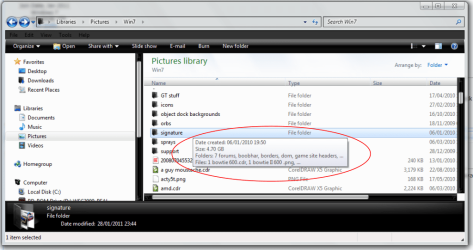
anyone know how to get those to show without selecting a group of files? i know in xp i was able to enable the status bar and then it would show total size of files in a particular folder but in win7 it only shows a total size when the files are selected.
thanks.
anyone know how to get those to show without selecting a group of files? i know in xp i was able to enable the status bar and then it would show total size of files in a particular folder but in win7 it only shows a total size when the files are selected.
thanks.
My Computer
- Computer Manufacturer/Model Number
- built by me
- OS
- Windows 7 Ultimate x64
- CPU
- Intel Core 2 Quad Q9550S @3.6 Ghz / 1.2 Ghz (low power mode)
- Motherboard
- Asus P5Q-EM Micro ATX
- Memory
- 8 Gb DDR2 800 Corsair XMS2
- Graphics Card(s)
- XFX ATI HD5770
- Sound Card
- On board ALC1200 7.1 + SPDIF Optical Out
- Monitor(s) Displays
- Samsung SA300B 24inch
- Screen Resolution
- 1920x1080
- Hard Drives
- Western Digital Green 2TB 64mb cache
- PSU
- OCZ Stealtstream 500W
- Case
- Antec Mini P180
- Cooling
- Zalman CNPS 9900A LED
- Keyboard
- Logitech Cordless Wave
- Mouse
- Logitech Cordless (came with Cordless Wave keyboard)
- Internet Speed
- Motorolla SB5120 DOCSIS 2.0 modem, 16MB down 3MB up
- Other Info
- I built this PC to be energy efficient and quiet while also having the ability to play most games comfortably. I'm able to downclock the cpu to 1.2 Ghz and the power usage is at 94 watts. Overclocked at 3.6 Ghz its at 156 Watts and 220 Watts at max load while playing games.