- Local time
- 3:55 AM
- Messages
- 152
Hello,
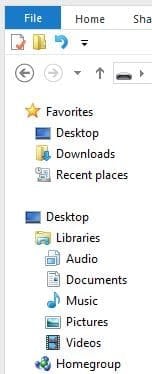
I'm used to having Windows Explorer show a Desktop icon immediately above the Libraries icon (as in the attached screenshot) as well as under Favorites, but my new computer only shows Desktop under Favorites. How can I add a Desktop icon by the Libraries icon?
I'm used to having Windows Explorer show a Desktop icon immediately above the Libraries icon (as in the attached screenshot) as well as under Favorites, but my new computer only shows Desktop under Favorites. How can I add a Desktop icon by the Libraries icon?
Attachments
My Computer
At a glance
Windows 7 Pro 64-bitAMD 2.9GHz / Intel 3.2GHz8GB / 4GB
- Computer type
- PC/Desktop
- Computer Manufacturer/Model Number
- Lenovo ThinkPad E545 / Dell Optiplex 980
- OS
- Windows 7 Pro 64-bit
- CPU
- AMD 2.9GHz / Intel 3.2GHz
- Memory
- 8GB / 4GB
- Antivirus
- AVG / Norton 360
- Browser
- Firefox & Chrome