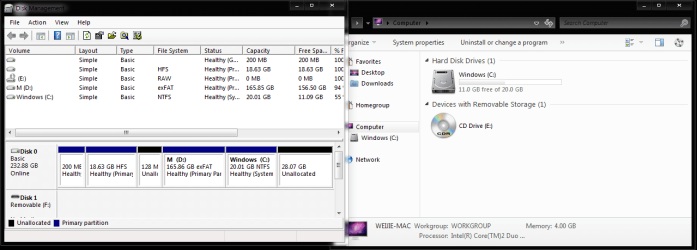
Windows Explorer does not show disk partition letter

iFission

New member
Local time
4:51 PM
Messages
13
Location
singapore
I am installing Windows 7 32bit on a Macbook Pro 13' 2010 model (2.4Ghz) (250GB HDD).
I have a system partition (C:\ 20GB) and media partition (D:\ 156GB). The latter is not visible in the windows explorer (refer to the attachment) but is accessible by typing 'D:\' on the address field. It is also visible in the disk management.

Anyone has the same problem or has a solution??
Thanks.:D
 

Attachments

  • Capture.PNG
    Capture.PNG
    30.6 KB · Views: 67

My Computer

Computer Manufacturer/Model Number
Macbook Pro 13' 7.1
OS
Windows 7 Ultimate x86
CPU
Intel Core 2 Duo 2.4 Ghz
Memory
4GB
Graphics Card(s)
nVidia Geforce 320M
Screen Resolution
1280x800

My Computer

Computer Manufacturer/Model Number
Compaq Desktop
OS
Windows 7 Ultimate x64
CPU
AMD Sempron Dual Core
Memory
3GB
Graphics Card(s)
NVIDIA GeForce 6150SE nForce 430
Screen Resolution
1024x768
Hard Drives
150GB Sata
The following report states exFAT as Mobile Personal Storage

exFAT File System

It could be treating the drive almost like a USB/Removable storage
 

My Computer

Computer Manufacturer/Model Number
Compaq Desktop
OS
Windows 7 Ultimate x64
CPU
AMD Sempron Dual Core
Memory
3GB
Graphics Card(s)
NVIDIA GeForce 6150SE nForce 430
Screen Resolution
1024x768
Hard Drives
150GB Sata
Tried to enable hidden drives but does seem to help and I discovered one thing: when i change the disk letter from D to something else, the partition immediately shows up in the windows explorer but then when i revert that and partition goes missing again..
 

My Computer

Computer Manufacturer/Model Number
Macbook Pro 13' 7.1
OS
Windows 7 Ultimate x86
CPU
Intel Core 2 Duo 2.4 Ghz
Memory
4GB
Graphics Card(s)
nVidia Geforce 320M
Screen Resolution
1280x800
Back
Top