
Windows explorer Navigation pane graphics corrupted when scrolling

fatherom

New member
Local time
9:43 AM
Messages
6
Hi everyone,

This is my first post here. I just got a Dell XPS 8300 with Windows Professional 64-bit. So far, most everything seems to be working normally. However, in Windows Explorer (which I use a lot), the left-side Navigation Pane is getting all screwed up visually when I scroll.

As an aside, I would really like to turn off smooth scrolling in Windows Explorer, but can't figure out how to do it. I have "smooth-scroll list boxes" unchecked, but it doesn't seem to help. I can get TweakUI for XP to run in compatibility mode either (someone on another forum was able to use that to disable smooth scrolling). I wonder if the animated smooth scrolling is causing the problem.

Different types of scrolling cause different degrees of the problem, but it happens nearly all the time. Hitting F5 will clean up the screen, but I would rather figure out what's causing the screen repaint problems.

I've attached a screenshot of what's happening.

I've done many searches (on this forum and other places) and not seen much, if any, people talking about this.

Any ideas?

Thanks,

Chris
 

Attachments
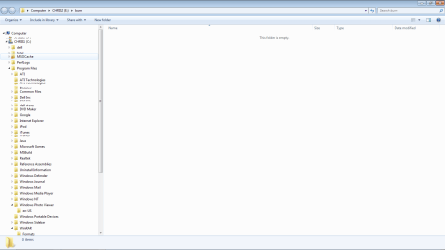
  • windows 7 corrupt file explorer.png
    windows 7 corrupt file explorer.png
    26.3 KB · Views: 187

My Computer

Computer Manufacturer/Model Number
Dell XPS 8300
OS
Windows 7 Professional 64-bit
CPU
intel i5 3.1ghz
Memory
6GB
Graphics Card(s)
ATI Radeon 5450
Sound Card
THX integrated
Smooth scrolling on/off:
Turn off Smooth Scrolling

  1. Click the Start button, and then click Control Panel.
  2. In Control Panel, make sure you are in Classic View, with all Control Panel icons showing. If not, click Switch to Classic View in the left pane of Control Panel.
  3. Click Internet Options to open the Internet Options dialog box. Click the Advanced tab and scroll down to the Settings: Browsing heading. Select or clear the Use smooth scrolling check box.
  4. Click OK, and then click the Close button.
 

My Computer

Computer type
PC/Desktop
Computer Manufacturer/Model Number
Packard Bell
OS
Windows 7 Home Premium 64bit
CPU
Intel(R) Core(TM) i3-2120 CPU @ 3.30GHz
Motherboard
Packard Bell IPISB-AG
Memory
3.00 GB
Graphics Card(s)
(1) Intel(R) HD Graphics (2) VNC Mirror Driver
Sound Card
Realtek High Definition Audio
Monitor(s) Displays
AIO LCD
Screen Resolution
1920 x 1080
Hard Drives
WDC WD10EADX-22TDHB0 ATA Device
Fixed hard disk media
4 partitions
931.51 GB
Keyboard
Wireless
Mouse
Wireless
Antivirus
Microsoft Security Essentials
Browser
IE; Firefox
Other Info
Also:
Samsung N220 Plus Netbook - Windows 7 Home
HP laptop
iPad 5
Hi everyone,

This is my first post here. I just got a Dell XPS 8300 with Windows Professional 64-bit. So far, most everything seems to be working normally. However, in Windows Explorer (which I use a lot), the left-side Navigation Pane is getting all screwed up visually when I scroll.

As an aside, I would really like to turn off smooth scrolling in Windows Explorer, but can't figure out how to do it. I have "smooth-scroll list boxes" unchecked, but it doesn't seem to help. I can get TweakUI for XP to run in compatibility mode either (someone on another forum was able to use that to disable smooth scrolling). I wonder if the animated smooth scrolling is causing the problem.

Different types of scrolling cause different degrees of the problem, but it happens nearly all the time. Hitting F5 will clean up the screen, but I would rather figure out what's causing the screen repaint problems.

I've attached a screenshot of what's happening.

I've done many searches (on this forum and other places) and not seen much, if any, people talking about this.

Any ideas?

Thanks,

Chris

Welcome to the forums.

You might like to try this;

QTTabBar

solves most such Explorer problems, ( and gives very considerable enhancements), because the developer has managed to streamline the Explorer code. Explorer actually starts and runs a lot faster with this add-on. The add-on is integrated into Explorer itself, it is not a separate program as such.

It usually also clears the repainting problems, as it removes Explorer "lag".

Regards....Mike Connor
 

My Computer

OS
Several, including Windows 7 x64 Ultimate
This only turns off smooth scrolling in IE, not Windows File Explorer. Thanks though...

Smooth scrolling on/off:
Turn off Smooth Scrolling

  1. Click the Start button, and then click Control Panel.
  2. In Control Panel, make sure you are in Classic View, with all Control Panel icons showing. If not, click Switch to Classic View in the left pane of Control Panel.
  3. Click Internet Options to open the Internet Options dialog box. Click the Advanced tab and scroll down to the Settings: Browsing heading. Select or clear the Use smooth scrolling check box.
  4. Click OK, and then click the Close button.
 

My Computer

Computer Manufacturer/Model Number
Dell XPS 8300
OS
Windows 7 Professional 64-bit
CPU
intel i5 3.1ghz
Memory
6GB
Graphics Card(s)
ATI Radeon 5450
Sound Card
THX integrated
Cool thanks! I'll look into this. Question though: can QTTabBar be used in conjuction with Classic Shell? I installed that last night and am quite happy with it.

Thanks,

Chris

Welcome to the forums.

You might like to try this;

QTTabBar

solves most such Explorer problems, ( and gives very considerable enhancements), because the developer has managed to streamline the Explorer code. Explorer actually starts and runs a lot faster with this add-on. The add-on is integrated into Explorer itself, it is not a separate program as such.

It usually also clears the repainting problems, as it removes Explorer "lag".

Regards....Mike Connor
 

My Computer

Computer Manufacturer/Model Number
Dell XPS 8300
OS
Windows 7 Professional 64-bit
CPU
intel i5 3.1ghz
Memory
6GB
Graphics Card(s)
ATI Radeon 5450
Sound Card
THX integrated
Cool thanks! I'll look into this. Question though: can QTTabBar be used in conjuction with Classic Shell? I installed that last night and am quite happy with it.

Thanks,

Chris

Yes, a brilliant combination by the way, I use it myself. Some info on that;

http://www.sevenforums.com/customization/151865-classic-shell-add-buttons.html#post1302905

the search modification shown there using StexBar is no longer required, The new QTTabBar release has solved the problem with slow searching. It is now extremely fast.

Regards....Mike Connor
 

My Computer

OS
Several, including Windows 7 x64 Ultimate
So I "figured out" the graphic corruption issue. In "Folder and Search Options" I checked the "Show All Folders" box. Now my navigation pane includes things like Desktop (as the root node of the tree), Control Panel, Recycle Bin, etc. I actually prefer this anyway, but as a side effect, the navigation pane doesn't get visually messed up when I scroll.

Not sure why it fixes the problem, but it works for me.

So now my NEXT question. :) The 'network' entry in the navigation pane auto-populates about 5 seconds after the Explorer window launches. This is fine, except if I'm already somewhere else navigating and the network entry is off the bottom of the screen, when it does populate, the scrollable area jumps down to the network entry on it's own. Quite annyoing. Classic shell fixes most of the navigation pane scrolling bugs, except this. Any way to get the network entry to not populate and automatically expand?

Thanks again...

Chris
 

My Computer

Computer Manufacturer/Model Number
Dell XPS 8300
OS
Windows 7 Professional 64-bit
CPU
intel i5 3.1ghz
Memory
6GB
Graphics Card(s)
ATI Radeon 5450
Sound Card
THX integrated

My Computer

Computer Manufacturer/Model Number
Dell XPS 8300
OS
Windows 7 Professional 64-bit
CPU
intel i5 3.1ghz
Memory
6GB
Graphics Card(s)
ATI Radeon 5450
Sound Card
THX integrated
So I "figured out" the graphic corruption issue. In "Folder and Search Options" I checked the "Show All Folders" box. Now my navigation pane includes things like Desktop (as the root node of the tree), Control Panel, Recycle Bin, etc. I actually prefer this anyway, but as a side effect, the navigation pane doesn't get visually messed up when I scroll.

Not sure why it fixes the problem, but it works for me.

So now my NEXT question. :) The 'network' entry in the navigation pane auto-populates about 5 seconds after the Explorer window launches. This is fine, except if I'm already somewhere else navigating and the network entry is off the bottom of the screen, when it does populate, the scrollable area jumps down to the network entry on it's own. Quite annyoing. Classic shell fixes most of the navigation pane scrolling bugs, except this. Any way to get the network entry to not populate and automatically expand?

Thanks again...

Chris

That works because explorer does not then try to jump around in the navigation pane. This is a bug in explorer. Doesn't happen when using QTTabBar when things are set up properly.

Only way I found to stop the problems with network, was to remove it from the pane;

http://www.door2windows.com/windows...me-items-in-windows-explorer-navigation-pane/

There are also instructions here in the tutorials, which will allow you to remove individual items;

http://www.sevenforums.com/tutorials/39699-network-add-remove-navigation-pane.html

You will almost certainly find that if you use QTTabBar, you don't need the navigation pane any more. Because you can reach any folder you want with a maximum of two mouse clicks, without any scrolling or anything like that.

Here an example;


Left-clicking on the icon in the tab, gives you an immediate cascade of the heirarchy, and you can just move there with the mouse and click on whatever you want. Right-clicking on the icon gives you a cascade of all items above the folder you are using.

There are also other ways to do this. It takes a little while to change your habits when you first start using QTTabBar. But it is a very great deal more comfortable and efficient than anything else I know of or have used.

Regards.....Mike Connor
 

My Computer

OS
Several, including Windows 7 x64 Ultimate
That works because explorer does not then try to jump around in the navigation pane. This is a bug in explorer. Doesn't happen when using QTTabBar when things are set up properly.

Just curious...I don't fully understand what you mean by this ("explorer does not then try to jump around in the navigation pane"). I don't really see Explorer jumping when "Show All Folders" is off/on, just the graphical corruption of the navigation pane when I scroll.

Only way I found to stop the problems with network, was to remove it from the pane;

That's unfortunate, but it's what I ended up doing. I would've liked to been able to navigate network shares in the navigation pane, but that population/scroll jump is too annoying.

Gonna play more with QTTabBar...
 

My Computer

Computer Manufacturer/Model Number
Dell XPS 8300
OS
Windows 7 Professional 64-bit
CPU
intel i5 3.1ghz
Memory
6GB
Graphics Card(s)
ATI Radeon 5450
Sound Card
THX integrated
[

That's unfortunate, but it's what I ended up doing. I would've liked to been able to navigate network shares in the navigation pane, but that population/scroll jump is too annoying.

Gonna play more with QTTabBar...

Have fun! Let us know how you get on with it. I think you will be very happy with it.

Regards....Mike Connor
 

My Computer

OS
Several, including Windows 7 x64 Ultimate
Back
Top