
Windows Explorer Not Loading

Icorre

New member
Local time
5:34 PM
Messages
4
I have an alienware m14X with windows 7 home premium 64-bit. Until recently my computer has ran fine, but now when i click the window browser button on the task bar, it won't load. The green bar in the path never runs all the way through, and the tabs on the right only show a rotating magnifying glass over them. I have run an Avast pre-boot scan, tested for a welchia worm and did a system restore, but noting helps!!
Any help would be appreciated.

p.s. this problem is temporarily solved by restarting my computer, but it re-occurs again shortly after.
 

Attachments
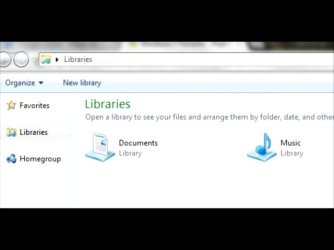
  • 120413-182243.jpg
    120413-182243.jpg
    16.7 KB · Views: 24

My Computer

OS
Windows 7 64-bit
When you say re-occurs, do you mean Explorer just won't show any data when you click on the Explorer folder icon on the taskbar?

When this happens, can you open an elevated cmd prompt and run the command dir /s from C:\?
 

My Computer

Computer type
PC/Desktop
Computer Manufacturer/Model Number
Custom
OS
Windows 10 Pro x64
CPU
Intel Core i7 4790K @ 4.5GHz
Motherboard
Asus Maximus Hero VII
Memory
32GB DDR3
Graphics Card(s)
Nvidia GeForce GTX970
Sound Card
Realtek HD Audio
Screen Resolution
1920x1200
Hard Drives
1x Samsung 250GB SSD
4x WD RE 2TB (RAIDZ)
PSU
Corsair AX760i
Case
Fractal Design Define R4
Cooling
Noctua NH-D15
I mean that it will not load the files. Icons are missing for files and the thumbnails never load or function. I can access the folders directly via cmd prompt or the windows start button search bar, but i would like to access them normally

edit: Come one people, 300+ views and only one reply?
 
Last edited:

My Computer

OS
Windows 7 64-bit
Have you tried disabling all non-Microsoft explorer shell extensions via ShellExView, rebooting, and retrying the operation to see if it still continues? It's likely to be down to either a filter driver or a shell extension at this point.
 

My Computer

Computer type
PC/Desktop
Computer Manufacturer/Model Number
Custom
OS
Windows 10 Pro x64
CPU
Intel Core i7 4790K @ 4.5GHz
Motherboard
Asus Maximus Hero VII
Memory
32GB DDR3
Graphics Card(s)
Nvidia GeForce GTX970
Sound Card
Realtek HD Audio
Screen Resolution
1920x1200
Hard Drives
1x Samsung 250GB SSD
4x WD RE 2TB (RAIDZ)
PSU
Corsair AX760i
Case
Fractal Design Define R4
Cooling
Noctua NH-D15
don't know what shell view is or how to use it. and if i do find the problem, how do i fix it?

side note: i have run the computer in safe and clean boot modes and this problem does not occur, and i've also noticed that the computer is now booting up slower
 
Last edited:

My Computer

OS
Windows 7 64-bit
Fixed It

i found a bad video file that wouldn't open, or interact at all. Deleted that after disabling explorer with command prompt, and presto! problem solved
 

My Computer

OS
Windows 7 64-bit
Wow, good find.
 

My Computer

Computer type
PC/Desktop
Computer Manufacturer/Model Number
Custom
OS
Windows 10 Pro x64
CPU
Intel Core i7 4790K @ 4.5GHz
Motherboard
Asus Maximus Hero VII
Memory
32GB DDR3
Graphics Card(s)
Nvidia GeForce GTX970
Sound Card
Realtek HD Audio
Screen Resolution
1920x1200
Hard Drives
1x Samsung 250GB SSD
4x WD RE 2TB (RAIDZ)
PSU
Corsair AX760i
Case
Fractal Design Define R4
Cooling
Noctua NH-D15
If only I found this before. I am just about finishing a backup so I can wipe my drives. Maybe this backup already solves this problem! But then I will have to be careful about what I will bring back.
 

My Computer

OS
Windows 7 Home Edition x64
Back
Top