Hi,
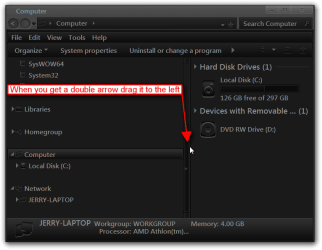
I have used the tutorial on this site to add my Computer to the nav pane as I am a school Admin and need it for the mapped drives and not libraries. Its added fine and deleted what I wanted but when i open up my computer or their homefolder its expanding the nav pane the full width of the screen with a slim bit at the right for the folders. I can't seem to reset this as everytime I reboot it goes back to how it looked before.
Anyone had this or has a solution to fix it? I have tried a few things including the resetshell file on this site.. and I found a shell32.dll which moved it to the right but my computer still covers all the nav pane.
If that can't help then I may need to disabel the nav pane altogether but I can't find that either as GP doesn't have any obvious solutions.
I have used the tutorial on this site to add my Computer to the nav pane as I am a school Admin and need it for the mapped drives and not libraries. Its added fine and deleted what I wanted but when i open up my computer or their homefolder its expanding the nav pane the full width of the screen with a slim bit at the right for the folders. I can't seem to reset this as everytime I reboot it goes back to how it looked before.
Anyone had this or has a solution to fix it? I have tried a few things including the resetshell file on this site.. and I found a shell32.dll which moved it to the right but my computer still covers all the nav pane.
If that can't help then I may need to disabel the nav pane altogether but I can't find that either as GP doesn't have any obvious solutions.
My Computer
At a glance
W7
- OS
- W7