Windows Explorer question

Paul W

New member
Local time
8:21 AM
Messages
3
In Windows Explorer in XP, you could have a folder open in the left column with all of the sub folders shown below. If you picked (highlighted) a sub folder, you would see its contents on the right.
You could then us the up or down button to move to the next sub folder. When it became highlighted, its contents would be displayed on the right.
Why doesn’t it work the same way using Windows 7? Or am I missing something?
 

My Computer

Computer type
PC/Desktop
Computer Manufacturer/Model Number
Dell
OS
Windows 7 Pro x64
Folder contents

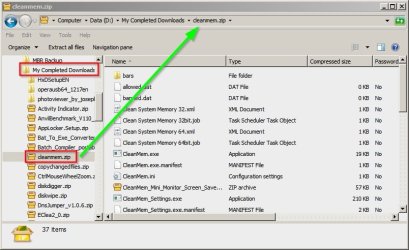
You mean like this?

Left Pane shows drive D expanded to a folder "my completed downloads" then a sub-folder "cleanmep.zip" which when clicked shows it's contents in the right pane.

Explorer.jpg

See the tutorial here: http://www.sevenforums.com/tutorials/295-folder-options-open.html

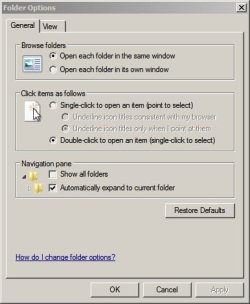
Personally I set mine like this:

Folder Options.jpg

EDIT: I see what you mean. Try up/down and Enter.
 
Last edited:

My Computer

Computer type
Laptop
Computer Manufacturer/Model Number
ASUS
OS
Microsoft Windows 7 Home Premium 64-bit 7601 Multiprocessor Free Service Pack 1
CPU
AMD C-60 APU with Radeon(tm) HD Graphics
Motherboard
ASUSTeK COMPUTER INC. X501U
Memory
4.00 GB
Graphics Card(s)
AMD Radeon HD 6290 Graphics
Sound Card
(1) AMD High Definition Audio Device (2) Realtek High Defi
Screen Resolution
1366 x 768 x 32 bits (4294967296 colors) @ 60 Hz
Hard Drives
Hitachi HTS545050A7E380 SATA Disk Device
Antivirus
Comodo CIS & FW, SecureAplus App Whitelisting, Threatfire
Browser
Cyberfox 64bit, Opera 64bit, Airfox
Other Info
Spy-The-Spy, HitmanPro.Alert, Norton Connect Safe, MJRegWatcher, BitDefender TrafficLight, Voodoo Shield, Zemana AntiMalware
XP was so long ago I don't remember anymore :o

In Win 7 you use the up or down button until you have highlighted the one you want. Then press Enter or Space to update the window to the right.

You use the left and right buttons to collapse/expand sub folders.
 

My Computer

Computer type
Laptop
Computer Manufacturer/Model Number
HP Elitebook 8540p
OS
Windows 7 Pro 32
CPU
Intel(R) Core(TM) i5 CPU M 540 @ 2.53GHz
Motherboard
Hewlett-Packard 1521
Memory
4,00 GB (Usable 2,98)
Graphics Card(s)
NVIDIA NVS 5100M
Sound Card
NVIDIA High Definition Audio
Screen Resolution
1600x900
Hard Drives
INTEL SSDSA2CW120G3
Antivirus
F-Secure Internet Security
Browser
IE, Firefox, Opera
Other Info
Sandboxie,
SRP (Software Restriction Policy),
EMET (Enhanced Mitigation Experience Toolkit),
WFC (Windows Firewall Control by BiniSoft),
Malwarebytes Premium
OK, hitting the up key and then hitting the space bar will do what I want, but why won't it work without hitting the space bar?
 

My Computer

Computer type
PC/Desktop
Computer Manufacturer/Model Number
Dell
OS
Windows 7 Pro x64
Space or Enter. I would guess it's so you can navigate faster and also avoid crashes. Say you have 10 sub folders with thousands of files in each, and you want the last sub folder. You press down 10 times + Enter and only then the files are shown.
The old way I guess it starts to load the right window every time you press the down key. So it'll try and load the right window 10 times, when you actually only want it to load 1 time.
 

My Computer

Computer type
Laptop
Computer Manufacturer/Model Number
HP Elitebook 8540p
OS
Windows 7 Pro 32
CPU
Intel(R) Core(TM) i5 CPU M 540 @ 2.53GHz
Motherboard
Hewlett-Packard 1521
Memory
4,00 GB (Usable 2,98)
Graphics Card(s)
NVIDIA NVS 5100M
Sound Card
NVIDIA High Definition Audio
Screen Resolution
1600x900
Hard Drives
INTEL SSDSA2CW120G3
Antivirus
F-Secure Internet Security
Browser
IE, Firefox, Opera
Other Info
Sandboxie,
SRP (Software Restriction Policy),
EMET (Enhanced Mitigation Experience Toolkit),
WFC (Windows Firewall Control by BiniSoft),
Malwarebytes Premium
IN XP the up or down keys were the only ones I needed to use and I could quickly look at each sub folder until I found what I wanted.

I guess it was too easy so Microsoft changed it to make it more trouble.
 

My Computer

Computer type
PC/Desktop
Computer Manufacturer/Model Number
Dell
OS
Windows 7 Pro x64
Back
Top