Windows Explorer SendTO Limit?

youraarpness

New member
Local time
5:44 PM
Messages
7
I have 53 entries in my SendTO folder. When I want to send a file to this folder, not all of the entries are displayed. Is there a way to "scroll" to the end of the list?
 

My Computer

OS
Windows 7 Home Premium Edition 64-bit
Context menus are not designed to scroll, unfortunately.
 

My Computer

OS
Windows 7 Ultimate 64-bit
CPU
AMD Phenom II X6 1090T 3.2GHZ
Motherboard
MSI 890FXA-GD70
Memory
G.SKILL RipJaw 3x2GB DDR3-1066
Graphics Card(s)
2x HIS Radeon HD 6850 1 GB
Sound Card
VIA 8-channel
Monitor(s) Displays
2x 20 inch Acer LCDs, 1x 32" Sony LCD TV
Screen Resolution
4480x900
Hard Drives
1x Crucial 64GB SSD
3x 1TB HDDs (WD, Seagate, Hitatchi)
1x 500GB Seagate External
PSU
Kingwin 1000W Modular
Case
Coolermaster HAF 932
Cooling
1x 120mm, 3x 200mm, CoolerMaster Hyper 212+
Keyboard
Microsoft Wireless Keyboard 1000
Mouse
Microsoft Wiresless Mouse 5000
Internet Speed
20mbps
Other Info
Samsung BD-ROM/DVD-RW
Shift + Right Click shows more folders, but i don't think that is what your looking for
 

My Computer

Computer type
PC/Desktop
Computer Manufacturer/Model Number
HP
OS
Windows Seven Ultimate x64 SP1
CPU
Intel Core i7 x980 @ 3.33GHz
Memory
12.0 GB
Graphics Card(s)
Nvidia GeForce GTX 260
One thing you can do to reduce the number of entries in the SendTo menu, allowing more space for the entries you want is to remove all of the HD entries (i.e., C:\, Floppy A:\, DVD drive, etc.). This is especially helpful, if, like me, you have many partitions on a given machine (I have 14). This requires a registry edit. As always, back up your registry before making changes:

1. press the winkey, type 'regedit' (minus quotes) and press enter
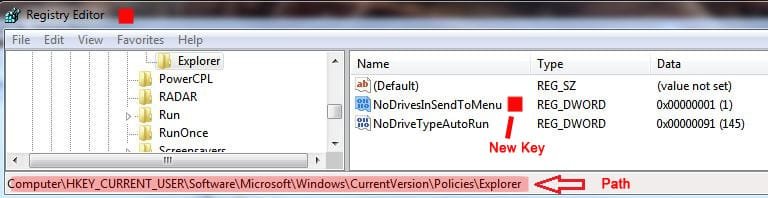
2. Navigate to HKEY_CURRENT_USER\Software\Microsoft\Windows\CurrentVersion\Policies\Explorer
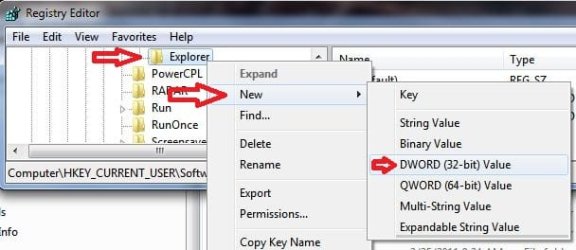
3. Right click on the Explorer folder---------------------------------------------------------------------^
4. Choose: New>DWORD (32 bit) Value
5. Name the value NoDrivesInSendToMenu
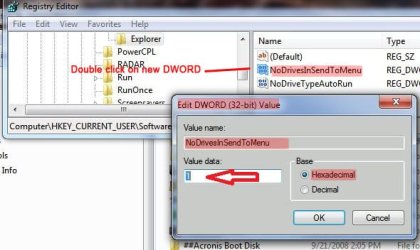
6. Double click on the entry--^
7. Enter 1 in the Value data field
8. Click OK, close Regedit, restart or log out and back in

Regedit_NoDrivesSendto_1.JPG

Regedit_NoDrivesSendto_2.JPG

Regedit_NoDrivesSendto_3.JPG

The drives should now be gone from the send to menu. If you only have a few partitions and optical drives, it will still help free up a few spaces.

Edit: I could have saved myself a lot of trouble if I had merely checked the Tutorial index first! :shock:
Here's a link: Send To Context Menu - Remove or Show Drive Letters - Vista Forums


James
 
Last edited by a moderator:

My Computer

OS
Win7U 64 RTM
CPU
Q9550
Motherboard
GA-EP45-UD3R
Memory
8GB Gskill
Graphics Card(s)
ASUS|EAH4850/HTDI/1GD3/A
Sound Card
xfi Plat
Monitor(s) Displays
Dell 2405fpw
Screen Resolution
1920x1200
Hard Drives
Seagate & WD sata Drives
PSU
Antec
Case
Antec
Keyboard
MS Natural Ergonomic 4000
Mouse
Logitech MX610 USB Cordless
Thanks to all that replied. It looks like I'll have to wait until you can scroll in a context window. I am OCD when it comes to backing up a file immediately.:)
 

My Computer

OS
Windows 7 Home Premium Edition 64-bit
Thanks to all that replied. It looks like I'll have to wait until you can scroll in a context window. I am OCD when it comes to backing up a file immediately.:)

If you use a [free] service like Dropbox or Box.net, that might alleviate that OCD.
 

My Computer

OS
Windows 7 Ultimate 64-bit
CPU
AMD Phenom II X6 1090T 3.2GHZ
Motherboard
MSI 890FXA-GD70
Memory
G.SKILL RipJaw 3x2GB DDR3-1066
Graphics Card(s)
2x HIS Radeon HD 6850 1 GB
Sound Card
VIA 8-channel
Monitor(s) Displays
2x 20 inch Acer LCDs, 1x 32" Sony LCD TV
Screen Resolution
4480x900
Hard Drives
1x Crucial 64GB SSD
3x 1TB HDDs (WD, Seagate, Hitatchi)
1x 500GB Seagate External
PSU
Kingwin 1000W Modular
Case
Coolermaster HAF 932
Cooling
1x 120mm, 3x 200mm, CoolerMaster Hyper 212+
Keyboard
Microsoft Wireless Keyboard 1000
Mouse
Microsoft Wiresless Mouse 5000
Internet Speed
20mbps
Other Info
Samsung BD-ROM/DVD-RW
Back
Top