windows explorer stopped working right click

zungul

New member
Member
VIP
Local time
2:26 PM
Messages
176
Hi,

I have a very strange problem. Everything works fine, but every time I press the right mouse button I get the message: "Windows Explorer has stopped working".
Can someone help me to solve this problem because it starts to be really annoying?
 
Last edited:

My Computer

OS
Windows 7 Ultimate x64
CPU
Intel(R) Core(TM)2 Quad Q6600
Motherboard
ASUS P5K Deluxe/WiFi-AP
Memory
4.00 GB
Graphics Card(s)
NVIDIA GEForce 8800 GTX
Sound Card
SoundMAX Intergrated Digital HD Audio
Monitor(s) Displays
LG Flatron Wide 22"
This may or may not help but won't hurt anything. I just checks Windows 7 System Files and repairs they if possible.

Please read completely and then complete the tutorial.

By Brink:
http://www.sevenforums.com/tutorials/1538-sfc-scannow-command-system-file-checker.html

Please fill in your system specs completely.

Please post all the security programs you have installed.
Please post all the clean up, speed up, tune up programs you are using.
 

My Computer

Computer type
PC/Desktop
Computer Manufacturer/Model Number
Home made Desktop
OS
Windows 10 Pro. 64/ version 1709 Windows 7 Pro/64
CPU
Intel i7-6800K @ 4.3
Motherboard
ASUS X-99 Deluxe II
Memory
Corsair Platinum 16 gig @2400
Graphics Card(s)
EVGA GTX 1070 OC
Monitor(s) Displays
Asus 27" LED LCD/VE278Q
Screen Resolution
1920-1080 or 1280-720 HDMI
Hard Drives
INTEL SSD 730-240 Gb Sata 3.0/
PSU
EVGA Platium 1200W
Case
Phanteks Luxe Tempered Glass 8 fans/ one radiator
Cooling
XSPC/ Water Cooled CPU
Keyboard
Das 4 Professional
Mouse
Logitech M705/MX Anywhere 2-S
Internet Speed
100 mbits
Antivirus
Microsoft Security Essentials/ Malwarebytes Premium 3.0/ SAS
Browser
I.E. 11 default/Firefox/ ISP Time Warner Cable/Spectrum
Other Info
LG BluRay Burner/
Sound system-KLipsch-THX/
Icy Dock ssd Hot Swap bays.
Hi there

Not even sure that there are 11,000 currently active viruses around !!!

Anyway ALWAYS separate OS from user data - keep it in its own partition. Take CLEAN backup and if you get this sort of nonsense then recover from clean backup and as a last resort re-install the OS.

My opinion of most AV software is pretty low anyway -- and I can't see the point of installing ANYTHING that doesn't provide REAL TIME PROTECTION -- after all what use is it to you to know hours or even DAYS later that your computer has got infected somehow -- you don't know WHEN and what's worse you don't know What's been happening in the mean time.

If the AV system doesn't have REAL TIME protection don't bother with it. unless you have something else already running REAL TIME protection and you want to double check.

Your best protection in any case is YOU -- avoid dubious web sites and don't get scammed by opening suspicious email attachments. If you DO use torrents then don't open any compressed files such as .RAR, .ZIP. etc and never an .EXE file. Multi-media files are safe if played with a proper player since anything buried into say an .MP3/MKV/MP4/FLAC file will be just treated as "Noise" by the player and ignored.

By all means scan your computer regularly and if the REAL TIME protection AV software has missed something then it's time to change that too.

AV posts are always rather funny actually -- the people who seem to have the most knowledge about this stuff are always those who probably wouldn't get ANY infections on their machines anyway even if they didn't run any AV software at all.

Cheers
jimbo
 

My Computer

Computer type
PC/Desktop
Computer Manufacturer/Model Number
Custom built, several laptops HP/ASUS
OS
Linux CENTOS 7 / various Windows OS'es and servers
CPU
Intel i7 Intel i5
Memory
8GB, 16GB
Graphics Card(s)
On Motherboard
Sound Card
Realtek HD audio
Monitor(s) Displays
Apple Cinema display, Samsung LCD
Screen Resolution
1920 X 1080
Hard Drives
4 X 1TB SATA
Mouse
Toshiba wireless laser
Internet Speed
> 20MB up
Hi,

I did SFC /SCANNOW and everything was ok. My AV is ESET NOD32 Antivirus.
I have installed Advanced System Optimizer (SysTweak).
 

My Computer

OS
Windows 7 Ultimate x64
CPU
Intel(R) Core(TM)2 Quad Q6600
Motherboard
ASUS P5K Deluxe/WiFi-AP
Memory
4.00 GB
Graphics Card(s)
NVIDIA GEForce 8800 GTX
Sound Card
SoundMAX Intergrated Digital HD Audio
Monitor(s) Displays
LG Flatron Wide 22"
Nothing helps!
 

My Computer

OS
Windows 7 Ultimate x64
CPU
Intel(R) Core(TM)2 Quad Q6600
Motherboard
ASUS P5K Deluxe/WiFi-AP
Memory
4.00 GB
Graphics Card(s)
NVIDIA GEForce 8800 GTX
Sound Card
SoundMAX Intergrated Digital HD Audio
Monitor(s) Displays
LG Flatron Wide 22"
My problem is, once you use Advanced System Optimizer (SysTweak) their is no way of knowing what was or wasn't tweaked.
Windows 7 does not want or need such programs.
Even if you remove the program you still leave the changes it has done.
The only way I know of to help you would be a Clean Install or a Repair Install.

**** Before doing anything I would recommend waiting for more suggestions from members.
 

My Computer

Computer type
PC/Desktop
Computer Manufacturer/Model Number
Home made Desktop
OS
Windows 10 Pro. 64/ version 1709 Windows 7 Pro/64
CPU
Intel i7-6800K @ 4.3
Motherboard
ASUS X-99 Deluxe II
Memory
Corsair Platinum 16 gig @2400
Graphics Card(s)
EVGA GTX 1070 OC
Monitor(s) Displays
Asus 27" LED LCD/VE278Q
Screen Resolution
1920-1080 or 1280-720 HDMI
Hard Drives
INTEL SSD 730-240 Gb Sata 3.0/
PSU
EVGA Platium 1200W
Case
Phanteks Luxe Tempered Glass 8 fans/ one radiator
Cooling
XSPC/ Water Cooled CPU
Keyboard
Das 4 Professional
Mouse
Logitech M705/MX Anywhere 2-S
Internet Speed
100 mbits
Antivirus
Microsoft Security Essentials/ Malwarebytes Premium 3.0/ SAS
Browser
I.E. 11 default/Firefox/ ISP Time Warner Cable/Spectrum
Other Info
LG BluRay Burner/
Sound system-KLipsch-THX/
Icy Dock ssd Hot Swap bays.
[FONT=&quot]Files that help describe the problem:[/FONT]
[FONT=&quot] C:\Users\Jarko 7\AppData\Local\Temp\WERFAF1.tmp.WERInternalMetadata.xml[/FONT]
[FONT=&quot] C:\Users\Jarko 7\AppData\Local\Temp\WER1313.tmp.appcompat.txt[/FONT]
[FONT=&quot] C:\Users\Jarko 7\AppData\Local\Temp\WER14AA.tmp.hdmp

I've got this message but I cannot find these files.
[/FONT]
 

My Computer

OS
Windows 7 Ultimate x64
CPU
Intel(R) Core(TM)2 Quad Q6600
Motherboard
ASUS P5K Deluxe/WiFi-AP
Memory
4.00 GB
Graphics Card(s)
NVIDIA GEForce 8800 GTX
Sound Card
SoundMAX Intergrated Digital HD Audio
Monitor(s) Displays
LG Flatron Wide 22"
Because it was explorer.exe that collapsed, we need to analyze which modules it loads.


I suggest you download a software called System Repair Engineer, and then send us the log.
 

My Computer

Computer type
PC/Desktop
Computer Manufacturer/Model Number
GenuineIntel
OS
Windows XP Pro ;Windows 7 Ultimate ;Windows 8 Pro 32 bit
CPU
Pentium(R) Dual-Core CPU E5300 @ 2.60GHz
Motherboard
Colorful Technology And Development Co.,LTD C.G31H Ver2.3
Memory
1.00 GB
Graphics Card(s)
Intel(R) G33/G31 Express Chipset Family
Sound Card
Realtek High Definition Audio
Screen Resolution
1024 x 768 x 32 bits (4294967296 colors) @ 60 Hz
Hard Drives
WDC WD3200AAJS-60M0A1 ATA Device
Keyboard
Standard PS/2 Keyboard
Mouse
PS/2 Compatible Mouse
Antivirus
AVG Internet Security 2014
Browser
Mozila Firefox 31.0.0.5310
It may help you.
Download and extract files.
Open it>Smart Scan>Scan, and then wait for a moment.
Save Reports and send it as an attachment.
 

Attachments

My Computer

Computer type
PC/Desktop
Computer Manufacturer/Model Number
GenuineIntel
OS
Windows XP Pro ;Windows 7 Ultimate ;Windows 8 Pro 32 bit
CPU
Pentium(R) Dual-Core CPU E5300 @ 2.60GHz
Motherboard
Colorful Technology And Development Co.,LTD C.G31H Ver2.3
Memory
1.00 GB
Graphics Card(s)
Intel(R) G33/G31 Express Chipset Family
Sound Card
Realtek High Definition Audio
Screen Resolution
1024 x 768 x 32 bits (4294967296 colors) @ 60 Hz
Hard Drives
WDC WD3200AAJS-60M0A1 ATA Device
Keyboard
Standard PS/2 Keyboard
Mouse
PS/2 Compatible Mouse
Antivirus
AVG Internet Security 2014
Browser
Mozila Firefox 31.0.0.5310

My Computer

OS
Windows 7 Ultimate x64
CPU
Intel(R) Core(TM)2 Quad Q6600
Motherboard
ASUS P5K Deluxe/WiFi-AP
Memory
4.00 GB
Graphics Card(s)
NVIDIA GEForce 8800 GTX
Sound Card
SoundMAX Intergrated Digital HD Audio
Monitor(s) Displays
LG Flatron Wide 22"
Ummmm, I think I can give you some advice.

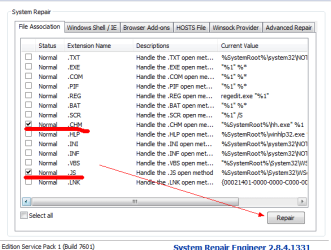
1.Open the System Repair Engineer>System Repair>Select 'File Association'>Select .chm and .js>repair.
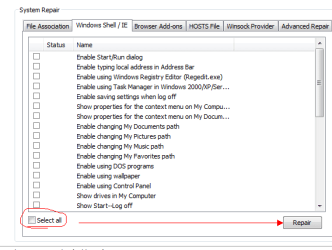
2.Open the System Repair Engineer>System Repair>Windows Shell /IE>Select all>Repair.
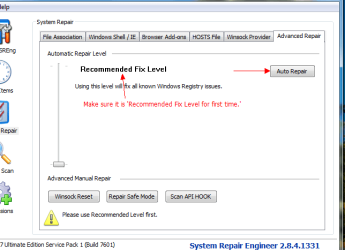
3.Open the System Repair Engineer>System Repair>Advanced Repair>Auto repair.
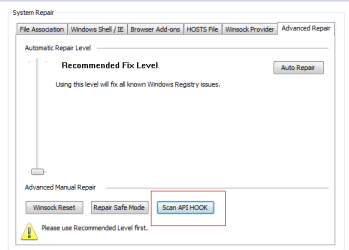
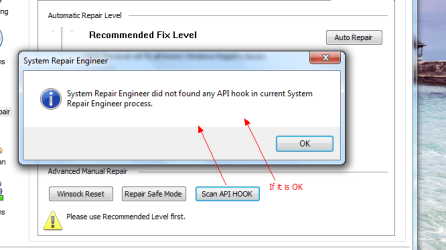
4.Open the System Repair Engineer>System Repair>Advanced Repair>Scan API HOOK.

Well, this is my solution based on your report, wish it can help you.
 

My Computer

Computer type
PC/Desktop
Computer Manufacturer/Model Number
GenuineIntel
OS
Windows XP Pro ;Windows 7 Ultimate ;Windows 8 Pro 32 bit
CPU
Pentium(R) Dual-Core CPU E5300 @ 2.60GHz
Motherboard
Colorful Technology And Development Co.,LTD C.G31H Ver2.3
Memory
1.00 GB
Graphics Card(s)
Intel(R) G33/G31 Express Chipset Family
Sound Card
Realtek High Definition Audio
Screen Resolution
1024 x 768 x 32 bits (4294967296 colors) @ 60 Hz
Hard Drives
WDC WD3200AAJS-60M0A1 ATA Device
Keyboard
Standard PS/2 Keyboard
Mouse
PS/2 Compatible Mouse
Antivirus
AVG Internet Security 2014
Browser
Mozila Firefox 31.0.0.5310
Just like this.
 

Attachments

  • setp1.png
    setp1.png
    11.5 KB · Views: 28
  • step2.png
    step2.png
    9.6 KB · Views: 28
  • step3.png
    step3.png
    16.1 KB · Views: 28

My Computer

Computer type
PC/Desktop
Computer Manufacturer/Model Number
GenuineIntel
OS
Windows XP Pro ;Windows 7 Ultimate ;Windows 8 Pro 32 bit
CPU
Pentium(R) Dual-Core CPU E5300 @ 2.60GHz
Motherboard
Colorful Technology And Development Co.,LTD C.G31H Ver2.3
Memory
1.00 GB
Graphics Card(s)
Intel(R) G33/G31 Express Chipset Family
Sound Card
Realtek High Definition Audio
Screen Resolution
1024 x 768 x 32 bits (4294967296 colors) @ 60 Hz
Hard Drives
WDC WD3200AAJS-60M0A1 ATA Device
Keyboard
Standard PS/2 Keyboard
Mouse
PS/2 Compatible Mouse
Antivirus
AVG Internet Security 2014
Browser
Mozila Firefox 31.0.0.5310
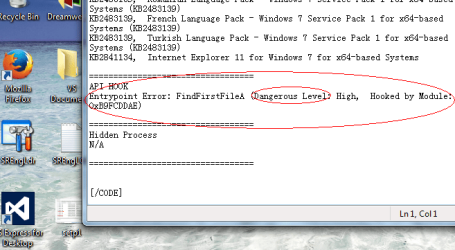
Because the report shows a dangerous level in API HOOK
 

Attachments

  • step4.png
    step4.png
    7.4 KB · Views: 28
  • step5.png
    step5.png
    26.8 KB · Views: 28
  • step6.png
    step6.png
    41.4 KB · Views: 28

My Computer

Computer type
PC/Desktop
Computer Manufacturer/Model Number
GenuineIntel
OS
Windows XP Pro ;Windows 7 Ultimate ;Windows 8 Pro 32 bit
CPU
Pentium(R) Dual-Core CPU E5300 @ 2.60GHz
Motherboard
Colorful Technology And Development Co.,LTD C.G31H Ver2.3
Memory
1.00 GB
Graphics Card(s)
Intel(R) G33/G31 Express Chipset Family
Sound Card
Realtek High Definition Audio
Screen Resolution
1024 x 768 x 32 bits (4294967296 colors) @ 60 Hz
Hard Drives
WDC WD3200AAJS-60M0A1 ATA Device
Keyboard
Standard PS/2 Keyboard
Mouse
PS/2 Compatible Mouse
Antivirus
AVG Internet Security 2014
Browser
Mozila Firefox 31.0.0.5310
It helps! :thumbsup::thumbsup::thumbsup::thumbsup:
Sammy thanks for your help and your time. I will never fix this problem without your help.
 

My Computer

OS
Windows 7 Ultimate x64
CPU
Intel(R) Core(TM)2 Quad Q6600
Motherboard
ASUS P5K Deluxe/WiFi-AP
Memory
4.00 GB
Graphics Card(s)
NVIDIA GEForce 8800 GTX
Sound Card
SoundMAX Intergrated Digital HD Audio
Monitor(s) Displays
LG Flatron Wide 22"
It helps! :thumbsup::thumbsup::thumbsup::thumbsup:
Sammy thanks for your help and your time. I will never fix this problem without your help.
:D:DIt is my pleasure!
 

My Computer

Computer type
PC/Desktop
Computer Manufacturer/Model Number
GenuineIntel
OS
Windows XP Pro ;Windows 7 Ultimate ;Windows 8 Pro 32 bit
CPU
Pentium(R) Dual-Core CPU E5300 @ 2.60GHz
Motherboard
Colorful Technology And Development Co.,LTD C.G31H Ver2.3
Memory
1.00 GB
Graphics Card(s)
Intel(R) G33/G31 Express Chipset Family
Sound Card
Realtek High Definition Audio
Screen Resolution
1024 x 768 x 32 bits (4294967296 colors) @ 60 Hz
Hard Drives
WDC WD3200AAJS-60M0A1 ATA Device
Keyboard
Standard PS/2 Keyboard
Mouse
PS/2 Compatible Mouse
Antivirus
AVG Internet Security 2014
Browser
Mozila Firefox 31.0.0.5310
Back
Top