

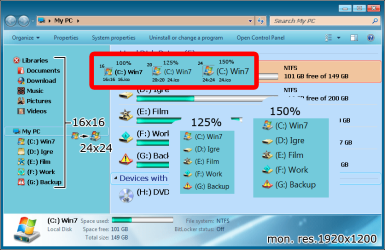
Is it possible to change the size of tree view icons from 16 to at least 24??
100% dpi show 16x16
125% dpi show 20x20 but icon 24 (if 20 does not exist)
150% dpi show 24x24 this is good but
everything looks very big.
Interesting thing is if I re size the fonts in 150% dpi to be like on 100% dpi the icons also change to 16x16.
W. Explorer can be replaced by another program but what for other software that also uses tree view?
I'm on 1920x1200 24" do I need to use smaller monitor with smaller resolution for bigger icons or very big monitor that 150% looks small or there is some reshack to some file that can be done??
In Xp registry:
Shell Small Icon Size = 24
And job is done.
So if anybody knows what file needs to be edited let me know if U know
100% dpi show 16x16
125% dpi show 20x20 but icon 24 (if 20 does not exist)
150% dpi show 24x24 this is good but
everything looks very big.
Interesting thing is if I re size the fonts in 150% dpi to be like on 100% dpi the icons also change to 16x16.
W. Explorer can be replaced by another program but what for other software that also uses tree view?
I'm on 1920x1200 24" do I need to use smaller monitor with smaller resolution for bigger icons or very big monitor that 150% looks small or there is some reshack to some file that can be done??
In Xp registry:
Shell Small Icon Size = 24
And job is done.
So if anybody knows what file needs to be edited let me know if U know
Attachments
My Computer
At a glance
7 Ultimate x64 sp1Intel i5-4690K16Gb HyperX furyR9-270x 2Gb
- Computer type
- PC/Desktop
- Computer Manufacturer/Model Number
- 696
- OS
- 7 Ultimate x64 sp1
- CPU
- Intel i5-4690K
- Motherboard
- GA Z97X Gaming 5
- Memory
- 16Gb HyperX fury
- Graphics Card(s)
- R9-270x 2Gb
- Sound Card
- On Board
- Monitor(s) Displays
- 2443NW
- Screen Resolution
- 1920x1200
- Hard Drives
- WD5000 -
WD5001 -
WD1002
- PSU
- Cft-650-14cs
- Case
- Very Big Case
- Cooling
- stock
- Keyboard
- G11
- Mouse
- Logitech
- Internet Speed
- Adsl
- Browser
- FF
- Other Info
- RWD


