Windows Explorer

Duker

New member
Local time
7:37 AM
Messages
8
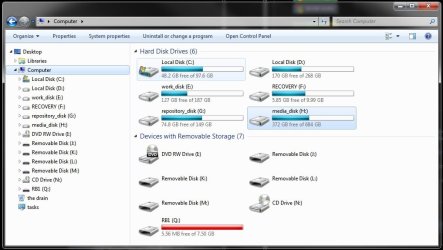
Explorer has lost the tool bars and all I can see is the library's, I Used to be able to see the entire tree view.Can anyone help?? Duker
 

My Computer My Computer

At a glance

win 7 pro 64 bitIntel(R) Pentium(R) D CPU 2.80GHz, 2799 Mhz, ...4.5
Computer Manufacturer/Model Number
Gateway GM 5066E
OS
win 7 pro 64 bit
CPU
Intel(R) Pentium(R) D CPU 2.80GHz, 2799 Mhz, 2 Cores
Memory
4.5
Try right clicking where the tree was. If it appears click on show all folders.

Also, right click on library and expand.
 
Last edited by a moderator:

My Computer My Computer

At a glance

Windows 10, Home Clean InstallIntel Core2 processsor Q8200(2.33Ghz 1333FSB)...6 gbATI Radeon 256MB HD3650
Computer type
PC/Desktop
Computer Manufacturer/Model Number
Dell XPS 420
OS
Windows 10, Home Clean Install
CPU
Intel Core2 processsor Q8200(2.33Ghz 1333FSB) Quad Core Tech
Motherboard
Dell
Memory
6 gb
Graphics Card(s)
ATI Radeon 256MB HD3650
Sound Card
Intergrated 7.1 Channel Audio
Monitor(s) Displays
Dell SP2009W 20"
Hard Drives
640 GB Serial ATA Hard drive
Cooling
Fan
Keyboard
Dell USB Keyboard
Mouse
Dell Premium Optical USB
Internet Speed
DSL 2.85
Here's my Explorer. Certain standard entries, such as My Documents, etc. are removed since I have no use for them. But the navigation pane clearly shows the usual tree. Clicking on any of the drives expands the tree in exactly the same fashion as it was done in previous generations of Windows.

If you want to customize the navigation pane, please look in the Tutorial section of the Forums, there are at least a dozen tutorials on how to do that. You can start with

Navigation Pane - Automatically expand to current folder

There are links to further related Tutorials at the bottom.
 

Attachments

  • explorer.jpg
    explorer.jpg
    64.3 KB · Views: 5

My Computer My Computer

At a glance

Windows 7 Ultimate (x64)Q66008 GBATI Radeon HD 2600 XT
Computer Manufacturer/Model Number
Dell Inspiron 530
OS
Windows 7 Ultimate (x64)
CPU
Q6600
Memory
8 GB
Graphics Card(s)
ATI Radeon HD 2600 XT
Monitor(s) Displays
Samsung Syncmaster P2450
Screen Resolution
1920x1080
Hard Drives
Samsung HD103UJ
Samsung HD501LJ
Internet Speed
25 Mb/s
Back
Top