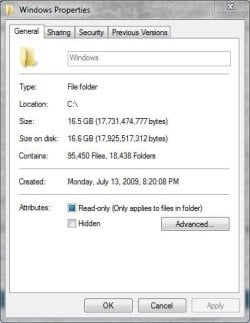
Windows Folder Size 24gb

Merlin2000

New member
Member
Local time
6:01 PM
Messages
91
I have Windows 7 x64 Ultimate and noticed that my c:\windows folder size is 24gbs!

Is this normal?

My Temp folder is 5.4GBs, not sure if it's safe to clean out the files in that folder...
 
Last edited:

My Computer

OS
Windows 7
I don't quite understand the main question, but it is safe to empty the Temp files. The files are intended to be removed automatically, but it doesn't always happen.
 

My Computer

Computer type
Laptop
Computer Manufacturer/Model Number
Toshiba P775-S7100
OS
Windows 7 Professional SP1 64-bit
CPU
Intel Core i5-2450M @2.5 GHz
Memory
6 GB DDR3 1333MHz
Graphics Card(s)
Intel HD 3000
Monitor(s) Displays
Built-in 17.3" LED; 22" Insignia NS-L22Q-10A
Screen Resolution
1600x900; 1360x768
Hard Drives
750 GB Hitachi
1TB Seagate FreeAgent External
Internet Speed
Verizon DSL Speed(Down/Up): 3360 Kbps / 800 Kbps
Antivirus
MSE and MBAM Pro
Browser
IE10
If you mean that the OS is taking up 24gb of space, just a bit on the high side. The OS requires 20 gb if 64 bit a and a bit less for 32. If you have programs etc, you may be about right.

If you did an upgrade or custom install you may have a windows.old.that can be deleted

You will also take space with backup, system restore, etc.
 

My Computer

Computer type
PC/Desktop
Computer Manufacturer/Model Number
Dell XPS 420
OS
Windows 10, Home Clean Install
CPU
Intel Core2 processsor Q8200(2.33Ghz 1333FSB) Quad Core Tech
Motherboard
Dell
Memory
6 gb
Graphics Card(s)
ATI Radeon 256MB HD3650
Sound Card
Intergrated 7.1 Channel Audio
Monitor(s) Displays
Dell SP2009W 20"
Hard Drives
640 GB Serial ATA Hard drive
Cooling
Fan
Keyboard
Dell USB Keyboard
Mouse
Dell Premium Optical USB
Internet Speed
DSL 2.85
Might be worth checking file and folder size with a tool like SpaceMonger to see where that particular usage is being reported. That is a bit high, even for a large WinSxS cache.
 

My Computer

Computer type
PC/Desktop
Computer Manufacturer/Model Number
Custom
OS
Windows 10 Pro x64
CPU
Intel Core i7 4790K @ 4.5GHz
Motherboard
Asus Maximus Hero VII
Memory
32GB DDR3
Graphics Card(s)
Nvidia GeForce GTX970
Sound Card
Realtek HD Audio
Screen Resolution
1920x1200
Hard Drives
1x Samsung 250GB SSD
4x WD RE 2TB (RAIDZ)
PSU
Corsair AX760i
Case
Fractal Design Define R4
Cooling
Noctua NH-D15
You have to take into account that the Windows folder size reported by folder properties is doubled due to hardlinks.
For a rough (very rough) estimate divide 24 by 2...12.
 

My Computer

Computer type
PC/Desktop
Computer Manufacturer/Model Number
Alienware Aurora ALX R4
OS
Windows 10 Pro (x64)
CPU
Intel Core i7-3930K (3.2GHz - 4.5GHz)
Motherboard
Alienware Aurora-R4 x79
Memory
4x Samsung 4GB PC3-12800 DDR3 (16GB 1600MHz)
Graphics Card(s)
Nvidia Geforce GTX 690
Sound Card
SteelSeries Siberia Elite
Monitor(s) Displays
Dell UltraSharp U3011
Screen Resolution
2560x1600
Hard Drives
Samsung 850 Pro 256 GB, Seagate 1TB Desktop Hybrid HDD, 2x Western Digital 4TB Green HDD
PSU
875W Some Dell PSU <.<
Case
Alienware Aurora ALX
Cooling
Custom Liquid Cooling (EK CPU & GPU blocks) dual EK 480RAD
Keyboard
Logitech G710+ Mechanical
Mouse
Logitech G700s
Internet Speed
Verizon Fios (50 mbps average)
Other Info
Server: Intel NUC D54250WYK: i5-4250U, 16GB, 256 GB mSATA, Windows Server 2012 R2
Sorry, I updated my OP. I'm talking about the Windows folder size at C:\Windows

It's showing up at 24gb. I checked it with WinDirStat

Is this what you guys have for the total size of your Windows folder?

The Windows.old folder is stored outside of the C:\Windows directory, so it's not including that space. Just surprising (well, not too surprising) that Win 7 would require so much space to run.

My WinSxs is 6.6gb, Temp 5.4gb, Installer 2.8gb, System32 2.8gb
 

My Computer

OS
Windows 7
Here's my windows folder,
 

Attachments

  • windows.JPG
    windows.JPG
    30.1 KB · Views: 18

My Computer

Computer type
PC/Desktop
Computer Manufacturer/Model Number
Self Built
OS
Win 10 Pro x64
CPU
Intel I5-2500K @3.3GHz
Motherboard
Asrock P67 Extreme4
Memory
16GB G.Skill Ripjaws X (4x4GB)
Graphics Card(s)
EVGA GeForce 750 Ti SC 2GB
Sound Card
ASUS Xonar DG 5.1 Channels 24-bit 96KHz PCI Interface Sound
Monitor(s) Displays
auria eq2367
Screen Resolution
1920 x 1080
Hard Drives
250GB Samsung 850 EVO SSD
1TB WD Blue
1TB Hitachi
PSU
SeaSonic X 650W 80 Plus Gold
Case
Corsair Obsidian 750D
Cooling
Corsair H60, Three 140mm case fans
Keyboard
Logitech Wireless Keyboard K520
Mouse
Logitech Wireless Mouse M310
Internet Speed
Wave Broadband ~ 100 dn 5 up
Antivirus
Windows Defender, Malwarebytes Premium
Browser
Edge, IE11, Chrome
Other Info
Laptop specs: HP g7-1365dx /
CPU: AMD A6-3420M APU with Radeon(tm) HD Graphics /
RAM: Crucial 8Gb (2x4Gb) /
SSD: Crucial M4-CT128M4SSD2 ATA Device/ FW 000F /
GFX: AMD Radeon HD 6520G /
OS: Windows 10 Pro x64
Mine is at 16.2GB on disk as well, for what it's worth (x64, installed since August 2009). It's probably time to drill down and see where that used space is going.
 

My Computer

Computer type
PC/Desktop
Computer Manufacturer/Model Number
Custom
OS
Windows 10 Pro x64
CPU
Intel Core i7 4790K @ 4.5GHz
Motherboard
Asus Maximus Hero VII
Memory
32GB DDR3
Graphics Card(s)
Nvidia GeForce GTX970
Sound Card
Realtek HD Audio
Screen Resolution
1920x1200
Hard Drives
1x Samsung 250GB SSD
4x WD RE 2TB (RAIDZ)
PSU
Corsair AX760i
Case
Fractal Design Define R4
Cooling
Noctua NH-D15
I'm running a clean install of Win 7 x64 Professional.

I ran a disk cleanup and it removed a lot of the temp files, but none inside of c:\Windows\Temp

I believe the Disk Cleanup utility removes the temps files within C:\Users\[username]\AppData\Local\Temp not the c:\Windows\Temp folder. I usually don't like touching the Windows\Temp folder - I've never seen the after effects of deleting it under Win 7.
 

My Computer

OS
Windows 7

My Computer

Computer type
PC/Desktop
Computer Manufacturer/Model Number
Alienware Aurora ALX R4
OS
Windows 10 Pro (x64)
CPU
Intel Core i7-3930K (3.2GHz - 4.5GHz)
Motherboard
Alienware Aurora-R4 x79
Memory
4x Samsung 4GB PC3-12800 DDR3 (16GB 1600MHz)
Graphics Card(s)
Nvidia Geforce GTX 690
Sound Card
SteelSeries Siberia Elite
Monitor(s) Displays
Dell UltraSharp U3011
Screen Resolution
2560x1600
Hard Drives
Samsung 850 Pro 256 GB, Seagate 1TB Desktop Hybrid HDD, 2x Western Digital 4TB Green HDD
PSU
875W Some Dell PSU <.<
Case
Alienware Aurora ALX
Cooling
Custom Liquid Cooling (EK CPU & GPU blocks) dual EK 480RAD
Keyboard
Logitech G710+ Mechanical
Mouse
Logitech G700s
Internet Speed
Verizon Fios (50 mbps average)
Other Info
Server: Intel NUC D54250WYK: i5-4250U, 16GB, 256 GB mSATA, Windows Server 2012 R2
I would agree - %windir%\Temp is just a temporary folder, it's just not *your* temporary folder. I've cleaned it for years with no ill effects across many Windows versions. With few exceptions, on a Windows 7 machine most of the data you'll find in your %windir%\Temp folder is left behind by Windows Update or problem report data (which is periodically sent to MS unless you've disabled it).
 

My Computer

Computer type
PC/Desktop
Computer Manufacturer/Model Number
Custom
OS
Windows 10 Pro x64
CPU
Intel Core i7 4790K @ 4.5GHz
Motherboard
Asus Maximus Hero VII
Memory
32GB DDR3
Graphics Card(s)
Nvidia GeForce GTX970
Sound Card
Realtek HD Audio
Screen Resolution
1920x1200
Hard Drives
1x Samsung 250GB SSD
4x WD RE 2TB (RAIDZ)
PSU
Corsair AX760i
Case
Fractal Design Define R4
Cooling
Noctua NH-D15

My Computer

Computer Manufacturer/Model Number
Self-Built in July 2009
OS
Windows 7 Ultimate x64
CPU
Intel Q9550 2.83Ghz OC'd to 3.40Ghz
Motherboard
Gigabyte GA-EP45-UD3R rev. 1.1, F12 BIOS
Memory
8GB G.Skill PI DDR2-800, 4-4-4-12 timings
Graphics Card(s)
EVGA 1280MB Nvidia GeForce GTX570
Sound Card
Realtek ALC899A 8 channel onboard audio
Monitor(s) Displays
23" Acer x233H
Screen Resolution
1920x1080
Hard Drives
Intel X25-M 80GB Gen 2 SSD
Western Digital 1TB Caviar Black, 32MB cache. WD1001FALS
PSU
Corsair 620HX modular
Case
Antec P182
Cooling
stock
Keyboard
ABS M1 Mechanical
Mouse
Logitech G9 Laser Mouse
Internet Speed
15/2 cable modem
Other Info
Windows and Linux enthusiast. Logitech G35 Headset.
1) What is this "Installer" folder? I'm running win7 pro and I have no such folder under C:\windows. Please check its contents and let us know.

2) Navigate to the folder C:\windows\SoftwareDistribution\Download and delete all its contents. That'll free up some space.
 

My Computer

Computer Manufacturer/Model Number
Too many to describe...
OS
Windows 7 x64 pro/ Windows 7 x86 Pro/ XP SP3 x86
Be sure that you understand that the winSXS folder isn't really 6.6GB...that number is pretty misleading;
- It may not be "using" 6.6gb, but it's still allocating 6.6gb from my hard drive :mad:


1) What is this "Installer" folder? I'm running Windows 7 pro and I have no such folder under C:\windows. Please check its contents and let us know.
- Looks like it's 1.8gb of msi files, and then 1gb folder named $PatchCache$

2) Navigate to the folder C:\windows\SoftwareDistribution\Download and delete all its contents. That'll free up some space.
- That freed up about 150mb :zip:

If I empty Windows\Installer and Windows\Temp, I'll be right at about 15.6gb for the Windows folder, which is workable. My main hard drive is only 74gb, so every MB counts :p

Anyone know about that $PatchCache$ folder?


Code:
    64.0 GB C:\
      23.8 GB C:\Windows
       6.6 GB C:\Windows\winsxs
       5.4 GB C:\Windows\Temp
       2.9 GB C:\Windows\Installer
       1.8 GB C:\Windows\Installer\<Files>
     285.8 MB C:\Windows\Installer\38a3a9.msi
     110.0 MB C:\Windows\Installer\2dcc70.msi
      95.0 MB C:\Windows\Installer\79621.msp
      76.2 MB C:\Windows\Installer\79549.msp
      76.2 MB C:\Windows\Installer\5a0e32.msp
      61.7 MB C:\Windows\Installer\5a0e4d.msp
      58.8 MB C:\Windows\Installer\5a0e9e.msp
      55.3 MB C:\Windows\Installer\182941.msi
      37.6 MB C:\Windows\Installer\a64321d.msi
      34.5 MB C:\Windows\Installer\102e3f.msi
      25.9 MB C:\Windows\Installer\a643219.msi
      25.8 MB C:\Windows\Installer\1d8727.msi
      25.7 MB C:\Windows\Installer\18293d.msi
      24.3 MB C:\Windows\Installer\18294b.msi
      24.0 MB C:\Windows\Installer\180020f.msi
      23.7 MB C:\Windows\Installer\7f0d25c.msi
      21.4 MB C:\Windows\Installer\5a109d.msp
      21.2 MB C:\Windows\Installer\102dfc.msi
      19.3 MB C:\Windows\Installer\46597.msp
      15.6 MB C:\Windows\Installer\5a1191.msp
      15.2 MB C:\Windows\Installer\38a3a5.msi
      15.2 MB C:\Windows\Installer\5a1122.msp
      15.2 MB C:\Windows\Installer\48f7b3.msi
      15.2 MB C:\Windows\Installer\cc3fc49.msi
      15.0 MB C:\Windows\Installer\102df3.msp
      14.5 MB C:\Windows\Installer\5a0f58.msp
      14.5 MB C:\Windows\Installer\79298.msp
      14.5 MB C:\Windows\Installer\5a1071.msp
      14.5 MB C:\Windows\Installer\6dd4d.msp
      14.4 MB C:\Windows\Installer\7d43606.msp
      14.0 MB C:\Windows\Installer\1564935.msi
      13.5 MB C:\Windows\Installer\182629.msi
      13.4 MB C:\Windows\Installer\3b9359e.msi
      13.3 MB C:\Windows\Installer\180023e.msi
      12.2 MB C:\Windows\Installer\5a0ec7.msp
      12.1 MB C:\Windows\Installer\705bc.msi
      11.8 MB C:\Windows\Installer\150c9ed5.msi
      11.7 MB C:\Windows\Installer\700dfed.msp
      11.3 MB C:\Windows\Installer\9ff0e14.msp
      11.2 MB C:\Windows\Installer\3b935ae.msi
      11.2 MB C:\Windows\Installer\6dd68.msp
      11.2 MB C:\Windows\Installer\7d4364f.msp
      10.3 MB C:\Windows\Installer\5a0c05.msp
      10.1 MB C:\Windows\Installer\18264e.msi
       9.9 MB C:\Windows\Installer\24ab6.msi
       9.5 MB C:\Windows\Installer\79587.msp
       9.5 MB C:\Windows\Installer\7060c.msi
       9.5 MB C:\Windows\Installer\7955a.msp
       8.7 MB C:\Windows\Installer\7951f.msp
       8.2 MB C:\Windows\Installer\79596.msp
       7.9 MB C:\Windows\Installer\5a0f91.msp
       7.9 MB C:\Windows\Installer\5a0e69.msp
       7.7 MB C:\Windows\Installer\7447ab.msp
       7.6 MB C:\Windows\Installer\79511.msp
       7.6 MB C:\Windows\Installer\5a0e6a.msp
       7.5 MB C:\Windows\Installer\7956a.msp
       7.5 MB C:\Windows\Installer\5a0eab.msp
       7.4 MB C:\Windows\Installer\5a0e5a.msp
       7.4 MB C:\Windows\Installer\d341334.msi
       7.1 MB C:\Windows\Installer\a7ba898.msp
       6.7 MB C:\Windows\Installer\6a68160.msi
       6.6 MB C:\Windows\Installer\5a0e09.msp
       6.2 MB C:\Windows\Installer\5a0b9f.msp
       5.9 MB C:\Windows\Installer\12066c.msi
       5.8 MB C:\Windows\Installer\584f17.msi
       5.8 MB C:\Windows\Installer\584f0a.msi
       5.7 MB C:\Windows\Installer\a643222.msi
       5.7 MB C:\Windows\Installer\10ac734.msi
       5.7 MB C:\Windows\Installer\120796.msi
       5.5 MB C:\Windows\Installer\5a0eba.msp
       5.4 MB C:\Windows\Installer\143c8.msi
       5.4 MB C:\Windows\Installer\3b935e5.msi
       5.3 MB C:\Windows\Installer\120701.msi
       5.3 MB C:\Windows\Installer\4eddd11.msp
       5.2 MB C:\Windows\Installer\10ac6df.msi
       5.1 MB C:\Windows\Installer\3b935cd.msi
       5.0 MB C:\Windows\Installer\10ac727.msi
       5.0 MB C:\Windows\Installer\5a0bf6.msp
       4.1 MB C:\Windows\Installer\a7ba55b.msp
       3.8 MB C:\Windows\Installer\10c5c6.msi
       3.7 MB C:\Windows\Installer\10ac62b.msi
       3.6 MB C:\Windows\Installer\134b8b.msi
       3.6 MB C:\Windows\Installer\35b70.msp
       3.5 MB C:\Windows\Installer\705b2.msi
       3.4 MB C:\Windows\Installer\70656.msi
       3.4 MB C:\Windows\Installer\24aac.msi
       3.3 MB C:\Windows\Installer\51d7c.msp
       3.3 MB C:\Windows\Installer\5c1e9b.msp
       3.2 MB C:\Windows\Installer\19a0fbb.msp
       3.2 MB C:\Windows\Installer\19a0ef3.msp
       3.1 MB C:\Windows\Installer\15f92e37.msi
       3.1 MB C:\Windows\Installer\1800234.msi
       3.1 MB C:\Windows\Installer\102dd7.msi
       3.0 MB C:\Windows\Installer\52aa511.msi
       3.0 MB C:\Windows\Installer\705f8.msi
       3.0 MB C:\Windows\Installer\134acf.msi
       2.9 MB C:\Windows\Installer\7f0bfac.msi
       2.9 MB C:\Windows\Installer\a7ba583.msp
       2.8 MB C:\Windows\Installer\a643226.msi
       2.7 MB C:\Windows\Installer\7f0bec8.msi
       2.7 MB C:\Windows\Installer\5c1e65.msp
       2.7 MB C:\Windows\Installer\24ac0.msi
       2.6 MB C:\Windows\Installer\52aa505.msi
       2.5 MB C:\Windows\Installer\35c11.msp
       2.4 MB C:\Windows\Installer\182644.msi
       2.4 MB C:\Windows\Installer\3b935d9.msi
       2.3 MB C:\Windows\Installer\7f0bf51.msi
       2.3 MB C:\Windows\Installer\1204b7.msi
       2.2 MB C:\Windows\Installer\19a10d5.msi
       2.2 MB C:\Windows\Installer\70644.msi
       2.1 MB C:\Windows\Installer\16174c8d.msp
       2.1 MB C:\Windows\Installer\7059e.msi
       2.0 MB C:\Windows\Installer\7f0befe.msi
       2.0 MB C:\Windows\Installer\182686.msi
       2.0 MB C:\Windows\Installer\1800193.msi
       1.9 MB C:\Windows\Installer\70594.msi
       1.8 MB C:\Windows\Installer\120627.msi
       1.8 MB C:\Windows\Installer\705e4.msi
       1.8 MB C:\Windows\Installer\155d07.msi
       1.8 MB C:\Windows\Installer\102e28.msi
       1.7 MB C:\Windows\Installer\4cf17b5.msi
       1.7 MB C:\Windows\Installer\7f0bf9e.msi
       1.7 MB C:\Windows\Installer\7f0bf60.msi
       1.7 MB C:\Windows\Installer\7f0bf74.msi
       1.7 MB C:\Windows\Installer\7f0bef3.msi
       1.7 MB C:\Windows\Installer\7f0bee9.msi
       1.7 MB C:\Windows\Installer\7f0bede.msi
       1.7 MB C:\Windows\Installer\7f0bf45.msi
       1.7 MB C:\Windows\Installer\12cd966a.msi
       1.7 MB C:\Windows\Installer\12076c.msi
       1.6 MB C:\Windows\Installer\1206ab.msi
       1.5 MB C:\Windows\Installer\e65ac7.msi
       1.5 MB C:\Windows\Installer\17da525.msi
       1.5 MB C:\Windows\Installer\143c5.msi
       1.5 MB C:\Windows\Installer\705da.msi
       1.4 MB C:\Windows\Installer\51d98.msp
       1.4 MB C:\Windows\Installer\a643215.msi
       1.3 MB C:\Windows\Installer\35a84.msp
       1.2 MB C:\Windows\Installer\5a1060.msp
       1.2 MB C:\Windows\Installer\79578.msp
       1.2 MB C:\Windows\Installer\102d9d.msi
       1.1 MB C:\Windows\Installer\5a1105.msp
       1.0 MB C:\Windows\Installer\24ae8.msi
     992.0 KB C:\Windows\Installer\4864476.msi
     968.5 KB C:\Windows\Installer\d3947.msi
     938.5 KB C:\Windows\Installer\18001a4.msi
     903.5 KB C:\Windows\Installer\18001c5.msi
     896.5 KB C:\Windows\Installer\102e1f.msi
     828.0 KB C:\Windows\Installer\1205b1.msi
     723.0 KB C:\Windows\Installer\3bfa12b.msi
     722.5 KB C:\Windows\Installer\18001dd.msi
     708.5 KB C:\Windows\Installer\705a8.msi
     682.5 KB C:\Windows\Installer\7d43612.msi
     652.0 KB C:\Windows\Installer\7f0bf27.msi
     647.5 KB C:\Windows\Installer\7f0bf1c.msi
     641.5 KB C:\Windows\Installer\7f0bf31.msi
     638.5 KB C:\Windows\Installer\7f0bf08.msi
     635.0 KB C:\Windows\Installer\7f0bed2.msi
     635.0 KB C:\Windows\Installer\7f0bf12.msi
     635.0 KB C:\Windows\Installer\7f0bf3b.msi
     635.0 KB C:\Windows\Installer\7f0bf6a.msi
     605.5 KB C:\Windows\Installer\705ee.msi
     593.5 KB C:\Windows\Installer\705d0.msi
     592.0 KB C:\Windows\Installer\705c6.msi
     565.5 KB C:\Windows\Installer\35b00.msp
     520.5 KB C:\Windows\Installer\70602.msi
     506.0 KB C:\Windows\Installer\120547.msi
     502.0 KB C:\Windows\Installer\120539.msi
     499.0 KB C:\Windows\Installer\7063a.msi
     496.0 KB C:\Windows\Installer\120555.msi
     491.5 KB C:\Windows\Installer\12051f.msi
     490.5 KB C:\Windows\Installer\1204c4.msi
     490.5 KB C:\Windows\Installer\12052c.msi
     490.5 KB C:\Windows\Installer\120562.msi
     358.0 KB C:\Windows\Installer\7d1c5.msi
     323.0 KB C:\Windows\Installer\102e0c.msi
     317.0 KB C:\Windows\Installer\5a0f03.msp
     317.0 KB C:\Windows\Installer\5a0f10.msp
     311.5 KB C:\Windows\Installer\19a1088.msp
     310.0 KB C:\Windows\Installer\a7ba4c3.msp
     280.5 KB C:\Windows\Installer\5c1e80.msp
     256.0 KB C:\Windows\Installer\5a0bbf.msi
     246.0 KB C:\Windows\Installer\5a0bcb.msi
     236.5 KB C:\Windows\Installer\84cd9.msi
     234.5 KB C:\Windows\Installer\18001e7.msi
     227.5 KB C:\Windows\Installer\46c3c85.msi
     204.5 KB C:\Windows\Installer\5a0c2f.msi
     195.0 KB C:\Windows\Installer\49a28de.msi
     179.5 KB C:\Windows\Installer\c2813c7.msi
     124.0 KB C:\Windows\Installer\51da4.msp
      52.0 KB C:\Windows\Installer\102de9.msi
      35.0 KB C:\Windows\Installer\6fc01b5.msi
      30.5 KB C:\Windows\Installer\70626.msi
      24.5 KB C:\Windows\Installer\41cc7a3.msi
      23.5 KB C:\Windows\Installer\134c0c.msi
      22.5 KB C:\Windows\Installer\10ac71b.msi
      22.5 KB C:\Windows\Installer\70630.msi
      21.5 KB C:\Windows\Installer\134cee.msi
      20.5 KB C:\Windows\Installer\10ac70f.msi
       3.5 KB C:\Windows\Installer\143c9.mst
            0 C:\Windows\Installer\wix{404BB1FF-A84F-432F-B77B-301E88E8D1C7}.SchedServiceConfig.rmi
       1.0 GB C:\Windows\Installer\$PatchCache$
      10.4 MB C:\Windows\Installer\{90140000-0011-0000-0000-0000000FF1CE}
       4.8 MB C:\Windows\Installer\{26A24AE4-039D-4CA4-87B4-2F83216018FF}
       2.0 MB C:\Windows\Installer\{AC76BA86-7AD7-1033-7B44-A93000000001}
       1.9 MB C:\Windows\Installer\{38975F50-EAA2-012B-ADB4-000000000000}
       1.6 MB C:\Windows\Installer\{3AC8457C-0385-4BEA-A959-E095F05D6D67}
     665.8 KB C:\Windows\Installer\{90120000-0051-0000-0000-0000000FF1CE}
     644.9 KB C:\Windows\Installer\{626672CD-BFCF-49A9-AEFE-AB0FED3BFC5B}
     579.3 KB C:\Windows\Installer\{90120000-003B-0000-0000-0000000FF1CE}
     557.8 KB C:\Windows\Installer\{90140000-006E-0409-0000-0000000FF1CE}
     528.4 KB C:\Windows\Installer\{67ED38A3-4882-448B-B44D-3428AB00D7D5}
     452.8 KB C:\Windows\Installer\{96D5EB02-DE18-4DCD-A713-929B4461CA8D}
     362.6 KB C:\Windows\Installer\{5C474A83-A45F-470C-9AC8-2BD1C251BF9A}
     345.6 KB C:\Windows\Installer\{90120000-0026-0000-0000-0000000FF1CE}
     288.7 KB C:\Windows\Installer\{4475560E-9418-4908-A158-472D873AE139}
     280.5 KB C:\Windows\Installer\{404BB1FF-A84F-432F-B77B-301E88E8D1C7}
     212.8 KB C:\Windows\Installer\{90120000-006E-0409-0000-0000000FF1CE}
     168.0 KB C:\Windows\Installer\{987FE247-4E69-4A2E-A961-D14F901FDBF6}
     139.5 KB C:\Windows\Installer\{30988956-A604-4974-9333-10B63252522D}
     119.0 KB C:\Windows\Installer\{048298C9-A4D3-490B-9FF9-AB023A9238F3}
     109.0 KB C:\Windows\Installer\{57B012C9-5EAD-441B-9925-6B560B543D87}
      90.6 KB C:\Windows\Installer\{C19D4D8F-4433-4F6D-9F0C-79589FD0B973}
      88.6 KB C:\Windows\Installer\{28BE306E-5DA6-4F9C-BDB0-DBA3C8C6FFFD}
      88.4 KB C:\Windows\Installer\{92DBCA36-9B41-4DD1-941A-AED149DD37F0}
      80.0 KB C:\Windows\Installer\{6E9EF98E-259E-416D-B5F8-0ABDB99942CE}
      78.5 KB C:\Windows\Installer\{A85FD55B-891B-4314-97A5-EA96C0BD80B5}
      78.5 KB C:\Windows\Installer\{B57EAFF2-D6EE-4C6C-9175-ED9F17BFC1BC}
      71.4 KB C:\Windows\Installer\{205C6BDD-7B73-42DE-8505-9A093F35A238}
      70.0 KB C:\Windows\Installer\{89F4137D-6C26-4A84-BDB8-2E5A4BB71E00}
      60.8 KB C:\Windows\Installer\{F6BD194C-4190-4D73-B1B1-C48C99921BFE}
      60.5 KB C:\Windows\Installer\{90120000-002A-0000-1000-0000000FF1CE}
      59.8 KB C:\Windows\Installer\{E6158D07-2637-4ECF-B576-37C489669174}
      58.6 KB C:\Windows\Installer\{1F6CA293-60B5-422E-80A6-C765B7BFA6D5}
      57.6 KB C:\Windows\Installer\{6412CECE-8172-4BE5-935B-6CECACD2CA87}
      49.2 KB C:\Windows\Installer\{DEA314C4-0929-4250-BC92-98E4C105F28D}
      45.4 KB C:\Windows\Installer\{EFC66B21-644A-48FB-B011-2D7A16128C74}
      42.1 KB C:\Windows\Installer\{CCC68887-6E07-4438-A035-7C22EFBDC15E}
      32.0 KB C:\Windows\Installer\{716E0306-8318-4364-8B8F-0CC4E9376BAC}
      32.0 KB C:\Windows\Installer\{86493ADD-824D-4B8E-BD72-8C5DCDC52A71}
      32.0 KB C:\Windows\Installer\{F662A8E6-F4DC-41A2-901E-8C11F044BDEC}
      29.2 KB C:\Windows\Installer\{45338B07-A236-4270-9A77-EBB4115517B5}
      28.7 KB C:\Windows\Installer\{C41300B9-185D-475E-BFEC-39EF732F19B1}
      22.0 KB C:\Windows\Installer\{8B7917E0-AF55-4E8A-9473-017F0AA03AC8}
      19.8 KB C:\Windows\Installer\{90120000-0030-0000-0000-0000000FF1CE}
      14.7 KB C:\Windows\Installer\{2FA41EBB-3F5A-35C3-85D6-51EC72A11FBD}
       9.9 KB C:\Windows\Installer\{033E378E-6AD3-4AD5-BDEB-CBD69B31046C}
       9.9 KB C:\Windows\Installer\{08D2E121-7F6A-43EB-97FD-629B44903403}
       9.9 KB C:\Windows\Installer\{0C826C5B-B131-423A-A229-C71B3CACCD6A}
       9.9 KB C:\Windows\Installer\{0F3647F8-E51D-4FCC-8862-9A8D0C5ACF25}
       9.9 KB C:\Windows\Installer\{1E9FC118-651D-4934-97BE-E53CAE5C7D45}
       9.9 KB C:\Windows\Installer\{4569AD91-47F4-4D9E-8FC9-717EC32D7AE1}
       9.9 KB C:\Windows\Installer\{5E994A95-9388-4D10-8E68-54B8CBF894D3}
       9.9 KB C:\Windows\Installer\{635FED5B-2C6D-49BE-87E6-7A6FCD22BC5A}
       9.9 KB C:\Windows\Installer\{71B7840D-BB4D-409C-87A2-9EFD10BC0C3D}
       9.9 KB C:\Windows\Installer\{8557397C-A42D-486F-97B3-A2CBC2372593}
       9.9 KB C:\Windows\Installer\{925D058B-564A-443A-B4B2-7E90C6432E55}
       9.9 KB C:\Windows\Installer\{92A3CA0D-55CD-4C5D-BA95-5C2600C20F26}
       9.9 KB C:\Windows\Installer\{92D58719-BBC1-4CC3-A08B-56C9E884CC2C}
       9.9 KB C:\Windows\Installer\{A472B9E4-0AFF-4F7B-B25D-F64F8E928AAB}
       9.9 KB C:\Windows\Installer\{A498D9EB-927B-459B-85D6-DD6EF8C2C564}
       9.9 KB C:\Windows\Installer\{C8C1BAD5-54E6-4146-AD07-3A8AD36569C3}
       9.9 KB C:\Windows\Installer\{D1A19B02-817E-4296-A45B-07853FD74D57}
       9.9 KB C:\Windows\Installer\{D92BBB52-82FF-42ED-8A3C-4E062F944AB7}
       9.9 KB C:\Windows\Installer\{DA97BDF9-BC72-46FD-8E76-427F2BB951EE}
       9.9 KB C:\Windows\Installer\{F3F18612-7B5D-4C05-86C9-AB50F6F71727}
       4.5 KB C:\Windows\Installer\{C4901881-CA4A-48BD-BD48-C4CA87C1DD7C}
       4.2 KB C:\Windows\Installer\{0EFDF2F9-836D-4EB7-A32D-038BD3F1FB2A}
       3.9 KB C:\Windows\Installer\{943BD9F2-E18A-4533-A6A7-B14326638958}
       3.5 KB C:\Windows\Installer\{90140000-002A-0000-1000-0000000FF1CE}
       2.2 KB C:\Windows\Installer\{553255F3-78FD-40F1-A6F8-6882140265FE}
       2.2 KB C:\Windows\Installer\{FB26A501-6BA6-459B-89AA-9736730752FB}
       2.8 GB C:\Windows\System32
       1.9 GB C:\Windows\assembly
       1.4 GB C:\Windows\SysWOW64
     685.5 MB C:\Windows\Microsoft.NET
     597.1 MB C:\Windows\Fonts
     536.8 MB C:\Windows\ServiceProfiles
     172.6 MB C:\Windows\Speech
     149.5 MB C:\Windows\SoftwareDistribution
     136.9 MB C:\Windows\IME
     112.5 MB C:\Windows\ehome
      83.8 MB C:\Windows\WindowsMobile
      81.1 MB C:\Windows\inf
      60.7 MB C:\Windows\Performance
      38.8 MB C:\Windows\Web
      30.2 MB C:\Windows\Help
      29.3 MB C:\Windows\Prefetch
      28.8 MB C:\Windows\Globalization
      27.6 MB C:\Windows\Boot
      23.9 MB C:\Windows\Logs
      19.8 MB C:\Windows\servicing
      12.7 MB C:\Windows\Media
      10.4 MB C:\Windows\AppPatch
      10.0 MB C:\Windows\<Files>
       8.4 MB C:\Windows\rescache
       6.7 MB C:\Windows\twain_32
       6.1 MB C:\Windows\security
       6.1 MB C:\Windows\PolicyDefinitions
       3.1 MB C:\Windows\diagnostics
       2.3 MB C:\Windows\Branding
       2.0 MB C:\Windows\Cursors
       1.7 MB C:\Windows\Panther
       1.6 MB C:\Windows\Resources
       1.2 MB C:\Windows\Close Combat The Longest Day
       1.1 MB C:\Windows\PLA
     512.2 KB C:\Windows\system
     347.4 KB C:\Windows\Downloaded Program Files
     235.5 KB C:\Windows\ShellNew
     107.5 KB C:\Windows\en-US
      80.4 KB C:\Windows\Minidump
      69.8 KB C:\Windows\AppCompat
      54.2 KB C:\Windows\schemas
      47.2 KB C:\Windows\L2Schemas
      41.6 KB C:\Windows\debug
      33.6 KB C:\Windows\Tasks
      22.1 KB C:\Windows\registration
      13.1 KB C:\Windows\ModemLogs
      12.1 KB C:\Windows\Vss
       2.5 KB C:\Windows\Java
    802 Bytes C:\Windows\addins
     65 Bytes C:\Windows\Offline Web Pages
     42 Bytes C:\Windows\Setup
     15 Bytes C:\Windows\TAPI
            0 C:\Windows\CSC
            0 C:\Windows\DigitalLocker
            0 C:\Windows\LiveKernelReports
            0 C:\Windows\PCHEALTH
            0 C:\Windows\SchCache
            0 C:\Windows\Sun
            0 C:\Windows\tracing
   
      11.6 GB C:\Users
      11.1 GB C:\Program Files (x86)
       8.0 GB C:\<Files>
       4.5 GB C:\ProgramData
       2.0 GB C:\Program Files
       1.3 GB C:\Symbols
       1.1 GB C:\MSOCache
     280.1 MB C:\NVIDIA
     163.6 MB C:\Recovery
      18.3 MB C:\php5
       6.5 MB C:\ADBDriver_v3_Google
       5.1 MB C:\Temp
       1.9 MB C:\DroidXRoot_v2
     548.4 KB C:\Intel
      54.6 KB C:\AdobeTemp
    258 Bytes C:\$Recycle.Bin
            0 C:\Documents and Settings
            0 C:\PerfLogs
            0 C:\System Volume Information
 

My Computer

OS
Windows 7

My Computer

Computer type
PC/Desktop
Computer Manufacturer/Model Number
Alienware Aurora ALX R4
OS
Windows 10 Pro (x64)
CPU
Intel Core i7-3930K (3.2GHz - 4.5GHz)
Motherboard
Alienware Aurora-R4 x79
Memory
4x Samsung 4GB PC3-12800 DDR3 (16GB 1600MHz)
Graphics Card(s)
Nvidia Geforce GTX 690
Sound Card
SteelSeries Siberia Elite
Monitor(s) Displays
Dell UltraSharp U3011
Screen Resolution
2560x1600
Hard Drives
Samsung 850 Pro 256 GB, Seagate 1TB Desktop Hybrid HDD, 2x Western Digital 4TB Green HDD
PSU
875W Some Dell PSU <.<
Case
Alienware Aurora ALX
Cooling
Custom Liquid Cooling (EK CPU & GPU blocks) dual EK 480RAD
Keyboard
Logitech G710+ Mechanical
Mouse
Logitech G700s
Internet Speed
Verizon Fios (50 mbps average)
Other Info
Server: Intel NUC D54250WYK: i5-4250U, 16GB, 256 GB mSATA, Windows Server 2012 R2
Be sure that you understand that the winSXS folder isn't really 6.6GB...that number is pretty misleading;
- It may not be "using" 6.6gb, but it's still allocating 6.6gb from my hard drive :mad:

No it's not. Did you even read the link that I posted that I wrote up some time ago? It's your reporting tool of choice that is reporting that it's taking 6.6GB of space...when in actuality it is not.

Look at my example. I used a 200MB partition and managed to put nearly 300MB of stuff in it...at least according to Windows explorer and tree size pro. But obviously, it's not possible to put 300MB of stuff in 200MB of space.

Now, to be fair, there is 6+GB of stuff used within the C:\windows share that does make up what you are seeing in C:\windows\winsxs....but that WinSXS folder is NOT actually 6.6GB in size...nor would you get 6.6GB of disk space back if you were able to delete the folder.
 

My Computer

Computer Manufacturer/Model Number
Self-Built in July 2009
OS
Windows 7 Ultimate x64
CPU
Intel Q9550 2.83Ghz OC'd to 3.40Ghz
Motherboard
Gigabyte GA-EP45-UD3R rev. 1.1, F12 BIOS
Memory
8GB G.Skill PI DDR2-800, 4-4-4-12 timings
Graphics Card(s)
EVGA 1280MB Nvidia GeForce GTX570
Sound Card
Realtek ALC899A 8 channel onboard audio
Monitor(s) Displays
23" Acer x233H
Screen Resolution
1920x1080
Hard Drives
Intel X25-M 80GB Gen 2 SSD
Western Digital 1TB Caviar Black, 32MB cache. WD1001FALS
PSU
Corsair 620HX modular
Case
Antec P182
Cooling
stock
Keyboard
ABS M1 Mechanical
Mouse
Logitech G9 Laser Mouse
Internet Speed
15/2 cable modem
Other Info
Windows and Linux enthusiast. Logitech G35 Headset.
I have Windows 7 x64 Ultimate and noticed that my c:\windows folder size is 24gbs!

Is this normal?

My Temp folder is 5.4GBs, not sure if it's safe to clean out the files in that folder...

I only have win 7 x32, but windows folder is ~10 GB.

From looking at a couple of the posts here, then you can gain some, but no earth-shaker, by:

1. WIN + E |open your C drive | in the long bar at the top, type in %temp%
Now select everything that gets displayed (Ctrl + A) | right-click and choose Delete.

That got rid of a lots of temp files, but not all. Oh yes, if you get a prompt about a file being in use, just hit the SKIP button.

2. Download and run CCleaner.

3. WIN | type Disk Cleanup | be sure to check mark anything shown and to also visit the Advanced tab to reduce your system restore points to one.

Now some links:
CCleaner - Optimization and Cleaning - Free Download
http://www.sevenforums.com/tutorials/818-disk-cleanup-open-use.html
 

My Computer

Computer Manufacturer/Model Number
Toshiba Satellite S875D-S7239 laptop
OS
MS Windows 7 Ultimate SP1 64-bit
CPU
AMD A10-4600M
Motherboard
AMD Pumori (Socket FT1)
Memory
6.00 GB Dual-Channel DDR3 @ 798MHz (11-11-12-28)
Graphics Card(s)
AMD Radeon HD 7660G
Sound Card
High Definition Audio Device
Monitor(s) Displays
Generic PnP Monitor (1600x900@60Hz)
Screen Resolution
1600x900@60Hz
Hard Drives
SSD 119GB Corsair CSSD-V128GB2 ATA Device
Keyboard
Standard PS/2 Keyboard
Mouse
HP Wireless Optical Mobile Mouse Model FHA-3410
Internet Speed
What the local pub, local coffee shop offers.
Other Info
Optical Drive:MATSHITA BD-CMB UJ160B ATA Device


Also have an Asus ha1002xp netbook with Win 7 Ultimate installed.
No it's not. Did you even read the link that I posted that I wrote up some time ago? It's your reporting tool of choice that is reporting that it's taking 6.6GB of space...when in actuality it is not.
- Yes I did. What I'm saying is that even if it's a bunch of hard links, Windows 7 is still going to show that space as being allocated in every program (including Windows Explorer). It may not be allocated on the hard drive, but it's less space I will have to use. So I can have Windows 7 report that I'm using 100% of my hard disk, yet my hard drive will actually have free space equivalent to the amount of space that Windows Explorer says is being taken up by Winsxs.


1. WIN + E |open your C drive | in the long bar at the top, type in %temp%
Now select everything that gets displayed (Ctrl + A) | right-click and choose Delete.

That got rid of a lots of temp files, but not all. Oh yes, if you get a prompt about a file being in use, just hit the SKIP button.
- That freed up about 50mb

2. Download and run CCleaner.
- I'm a little weary about running a registry cleaner. My Win 7 registry is only a couple MBs in size

3. WIN | type Disk Cleanup | be sure to check mark anything shown and to also visit the Advanced tab to reduce your system restore points to one.
- I did this, it didn't give me a confirmation at all when I checked to delete previous restore points though. I clicked the button and it didn't even hesitate. So most likely I didn't have too many restore points, I'm a little surprised that it didn't even think or show that it was deleting anything.
 

My Computer

OS
Windows 7
Merlin, merlin..

Did you even go to the ccleaner website and read the description?

Evidently not. CCleaner has two main parts: one part is a cleaner for windows and applications, the other part is a registry cleaner. The two parts are completely separate. By the way, one would never run a registry cleaner to regain space as that is a trivial amount
 

My Computer

Computer Manufacturer/Model Number
Toshiba Satellite S875D-S7239 laptop
OS
MS Windows 7 Ultimate SP1 64-bit
CPU
AMD A10-4600M
Motherboard
AMD Pumori (Socket FT1)
Memory
6.00 GB Dual-Channel DDR3 @ 798MHz (11-11-12-28)
Graphics Card(s)
AMD Radeon HD 7660G
Sound Card
High Definition Audio Device
Monitor(s) Displays
Generic PnP Monitor (1600x900@60Hz)
Screen Resolution
1600x900@60Hz
Hard Drives
SSD 119GB Corsair CSSD-V128GB2 ATA Device
Keyboard
Standard PS/2 Keyboard
Mouse
HP Wireless Optical Mobile Mouse Model FHA-3410
Internet Speed
What the local pub, local coffee shop offers.
Other Info
Optical Drive:MATSHITA BD-CMB UJ160B ATA Device


Also have an Asus ha1002xp netbook with Win 7 Ultimate installed.
Indeed, don't use the registry cleaner, but you can use other parts of the software.
 

My Computer

Computer type
Laptop
Computer Manufacturer/Model Number
Toshiba P775-S7100
OS
Windows 7 Professional SP1 64-bit
CPU
Intel Core i5-2450M @2.5 GHz
Memory
6 GB DDR3 1333MHz
Graphics Card(s)
Intel HD 3000
Monitor(s) Displays
Built-in 17.3" LED; 22" Insignia NS-L22Q-10A
Screen Resolution
1600x900; 1360x768
Hard Drives
750 GB Hitachi
1TB Seagate FreeAgent External
Internet Speed
Verizon DSL Speed(Down/Up): 3360 Kbps / 800 Kbps
Antivirus
MSE and MBAM Pro
Browser
IE10
Back
Top