Solved Windows force shutdown changed

waranty92

New member
Local time
9:45 PM
Messages
13
Hi. Before when i was shutting down my PC i was getting window like this
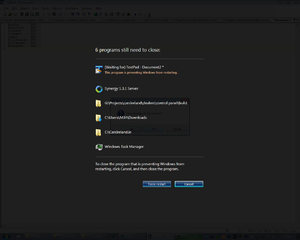
shutdown.jpg
.
Now I`m getting this window
Untitled.jpg
.
Now i need to know how to change it back.

advance thanks
 
Last edited:

My Computer My Computer

At a glance

Windows 7 Ultimate x64
OS
Windows 7 Ultimate x64
Are you dual booting?
 

My Computer My Computer

At a glance

Win 8 Release candidate 8400[email protected]4 gigsNvidia 9600M
Computer Manufacturer/Model Number
HP Pavillion dv-7 1005 Tx
OS
Win 8 Release candidate 8400
CPU
[email protected]
Memory
4 gigs
Graphics Card(s)
Nvidia 9600M
Sound Card
HD built-in
Monitor(s) Displays
17" Wxga
Screen Resolution
1440x900
Cooling
none
Internet Speed
45Mb down 5Mb up
No i have only windows 7 ultimate x64
 

My Computer My Computer

At a glance

Windows 7 Ultimate x64
OS
Windows 7 Ultimate x64
Make sure you not running on Classic Windows
 

My Computer My Computer

At a glance

Dual Booting Windows 7 Ultimate x64 & BackTra...@2.53GHz
OS
Dual Booting Windows 7 Ultimate x64 & BackTrack 5
CPU
@2.53GHz
Screen Resolution
1366 X 768 (Higher)
nothing changed in my windows but that if admins can take a look I could give my TeamViewer ID and pass
 

My Computer My Computer

At a glance

Windows 7 Ultimate x64
OS
Windows 7 Ultimate x64
None knows how change it back ?
 

My Computer My Computer

At a glance

Windows 7 Ultimate x64
OS
Windows 7 Ultimate x64
Maybe this problem happens only with notepad. The program is just the same like in XP, so...
edit*
MMM... just tested it and he ask it correct by me. Try it maybe again.
 

My Computer My Computer

At a glance

Windows 7 Home Premium 64bitIntel core I5DRR3 6144 MBNVIDIA Geforce 315M
Computer Manufacturer/Model Number
TOSHIBA Satellite C660 - 1R1
OS
Windows 7 Home Premium 64bit
CPU
Intel core I5
Motherboard
TOSHIBA - PWWHA - 1
Memory
DRR3 6144 MB
Graphics Card(s)
NVIDIA Geforce 315M
Sound Card
Realtek High Definition Audio
Monitor(s) Displays
1 PNP-screen
Screen Resolution
1366x768
Hard Drives
TOSHIBA MK5076GSXN
PSU
PA3715U-1ACA
Case
TOSHIBA Satellite C660 - 1R1
Cooling
Toshiba FAN
Keyboard
PS/2-keyboard
Mouse
Synaptics PS/2 Port TouchPad & Tust 15862 optical mause
Internet Speed
2,37 Mbp2
That's normal also happens to me from time to time ...
 

My Computer My Computer

At a glance

Windows 7 Home Premium x64Core i7 2600K4GB DDR3 Kingston HyperXGigabyte GTX 670
Computer Manufacturer/Model Number
Homebuilt
OS
Windows 7 Home Premium x64
CPU
Core i7 2600K
Motherboard
Asus P8Z77-V LX
Memory
4GB DDR3 Kingston HyperX
Graphics Card(s)
Gigabyte GTX 670
Sound Card
Realtek HD Audio
Monitor(s) Displays
Delium Monitor
Screen Resolution
1360 x 768
Hard Drives
C: (500GB)
PSU
Corsair 620W
Case
Antec
Cooling
Cooling Master
Keyboard
Logitech
Mouse
Logitech wireless mouse M 505
Internet Speed
60MBPS
This happens not only with notepad. Here is example
Untitled.jpg

And i`m not asking if it`s normal or not. I just want to know how change it back :)
 
Last edited:

My Computer My Computer

At a glance

Windows 7 Ultimate x64
OS
Windows 7 Ultimate x64
Someoneeeeeeee Please
 

My Computer My Computer

At a glance

Windows 7 Ultimate x64
OS
Windows 7 Ultimate x64
Dude just close your apps before you shutdown windows 7 :)
 

My Computer My Computer

At a glance

Windows 7 Home Premium x64Core i7 2600K4GB DDR3 Kingston HyperXGigabyte GTX 670
Computer Manufacturer/Model Number
Homebuilt
OS
Windows 7 Home Premium x64
CPU
Core i7 2600K
Motherboard
Asus P8Z77-V LX
Memory
4GB DDR3 Kingston HyperX
Graphics Card(s)
Gigabyte GTX 670
Sound Card
Realtek HD Audio
Monitor(s) Displays
Delium Monitor
Screen Resolution
1360 x 768
Hard Drives
C: (500GB)
PSU
Corsair 620W
Case
Antec
Cooling
Cooling Master
Keyboard
Logitech
Mouse
Logitech wireless mouse M 505
Internet Speed
60MBPS
Oh it`s so clever but not what i`m looking for
 

My Computer My Computer

At a glance

Windows 7 Ultimate x64
OS
Windows 7 Ultimate x64

My Computer My Computer

At a glance

Windows 7 Home Premium x64Core i7 2600K4GB DDR3 Kingston HyperXGigabyte GTX 670
Computer Manufacturer/Model Number
Homebuilt
OS
Windows 7 Home Premium x64
CPU
Core i7 2600K
Motherboard
Asus P8Z77-V LX
Memory
4GB DDR3 Kingston HyperX
Graphics Card(s)
Gigabyte GTX 670
Sound Card
Realtek HD Audio
Monitor(s) Displays
Delium Monitor
Screen Resolution
1360 x 768
Hard Drives
C: (500GB)
PSU
Corsair 620W
Case
Antec
Cooling
Cooling Master
Keyboard
Logitech
Mouse
Logitech wireless mouse M 505
Internet Speed
60MBPS
Untitled.jpg
 

My Computer My Computer

At a glance

Windows 7 Ultimate x64
OS
Windows 7 Ultimate x64
right click my computer-properties
on the window that comes up select advanced system properties on top left side.
go to the advanced tab and select performance then select the "adjust for best appearance" box.
if that fixes it than it is likely that the setting "animate elements in windows" was disabled.
also like the above users mentioned make sure windows 7 theme is selected and not the windows classic theme.

if all of that fails then it seems your video card and or driver was changed to either an old or generic one or a new one that has compatibility problems. if you know the exact day it started happening you can check event logs and see if a driver was updated/downgraded and go from there
 

My Computer My Computer

At a glance

32&64 bit win7 sp1 and windows xp sp3
OS
32&64 bit win7 sp1 and windows xp sp3
123.jpg

321.jpg

gfd.jpg


And it was not changed after updating Video driver:(:(:(:(:(
 

My Computer My Computer

At a glance

Windows 7 Ultimate x64
OS
Windows 7 Ultimate x64
:cry:
 

My Computer My Computer

At a glance

Windows 7 Ultimate x64
OS
Windows 7 Ultimate x64
:party:
 

My Computer My Computer

At a glance

Windows 7 Ultimate x64
OS
Windows 7 Ultimate x64
Is it only JDownloader that halts the shutdown? What have you recently installed or updated on the machine? You might want to try a System Restore to a time previous to this happening.
 

My Computer My Computer

At a glance

XP / Win7 x64 ProIntel Quad-Core Q9450 @ 3.2GHz2x2GB GSkill DDR2NVIDIA GeForce 8600 GTS (EVGA)
OS
XP / Win7 x64 Pro
CPU
Intel Quad-Core Q9450 @ 3.2GHz
Motherboard
Asus P5-E
Memory
2x2GB GSkill DDR2
Graphics Card(s)
NVIDIA GeForce 8600 GTS (EVGA)
Monitor(s) Displays
Dell 2408WFP
Screen Resolution
1920x1200
its happening with all programs jdownloader is just an example.
Whatever, never mind this can be solved only by reinstalling windows as i understood.
 

My Computer My Computer

At a glance

Windows 7 Ultimate x64
OS
Windows 7 Ultimate x64
Back
Top