Windows gaming issues =(

WindowsNatzi

New member
Local time
3:05 PM
Messages
17
Good evening all,

So I am one of the proud individuals who have installed w7, but like most have some issues to work out lol.

The OS is stable but I can not get my games to work, booooo =D The games I have installed and am trying to get working are...

COD4(this game spefically says directX has encountered an unrecoverable error and must close)
BF2
BF2142
Oblivion: Elder Scrolls

All of these encounter a program error and close before the game opens fully =( Most of these games have no specific reason given.

I have the latest version of directX10 installed, and have ran the programs as an administrator, both have had no success. I am looking for more possible solutions to my problem(s) now.

Thank you in advance for your posts =D
 

My Computer

OS
Windows 7
Try to install Direct X 9.0c

Yeah, I know it sounds dumb, but I have also a DirectX error with Mass Effect and it just worked fine after installing the DirectX 9.0c that comes with the ME DVD.

And by the way it doesn't uninstall posterior versions, you will still have the DirectX 11 that comes with Seven
 

My Computer

OS
Windows 7
Thanks Vitet, I shall try installing direc x 9.0c

what is ME btw =D
 

My Computer

OS
Windows 7
Mass Effect
 

My Computer

Computer Manufacturer/Model Number
Home Brew
OS
Windows 7 Ultimate Vista Ultimate x64
CPU
Core 2 Duo E8500 3.16Ghz @ 3.8Ghz
Motherboard
eVGA 750i FTW
Memory
2x2Gigs Patriot PC2-6400 LL
Graphics Card(s)
Inno3D GeForce GTX260 216 SP
Monitor(s) Displays
ASUS VW222U 22" 2ms Response time
Screen Resolution
1680x1050
Hard Drives
SATA 150GB
SATA II 250GB
USB IDE 750GB Ext.
PSU
HYTEC 600W & Thermaltake 650W Toughpower Power Exp
Case
Thermaltake Armor LCS (Liquid Cooling System)
Cooling
Liquid Cooling System
Keyboard
Logitech G15 Gaming Keyboard
Mouse
Logitech G9 Gaming Mouse
Thanks Grim,

So I have installed Direct X 9.0c and it still encounters a problem. I have changed the compatibility to XP sp2 as well as vista, still no success. When I changed the compatibility to to xp it asks me to insert the disk into the drive, which it is =(

Quick fyi this was a fresh install of w7, not an upgrade from vista.

Any more suggestions =D
 

My Computer

OS
Windows 7
U do know u just said u inserted your **** into your drive....lol, sorry I couldn't resist but it sounded so funny....:p

Anyways, I had no problems with Oblivion on my computer. Did you try running them as Administrator? Are all of your drivers up to date? Are all of the program errors the same. What do they say exactly?
 

My Computer

OS
Windows 7 Beta 7000 32 bit
CPU
Intel Core 2 Quad Core
Motherboard
EVGA 680i SLI
Graphics Card(s)
NVIDIA 8800 GTX
Screen Resolution
1600x1200
Mouse
Razer Copperhead
U do know u just said u inserted your dick into your drive....lol, sorry I couldn't resist but it sounded so funny....:p

Anyways, I had no problems with Oblivion on my computer. Did you try running them as Administrator? Are all of your drivers up to date? Are all of the program errors the same. What do they say exactly?

ROFLMAO sorry that was funny but no bad language please, clean up your post!
 

My Computer

Computer Manufacturer/Model Number
Home Brew
OS
Windows 7 Ultimate Vista Ultimate x64
CPU
Core 2 Duo E8500 3.16Ghz @ 3.8Ghz
Motherboard
eVGA 750i FTW
Memory
2x2Gigs Patriot PC2-6400 LL
Graphics Card(s)
Inno3D GeForce GTX260 216 SP
Monitor(s) Displays
ASUS VW222U 22" 2ms Response time
Screen Resolution
1680x1050
Hard Drives
SATA 150GB
SATA II 250GB
USB IDE 750GB Ext.
PSU
HYTEC 600W & Thermaltake 650W Toughpower Power Exp
Case
Thermaltake Armor LCS (Liquid Cooling System)
Cooling
Liquid Cooling System
Keyboard
Logitech G15 Gaming Keyboard
Mouse
Logitech G9 Gaming Mouse
lol, sorry bout the language, the post is now cleaned, but my mind isnt.... :p
 

My Computer

OS
Windows 7 Beta 7000 32 bit
CPU
Intel Core 2 Quad Core
Motherboard
EVGA 680i SLI
Graphics Card(s)
NVIDIA 8800 GTX
Screen Resolution
1600x1200
Mouse
Razer Copperhead
as far as drivers go i have the latest vidoecard drivers and network adapter drivers. Those are the only two pieces of hardwar that in my pc that require drivers as far as I know.

As for the error message...no error code or numer is given...
It simply states that the game (oblivion in this case) has stopped working. Windows searches for a solution, then informs me again the game has stopped working and windows will notify me when it has a solution...yea right lol.

I have tried running as administrator with no success =(

This is buggin me out, I have been trying for over 4 hours to get even one game to work! BBAAHH
 

My Computer

OS
Windows 7
as far as drivers go i have the latest vidoecard drivers and network adapter drivers. Those are the only two pieces of hardwar that in my pc that require drivers as far as I know.

As for the error message...no error code or numer is given...
It simply states that the game (oblivion in this case) has stopped working. Windows searches for a solution, then informs me again the game has stopped working and windows will notify me when it has a solution...yea right lol.

I have tried running as administrator with no success =(

This is buggin me out, I have been trying for over 4 hours to get even one game to work! BBAAHH

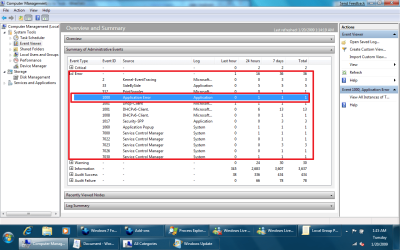
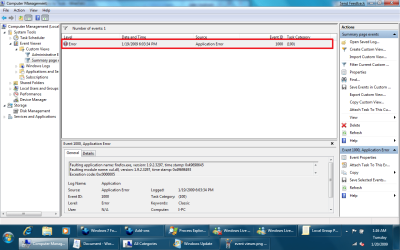
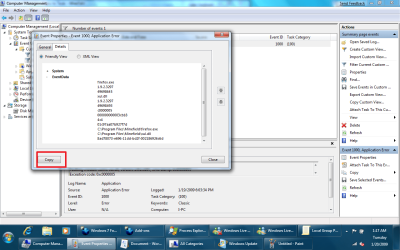
there is supposed to be a message
right click my computer
click on manage (there might be a UAC prompt click yes)
go to event viewer...
follow the pics...
then at the end paste them here (in quotes would be preferable)
 

Attachments

  • event viewer.png
    event viewer.png
    68.3 KB · Views: 131
  • error sample.png
    error sample.png
    72.5 KB · Views: 75
  • click.png
    click.png
    90.4 KB · Views: 80
  • save.png
    save.png
    88 KB · Views: 72

My Computer

Computer Manufacturer/Model Number
Tx2500z Tablet Pc/Homemade Server
OS
Windows 7 Ult x64(x2), HomePrem x32(x4), Server 08 (+VM), 08 R2 (VM) , SuSe 11.2 (VM), XP 32 (VM)
CPU
Turion X2 ultra (oh well came with laptop)/P4 @3.2 (yes P4)
Motherboard
IDK HP Motherboard / Intel DG965SS
Memory
OCZ Dual Channel 4GB kit/ 1gb Dual Channel
Graphics Card(s)
HD 3200 graphics /GMA x3100 (yay for intergrated!!)
Sound Card
Realtek HD Audio(mic working, well sort of)/Siig IC-70012
Monitor(s) Displays
built-in Hp 12" laptop screen/ Acer 19"
Screen Resolution
1280x800 /1440x900
Cooling
All Air Cooled
Mouse
Logi MX Rev. /MS Wheel Optical 1.1A /Logitech Optical Mouse
Internet Speed
College baby but its still routed through vpn to 1536k...
Other Info
love my wacom pen and pressure sensitivity...
wished it worked in 7, SUSE for that matter though
Sorry you said quotes, I didnt know if you meant to quote you or something =D Anyways here is the log info, its kinda a bummer it doesnt just list them anymore and you have to go to the even viewer. Thanks for your help btw


Log Name: Application
Source: Application Error
Date: 1/20/2009 1:22:40 AM
Event ID: 1000
Task Category: (100)
Level: Error
Keywords: Classic
User: N/A
Computer: BTMN-PC
Description:
Faulting application name: Oblivion.exe, version: 1.1.0.425, time stamp: 0x444e8718
Faulting module name: Oblivion.exe, version: 1.1.0.425, time stamp: 0x444e8718
Exception code: 0xc0000005
Fault offset: 0x0008ffa0
Faulting process id: 0x45c
Faulting application start time: 0x01c97ae0a175789e
Faulting application path: C:\Program Files\Bethesda Softworks\Oblivion\Oblivion.exe
Faulting module path: C:\Program Files\Bethesda Softworks\Oblivion\Oblivion.exe
Report Id: e1cacd0d-e6d3-11dd-a6aa-001bb9dc6603
Event Xml:
<Event xmlns="http://schemas.microsoft.com/win/2004/08/events/event">
<System>
<Provider Name="Application Error" />
<EventID Qualifiers="0">1000</EventID>
<Level>2</Level>
<Task>100</Task>
<Keywords>0x80000000000000</Keywords>
<TimeCreated SystemTime="2009-01-20T09:22:40.000000000Z" />
<EventRecordID>758</EventRecordID>
<Channel>Application</Channel>
<Computer>BTMN-PC</Computer>
<Security />
</System>
<EventData>
<Data>Oblivion.exe</Data>
<Data>1.1.0.425</Data>
<Data>444e8718</Data>
<Data>Oblivion.exe</Data>
<Data>1.1.0.425</Data>
<Data>444e8718</Data>
<Data>c0000005</Data>
<Data>0008ffa0</Data>
<Data>45c</Data>
<Data>01c97ae0a175789e</Data>
<Data>C:\Program Files\Bethesda Softworks\Oblivion\Oblivion.exe</Data>
<Data>e1cacd0d-e6d3-11dd-a6aa-001bb9dc6603</Data>
</EventData>
</Event>
 

My Computer

OS
Windows 7
what do you have currently installed?

include any and all games....

this can either be a corrupted install something is conflicting with something else or a hardware issue

im sorry i am not going to be awake as it is into the wee hours in the night, someone else should be able to troubleshoot your problem if not i will check back and i will help you...
 

My Computer

Computer Manufacturer/Model Number
Tx2500z Tablet Pc/Homemade Server
OS
Windows 7 Ult x64(x2), HomePrem x32(x4), Server 08 (+VM), 08 R2 (VM) , SuSe 11.2 (VM), XP 32 (VM)
CPU
Turion X2 ultra (oh well came with laptop)/P4 @3.2 (yes P4)
Motherboard
IDK HP Motherboard / Intel DG965SS
Memory
OCZ Dual Channel 4GB kit/ 1gb Dual Channel
Graphics Card(s)
HD 3200 graphics /GMA x3100 (yay for intergrated!!)
Sound Card
Realtek HD Audio(mic working, well sort of)/Siig IC-70012
Monitor(s) Displays
built-in Hp 12" laptop screen/ Acer 19"
Screen Resolution
1280x800 /1440x900
Cooling
All Air Cooled
Mouse
Logi MX Rev. /MS Wheel Optical 1.1A /Logitech Optical Mouse
Internet Speed
College baby but its still routed through vpn to 1536k...
Other Info
love my wacom pen and pressure sensitivity...
wished it worked in 7, SUSE for that matter though
Currently I have COD4, BF2142, and Oblivion: Elder Scrolls installed. I posted the error log from Oblivion, would it help if I posted the logs from COD4 and 2142 too?

Thank you for your help DarkAssain , I am looking foreward to playing =D

system specs;
intel q9550
nvidia 9800gt 512mb
70gb 10k rpm raptor hd
patriot 4gb(2 2gig sticks) 800 mgz dual channel ddr2
g31t-m mobo(cheap ass board, but it came with cpu as a bundle for 300$)
thermaltake 500w power supply
 

My Computer

OS
Windows 7
on a sidenote... I typed in dxdiag into run and found that version of directx I am running is directx 11. My question is how do i change that to 9.0c?

I had previously dl and installed 9.0c and thought that changed it from dx11 to dx9.0c, but i guess it didnt =(

Can someone please provide a link to correct 9.0c so I may try this again?
 

My Computer

OS
Windows 7
on a sidenote... I typed in dxdiag into run and found that version of directx I am running is directx 11. My question is how do i change that to 9.0c?

I had previously dl and installed 9.0c and thought that changed it from dx11 to dx9.0c, but i guess it didnt =(

Can someone please provide a link to correct 9.0c so I may try this again?

no it is stated correctly...
think of it like Dxdiag shows you the lastest directx installed (which is 11 which is preinstalled)
direct 9.0c is the lastest
http://www.microsoft.com/downloads/...38-db71-4c1b-bc6a-9b6652cd92a3&displaylang=en
this when download will check and install any other files that might be missing or that they are updated...
 

My Computer

Computer Manufacturer/Model Number
Tx2500z Tablet Pc/Homemade Server
OS
Windows 7 Ult x64(x2), HomePrem x32(x4), Server 08 (+VM), 08 R2 (VM) , SuSe 11.2 (VM), XP 32 (VM)
CPU
Turion X2 ultra (oh well came with laptop)/P4 @3.2 (yes P4)
Motherboard
IDK HP Motherboard / Intel DG965SS
Memory
OCZ Dual Channel 4GB kit/ 1gb Dual Channel
Graphics Card(s)
HD 3200 graphics /GMA x3100 (yay for intergrated!!)
Sound Card
Realtek HD Audio(mic working, well sort of)/Siig IC-70012
Monitor(s) Displays
built-in Hp 12" laptop screen/ Acer 19"
Screen Resolution
1280x800 /1440x900
Cooling
All Air Cooled
Mouse
Logi MX Rev. /MS Wheel Optical 1.1A /Logitech Optical Mouse
Internet Speed
College baby but its still routed through vpn to 1536k...
Other Info
love my wacom pen and pressure sensitivity...
wished it worked in 7, SUSE for that matter though
Thanks darkassain, I followed the link, dl the file and installed it. Although I believe that it was the same file I dl'ed last time because the file name was the same, I went ahead and did it again...unfortunetly it produced the same result =( I am kinda of stumped here. I have reinstalled the games multiple times, have set them to run as xp sp2, and have set to run as administrator, all with the same results..blah

Any other ideas folks? =D
 

My Computer

OS
Windows 7
DxDiag has to say DirectX 11, I also installed Dx 9.0c for compatibility with some games, but your version in Seven has to be 11.

I'll try to install COD4 and see if it works for me.

Also, have you the nvidia windows 7 drivers? They come with a Windows Update optional update i think
 

My Computer

OS
Windows 7
Vitet, quick fyi, I just noticed that COD4 gives you the option to install direct x 9.0c =D I dont know if it is every single copy, but mine had the option.

As far as the nvidia drivers from a w7 update, I have all of the updates installed for w7 at this time. I dont remember a specific option to update an nvidia driver, but I will check out nvidias website as well as microsofts.

Just reinstalled my games again to no prevale =(

Thanks for all your suggestions =D
 

My Computer

OS
Windows 7
Just did a search on my pc for windows update. Opened it, whent to optional drivers and selected my video card drivers!! I am currently dl the driver and will post if it is successful!! I am stoked =D

I have previously only done the automatic updates and was not aware of the optional ones in the windows update app.
 

My Computer

OS
Windows 7
Ok here is the update...

So far I have Oblivion working with out any problems.

COD4 is fine when playing the cinematics but when playing in game it is buggy. Walls go missing and there are flashes of light, strange really.

BF2142 presents its own problem, the game is still telling me to insert the disk and restart the application. This happens when I launch from the desktop shortcut as well as when I launch directly from the cd.

Any ideas on how to fix the bugging in COD4? Also has anyone expierenced the disk problem I am having with 2142 or any ideas on how to fix it?

Thanks =D
 

My Computer

OS
Windows 7
Back
Top