
Windows getting stuck on taskbar after closing

zim

New member
Local time
4:19 AM
Messages
11
Location
Norway
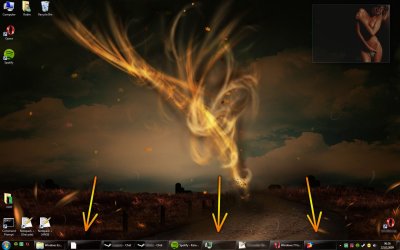
Occassionally the window of an ended process will get stuck on the taskbar. That is, it will appear in the taskbar with the original icon, but no title, and the original process is not running anymore according to the task manager.

They seem to be stuck down there until I log off and on again - which is quite annoying. Anyone know an easier way to get rid of them?

Is this a known bug or could it be caused by some third party software?
 

Attachments
  • w7task.jpg
    w7task.jpg
    163.9 KB · Views: 182

My Computer

Computer Manufacturer/Model Number
Myself
OS
Microsoft Windows 7 Ultimate x64
CPU
Intel C2Q Q9550
Motherboard
Asus P5Q-E
Memory
Corsair 4 GB
Graphics Card(s)
Sapphire Radeon HD 4870 (512 MB)
Sound Card
Non-external
Monitor(s) Displays
LG Flatron
Screen Resolution
1680x1050
Keyboard
Logitech G15 (both versions)
Mouse
Logitech G5 2007 Ed.
Internet Speed
10/10 Mbps fiber-optic
This used to happen a lot with IrfanView 4.22 and 4.23 on older builds - 6801 and 7000 in particular for me. Using 7048 this almost never happens now - I'd chalk it up to Windows 7 being a beta OS and monitor it for now.
 

My Computers

System One System Two

  • Computer type
    PC/Desktop
    Computer Manufacturer/Model Number
    The Beast Model A (homebrew)
    OS
    Windows 11 21H2 Current build
    CPU
    AMD Ryzen 9 3950X
    Motherboard
    MSI MEG X570 GODLIKE
    Memory
    4 * 32 GB - Corsair Vengeance 3600 MHz
    Graphics Card(s)
    EVGA GeForce RTX 3080 Ti XC3 ULTRA GAMING (12G-P5-3955-KR)
    Sound Card
    Realtek® ALC1220 Codec
    Monitor(s) Displays
    2x Eve Spectrum ES07D03 4K Gaming Monitor (Matte) | Eve Spec
    Screen Resolution
    3x 3840 x 2160
    Hard Drives
    3x Samsung 980 Pro NVMe PCIe 4 M.2 2 TB SSD (MZ-V8P2T0B/AM) } 3x Sabrent Rocket NVMe 4.0 1 TB SSD
    PSU
    PC Power & Cooling’s Silencer Series 1050 Watt, 80 Plus Plat
    Case
    Fractal Design Define 7 XL Dark ATX Full Tower Case
    Cooling
    SteelSeries Apex Pro Wired Gaming Keyboard
    Keyboard
    SteelSeries Apex Pro
    Mouse
    Logitech MX Master 3S | MX Master 3 for business
    Internet Speed
    AT&T LightSpeed Gigabit Duplex Ftth
    Antivirus
    Windows Defender + MB 3
    Browser
    Nightly (default) + Firefox (stable),Chrome, Edge
  • Computer type
    PC/Desktop
    System Manufacturer/Model Number
    Dell Latitude E5470
    OS
    ChromeOS Flex Dev Channel (current)
    CPU
    Intel(R) Core(TM) i5-6300U CPU @ 2.40GHz, 2501 Mhz, 2 Core(s), 4 Logical Processor(s)
    Motherboard
    Dell
    Memory
    16 GB
    Graphics Card(s)
    Intel(R) HD Graphics 520
    Sound Card
    Intel(R) HD Graphics 520 + RealTek Audio
    Monitor(s) Displays
    Dell laptop display 15"
    Screen Resolution
    1920 * 1080
    Hard Drives
    Toshiba 128GB M.2 22300 drive
    INTEL Cherryville 520 Series SSDSC2CW180A 180 GB SATA III SSD
    PSU
    Dell
    Case
    Dell
    Cooling
    Dell
    Keyboard
    Dell
    Mouse
    Logitech MX Master 3S (shared w. Sys 1) | Dell TouchPad
    Internet Speed
    AT&T LightSpeed Gigabit Duplex Ftth
Hi, and thanks for replying.

I haven't noticed any pattern in which programs this happen with most. But I'll keep my eyes open.

Still, if anyone knows another way to make the stuck windows disappear without logging off and on again, please share.

I don't feel like upgrading from build 7000 yet. I'd rather stick with this until the RC is official.
 

My Computer

Computer Manufacturer/Model Number
Myself
OS
Microsoft Windows 7 Ultimate x64
CPU
Intel C2Q Q9550
Motherboard
Asus P5Q-E
Memory
Corsair 4 GB
Graphics Card(s)
Sapphire Radeon HD 4870 (512 MB)
Sound Card
Non-external
Monitor(s) Displays
LG Flatron
Screen Resolution
1680x1050
Keyboard
Logitech G15 (both versions)
Mouse
Logitech G5 2007 Ed.
Internet Speed
10/10 Mbps fiber-optic
Back
Top