
Windows idles to login screen

Stratman69

Banned
Local time
8:36 PM
Messages
21
Location
Frankenmuth, MI
Hey guys :)

Whenever my PC is idle for a while (haven't timed it but I think it's about 30 min.) it will switch to the blue login screen. I've never actually seen the login screen since I don't use a password, but I'm assuming it is. Blue screen, shows my name and icon, ease of use button on bottom left, etc. Anyways, I don't really want Windows to DO this, so can someone tell me where I can change those settings? I already tried changing all of the Power settings but it still does it. Oh, BTW I do not use a screen saver either. Thanks. :D

Strat:cool:
 

My Computer My Computer

OS
Windows 7 Ultimate 64bit (6.1, Build 7600)
CPU
Intel Core 2 Duo [email protected]
Motherboard
Gigabyte EP45-UD3P
Memory
4GB G-Skill DDR2-800
Graphics Card(s)
Sapphire Radeon HD 4770
Sound Card
M-Audio Audiophile 192
Monitor(s) Displays
Hanns-G HG281D
Screen Resolution
1900 x 1200
Hard Drives
Seagate Barracuda (160GB)
Hitachi Deskstar (360G)
Western Digital Caviar Green (1TB)
PSU
PC Power & Cooling Silencer 420W ATX
Case
Xoxide X-Purity EXE Edition Case
Cooling
Noctua NH-U9B High Performance Cooler, Gelid WING 9 92mm
Keyboard
Saitek Eclipse II Illuminated Keyboard
Mouse
Dell OC8639 Optical Mouse
Internet Speed
Charter High-Speed Plus Internet 16Mb
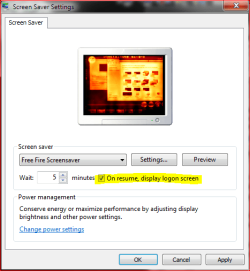
Only things I can think of are the screensaver settings and power options.

Screensaver:
If you tick the box On resume, display logon screen, Windows shows the logon screen every time screensaver is stopped by moving the pointer or pressing a key.

ssaver.PNG

Power Options:
If you choose Yes in Power Options > Change plan settings > Change advanced power settings> Require a password on wakeup, Windows shows logon screen when resuming from sleep or hibernate. This also happens even you have no password.

sleep.PNG

Kari
 

My Computer My Computer

Computer type
Laptop
Computer Manufacturer/Model Number
HP ENVY 17-1150eg
OS
Windows 10 Pro x64 EN-GB
CPU
1.6 GHz Intel Core i7-720QM Processor
Memory
6 GB
Graphics Card(s)
ATI Mobility Radeon HD 5850 Graphics
Sound Card
Beats sound system with integrated subwoofer
Monitor(s) Displays
17" laptop display, 22" LED and 32" Full HD TV through HDMI
Screen Resolution
1600*900 (1), 1920*1080 (2&3)
Hard Drives
Internal: 2 x 500 GB SATA Hard Disk Drive 7200 rpm
External: 2TB for backups, 3TB USB3 network drive for media
Cooling
As Envy runs a bit warm, I have it on a Cooler Master pad
Keyboard
Logitech diNovo Media Desktop Laser (bluetooth)
Mouse
Logitech Performance Mouse MX
Internet Speed
50/10 Mbps VDSL
Antivirus
Windows Defender 4.3.9431.0
Browser
Maxthon 3.5.2., IE11
Kari, That was it! I didn't realize that the box was ticked in the screensaver settings. Thanks so much. This was driving me bananas!:cry:
 

My Computer My Computer

OS
Windows 7 Ultimate 64bit (6.1, Build 7600)
CPU
Intel Core 2 Duo [email protected]
Motherboard
Gigabyte EP45-UD3P
Memory
4GB G-Skill DDR2-800
Graphics Card(s)
Sapphire Radeon HD 4770
Sound Card
M-Audio Audiophile 192
Monitor(s) Displays
Hanns-G HG281D
Screen Resolution
1900 x 1200
Hard Drives
Seagate Barracuda (160GB)
Hitachi Deskstar (360G)
Western Digital Caviar Green (1TB)
PSU
PC Power & Cooling Silencer 420W ATX
Case
Xoxide X-Purity EXE Edition Case
Cooling
Noctua NH-U9B High Performance Cooler, Gelid WING 9 92mm
Keyboard
Saitek Eclipse II Illuminated Keyboard
Mouse
Dell OC8639 Optical Mouse
Internet Speed
Charter High-Speed Plus Internet 16Mb
windows idles to login screen

hi, friend
you can change settings if u don't want keep ur system idle,
go to the desktop properties and select desktop setting on the screen saver button there some options idle my system after 30min, or turn of Monitor after ....
like this some options or there choose that options for everything 0 ok then next time you will not find that problem ok
 

My Computer My Computer

OS
windows 7
CPU
AMD
Motherboard
Asus
Memory
1 gb
Graphics Card(s)
Nvidia
Sound Card
realtek
Monitor(s) Displays
1024*725
Hard Drives
SATA
Cooling
Fan
Good to know it was not a serious issue.

Kari
 

My Computer My Computer

Computer type
Laptop
Computer Manufacturer/Model Number
HP ENVY 17-1150eg
OS
Windows 10 Pro x64 EN-GB
CPU
1.6 GHz Intel Core i7-720QM Processor
Memory
6 GB
Graphics Card(s)
ATI Mobility Radeon HD 5850 Graphics
Sound Card
Beats sound system with integrated subwoofer
Monitor(s) Displays
17" laptop display, 22" LED and 32" Full HD TV through HDMI
Screen Resolution
1600*900 (1), 1920*1080 (2&3)
Hard Drives
Internal: 2 x 500 GB SATA Hard Disk Drive 7200 rpm
External: 2TB for backups, 3TB USB3 network drive for media
Cooling
As Envy runs a bit warm, I have it on a Cooler Master pad
Keyboard
Logitech diNovo Media Desktop Laser (bluetooth)
Mouse
Logitech Performance Mouse MX
Internet Speed
50/10 Mbps VDSL
Antivirus
Windows Defender 4.3.9431.0
Browser
Maxthon 3.5.2., IE11
Back
Top