Windows .iso not showing up?

Chaotix

New member
Local time
7:51 PM
Messages
7
Hi there, I have a few questions.
First off, I tried downloading the Win7 RC 64-bit via that download manager that you have to use. After the download, I do no see the .iso file of Win7 RC on my desktop(which I set as where I want to file to download). The only icons I see that are related to the RC are the "Start Download Manager" and the .dlm file for the RC. Does anyone know what may be going wrong?

And another question: since you can't upgrade from a 32-bit Vista to a 64-bit Win7, I will have to do a clean install. Does anyone know how I can make an ISO of my current OS? I don't have the OS DVD since my laptop came with Vista already installed.

Any help is greatly appreciated, thank you.
 

My Computer

OS
Windows Vista Home Premium
CPU
Intel Core 2 Duo T5250 1.50GHz
Memory
4GB
Hi there, I have a few questions.
First off, I tried downloading the Win7 RC 64-bit via that download manager that you have to use. After the download, I do no see the .iso file of Win7 RC on my desktop(which I set as where I want to file to download). The only icons I see that are related to the RC are the "Start Download Manager" and the .dlm file for the RC. Does anyone know what may be going wrong?

And another question: since you can't upgrade from a 32-bit Vista to a 64-bit Win7, I will have to do a clean install. Does anyone know how I can make an ISO of my current OS? I don't have the OS DVD since my laptop came with Vista already installed.

Any help is greatly appreciated, thank you.

HI and welcome

How big is the dl, file? how long did it take you to download? where did you download it?

re:backup of vista. do you want an ISO or a backup? You cant just make and iso of vista then install it back, so im thinking either you want a backup, or want to be able to roll it back, or dual boot, which?

Ken
 

My Computer

Computer Manufacturer/Model Number
HP Pavillion dv-7 1005 Tx
OS
Win 8 Release candidate 8400
CPU
[email protected]
Memory
4 gigs
Graphics Card(s)
Nvidia 9600M
Sound Card
HD built-in
Monitor(s) Displays
17" Wxga
Screen Resolution
1440x900
Cooling
none
Internet Speed
45Mb down 5Mb up
Thanks for the welcome :D

The .dlm file is 3.04GB. It took quite a few hours to fully download and I chose my Desktop as the destination for the file.

Well, I want to have Vista just in case I want to go back to it later. I've made a backup of my computer with Acronis True Image.
 

My Computer

OS
Windows Vista Home Premium
CPU
Intel Core 2 Duo T5250 1.50GHz
Memory
4GB
Acronis is fine. the dlm file im not sure abt (i think either it didn't finish, or just needs to have the extension changed to ISO) but the size is right. Might want to just change the ext to *.iso and see if it can be opened with a iso app.

Ken
 

My Computer

Computer Manufacturer/Model Number
HP Pavillion dv-7 1005 Tx
OS
Win 8 Release candidate 8400
CPU
[email protected]
Memory
4 gigs
Graphics Card(s)
Nvidia 9600M
Sound Card
HD built-in
Monitor(s) Displays
17" Wxga
Screen Resolution
1440x900
Cooling
none
Internet Speed
45Mb down 5Mb up
You cant just make and iso of vista then install it back, so im thinking either you want a backup, or want to be able to roll it back, or dual boot, which?
It's too bad that you cannot do this with Windows. There is a utility that I use with Ubuntu called Remastersys that allows you to do just this. It creates an iso of your system with the software installed or as an iso with your software and your data files. Best part is...it's an installer and not an image. So, you can redistribute to others and they can get everything that you had. It's really slick.
 

My Computer

Computer Manufacturer/Model Number
Self-Built in July 2009
OS
Windows 7 Ultimate x64
CPU
Intel Q9550 2.83Ghz OC'd to 3.40Ghz
Motherboard
Gigabyte GA-EP45-UD3R rev. 1.1, F12 BIOS
Memory
8GB G.Skill PI DDR2-800, 4-4-4-12 timings
Graphics Card(s)
EVGA 1280MB Nvidia GeForce GTX570
Sound Card
Realtek ALC899A 8 channel onboard audio
Monitor(s) Displays
23" Acer x233H
Screen Resolution
1920x1080
Hard Drives
Intel X25-M 80GB Gen 2 SSD
Western Digital 1TB Caviar Black, 32MB cache. WD1001FALS
PSU
Corsair 620HX modular
Case
Antec P182
Cooling
stock
Keyboard
ABS M1 Mechanical
Mouse
Logitech G9 Laser Mouse
Internet Speed
15/2 cable modem
Other Info
Windows and Linux enthusiast. Logitech G35 Headset.
Acronis is fine. the dlm file im not sure abt (i think either it didn't finish, or just needs to have the extension changed to ISO) but the size is right. Might want to just change the ext to *.iso and see if it can be opened with a iso app.

Ken

I'm assuming you have Windows 7, am I correct? If so, then when you downloaded it via the download manager, were there two new icons when you began to download it? The download manager page and the .dlm?
 

My Computer

OS
Windows Vista Home Premium
CPU
Intel Core 2 Duo T5250 1.50GHz
Memory
4GB
I knew i liked ubuntu for a reason. I run it from a win 7 window. wonder if that would work?

Ken
 

My Computer

Computer Manufacturer/Model Number
HP Pavillion dv-7 1005 Tx
OS
Win 8 Release candidate 8400
CPU
[email protected]
Memory
4 gigs
Graphics Card(s)
Nvidia 9600M
Sound Card
HD built-in
Monitor(s) Displays
17" Wxga
Screen Resolution
1440x900
Cooling
none
Internet Speed
45Mb down 5Mb up
Hi there, I have a few questions.
First off, I tried downloading the Win7 RC 64-bit via that download manager that you have to use. After the download, I do no see the .iso file of Win7 RC on my desktop(which I set as where I want to file to download). The only icons I see that are related to the RC are the "Start Download Manager" and the .dlm file for the RC. Does anyone know what may be going wrong?

Any help is greatly appreciated, thank you.

I had the same experience downloading the RTM version, with only the file with the .dlm extension visible. However, when I looked at the Desktop with Explorer, I could see the .iso file. A few minutes later, the .iso was visible on the Desktop.

Odd, but it all worked out in the end.
 

My Computer

Computer Manufacturer/Model Number
Dell E520
OS
Windows 7 Enterprise x64 SP1, Ubuntu 11.04 x64
CPU
Core2Quad Q6700 - 2.66 GHz
Motherboard
Whatever the heck Dell put in there...
Memory
8 Gig Mushkin DDR2 800 MHz
Graphics Card(s)
EVGA NVIDIA 9800GT - 512MB DDR3
Monitor(s) Displays
2 x 19" ViewSonic LCD
Screen Resolution
2560x1024
Hard Drives
1 Intel X25-M 120G SSD, 1 300G VelociRaptor, 1 WD Caviar Black 1TB
PSU
PCPower & Cooling Silencer 500 Watt
Internet Speed
15/2 Roadrunner Cable
Other Info
NOD32 AV - Malwarebytes
I had the same experience downloading the RTM version, with only the file with the .dlm extension visible. However, when I looked at the Desktop with Explorer, I could see the .iso file. A few minutes later, the .iso was visible on the Desktop.

Odd, but it all worked out in the end.

I have a question about that. What's RTM?
 

My Computer

OS
Windows Vista Home Premium
CPU
Intel Core 2 Duo T5250 1.50GHz
Memory
4GB

My Computer

Computer Manufacturer/Model Number
tw33k
OS
Windows 7 Ultimate (x64) SP1
CPU
Intel 3770k 4.6GHz
Motherboard
ASUS Maximus V Formula
Memory
8GB (2x 4GB) Crucial Ballistix
Graphics Card(s)
Sapphire 7950 (1060/1600)
Sound Card
On Board Realtek HD Audio
Monitor(s) Displays
27" Acer B273HU (via HDMI)
Screen Resolution
2048 x 1152
Hard Drives
Crucial M4 128GB
2TB WD Black
1TB Samsung F3 SATA
1TB WD Elite External
2TB WD USB 3.0
PSU
Corsair AX750 Gold
Case
Corsair Obsidian 800DW
Cooling
Corsair H100 (2x AP-121/2x UK-3000 push/pull)
Keyboard
Microsoft Wireless 5000
Mouse
Microsoft Wireless 5000
Internet Speed
5mb/s
Other Info
Logitech z-2300 2.1 speakers
Lamptron FC-5 v2
And another question: since you can't upgrade from a 32-bit Vista to a 64-bit Win7, I will have to do a clean install. Does anyone know how I can make an ISO of my current OS? I don't have the OS DVD since my laptop came with Vista already installed.
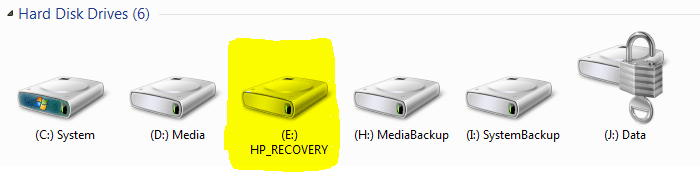
IF your laptop came with Vista preinstalled, you should have a recovery partition on your laptop. Not knowing the make and model of your laptop I don't know what its name. For example HP laptops come with a partition called HP_Recovery (see image). Do you have a hard disk partition called Recovery or Restore or something similar? If yes, that's probably it.

recovery.PNG

This partition includes all the necessary installation files to restore your computer to factory defaults, to restore your original operating system. Hopefully you have not deleted this partition. Check your computers documentation to see how this is done; again using HP laptops as an example it's done by pressing F11 when booting and then choosing restore. Your documentation should also tell you how to use this partition to burn a set of restore CD's or DVD's.

If you don't find this partition you can often order a system restore disk set by contacting your laptops manufacturer and telling the serial number of your PC.

Kari
 

My Computer

Computer type
Laptop
Computer Manufacturer/Model Number
HP ENVY 17-1150eg
OS
Windows 10 Pro x64 EN-GB
CPU
1.6 GHz Intel Core i7-720QM Processor
Memory
6 GB
Graphics Card(s)
ATI Mobility Radeon HD 5850 Graphics
Sound Card
Beats sound system with integrated subwoofer
Monitor(s) Displays
17" laptop display, 22" LED and 32" Full HD TV through HDMI
Screen Resolution
1600*900 (1), 1920*1080 (2&3)
Hard Drives
Internal: 2 x 500 GB SATA Hard Disk Drive 7200 rpm
External: 2TB for backups, 3TB USB3 network drive for media
Cooling
As Envy runs a bit warm, I have it on a Cooler Master pad
Keyboard
Logitech diNovo Media Desktop Laser (bluetooth)
Mouse
Logitech Performance Mouse MX
Internet Speed
50/10 Mbps VDSL
Antivirus
Windows Defender 4.3.9431.0
Browser
Maxthon 3.5.2., IE11
IF your laptop came with Vista preinstalled, you should have a recovery partition on your laptop. Not knowing the make and model of your laptop I don't know what its name. For example HP laptops come with a partition called HP_Recovery (see image). Do you have a hard disk partition called Recovery or Restore or something similar? If yes, that's probably it.

View attachment 23133

This partition includes all the necessary installation files to restore your computer to factory defaults, to restore your original operating system. Hopefully you have not deleted this partition. Check your computers documentation to see how this is done; again using HP laptops as an example it's done by pressing F11 when booting and then choosing restore. Your documentation should also tell you how to use this partition to burn a set of restore CD's or DVD's.

If you don't find this partition you can often order a system restore disk set by contacting your laptops manufacturer and telling the serial number of your PC.

Kari

Unfortunately, I do not have that partition. I have a Toshiba Satellite.


@tw33k: How/where do you get the RTM?
 

My Computer

OS
Windows Vista Home Premium
CPU
Intel Core 2 Duo T5250 1.50GHz
Memory
4GB
Unfortunately, I do not have that partition. I have a Toshiba Satellite.


@tw33k: How/where do you get the RTM?

you either have to buy a technet/MSDN/Connect subscription to get it now or wait til Oct 22. Those are your only options to obtaining it legally. Other options are not to be discussed in this forum
 

My Computer

Computer Manufacturer/Model Number
tw33k
OS
Windows 7 Ultimate (x64) SP1
CPU
Intel 3770k 4.6GHz
Motherboard
ASUS Maximus V Formula
Memory
8GB (2x 4GB) Crucial Ballistix
Graphics Card(s)
Sapphire 7950 (1060/1600)
Sound Card
On Board Realtek HD Audio
Monitor(s) Displays
27" Acer B273HU (via HDMI)
Screen Resolution
2048 x 1152
Hard Drives
Crucial M4 128GB
2TB WD Black
1TB Samsung F3 SATA
1TB WD Elite External
2TB WD USB 3.0
PSU
Corsair AX750 Gold
Case
Corsair Obsidian 800DW
Cooling
Corsair H100 (2x AP-121/2x UK-3000 push/pull)
Keyboard
Microsoft Wireless 5000
Mouse
Microsoft Wireless 5000
Internet Speed
5mb/s
Other Info
Logitech z-2300 2.1 speakers
Lamptron FC-5 v2
Unfortunately, I do not have that partition. I have a Toshiba Satellite.
A little bit Googling told me this:

  • Normally Toshiba Satellite comes with a recovery DVD. Do you have it?
  • There should be a folder called hddrecovery on your D: harddrive. That is for system recovery
  • If you find nothing to recover your Satellite to factory defaults, you can order a recovery disk from Toshiba (about $50)
Good luck,

Kari
 

My Computer

Computer type
Laptop
Computer Manufacturer/Model Number
HP ENVY 17-1150eg
OS
Windows 10 Pro x64 EN-GB
CPU
1.6 GHz Intel Core i7-720QM Processor
Memory
6 GB
Graphics Card(s)
ATI Mobility Radeon HD 5850 Graphics
Sound Card
Beats sound system with integrated subwoofer
Monitor(s) Displays
17" laptop display, 22" LED and 32" Full HD TV through HDMI
Screen Resolution
1600*900 (1), 1920*1080 (2&3)
Hard Drives
Internal: 2 x 500 GB SATA Hard Disk Drive 7200 rpm
External: 2TB for backups, 3TB USB3 network drive for media
Cooling
As Envy runs a bit warm, I have it on a Cooler Master pad
Keyboard
Logitech diNovo Media Desktop Laser (bluetooth)
Mouse
Logitech Performance Mouse MX
Internet Speed
50/10 Mbps VDSL
Antivirus
Windows Defender 4.3.9431.0
Browser
Maxthon 3.5.2., IE11
A little bit Googling told me this:

  • Normally Toshiba Satellite comes with a recovery DVD. Do you have it?
  • There should be a folder called hddrecovery on your D: harddrive. That is for system recovery
  • If you find nothing to recover your Satellite to factory defaults, you can order a recovery disk from Toshiba (about $50)
Good luck,

Kari

if you've got the hdd space, you could use a program like Acronis and clone your Vista partition.
 

My Computer

Computer Manufacturer/Model Number
tw33k
OS
Windows 7 Ultimate (x64) SP1
CPU
Intel 3770k 4.6GHz
Motherboard
ASUS Maximus V Formula
Memory
8GB (2x 4GB) Crucial Ballistix
Graphics Card(s)
Sapphire 7950 (1060/1600)
Sound Card
On Board Realtek HD Audio
Monitor(s) Displays
27" Acer B273HU (via HDMI)
Screen Resolution
2048 x 1152
Hard Drives
Crucial M4 128GB
2TB WD Black
1TB Samsung F3 SATA
1TB WD Elite External
2TB WD USB 3.0
PSU
Corsair AX750 Gold
Case
Corsair Obsidian 800DW
Cooling
Corsair H100 (2x AP-121/2x UK-3000 push/pull)
Keyboard
Microsoft Wireless 5000
Mouse
Microsoft Wireless 5000
Internet Speed
5mb/s
Other Info
Logitech z-2300 2.1 speakers
Lamptron FC-5 v2
if you've got the hdd space, you could use a program like Acronis and clone your Vista partition.

How would I go along doing that? I have the trial version of Acronis True Image Home.
 

My Computer

OS
Windows Vista Home Premium
CPU
Intel Core 2 Duo T5250 1.50GHz
Memory
4GB
if you've got the hdd space, you could use a program like Acronis and clone your Vista partition.

There you have a good and working idea!
 

My Computer

Computer type
Laptop
Computer Manufacturer/Model Number
HP ENVY 17-1150eg
OS
Windows 10 Pro x64 EN-GB
CPU
1.6 GHz Intel Core i7-720QM Processor
Memory
6 GB
Graphics Card(s)
ATI Mobility Radeon HD 5850 Graphics
Sound Card
Beats sound system with integrated subwoofer
Monitor(s) Displays
17" laptop display, 22" LED and 32" Full HD TV through HDMI
Screen Resolution
1600*900 (1), 1920*1080 (2&3)
Hard Drives
Internal: 2 x 500 GB SATA Hard Disk Drive 7200 rpm
External: 2TB for backups, 3TB USB3 network drive for media
Cooling
As Envy runs a bit warm, I have it on a Cooler Master pad
Keyboard
Logitech diNovo Media Desktop Laser (bluetooth)
Mouse
Logitech Performance Mouse MX
Internet Speed
50/10 Mbps VDSL
Antivirus
Windows Defender 4.3.9431.0
Browser
Maxthon 3.5.2., IE11
Thanks for everyone's help! :D I'm now running windows 7! :D
 

My Computer

OS
Windows Vista Home Premium
CPU
Intel Core 2 Duo T5250 1.50GHz
Memory
4GB
Really nice you managed it. Welcomw to the wonderful world of Windows 7.

Kari
 

My Computer

Computer type
Laptop
Computer Manufacturer/Model Number
HP ENVY 17-1150eg
OS
Windows 10 Pro x64 EN-GB
CPU
1.6 GHz Intel Core i7-720QM Processor
Memory
6 GB
Graphics Card(s)
ATI Mobility Radeon HD 5850 Graphics
Sound Card
Beats sound system with integrated subwoofer
Monitor(s) Displays
17" laptop display, 22" LED and 32" Full HD TV through HDMI
Screen Resolution
1600*900 (1), 1920*1080 (2&3)
Hard Drives
Internal: 2 x 500 GB SATA Hard Disk Drive 7200 rpm
External: 2TB for backups, 3TB USB3 network drive for media
Cooling
As Envy runs a bit warm, I have it on a Cooler Master pad
Keyboard
Logitech diNovo Media Desktop Laser (bluetooth)
Mouse
Logitech Performance Mouse MX
Internet Speed
50/10 Mbps VDSL
Antivirus
Windows Defender 4.3.9431.0
Browser
Maxthon 3.5.2., IE11
Back
Top