I am not sure to what degree this problem can be solved. I have written to ASUS and have yet to receive a reply so I thought I'd try here.
MB: ASUS P7P55D-E LX
Audio card: ASUS Xonar DG
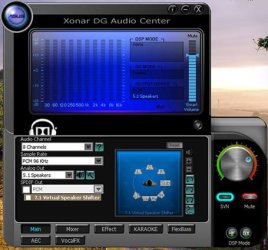
Asus AUdio Software: Xonar DG Audio Center
I plugged the front panel cables to the Sound card and went to my BIOS to disable the on-board one.
Now upon reboot the computer, therefore the sound card, chooses to go by default to earphones. This means that I have to manually (via the Audio Center) change it each and every time so I could hear my external speakers.
Does anyone know if anything can be done about this (and how)?
Thanks
MB: ASUS P7P55D-E LX
Audio card: ASUS Xonar DG
Asus AUdio Software: Xonar DG Audio Center
I plugged the front panel cables to the Sound card and went to my BIOS to disable the on-board one.
Now upon reboot the computer, therefore the sound card, chooses to go by default to earphones. This means that I have to manually (via the Audio Center) change it each and every time so I could hear my external speakers.
Does anyone know if anything can be done about this (and how)?
Thanks
My Computer
- Computer type
- PC/Desktop
- Computer Manufacturer/Model Number
- OEM Designed by me :-)
- OS
- Windows 7 Home Premium 64
- CPU
- Intel Core i5 760 @ 2800MHz
- Motherboard
- Asus P7P55D-E LX
- Memory
- 12288MB
- Graphics Card(s)
- AMD Radeon HD 7800 Series
- Sound Card
- ASUS Xonar DG
- Monitor(s) Displays
- ViewSonic VX2453 Series, HDMI 1080p Full HD
- Screen Resolution
- 1920X1080
- Hard Drives
- Samsung SSD 840 EVO 250GB& two others
- PSU
- Tagan BZ Series, TG800-BZ 800W
- Keyboard
- Logitech MK250
- Mouse
- Logitech M310
- Internet Speed
- toppest, mostest :-) <-- bad, but fun English
- Browser
- Firefox, Crrome, IE