G'day,
I've setup a dual-boot Windows 7 + LinuxMint13 on a single hard disk. My plan was to use Macrium to image this setup. For the Windows partition, this isn't a problem. For the Linux partition, however, I'm unsure whether a restore of an image of this partition would work, because of my lack of understanding of the relationship between the Windows and GRUB2 bootloaders - let me explain further:
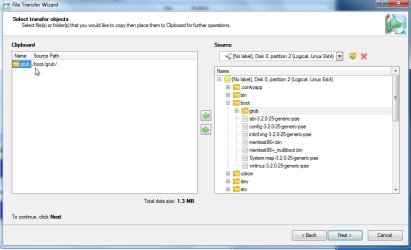
After the initial Windows installation, I used EasyBCD to copy the bootloader to the C: partition, allowing me to remove the 100MB System Reserved partition. I then installed LinuxMint, and again used EasyBCD to add the LinuxMint boot entry. I again used the 'Write MBR' function under the BCD Deployment option in EasyBCD, to ensure the Windows bootloader appears first at bootup. This allows me to select the LinuxMint entry, which in turn chainloads the GRUB2 bootloader, which eventually loads LinuxMint. This works perfectly.
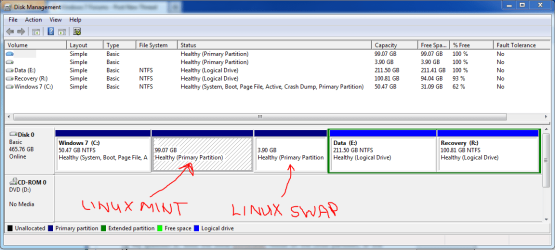
My question is: does the GRUB bootloader reside on the Linux partition, or does it reside on the Windows partition by virtue of the EasyBCD manipulation I have done?
If its the former, than using Macrium to image just the LinuxMint partition will work for me. Can anyone confirm this? Should I also image the Linux Swap partition as part of the LinuxMint partition image?
Thanks,
Golden
I've setup a dual-boot Windows 7 + LinuxMint13 on a single hard disk. My plan was to use Macrium to image this setup. For the Windows partition, this isn't a problem. For the Linux partition, however, I'm unsure whether a restore of an image of this partition would work, because of my lack of understanding of the relationship between the Windows and GRUB2 bootloaders - let me explain further:
After the initial Windows installation, I used EasyBCD to copy the bootloader to the C: partition, allowing me to remove the 100MB System Reserved partition. I then installed LinuxMint, and again used EasyBCD to add the LinuxMint boot entry. I again used the 'Write MBR' function under the BCD Deployment option in EasyBCD, to ensure the Windows bootloader appears first at bootup. This allows me to select the LinuxMint entry, which in turn chainloads the GRUB2 bootloader, which eventually loads LinuxMint. This works perfectly.
My question is: does the GRUB bootloader reside on the Linux partition, or does it reside on the Windows partition by virtue of the EasyBCD manipulation I have done?
If its the former, than using Macrium to image just the LinuxMint partition will work for me. Can anyone confirm this? Should I also image the Linux Swap partition as part of the LinuxMint partition image?
Thanks,
Golden
My Computer
- Computer type
- PC/Desktop
- Computer Manufacturer/Model Number
- Golden Mk. I.4
- OS
- Windows 10 Pro x64 ; Xubuntu x64
- CPU
- Intel i7 860 @ 2.80 GHz O/C'ed to 4.0GHz
- Motherboard
- Gigabyte P55A-UD3R Rev.1. Award BIOS F13
- Memory
- 16GB Corsair Vengance DDR3 @ 661 MHz Dual Channel (9-9-9-24)
- Graphics Card(s)
- EVGA NVidia GTX 560 1024MB
- Sound Card
- Realtek Integrated
- Monitor(s) Displays
- Dual Samsung SyncMaster 2494HS
- Screen Resolution
- 1920*1080 and 1920*1080
- Hard Drives
- 1*Samsung 840 EVO 120GB SSD;
1*OCZ Vertex 2 60GB SSD;
2*Samsung F3 SpinPoint 1TB in RAID0;
1*Samsung F1 SpinPoint 1TB;
2*Western Digital 1TB External USB 3.0
1*Western Digital 500GB External USB 3.0
1*Seagate 500GB External USB 2.0
- PSU
- Thermaltake ToughPower QFan 750W
- Case
- Thermaltake Element S VK60001W2Z
- Cooling
- Corsair H60 Water Cooling, 2*230mm and 2*80mm case fans
- Keyboard
- Logitech G110
- Mouse
- Logitech MX518